
Zavedení
Thank you for choosing the NXGKET Rechargeable Kids Walkie-Talkie set. This manual provides detailed instructions on how to set up, operate, and maintain your walkie-talkies to ensure optimal performance and a fun communication experience for children. Designed for outdoor adventures, camping, hiking, and imaginative play, these walkie-talkies offer clear communication and a range of useful features.
Obsah balení
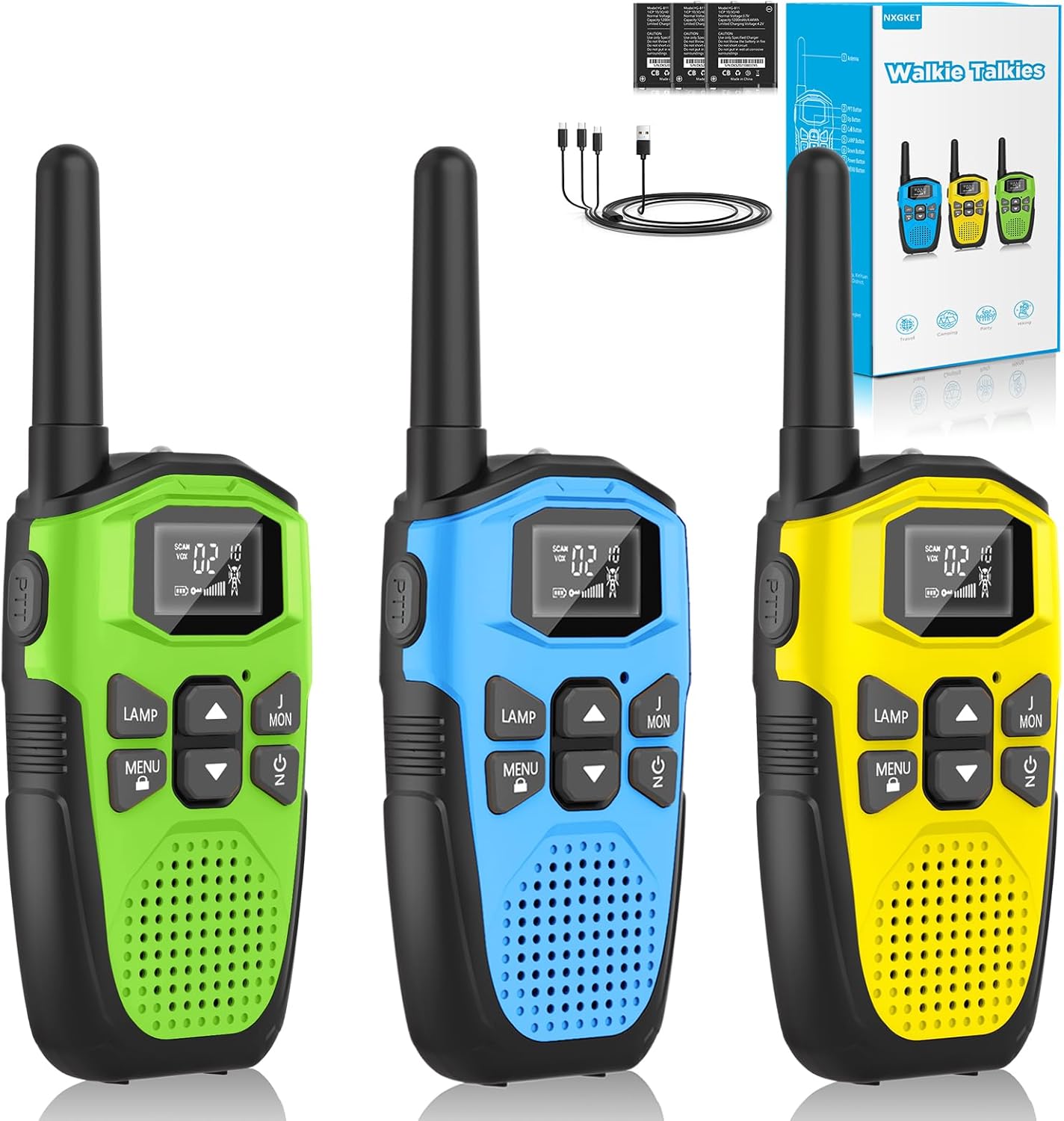
Image: Contents of the NXGKET Walkie-Talkie package, including three units and accessories.
- 3 x NXGKET Rechargeable Walkie-Talkies (Green, Blue, Yellow)
- 1 x USB nabíjecí kabel typu C
- 1 x Uživatelská příručka (tento dokument)
Konec produktuview

Image: Labeled diagram illustrating the various parts and buttons of the NXGKET Walkie-Talkie.
| Komponent | Funkce |
|---|---|
| Anténa | Vysílá a přijímá rádiové signály. |
| LED svítilna | Provides illumination, useful in low-light conditions or as an emergency light. |
| Nabíjecí port USB-C | Connects for recharging the built-in lithium-ion battery. |
| LCD displej | Shows channel, sub-code, battery level, VOX status, and other indicators. |
| Tlačítko PTT (Push-to-Talk) | Stiskněte a podržte pro přenos hlasu. Uvolněte pro poslech. |
| LAMP Tlačítko | Aktivuje/deaktivuje LED svítilnu. |
| MENU / Lock Button | Enters menu settings; long press to lock/unlock keypad. |
| Tlačítka Nahoru/Dolů | Navigates menu options and adjusts volume/channel. |
| Zvukový reproduktor | Výstupy přijatého zvuku. |
| Tlačítko napájení / skenování | Turns the unit on/off; short press to activate channel scan. |
| Call / Ring Button | Sends an audible call alert to other walkie-talkies on the same channel. |
| Spona na opasek | Allows for convenient attachment to clothing or bags. |
Nastavení
Nabíjení baterie

Image: The walkie-talkie connected to a USB-C charging cable.
Your NXGKET walkie-talkies come with a built-in 1200mAh rechargeable lithium-polymer battery. Before first use, it is recommended to fully charge the devices.
- Locate the USB Type-C charging port on the side or top of the walkie-talkie.
- Connect the provided USB Type-C cable to the walkie-talkie.
- Plug the other end of the USB cable into a compatible USB power adapter (not included), computer USB port, or power bank.
- The battery indicator on the LCD display will show charging status. A full charge typically takes approximately 2 hours.
- Once fully charged, the walkie-talkie can be used for up to 1 day of continuous operation and up to 3 days in standby mode.
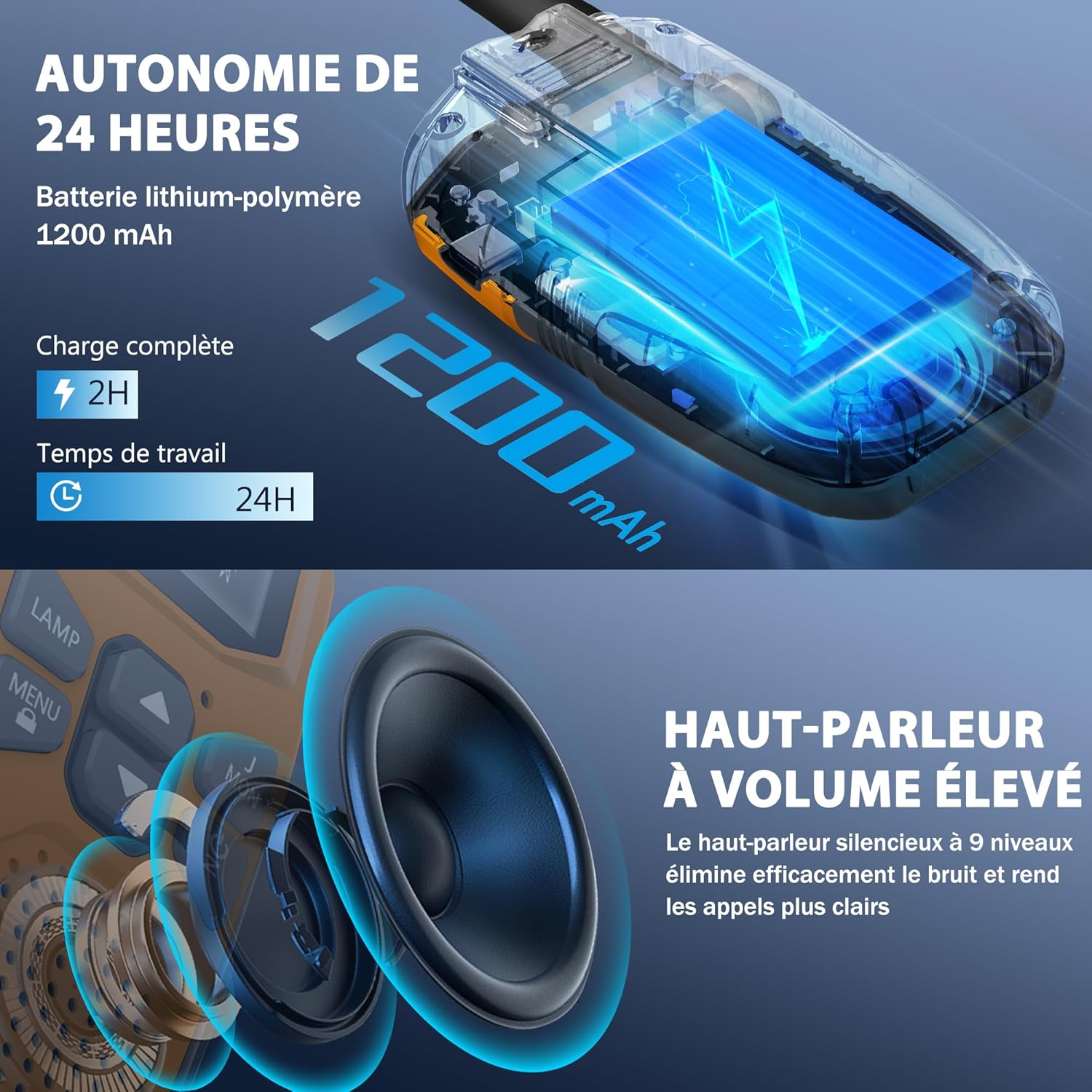
Image: Visual representation of the 24-hour battery life and high-quality speaker.
Zapnutí/vypnutí
- Zapnutí: Stiskněte a podržte Power / Scan button (usually located below the Up/Down buttons) until the LCD screen illuminates and you hear a power-on tone.
- Vypnutí: Stiskněte a podržte Power / Scan button again until the LCD screen turns off and you hear a power-off tone.
Návod k obsluze
Setting Channels and Sub-codes
Your walkie-talkies operate on 16 main channels and feature 121 interference elimination codes (CTCSS/DCS) to ensure private communication. For two or more walkie-talkies to communicate, they must be set to the same channel and sub-code.
- Turn on both walkie-talkies.
- Stiskněte tlačítko MENU button once. The channel number on the LCD display will start flashing.
- Použijte Up or Dolů buttons to select your desired main channel (1-16).
- Stiskněte tlačítko MENU button again. The sub-code number will start flashing.
- Použijte Up or Dolů buttons to select your desired sub-code (0-121). Setting to 0 disables the sub-code.
- Stiskněte tlačítko MENU button a third time or wait a few seconds for the settings to be saved automatically.
- Repeat these steps for all walkie-talkies you wish to communicate with, ensuring they are on the exact same channel and sub-code.
Transmitting (PTT Button)
- To speak, press and hold the PTT (Push-to-Talk) button located on the side of the walkie-talkie.
- Mluvte zřetelně do mikrofonu a držte vysílačku přibližně 5–10 cm od úst.
- Uvolněte PTT tlačítko po domluvení, aby druhá strana mohla odpovědět.
VOX Hands-Free Function
The VOX (Voice Operated Exchange) function allows you to transmit without pressing the PTT button. The walkie-talkie will automatically transmit when it detects your voice.
- To activate/deactivate VOX: Press the MENU button repeatedly until the VOX icon appears on the LCD display.
- Použijte Up or Dolů buttons to select the VOX sensitivity level (e.g., 1-3, with 1 being most sensitive). Select "OFF" to disable VOX.
- Stiskněte MENU again or wait to save the setting.
Funkce svítilny
Each walkie-talkie is equipped with a built-in LED flashlight for convenience and safety.
- Zapnutí svítilny: Stiskněte tlačítko LAMP tlačítko.
- Vypnutí svítilny: Stiskněte tlačítko LAMP znovu tlačítko.
Call/Ring Button
Stiskněte tlačítko Call / Ring button (usually labeled "MON" or with a bell icon) to send an audible alert tone to other walkie-talkies on the same channel, signaling that you wish to communicate.
Automatické skenování
The auto-scan feature allows the walkie-talkie to automatically scan through all available channels to find active conversations.
- To activate scan: Briefly press the Power / Scan button while the unit is on. The scan icon will appear on the display.
- The walkie-talkie will stop scanning when it detects a signal. It will resume scanning after a few seconds of inactivity.
- Zastavení skenování: Krátce stiskněte Power / Scan znovu tlačítko.
Klíčové vlastnosti
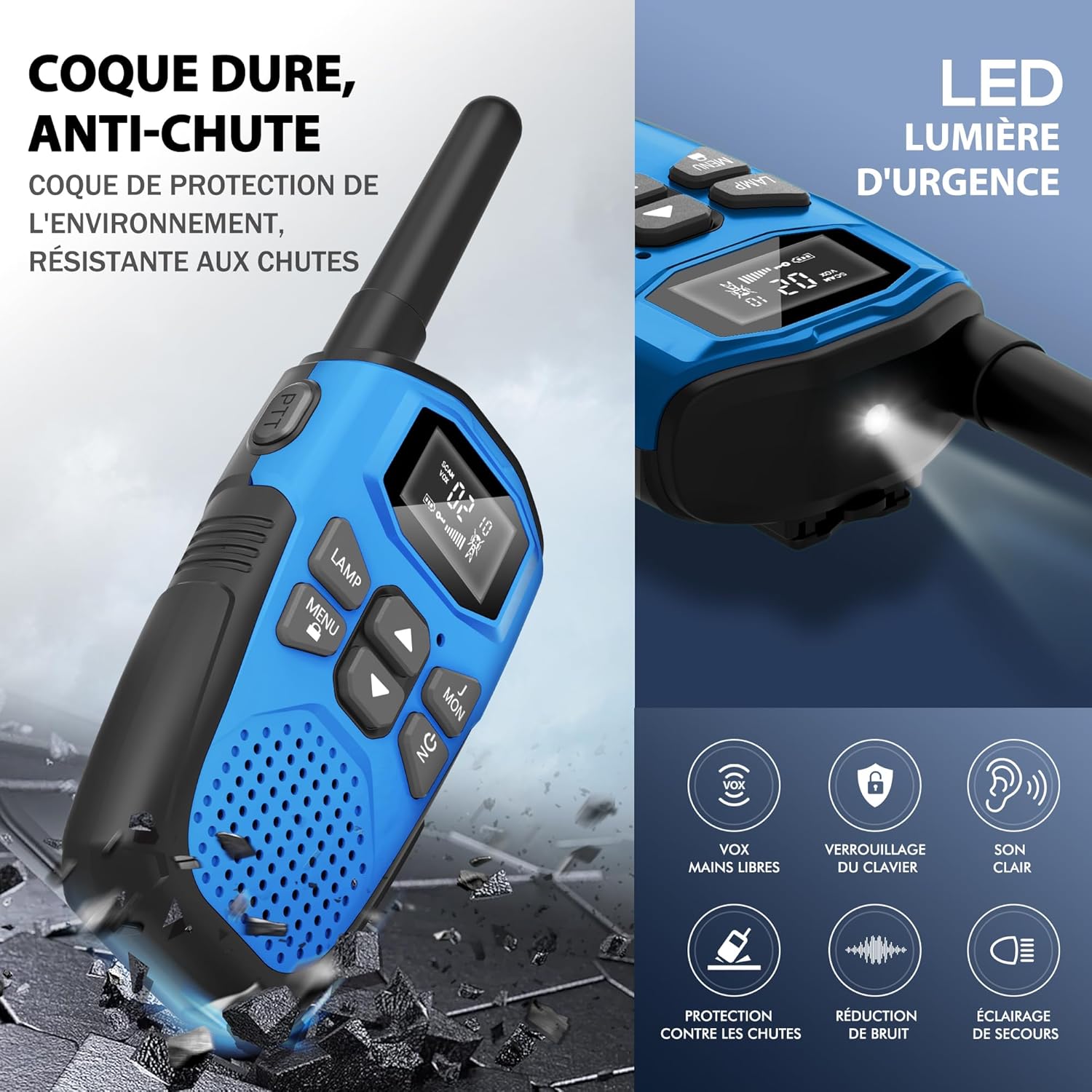
Image: Visual summary of key features including durability and various functions.
- Dobíjecí lithium-iontová baterie: Equipped with a 1200mAh built-in lithium-polymer battery and a USB Type-C charging cable for convenient and economical recharging. Provides up to 1 day of use and 3 days of standby.
- Multi-functional and User-Friendly: Designed for ease of use for children aged 3 and above. Features include volume adjustment, VOX hands-free operation, automatic memory, automatic scanning, low battery alert, drop protection, and a large backlit LCD screen.
- Široká kompatibilita: Supports communication with any radio on the same channel and sub-code, regardless of brand, thanks to 16 channels and 121 interference elimination codes.
- Extended Range and Clear Audio: Achieves up to 5 km (3.1 miles) in open areas and 1.5 km (0.9 miles) in urban environments. Delivers clear, high-quality sound without noise, ensuring quick response times.
- Integrovaná LED svítilna: A built-in LED flashlight serves as a useful tool for outdoor play, camping, hiking, and as an emergency light.
- Durable and Drop-Resistant: Constructed with a hard, anti-drop casing for environmental protection and resilience during outdoor activities.

Image: Diagram illustrating the effective communication range in different environments.
Péče a údržba
- Čištění: Wipe the walkie-talkies with a soft, damp tkanina. Nepoužívejte agresivní chemikálie nebo abrazivní čisticí prostředky.
- Skladování: Pokud zařízení nepoužíváte, skladujte je na chladném a suchém místě mimo dosah přímého slunečního záření a extrémních teplot.
- Péče o baterie: To prolong battery life, avoid fully discharging the battery frequently. Recharge the battery regularly, even if the walkie-talkie is not used for extended periods.
- Voděodolnost: These walkie-talkies are not waterproof. Avoid exposing them to rain, splashes, or immersion in water.
Průvodce řešením problémů
| Problém | Možná příčina | Řešení |
|---|---|---|
| Žádná síla | Baterie je slabá nebo vybitá. | Charge the walkie-talkie fully using the provided USB-C cable. |
| Nelze komunikovat s jinými jednotkami | Units are on different channels or sub-codes. | Ensure all units are set to the exact same channel and sub-code. |
| Špatná kvalita zvuku / Statický šum | Mimo dosah; rušení; slabá baterie. | Move closer to the other unit; change channel/sub-code; recharge battery. |
| VOX nefunguje | VOX sensitivity too low or feature is off. | Adjust VOX sensitivity level in the menu or ensure VOX is enabled. |
| Klávesnice nereaguje | Zámek klávesnice je aktivován. | Stiskněte a podržte MENU tlačítko pro odemknutí klávesnice. |
Specifikace

Image: Physical dimensions and weight of the walkie-talkie.
| Funkce | Detail |
|---|---|
| Značka | NXGKET |
| Číslo modelu | 2AYV7YG-813 |
| Barva | Zelená + Modrá + Žlutá |
| Počet kanálů | 16 |
| Frekvenční rozsah | 446 MHz (UHF) |
| Maximální dosah | 5 Kilometers (open areas) |
| Typ baterie | Lithium-Polymer (1 included per unit) |
| Kapacita baterie | 1200 XNUMX mAh |
| Nabíjecí rozhraní | USB Type-C |
| svtage | 3.7 voltů |
| Úroveň odolnosti proti vodě | Není vodotěsný |
| Speciální funkce | Battery level indicator, Long range, Battery saver mode, Rechargeable, Noise reduction, VOX, LED Flashlight, Keypad Lock |
| Rozměry (cca) | 16 cm (Height) x 3 cm (Depth) x 2 cm (Width) |
| Hmotnost (přibližně) | 93 g na jednotku |
Záruka a podpora
The NXGKET walkie-talkie has been tested and certified to meet CE standards. The manufacturer offers a 1-letá záruka od data nákupu.
For any product inquiries, technical support, or warranty claims, please contact your retailer or the manufacturer directly through their official support channels. Please have your purchase receipt and model number (2AYV7YG-813) ready when contacting support.