
Zavedení
Thank you for choosing the Hoco Y7 Smart Sport Watch. This manual provides essential information for setting up, operating, and maintaining your device. Please read it thoroughly before use to ensure optimal performance and longevity of your watch.
Obsah balení
Ověřte, zda jsou v balení přítomny všechny položky:
- Hoco Y7 Smart Sport Watch
- Nabíjecí kabel
- Uživatelská příručka (tento dokument)

Image: The Hoco Y7 Smart Sport Watch packaging, showing the watch and its box.
Konec produktuview
The Hoco Y7 Smart Sport Watch features a 1.32-inch TFT OGS capacitive touch screen and a durable design. Key components include:
- Zobrazit: 1.32-inch TFT OGS capacitive touch screen with 360x360 resolution.
- Boční tlačítka: For power, menu navigation, and quick access functions.
- Senzory: Located on the back for heart rate detection and other health monitoring.
- Kontakty pro nabíjení: Magnetické kontakty na zadní straně pro nabíjení.
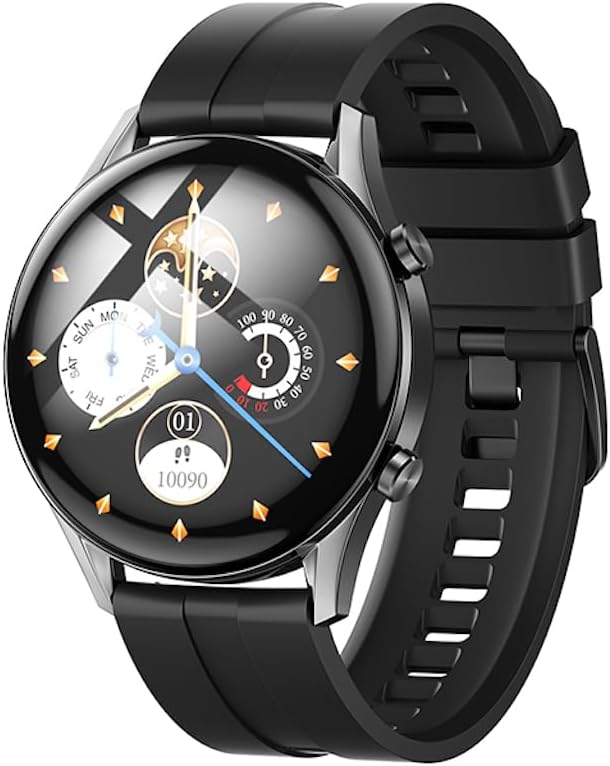
Obrázek: Přední strana view of the Hoco Y7 Smart Sport Watch, displaying a detailed watch face with time, date, and activity tracking.
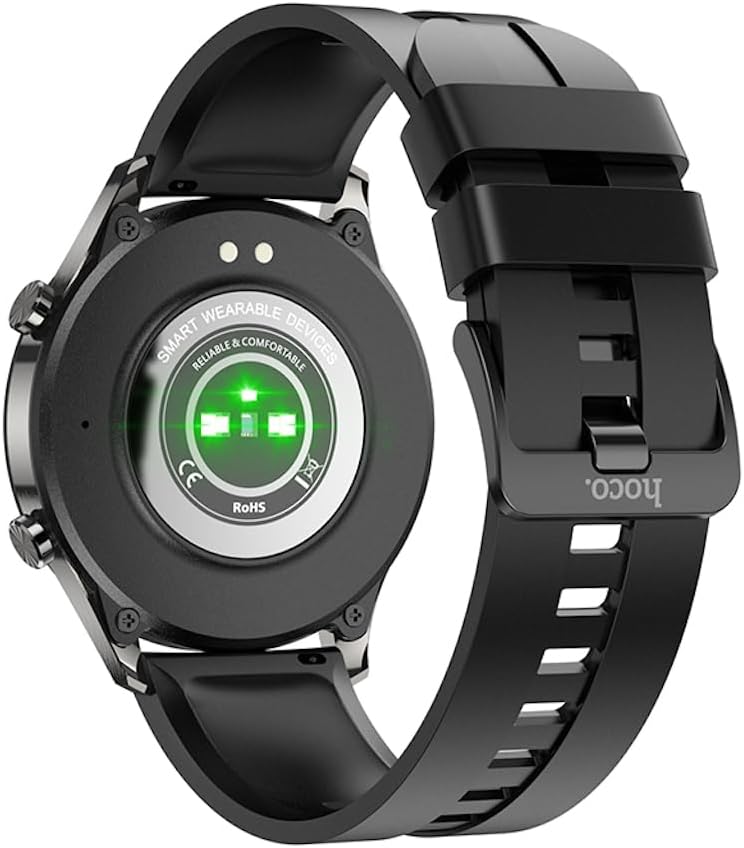
Obrázek: Zpět view of the Hoco Y7 Smart Sport Watch, showing the optical heart rate sensors and charging contacts.
Nastavení
1. Nabíjení zařízení
Before first use, fully charge your Hoco Y7 Smart Sport Watch. Connect the magnetic charging cable to the charging contacts on the back of the watch and plug the USB end into a standard USB power adapter (not included) or a computer's USB port.
- Plné nabití obvykle trvá přibližně 2 hodiny.
- Displej hodinek bude ukazovat stav nabíjení.
2. Zapnutí/vypnutí
- Zapnutí: Press and hold the side button until the Hoco logo appears.
- Vypnout: From the watch face, swipe down to access quick settings, or navigate to the settings menu. Select the power off option and confirm. Alternatively, press and hold the side button and select "Power Off" when prompted.
3. Párování s vaším smartphonem
To unlock the full features of your Hoco Y7 Smart Sport Watch, pair it with your smartphone via Bluetooth 5.0. The watch does not support direct calls, but connects for data synchronization and notifications.
- Stáhněte si doprovodnou aplikaci: Hledat the official Hoco Smart Watch app on your smartphone's app store (e.g., Google Play Store for Android or Apple App Store for iOS). Install the app.
- Povolit Bluetooth: Ujistěte se, že je na vašem smartphonu povoleno Bluetooth.
- Otevřete aplikaci: Launch the Hoco Smart Watch app and follow the on-screen instructions to create an account or log in.
- Přidat zařízení: In the app, navigate to the "Add Device" or "Pair Device" section. The app will search for nearby Hoco Y7 watches.
- Vyberte si hodinky: Once your watch appears in the app's list, select it to initiate the pairing process.
- Potvrdit spárování: A pairing request may appear on both your watch and smartphone. Confirm the pairing on both devices.
Once paired, the watch will synchronize data with the app, and you can customize settings, receive notifications, and view podrobné údaje o zdraví a aktivitě.

Image: The Hoco Y7 Smart Sport Watch positioned next to a smartphone and laptop, illustrating its connectivity with other devices.
Návod k obsluze
1. Základní navigace
- Dotyková obrazovka: Klepnutím vyberete, přejetím prstem doleva/doprava/nahoru/dolů procházíte nabídky a obrazovky.
- Boční tlačítko: Press to return to the watch face, or to access the main menu from the watch face. A long press may activate power options.
2. Změna ciferníků
From the main watch face, press and hold the screen. Swipe left or right to browse available watch faces. Tap to select and apply a new watch face. More watch faces can be downloaded and customized via the companion app.

Image: The Hoco Y7 Smart Sport Watch showing a watch face focused on health metrics like heart rate and battery percentage.
3. Monitorování zdraví
The Hoco Y7 supports various health monitoring functions:
- Detekce srdeční frekvence: Swipe to the heart rate interface or select it from the menu. The watch will automatically measure your heart rate. Ensure the watch is snug on your wrist for accurate readings.
- Sledování aktivity: Sleduje kroky, vzdálenost a spálené kalorie během dne. View daily summaries on the watch or detailed reports in the app.
- Monitorování spánku: Automatically monitors your sleep patterns when worn during sleep. Provides data on deep sleep, light sleep, and awake times.
4. Sportovní režimy
The watch supports multiple sport modes, including running, walking, climbing, and yoga. To start a workout:
- From the main menu, select the "Sport" or "Workout" icon.
- Choose your desired activity (e.g., Running, Walking, Climbing, Yoga).
- Tap to start the activity. The watch will begin tracking relevant metrics like duration, heart rate, and calories.
- To pause or end a workout, swipe or press the side button as indicated on screen.
5. Oznámení
Once paired with your smartphone, the Hoco Y7 can display notifications for calls, messages, and app alerts. Ensure notification permissions are enabled in both your phone's settings and the Hoco Smart Watch app.
6. Nastavení jazyka
The watch supports 19 languages. To change the language:
- Navigate to the "Settings" menu on your watch.
- Find and select "Language".
- Vyberte si ze seznamu preferovaný jazyk.
Údržba
1. Čištění hodinek
Pravidelné čištění pomáhá udržovat vzhled a funkčnost hodinek:
- Otřete obrazovku a tělo měkkým hadříkem, který nepouští vlákna.
- For stubborn spots, damphadřík lehce navlhčete vodou. Nepoužívejte agresivní chemikálie ani abrazivní materiály.
- Pravidelně čistěte nabíjecí kontakty suchým hadříkem, aby bylo zajištěno dobré spojení.
2. Voděodolnost (IP68)
The Hoco Y7 Smart Sport Watch is IP68 waterproof, meaning it is resistant to dust and can withstand immersion in water up to 1.5 meters for up to 30 minutes. It is suitable for daily use, hand washing, and light rain. However, it is not recommended for hot showers, saunas, or diving, as steam and high water pressure can compromise the seal.

Image: The Hoco Y7 Smart Sport Watch partially submerged in water, demonstrating its IP68 waterproof capability.
3. Péče o baterie
- Vyhněte se extrémním teplotám, které mohou snížit životnost baterie.
- Hodinky pravidelně nabíjejte, ale nenechávejte je delší dobu zcela vybité.
- The typical battery life is up to 6 days, depending on usage.
Odstraňování problémů
| Problém | Možná příčina | Řešení |
|---|---|---|
| Hodinky se nezapínají. | Slabá baterie. | Charge the watch for at least 30 minutes before attempting to power on. |
| Nelze spárovat se smartphonem. | Bluetooth je vypnutý; hodinky jsou mimo dosah; problém s aplikací. | Ensure Bluetooth is enabled on your phone. Keep watch close to phone. Restart both watch and phone. Reinstall the companion app. |
| Oznámení nebyla přijata. | Permissions not granted; app not running in background. | Check notification permissions in phone settings and the Hoco app. Ensure the app is running in the background. |
| Nepřesné údaje o tepové frekvenci. | Watch too loose or too tight; sensor dirty. | Adjust watch strap for a snug fit. Clean the heart rate sensor on the back of the watch. |
Specifikace
| Funkce | Detail |
|---|---|
| Model | Hoco Y7 |
| Hlavní obrazovka | TFT 1.32 inch OGS capacitive touch screen |
| Rezoluce | 360 x 360 pixelů |
| CPU | Realtek 8762D |
| Paměť | RAM192KB + ROM128MB + FLASH 128MB |
| Verze Bluetooth | 5.0 (does not support calls) |
| Kapacita baterie | 330 XNUMX mAh |
| Životnost baterie | Až 6 dní (typické používání) |
| Hodnocení voděodolnosti | IP68 |
| Senzory | Detekce srdeční frekvence |
| Supported Sports Modes | Running, Walking, Climbing, Yoga, etc. |
| Podporované jazyky | 19 languages (English, Simplified Chinese, Russian, Arabic, Vietnamese, Thai, Polish, Spanish, Malay, Greek, French, Italian, German, Portuguese, Indonesian, Turkish, Japanese, Korean, Ukrainian) |
| Operating System (Companion App) | Android (as per product specifications, likely refers to app compatibility) |
| Hmotnost položky | 173 g |
Záruka a podpora
For product support, technical assistance, or warranty inquiries, please contact your retailer or the official HOCO customer service. Refer to the product packaging or the HOCO official webstránky pro kontaktní informace.
Please note that while extended warranty options may be available from third-party providers, any standard manufacturer's warranty terms are typically provided at the point of purchase or through official HOCO channels.