
Zavedení
Thank you for choosing the PETLIBRO 5L Automatic Pet Feeder with 1080P Camera. This device is designed to provide convenient and reliable feeding for your pets, ensuring they receive their meals on schedule while allowing you to monitor and interact with them remotely. This manual provides essential information for setting up, operating, and maintaining your feeder.

The PETLIBRO 5L Automatic Pet Feeder offers a range of features including a 1080p HD camera, night vision, two-way audio, remote feeding, in-app monitoring, and easy cleanup.
Bezpečnostní pokyny
- Před použitím podavače si pečlivě přečtěte všechny pokyny.
- Tento spotřebič je určen pouze pro vnitřní použití.
- Neponořujte hlavní jednotku do vody nebo jiných kapalin.
- Udržujte krmítko mimo dosah přímého slunečního záření a zdrojů tepla.
- Ensure the power cord is not damaged and is placed where pets cannot chew on it.
- Používejte pouze originální napájecí adaptér dodaný s podavačem.
- Always supervise children around the feeder.
- Only use dry pet food with a diameter between 2-15mm.
Obsah balení
Ověřte, zda jsou v balení přítomny všechny komponenty:
- PETLIBRO Automatic Pet Feeder (Main Unit)
- Miska na jídlo z nerezové oceli
- Napájecí adaptér
- Uživatelská příručka
- Desiccant Bag (may be pre-installed)
Konec produktuview
Familiarize yourself with the different parts of your PETLIBRO Automatic Pet Feeder.

The main unit of the feeder, featuring the food hopper, dispensing mechanism, 1080P camera, and control panel. A cat is shown eating from the stainless steel bowl, with a smartphone displaying the live camera feed.
- Zásobník na potraviny: Skladuje suché krmivo pro domácí mazlíčky.
- Lid with Twist-Lock: Secures the food hopper and keeps food fresh.
- Ovládací panel: Buttons for manual feeding and settings.
- 1080P HD kamera: Pro živé sledování a nahrávání.
- Infračervený senzor: Detects low food levels and blockages.
- Reproduktor a mikrofon: Pro obousměrnou audio komunikaci.
- Potraviny: Místo, kde se jídlo dávkuje do misky.
- Nerezová mísa: Odnímatelné pro snadné čištění.
- Napájecí port: Pro připojení síťového adaptéru.
- Přihrádka na baterie: Pro záložní baterie (nejsou součástí balení).
Nastavení
1. Vybalení a montáž
- Vyjměte všechny součásti z obalu.
- Umístěte hlavní podavač na rovný a stabilní povrch.
- Vložte misku z nerezové oceli do určeného otvoru ve spodní části krmítka.
2. Napájení
- Connect the power adapter to the feeder's power port and plug it into a wall outlet.
- Pro sílu outage protection, install 3 D-cell alkaline batteries (not included) into the battery compartment at the bottom of the feeder. This ensures continuous operation during power interruptions.
3. Plnění zásobníku na potraviny
- Open the Twist-Lock lid on top of the feeder.
- Pour dry pet food into the hopper. Ensure the food size is between 2-15mm.
- Close the lid securely by twisting it until it locks.
4. Instalace aplikace a připojení k Wi-Fi
- Stáhněte si aplikaci PETLIBRO z App Storu (iOS) nebo Obchodu Google Play (Android).
- Vytvořte si účet a přihlaste se.
- Follow the in-app instructions to add your feeder. Ensure your smartphone is connected to a 2.4GHz or 5GHz Wi-Fi network. The feeder supports both for a more stable connection.
- Aplikace vás provede připojením podavače k vaší domácí Wi-Fi síti.
5. Nastavení fotoaparátu
- Once connected to Wi-Fi, the 1080P camera will automatically activate.
- For video recording, insert a Micro SD card (up to 256GB, not included) into the designated slot, usually located near the camera or at the bottom of the unit.
Návod k obsluze
1. Ruční krmení
- Press the manual feed button on the feeder's control panel to dispense one portion of food instantly.
- Alternatively, use the 'Feed Now' option in the PETLIBRO app for immediate dispensing.
2. Plánování jídel přes aplikaci
The PETLIBRO app allows you to customize your pet's feeding schedule.

The PETLIBRO app provides an intuitive interface to set custom feeding times and amounts, and to review feeding logs.
- Open the PETLIBRO app and select your feeder.
- Navigate to the 'Feeding Schedule' section.
- Set up to 10 meals per day. For each meal, specify the time and the number of portions (1-50 portions per meal).
- Uložte si rozvrh. Krmítko bude automaticky dávkovat krmivo v naprogramovaných časech.
- Můžete view feeding logs within the app to track your pet's meal history.
3. Two-Way Audio & Voice Recording
Communicate with your pet remotely using the two-way audio feature.

The feeder allows two-way audio communication, enabling you to speak to your pet and hear their responses through the app.
- Živá komunikace: V živém vysílání aplikace view, tap the microphone icon to speak to your pet. Your voice will be played through the feeder's speaker.
- Hlasové nahrávání: Record a personalized voice message (up to 10 seconds) in the app. This message can be set to play at meal times (0-5 times per meal). A new recording will overwrite any previous one.
4. Monitoring with 1080P Camera and Night Vision
The integrated camera allows you to keep an eye on your pet at all times.

The 1080P camera provides clear vision, even at night, allowing you to monitor your pet's meals with high-definition infrared night vision.
- Access the live camera feed through the PETLIBRO app to view your pet in real-time.
- The 145° wide-angle lens provides a broad view krmné oblasti.
- Infrared night vision ensures clear visibility even in dark conditions.
- Videos can be stored on a Micro SD card (up to 256GB, not included).
5. Chytrá upozornění a oznámení
- Detekce pohybu a zvuku: The feeder automatically records pet activity and saves video clips (SD card required). You will receive notifications on your phone for detected motion or sounds.
- Low Food Level Alert: The infrared sensor monitors the food level in the hopper. You will receive an alert on your phone when the food supply is low, prompting you to refill.
- Blockage Detection: The sensor also detects potential food blockages in the dispensing mechanism and will send an alert if an issue occurs.
- Wi-Fi Disconnection Alert: If the feeder loses its Wi-Fi connection, you will be notified via the app.
Údržba
1. Čištění podavače
Pravidelné čištění zajišťuje hygienu a správnou funkci krmítka.
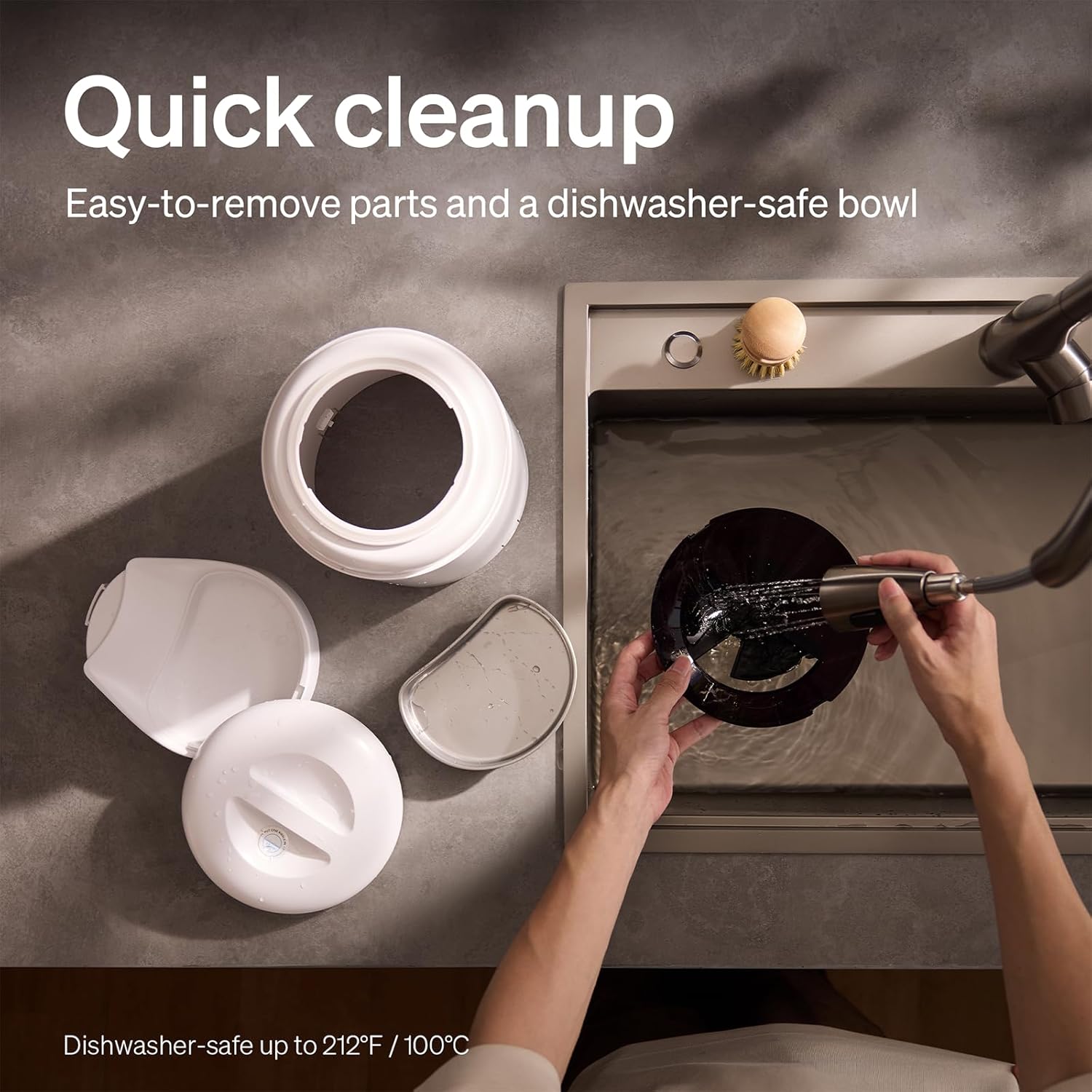
The feeder is designed for quick cleanup with easy-to-remove parts and a dishwasher-safe bowl.
- Odpojit napájení: Před čištěním vždy odpojte podavač ze zásuvky.
- Odstraňte jídlo: Empty any remaining food from the hopper.
- Rozebrat: Remove the food bowl, lid, and food hopper.
- Omyvatelné části: The stainless steel bowl and food hopper are dishwasher-safe (up to 100°C / 212°F) or can be hand-washed with mild soap and water.
- Hlavní jednotka: Otřete hlavní jednotku měkkým, damp tkanina. Neponořujte jej do vody.
- Důkladně vysušte: Před opětovným sestavením a naplněním potravinami se ujistěte, že všechny díly jsou zcela suché.
2. Výměna vysoušedla
- The desiccant bag helps keep the food fresh. It is recommended to replace it every 15 days.
- Locate the desiccant compartment, usually under the lid.
- Remove the old desiccant bag and insert a new one.
Odstraňování problémů
| Problém | Možná příčina | Řešení |
|---|---|---|
| Krmítko nevydává krmivo. | Food blockage; empty hopper; dispensing mechanism issue. | Check for food blockages and clear them. Refill hopper if empty. Ensure food size is appropriate (2-15mm). |
| Odpojení Wi-Fi. | Weak Wi-Fi signal; router issues; incorrect password. | Ensure feeder is within Wi-Fi range. Restart your router. Reconnect the feeder to Wi-Fi via the app, verifying the password. |
| Camera not working or frequently disconnecting. | Poor Wi-Fi connection; app glitch; SD card issue. | Check Wi-Fi stability. Restart the feeder and the app. Ensure the SD card is properly inserted and not full. Consider a system reset if issues persist. |
| App shows "status unknown" or feeding errors. | Wi-Fi disconnection; app synchronization issue. | Verify Wi-Fi connection. Close and reopen the app. Restart the feeder. |
| Hlasový záznam se nepřehrává. | No recording saved; volume too low; incorrect schedule. | Ensure a voice message is recorded and saved in the app. Check the playback settings for meal times. |
Specifikace
| Funkce | Detail |
|---|---|
| Číslo modelu | AF203 |
| Rozměry (D x Š x V) | 12 x 10 x 27 cm |
| Hmotnost | 2.15 kg |
| Materiál | Nerezová ocel (miska) |
| Kapacita | 5 litrů |
| Cílový druh | Kočka, pes |
| Doporučená použití | Automatic indoor dog/cat feeding |
| Speciální funkce | 1080P Camera, Smart App, Two-way Audio |
| Barva | Bílý |
| Technologie připojení | Wi-Fi (2.4 GHz a 5 GHz) |
| Provozní režim | Automatický |
| Pokyny pro péči | Dishwasher safe (bowl) |
| Jsou vyžadovány baterie | No (for primary operation), Yes (for backup, 3 D-cell, not included) |
Záruka a podpora
PETLIBRO products come with a standard manufacturer's warranty. For detailed warranty information, please refer to the warranty card included in your package or visit the official PETLIBRO webmísto.
If you encounter any issues or have questions regarding your PETLIBRO Automatic Pet Feeder, please contact PETLIBRO customer support through the following channels:
- E-mail: Viz obal produktu nebo PETLIBRO. webNejnovější e-mailovou adresu podpory naleznete na webu.
- Webmísto: Navštivte oficiální stránky PETLIBRO webweb s nejčastějšími dotazy, průvodci řešením problémů a kontaktními formuláři.
- Podpora v aplikaci: The PETLIBRO app may offer a support section for direct assistance.
Please have your model number (AF203) and purchase information ready when contacting support.