
APORO T4
Occus APORO T4 Kabelové výukové zařízení Amplifier Uživatelská příručka
Model: APORO T4 | Značka: Generic
1. Úvod
The Occus APORO T4 Wired Teaching Amplifier is a compact and portable audio amplification device designed to enhance vocal clarity and projection. It is ideal for teachers, presenters, tour guides, and anyone requiring clear voice amplification in various settings. Its lightweight design and waist-hanging capability offer convenience and mobility during use.
2. Bezpečnostní informace
Před použitím zařízení si prosím přečtěte a pochopte všechny bezpečnostní pokyny, abyste zajistili bezpečné a správné používání.
- Nevystavujte zařízení vodě, dešti ani nadměrné vlhkosti.
- Keep the device away from direct sunlight, heat sources, or high temperatures.
- Use only the specified input voltage (110V) for charging.
- Nepokoušejte se zařízení rozebírat, upravovat ani opravovat sami. Veškerý servis svěřte kvalifikovanému personálu.
- Uchovávejte mimo dosah dětí.
- Zabraňte pádu zařízení nebo jeho vystavení silným nárazům.
3. Obsah balení
Ověřte, zda jsou v balení přítomny všechny položky:
- Occus APORO T4 AmpLifikační jednotka
- Kabelový mikrofon
- USB nabíjecí kabel
- Pásek na pásek
- Uživatelská příručka
4. Konec produktuview
Familiarize yourself with the components and features of your APORO T4 ampživější.

Obrázek 4.1: Přední view of the APORO T4 amplifier in black. The device features a prominent speaker grille and a digital display at the top, indicating "SP" (likely for speaker or sound output mode).

Obrázek 4.2: The APORO T4 amplifier is available in multiple color options, including black, blue, and red, catering to personal preference.

Obrázek 4.3: Top panel of the APORO T4 amplifier (blue model), illustrating the various ports and control buttons. From left to right, these include an antenna port, microphone input (MIC), recording button (REC), previous track button, play/pause button, next track button, mode key (M), and the power on/off and volume control dial (ON+).
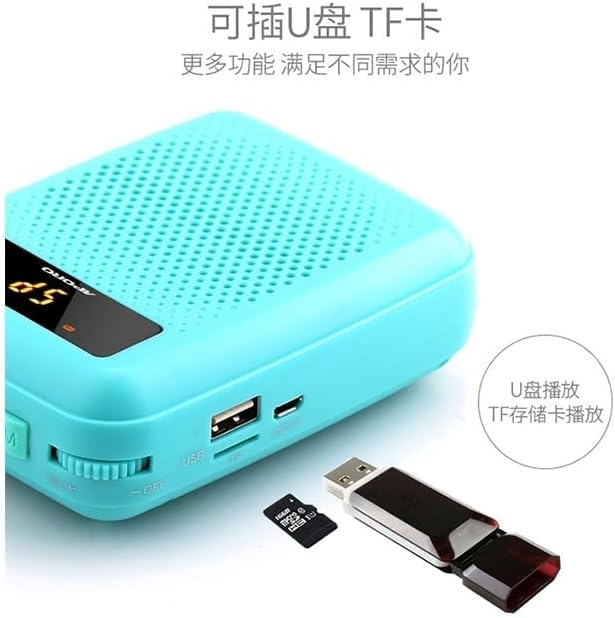
Obrázek 4.4: The APORO T4 amplifier supports external media playback via its USB port and TF (microSD) card slot, allowing users to play audio files directly from a USB flash drive or TF memory card.
5. Nastavení
5.1 Nabíjení Ampdoživotní
- Connect the USB charging cable to the charging port on the ampživější.
- Plug the other end of the USB cable into a standard 110V USB power adapter (not included) or a computer USB port.
- The charging indicator light will illuminate. Once fully charged (typically 3-5 hours for the 2000-4000 mAh battery), the indicator light may change or turn off.
- Po dokončení nabíjení odpojte nabíjecí kabel.
5.2 Attaching the Waist Strap
- Locate the strap loops on the sides of the ampživější jednotka.
- Thread the waist strap through these loops.
- Adjust the strap length for comfortable and secure wearing around your waist.
5.3 Připojení mikrofonu
- Insert the microphone's 3.5mm jack firmly into the "MIC" port on the top of the amplifier (refer to Figure 4.3).
- Ensure the microphone is securely connected for optimal sound input.
6. Návod k obsluze
6.1 Zapnutí/vypnutí a ovládání hlasitosti
- To power on the device, rotate the ON+ dial (located on the right side of the top panel, refer to Figure 4.3) clockwise until you hear a click and the display illuminates.
- Continue rotating the dial clockwise to increase the volume.
- Rotate the dial counter-clockwise to decrease the volume.
- To power off, rotate the dial counter-clockwise until you hear a click and the display turns off.
6.2 Mikrofon Ampzvedání
- Once the microphone is connected and the amplifier is powered on, speak into the microphone.
- Adjust the volume dial to achieve the desired ampúroveň zvedání.
- Maintain a suitable distance between the microphone and your mouth to prevent feedback (howling).
6.3 Přehrávání z USB/TF karty
- Insert a USB flash drive into the USB port or a TF (microSD) card into the TF card slot (refer to Figure 4.4).
- The amplifier should automatically detect the media and begin playing audio files.
- Use the "Previous Track" and "Next Track" buttons (refer to Figure 4.3) to navigate through your audio files.
- Press the "Play/Pause" button to pause or resume playback.
- Press the "Mode" button (M) to switch between different input modes (e.g., microphone, USB, TF card).
6.4 Funkce nahrávání
- Ensure a USB flash drive or TF card is inserted for storage.
- Press the "REC" (Record) button (refer to Figure 4.3) to start recording.
- Press the "REC" button again to stop recording. The recorded file will be saved to the inserted media.
7. Údržba
- Čištění: Use a soft, dry cloth to wipe the surface of the ampNepoužívejte tekuté čisticí prostředky ani abrazivní materiály.
- Skladování: Pokud zařízení nepoužíváte, skladujte ho na chladném a suchém místě mimo dosah přímého slunečního záření a extrémních teplot.
- Péče o baterie: Chcete-li prodloužit životnost baterie, vyvarujte se častého úplného vybíjení. Zařízení pravidelně nabíjejte, i když jej delší dobu nepoužíváte (např. jednou za 3 měsíce).
8. Řešení problémů
| Problém | Možná příčina | Řešení |
|---|---|---|
| Žádný zvukový výstup. | Device is off; Volume is too low; Microphone not connected properly; Microphone faulty. | Ensure device is powered on; Increase volume; Reconnect microphone firmly; Test with another microphone if available. |
| Zvuk je zkreslený nebo nejasný. | Volume too high; Microphone too close to speaker; Low battery. | Decrease volume; Adjust microphone distance; Charge the device. |
| Zařízení se nezapíná. | Battery is depleted; Power switch not fully engaged. | Charge the device fully; Ensure the ON+ dial is rotated completely to the 'on' position. |
| USB/TF karta nepřehrává. | Nesprávný file format; Media not inserted correctly; Device not in correct mode. | Zajistěte zvuk files are in a compatible format (e.g., MP3); Reinsert USB/TF card; Press the 'M' (Mode) button to select the correct input mode. |
9. Specifikace
| Model | APORO T4 |
| Značka | Obecný |
| Typ položky | Hand Tool Parts (as per product listing) |
| Původ | pevninská Čína |
| Kapacita vestavěné baterie | 2000 mAh - 4000 mAh |
| Vstupní objemtage | 110V |
| Barva | Black (as reviewed model) |
| ASIN | B0CB1T57KC |
| Číslo dílu výrobce | OCS-E827C6BF537942AD6D7B8415E204D770 |
10. Záruka a podpora
For specific warranty information and terms, please refer to the documentation provided with your purchase or contact the manufacturer directly. Technical support may be available through the manufacturer's official webstránky nebo kanály zákaznických služeb.
Výrobce: Obecný
Ask a question about this manual
Ask about setup, troubleshooting, compatibility, parts, safety, or missing instructions. Manuals+ will review the question and use this page’s manual context to help answer it.