
1. Úvod
Thank you for choosing the Re-Flix Superior Light 4-in-1 Universal Remote Control. This remote is designed for ease of use, coming pre-programmed for your specific device, such as a TV decoder. Simply insert batteries, and it is ready for immediate operation. This manual provides essential information on setup, operation, maintenance, and troubleshooting to ensure optimal performance.
2. Konec produktuview
The Re-Flix Superior Light remote control is a versatile device designed to simplify your home entertainment experience. Its ergonomic design and intuitive button layout provide comfortable and efficient control.
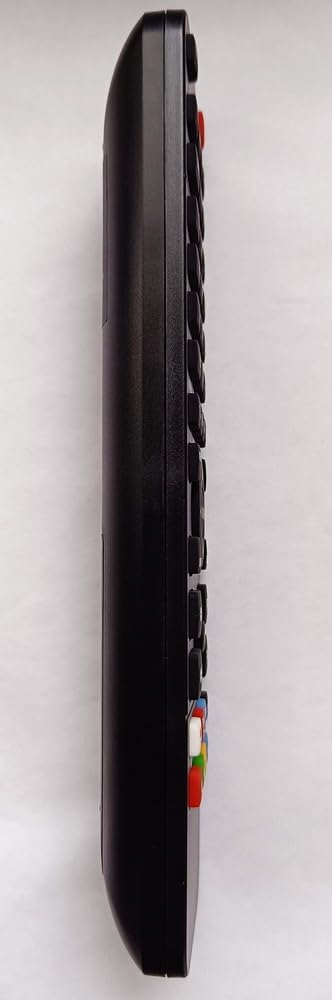
Obrázek 2.1: Strana view of the remote control, highlighting its ergonomic shape and button placement.

Obrázek 2.2: Zpět view of the remote control, displaying the battery cover and the product information label.
3. Nastavení
3.1 Instalace baterie
To power your remote control, follow these steps:
- Vyhledejte přihrádku na baterie na zadní straně dálkového ovladače (viz obrázek 2.2).
- Posuňte kryt přihrádky na baterie dolů nebo stiskněte západku a zvedněte jej pro otevření.
- Insert two (2) 1.5V AAA batteries, ensuring the positive (+) and negative (-) terminals align correctly with the markings inside the compartment.
- Nasaďte kryt přihrádky na baterie tak, že jej zasunete zpět na místo, dokud bezpečně nezacvakne.
Poznámka: Baterie nejsou součástí dálkového ovladače.
3.2 První použití
Your Re-Flix Superior Light remote control is pre-programmed for the device specified at the time of purchase (e.g., GTMEDIA P30M3ST-1 TV Decoder). Once batteries are installed, the remote is ready for immediate use without any additional code entry or setup.
Důležité:
- Ensure that the model designation of your device or original remote control matches the model indicated in the product description.
- If you wish to program the remote for other devices, a separate USB programmer is required. This programmer is not included with the remote control.
4. Návod k obsluze
This remote control operates using infrared (IR) technology. Ensure a clear line of sight between the remote's IR emitter and your device's IR receiver for proper functionality.
4.1 Základní funkce
The remote provides standard controls for your compatible TV decoder:
- Vypínač: Zapne nebo vypne zařízení.
- Kanál nahoru/dolů: Prochází kanály.
- Zvýšení/Snížení hlasitosti: Nastavuje hlasitost zvuku.
- Numerická klávesnice: Pro přímý vstup kanálu.
- Nabídka/Průvodce: Accesses your device's menu or program guide.
- Navigation Buttons (Arrows, OK): Pro navigaci v menu a potvrzování výběrů.
Refer to your device's manual for specific functions corresponding to each button on the remote.
5. Údržba
5.1 Čištění
Pro zachování vzhledu a funkčnosti dálkového ovladače:
- Otřete povrch měkkým suchým hadříkem.
- Pro odolnou špínu lehceampnavlhčete hadřík vodou nebo jemným neabrazivním čisticím prostředkem.
- Nepoužívejte agresivní chemikálie, rozpouštědla nebo abrazivní materiály, protože by mohly poškodit povrchovou úpravu nebo vnitřní součásti dálkového ovladače.
5.2 Výměna baterie
Replace the batteries when the remote's response becomes sluggish or stops working. The remote retains its programming even when batteries are low or removed.
- Postupujte podle kroků pro instalaci baterie uvedených v části 3.1.
- Always replace both batteries at the same time with new 1.5V AAA batteries.
- Použité baterie zlikvidujte zodpovědně v souladu s místními předpisy.
6. Řešení problémů
Pokud narazíte na problémy s dálkovým ovladačem, podívejte se na následující běžná řešení:
- Dálkové ovládání nereaguje:
- Zkontrolujte, zda jsou baterie správně vloženy a zda jsou dostatečně nabité. V případě potřeby je vyměňte.
- Ensure there is a clear line of sight between the remote and your device's IR receiver. Remove any obstructions.
- Make sure you are within the effective operating range of the remote.
- Remote not controlling the intended device:
- Verify that the remote was purchased for the correct device model. This remote is pre-programmed for a specific device.
- If you are attempting to control a different device, remember that a separate USB programmer is required for additional programming.
- Tlačítka se zasekávají nebo nereagují:
- Vyčistěte dálkový ovladač dle popisu v části 5.1.
7. Specifikace
| Funkce | Detail |
|---|---|
| Značka | Re-Flix |
| Číslo modelu | 747516 |
| Technologie připojení | Infračervený (IR) |
| Kompatibilní zařízení | TV Decoder (e.g., GTMEDIA P30M3ST-1) |
| Maximální počet podporovaných zařízení | 1 (pre-programmed) |
| Jsou vyžadovány baterie | 2 x 1.5V AAA (not supplied) |
| Rozměry (D x Š x V) | 21 x 4.7 x 2 cm |
| Hmotnost | 89 g |
8. Záruka a podpora
This Re-Flix product is covered by a standard manufacturer's warranty. For specific warranty terms and conditions, please refer to the documentation provided at the time of purchase or contact your retailer.
For technical support, troubleshooting assistance beyond this manual, or inquiries regarding additional programming options (e.g., USB programmer), please contact the seller or manufacturer directly. Provide your product model number (747516) and details of your issue for efficient service.