
USHINING T180 4G
USHINING 4G Senior Mobile Phone User Manual
Model: T180 4G

The USHINING T180 4G senior mobile phone, shown here with its charging dock, is designed for ease of use with large buttons and a clear display.
Zavedení
The USHINING T180 4G Senior Mobile Phone is designed for simplicity and reliability, catering to the needs of elderly users. It features large buttons, a clear display, loud volume, and essential functions like an SOS emergency button and a convenient USB-C charging dock. This manual provides comprehensive instructions to help you get started and make the most of your new phone.
Komponenty skončilyview
Familiarize yourself with the main components of your USHINING T180 4G phone:
- Displej: Shows information, menus, and contacts.
- Velká klávesnice: Easy-to-press buttons for dialing and navigation.
- Navigační tlačítka: Tlačítka nahoru, dolů, vlevo, vpravo a OK pro navigaci v menu.
- Tlačítka pro volání/ukončení: Zelené tlačítko pro příjem/uskutečňování hovorů, červené tlačítko pro ukončení hovorů/vypnutí.
- SOS tlačítko: Located on the back, for emergency calls.
- Tlačítka hlasitosti: Located on the side for adjusting call and ringtone volume.
- Nabíjecí port USB-C: Located at the bottom for direct charging.
- Kontakty pro nabíjení: Located at the bottom for use with the charging dock.
- Svítilna: Integrované světlo pro větší pohodlí.

This image highlights the phone's large buttons, clear large font display, and loud volume capability, all designed for user convenience.
Nastavení
1. Instalace SIM karty a baterie
Before using your phone, you need to install a compatible 4G SIM card and the battery.
- Opatrně sejměte zadní kryt telefonu.
- Insert your 4G SIM card into the designated SIM slot. Ensure the gold contacts face downwards and the card is correctly oriented as per the diagram inside the phone.
- Insert the battery into the battery compartment, aligning the gold contacts with the phone's terminals.
- Nasaďte zadní kryt zpět, dokud bezpečně nezacvakne na místo.
2. Počáteční nabíjení
It is recommended to fully charge the phone before first use.
- Používání nabíjecího doku: Place the phone into the charging dock, ensuring the charging contacts align. The charging indicator on the phone screen will activate.
- Přímé nabíjení přes USB-C: Connect the provided USB-C cable to the phone's USB-C port and the other end to a compatible USB power adapter.

The phone supports both direct USB-C cable charging and convenient charging via the included dock, making it easy for seniors to keep their device powered.
Návod k obsluze
1. Zapnutí/vypnutí
- Zapnutí: Stiskněte a podržte Zelené tlačítko pro volání dokud se nerozsvítí obrazovka.
- Vypnutí: Stiskněte a podržte Červené tlačítko pro ukončení hovoru until the power off option appears, then confirm.
2. Uskutečňování a přijímání hovorů
- Chcete-li zavolat: Dial the phone number using the keypad and press the Zelené tlačítko pro volání.
- Chcete-li přijmout hovor: Když telefon zvoní, stiskněte Zelené tlačítko pro volání.
- Ukončení hovoru: Stiskněte tlačítko Červené tlačítko pro ukončení hovoru.
3. Odesílání a přijímání zpráv
Navigate to the "Message" menu using the navigation buttons. From there, you can compose new messages or read incoming ones.

The user-friendly interface provides clear icons for various functions, including messaging, call logs, and contacts.
4. Funkce nouzového volání SOS
The SOS button is a critical safety feature. You can set up to 5 emergency contacts.
- Nastavení SOS kontaktů: Přejít na Settings > SOS Settings > SOS Numbers to add or edit up to 5 emergency contacts.
- Using SOS: V případě nouze stiskněte a podržte SOS tlačítko on the back of the phone. The phone will automatically dial the emergency contacts in sequence until one answers. It will also send an emergency SMS to these contacts.
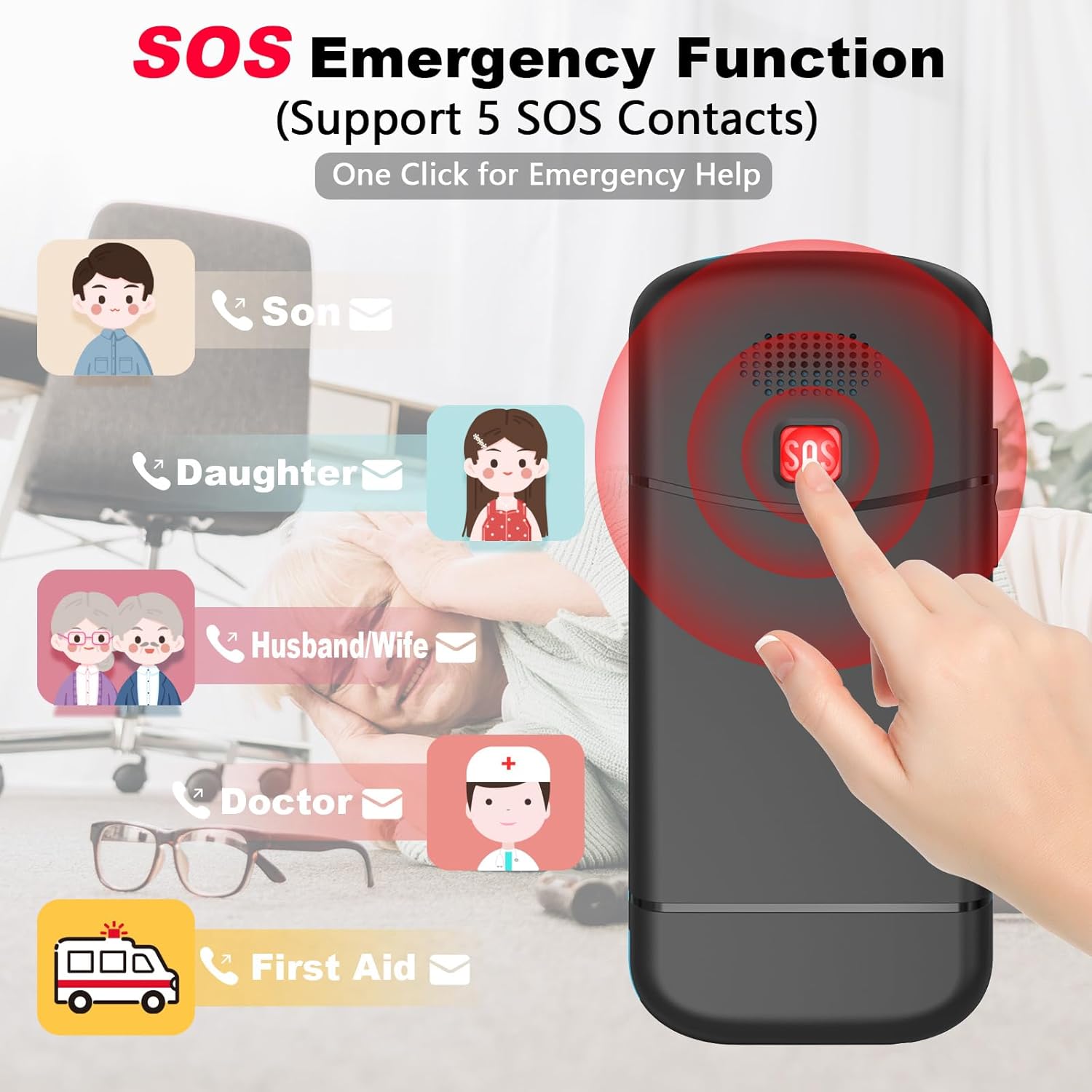
The dedicated SOS button provides immediate assistance by contacting pre-set emergency numbers and sending alerts.
5. Speed Dial Function
Assign frequently called numbers to keys 2-9 for quick dialing.
- Přejít na Nastavení > Rychlá volba.
- Select a number key (2-9) and assign a contact from your phonebook.
- To use, simply press and hold the assigned number key.
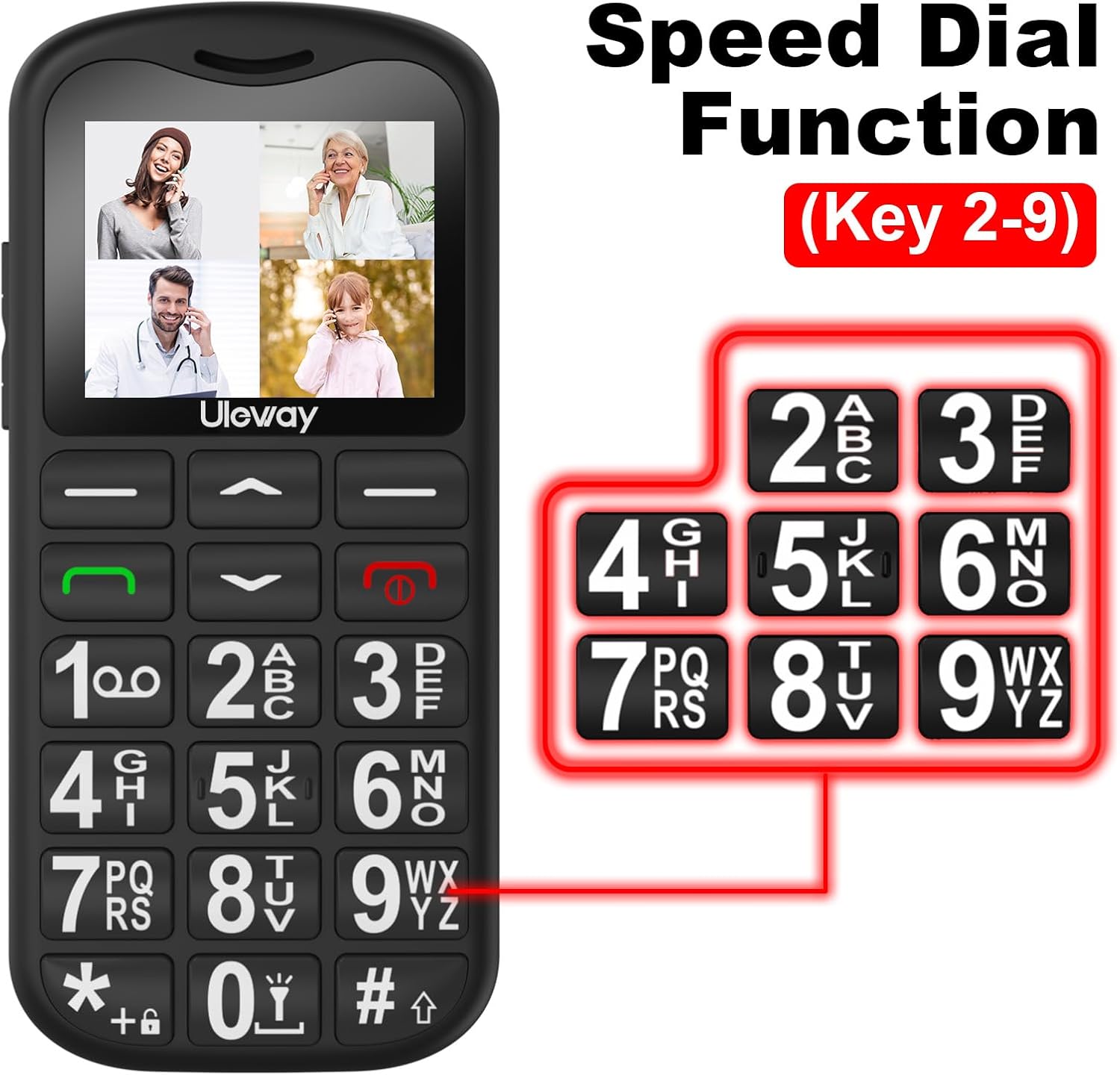
The speed dial feature allows users to quickly call important contacts by simply holding down a pre-assigned number key.
6. Funkce svítilny
Telefon má pro větší pohodlí vestavěnou svítilnu.
- Zapnutí/vypnutí: Press and hold the '0' key on the keypad.

The integrated flashlight is easily activated by holding the '0' key, providing illumination when needed.
7. FM rádio
Enjoy your favorite radio stations on the go. Navigate to the "FM Radio" application from the main menu.
8. Budík
Set alarms for reminders or wake-up calls. Access the "Alarm" function through the main menu.
9. Správa kontaktů
The phone supports storing up to 500 contacts. Navigate to the "Contacts" menu to add, edit, or delete entries.
10. Nastavení hlasitosti
Adjust the call volume during a conversation or the ringtone volume using the dedicated volume buttons on the side of the phone.
Údržba
- Čištění: K čištění povrchu telefonu používejte měkký, suchý hadřík. Nepoužívejte tekuté čisticí prostředky ani abrazivní materiály.
- Péče o baterie: Chcete-li prodloužit životnost baterie, vyhněte se extrémním teplotám. Nenechávejte telefon delší dobu zcela vybitý.
- Skladování: Pokud telefon nepoužíváte, skladujte jej na chladném a suchém místě mimo dosah přímého slunečního záření a vlhkosti.
Odstraňování problémů
If you encounter issues with your phone, refer to the table below for common problems and their solutions.
| Problém | Možná příčina | Řešení |
|---|---|---|
| Telefon se nezapne. | Low battery; Battery not installed correctly; Power button not pressed long enough. | Charge the phone; Reinstall battery; Press and hold the power button for several seconds. |
| Nelze uskutečňovat ani přijímat hovory. | No SIM card; SIM card not activated; Out of network coverage; Incorrect network settings. | Ensure SIM card is inserted and activated; Check network signal; Contact your service provider. |
| Špatná kvalita hovoru. | Slabý síťový signál; Překážky; Problémy s reproduktorem/mikrofonem. | Move to an area with better signal; Ensure nothing is blocking speaker/microphone; Adjust volume. |
| Funkce SOS nefunguje. | SOS numbers not set; No credit/signal; Emergency contact not answering. | Verify SOS numbers in settings; Ensure phone has signal and credit; Inform contacts about SOS function. |
| Telefon se nenabíjí. | Charger/cable faulty; Charging port dirty; Phone not seated correctly in dock. | Try a different charger/cable; Clean charging port gently; Ensure phone is properly seated in the dock. |
Specifikace
Key technical specifications for the USHINING T180 4G Senior Mobile Phone:
| Funkce | Detail |
|---|---|
| Číslo modelu | T180 4G |
| Značka | USHINING |
| Operační systém | KaiOS |
| Buněčná technologie | 4G |
| Velikost obrazovky | 1.77 palce |
| Kapacita baterie | 1000mAh Lithium-iont |
| Nabíjecí port | USB typ C |
| Kapacita paměti | 32 GB (Internal, likely for contacts/messages, not expandable storage) |
| Speciální funkce | SOS Emergency Button, Speed Dial, FM Radio, Flashlight, Large Buttons, Loud Volume, Charging Dock |

The phone's compact dimensions are approximately 112mm in height and 53mm in width, making it comfortable to hold.
Záruka a podpora
For warranty information and technical support, please refer to the documentation included with your purchase or visit the official USHINING webUschovejte si doklad o koupi pro případ reklamace.
If you have further questions or require assistance, please contact USHINING customer service.
Ask a question about this manual
Ask about setup, troubleshooting, compatibility, parts, safety, or missing instructions. Manuals+ will review the question and use this page’s manual context to help answer it.