
Zavedení
This manual provides detailed instructions for the assembly, operation, and maintenance of your TONOR T10 Microphone Boom Arm. Please read this guide thoroughly to ensure proper setup and optimal performance of your equipment. The TONOR T10 is designed to securely hold your microphone, offering flexibility and stability for various recording and broadcasting applications.
Co je v krabici
Opatrně vybalte obsah a ověřte, zda jsou všechny položky přítomny:
- 1 x rameno výložníku
- 1 x Stůl třamp
- 1 x Pop filtr
- 4 x kabelové svazky
- 1 x Mic Holder
- 1 x Manuál (tento dokument)

Pokyny pro nastavení
Follow these steps to correctly set up your TONOR T10 Microphone Boom Arm:
- Připojte desku Clamp:
Zajistěte psací stůl třamp to a sturdy surface. Ensure the contact area is maximized and the silicone pad is positioned to protect your table. The clamp supports surfaces up to 2.36 inches (6 cm) thick. Tighten the clamp firmly to prevent movement.
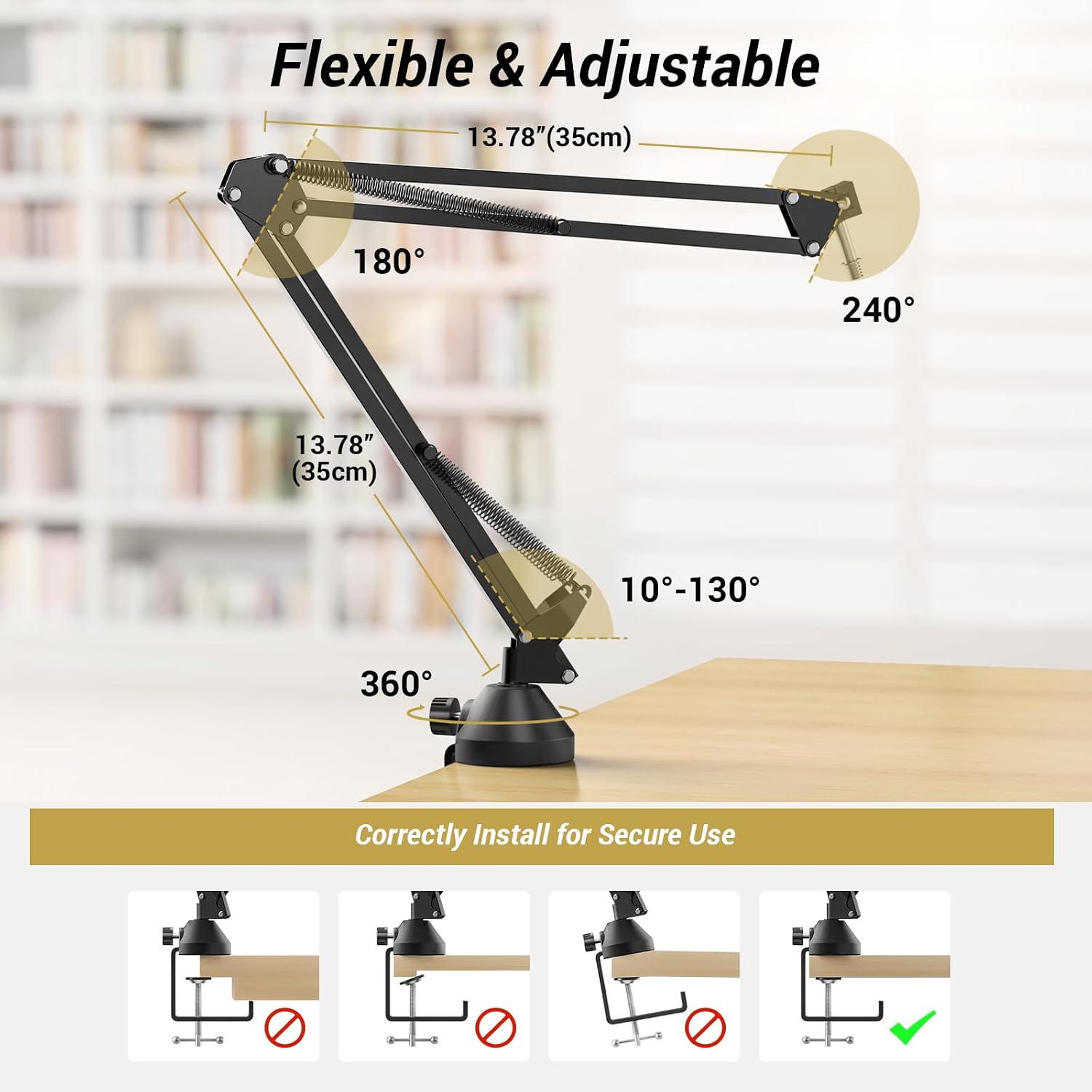
Image: Illustration showing the correct method for attaching the desk clamp to a table edge, ensuring full contact and stability. 
Obrázek: Podrobný view of the refined desk clamp, highlighting its large contact area and protective silicone pad for enhanced stability and surface protection. - Vložte rameno výložníku:
Slide the base of the boom arm into the hole on the desk clampRameno by se mělo volně otáčet v rámci clamp.
- Attach Your Microphone:
The boom arm features a standard 3/8'' screw. If your microphone requires a 5/8'' thread, use the included adapter screw. Attach your microphone or microphone shock mount to the boom arm's screw.

Image: Diagram illustrating the standard 3/8-inch screw and the included 5/8-inch adapter, demonstrating compatibility with various microphones. - Instalace pop filtru:
Attach the extra-large pop filter to the boom arm. Position it between your mouth and the microphone to effectively reduce plosive sounds and airflow noise.

Obrázek: Detailní záběr view of the extra-large pop filter, showing its metal net and foam layers designed to eliminate airflow noise. - Správa kabelů:
Use the four included hook-and-loop fasteners to secure your microphone cable along the boom arm. This helps organize cables and maintains a tidy workspace.

Image: Illustration demonstrating the use of hook-and-loop fasteners to neatly secure microphone cables along the boom arm, preventing clutter.
Návod k obsluze
The TONOR T10 Microphone Boom Arm offers extensive adjustability for optimal microphone positioning:
- Nastavení polohy: The arm can extend up to 27.56 inches (70 cm) horizontally and vertically. It features 13.78-inch (35 cm) upper and lower arms, allowing for flexible positioning.
- Otáčení: The boom arm can rotate 360 degrees at its base and offers 180-degree and 240-degree articulation at its joints, providing a wide range of motion.
- Kapacita zatížení: The reinforced boom arm has a maximum load-bearing capacity of 3.3 lbs (1.5 kg) when bent at a 90-degree angle, supporting most standard microphones.

Údržba
To ensure the longevity and optimal performance of your TONOR T10 Microphone Boom Arm, follow these maintenance guidelines:
- Čištění: Wipe the boom arm and clamp with a soft, dry cloth to remove dust and debris. Avoid using abrasive cleaners or solvents, as these can damage the finish.
- Společná inspekce: Periodically check all joints and screws for tightness. If any part feels loose, gently tighten it to maintain stability. Do not overtighten.
- Spring Care: Keep the springs free from dust and obstructions. If the arm's movement becomes stiff, a small amount of silicone-based lubricant can be applied to the joints, avoiding contact with the springs themselves.
- Skladování: When not in use for extended periods, store the boom arm in a clean, dry environment to prevent corrosion or damage.
Odstraňování problémů
If you encounter any issues with your TONOR T10 Microphone Boom Arm, refer to the following common solutions:
- Arm is unstable or sags:
- Zajistěte stůl třamp is securely tightened to the table.
- Verify that your microphone's weight does not exceed the maximum load capacity of 3.3 lbs (1.5 kg).
- Check that all joint screws on the boom arm are tightened.
- Microphone does not fit the screw:
- Confirm whether your microphone requires a 3/8'' or 5/8'' thread. Use the appropriate adapter provided.
- Pop filter is ineffective:
- Ensure the pop filter is positioned correctly between your mouth and the microphone, approximately 2-6 inches away from the microphone.
- Arm movement is stiff:
- Check for any obstructions in the joints or springs.
- Apply a small amount of silicone-based lubricant to the moving parts of the joints (avoiding springs) if necessary.
Specifikace
| Značka | TONOR |
| Název modelu | T10 |
| Barva | Černý |
| Materiál | Legovaná ocel, akrylonitrilbutadienstyren (ABS) |
| Hmotnost položky | 1 kilogram |
| Rozměry položky (D x Š x V) | 10 x 20 x 30 centimetrů |
| Maximální výška | 70 centimetrů |
| Základní typ | Clamp |
| Microphone Stand Thread Size | 3/8 inch, 5/8 inch (with adapter) |
| Doporučená maximální hmotnost | 3.3 liber (1.5 kg) |
Záruka
The TONOR T10 Microphone Boom Arm comes with a 2 roky záruka výrobce. Please retain your proof of purchase for warranty claims. For detailed terms and conditions, refer to the warranty information provided at the time of purchase or contact TONOR customer support.
Podpora
For further assistance, technical support, or inquiries regarding your TONOR T10 Microphone Boom Arm, please visit the official TONOR webwebové stránky nebo kontaktujte jejich oddělení zákaznických služeb. Kontaktní informace obvykle naleznete na obalu produktu nebo na oficiálních webových stránkách značky.