
Zavedení
Welcome to your new RECCAZR Wireless Keyboard and Mouse Combo. This manual provides detailed instructions for setup, operation, maintenance, and troubleshooting to ensure optimal performance and longevity of your device. Please read this manual thoroughly before using the product.
Vlastnosti produktu
- Bezdrátové připojení 2.4 GHz: Stable and reliable connection up to 10m (33ft) using a single nano USB receiver. Plug and play, no software needed.
- Comfortable Combo: Stepped keycap distribution and curved concave keycaps for comfortable typing. Ergonomic mouse design for smoother movement and reduced strain.
- Unique Design Keycap: Circular curved concave keycaps match fingertips for smooth typing. The cambered edge design of the last row key caps reduces stress during extended use.
- Funkce automatické úspory energie: Smart auto-sleep mode to conserve power. Press any key to wake.
- 3 DPI Level and Quiet Clicks: Mouse offers 90% less click noise. Adjustable DPI (800-1200-1600) with next/previous buttons for convenient web procházení.

Figure 1: RECCAZR Wireless Keyboard and Mouse Combo with USB receiver.
Průvodce nastavením
Obsah balení
- Bezdrátová klávesnice
- Bezdrátová myš
- Nano USB přijímač
- Uživatelská příručka
Note: Batteries are not included. You will need two AA batteries for the mouse and one AA battery for the keyboard.
Instalace baterie
Pro myš:
- Najděte přihrádku na baterie na spodní straně myši.
- Otevřete kryt baterie.
- Vložte dvě baterie typu AA a dbejte na správnou polaritu (+/-).
- Zavřete kryt baterie.
Pro klávesnici:
- Vyhledejte přihrádku na baterie na spodní straně klávesnice.
- Otevřete kryt baterie.
- Vložte jednu baterii typu AA a dbejte na správnou polaritu (+/-).
- Zavřete kryt baterie.
Video 1: Demonstrates battery installation for both the mouse and keyboard, as well as the connection process.
Připojení zařízení
- Locate the Nano USB receiver. It is typically stored inside the mouse's battery compartment for safekeeping.
- Plug the Nano USB receiver into an available USB port on your computer (desktop, laptop, or PC).
- Turn on the power switch for both the keyboard and the mouse. The power switch for the keyboard is located on the top right, and for the mouse, it's on the underside.
- Zařízení by se měla automaticky připojit k počítači. Obvykle nejsou vyžadovány žádné další ovladače.

Figure 2: Illustrates the 2.4GHz wireless connection setup with the USB receiver.
Návod k obsluze
Použití klávesnice
Typing and Ergonomics:
The keyboard features stepped keycap distribution and curved concave keycaps designed for comfortable and smooth typing. The cambered edge design of the last row key caps reduces stress during extended use.

Figure 3: Close-up of the ergonomic concave keycaps for comfortable typing.
Multimediální zkratky:
The keyboard includes 12 multimedia shortcut keys for quick access to functions like volume control, media playback, and more. Refer to the keyboard layout for specific functions.

Obrázek 4: Přesview of the keyboard's multimedia shortcut keys.
Použití myši
Nastavení DPI:
The mouse offers 3 adjustable DPI levels (800-1200-1600) to change cursor speed. Press the DPI button located on the top of the mouse to cycle through the settings.
Tiché kliknutí:
Experience quiet operation with 90% less click noise, ideal for quiet environments such as offices or libraries.
Navigační tlačítka:
The mouse includes dedicated next/previous buttons on the side for convenient web procházení.

Figure 5: Details the mouse's adjustable DPI levels and silent click feature.
Funkce úspory energie
Both the keyboard and mouse feature a smart auto-sleep mode to conserve battery life. They will enter sleep mode after a period of inactivity. To wake the devices, simply press any key on the keyboard or move/click the mouse.

Figure 6: Illustrates the automatic power saving function of the keyboard and mouse.
Údržba
- Clean the devices regularly with a soft, dry cloth. For stubborn dirt, a slightly damp Lze použít hadřík, který zajistí, aby se do vnitřních součástí nedostala vlhkost.
- Avoid exposing the devices to extreme temperatures, direct sunlight, or liquids.
- Store the Nano USB receiver inside the mouse when not in use or during travel to prevent loss.
- Replace batteries when performance degrades to ensure consistent operation.
Odstraňování problémů
Zařízení se nepřipojuje:
- Ujistěte se, že jsou baterie správně nainstalovány a jsou dostatečně nabité.
- Make sure the power switches on both the keyboard and mouse are in the "On" position.
- Verify the Nano USB receiver is securely plugged into a working USB port on your computer. Try a different USB port.
- Restartujte počítač.
- If the receiver was moved, try re-pairing by turning off both devices, plugging in the receiver, then turning on the devices.
Zpožděné nebo přerušované připojení:
- Vyměňte baterie v obou zařízeních.
- Ensure the devices are within the 10m (33ft) operating range of the receiver.
- Minimalizujte rušení od jiných bezdrátových zařízení (např. Wi-Fi routerů, dalších zařízení s frekvencí 2.4 GHz).
- Avoid using the devices on metallic surfaces, which can interfere with the wireless signal.
Kurzor myši poskakuje nebo je nepřesný:
- Vyčistěte optický senzor na spodní straně myši.
- Try adjusting the DPI settings using the DPI button on the mouse.
- Používejte myš na čistém, nereflexním povrchu.
Specifikace
| Funkce | Detail |
|---|---|
| Rozměry balení | 17.8 x 8.54 x 1.85 palce |
| Hmotnost položky | 1.81 libry |
| ASIN | B0C8H26XMC |
| Značka | RECCAZR |
| Barva | Černý |
| Technologie připojení | Bezdrátový |
| Speciální funkce | Ergonomický |
| Kompatibilní zařízení | Laptop, Gaming Console, Personal Computer |
| Výrobce | RECCAZR |
| Datum první dostupnosti | 19. června 2023 |
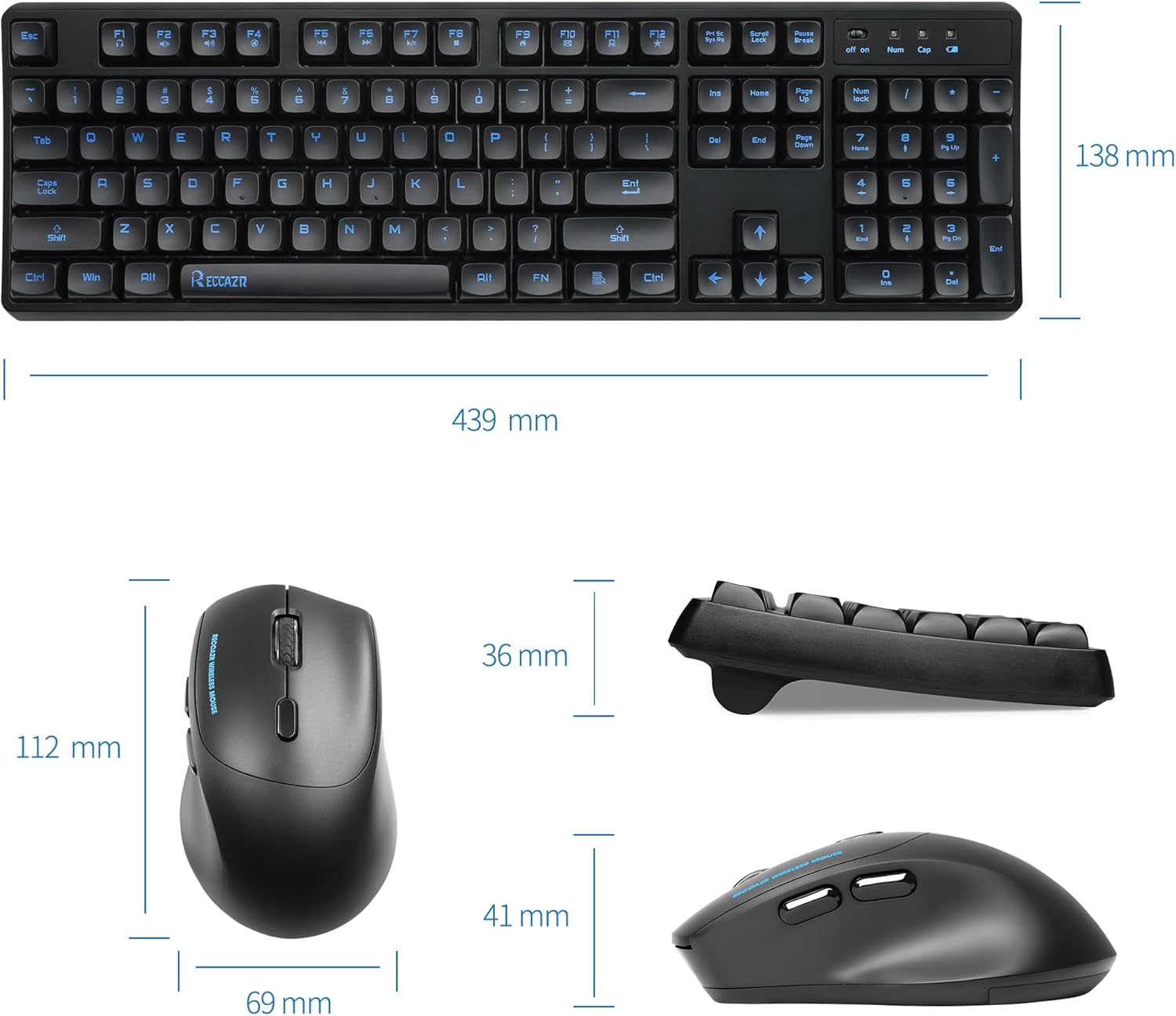
Figure 7: Detailed dimensions of the keyboard and mouse.

Figure 8: Shows compatibility with various operating systems including Windows 7, 8, 10, and 11.
Záruka a podpora
RECCAZR offers a 12-month free after-sales service for this product. If you encounter any problems during use, please contact RECCAZR customer service via Amazon email for a satisfactory solution.
For more information and support, visit the official RECCAZR Store: RECCAZR Store.

Figure 9: RECCAZR Service Team provides 24/365 support.