
1. Úvod
The TOPPING D70 Pro Sabre is a high-performance Digital-to-Analog Converter (DAC) designed for audiophiles seeking exceptional sound quality. Featuring the ES9039SPro chip, advanced I/V conversion circuitry, and versatile input/output options, this device delivers precise and immersive audio reproduction. It supports various audio formats and offers a user-friendly interface for an enhanced listening experience.
2. Bezpečnostní informace
- Zařízení nerozebírejte ani neupravujte. Neoprávněné úpravy mohou vést ke zrušení záruky a představovat bezpečnostní riziko.
- Chraňte zařízení před vodou, vlhkostí a vysokými teplotami.
- Zajistěte řádné větrání kolem jednotky, abyste zabránili přehřátí.
- Používejte pouze dodaný napájecí kabel a příslušenství.
- Disconnect the power cable during lightning storms or when unused for extended periods.
3. Obsah balení
Zkontrolujte prosím, zda jsou v balení přítomny všechny položky:
- 1 x TOPPING D70 Pro Sabre DAC
- 1 x Dálkové ovládání
- 1 x USB kabel
- 1 x AC napájecí kabel
- 1x Bluetooth anténa
- 1 x Uživatelská příručka (tento dokument)

Image: TOPPING D70 Pro Sabre DAC with its included accessories and dimensions.
4. Konec produktuview
4.1 Přední panel

Obrázek: Přední strana view of the TOPPING D70 Pro Sabre, showing the full-color display and control knob.
The front panel features a full-color display (Aurora UI) that shows current input, sample rate, volume level, and other playback information. A multi-function knob allows for input selection, volume adjustment, and menu navigation. Touch buttons provide quick access to various settings and display modes like FFT and VU meters.
4.2 Zadní panel

Obrázek: Zadní view of the TOPPING D70 Pro Sabre, illustrating the various input and output connections.
The rear panel provides a comprehensive set of input and output options:
- Vstupy: USB, AES, Optical, Coaxial, Bluetooth 5.1 (with antenna connector).
- výstupy: Balanced XLR, Unbalanced RCA.
- Moc: Vstup střídavého proudu.
5. Nastavení
5.1 Připojení napájení
- Connect the provided AC power cable to the power input on the rear panel of the D70 Pro Sabre.
- Plug the other end of the AC power cable into a suitable wall outlet.
5.2 Připojení zdrojů zvuku
Vyberte jednu z následujících metod zadávání:
- Vstup USB: Connect a USB cable from your computer (Windows 10/11, macOS, Linux) to the USB input on the D70 Pro Sabre. For Windows systems, a driver installation may be required for ASIO applications.
- Optical/Coaxial/AES Input: Connect your digital audio source (e.g., CD player, streamer) using an optical, coaxial, or AES cable to the corresponding input on the D70 Pro Sabre.
- Bluetooth vstup: Screw the Bluetooth antenna onto the designated connector on the rear panel.
5.3 Připojení k Amplifier/Headphones
Connect the D70 Pro Sabre to your ampzvedák nebo sluchátka amplifier using either XLR or RCA cables:
- XLR výstup: For balanced connections, use XLR cables to connect the D70 Pro Sabre to an ampzesilovač s XLR vstupy.
- RCA výstup: For unbalanced connections, use RCA cables to connect the D70 Pro Sabre to an ampzesilovač s RCA vstupy.

Image: Diagram illustrating typical connections for the D70 Pro Sabre with a PC, headphone amplifier, and headphones.
6. Návod k obsluze
6.1 Zapnutí/vypnutí
Press the power button on the front panel or the remote control to turn the device on or off.
6.2 Výběr vstupu
Rotate the multi-function knob or use the remote control to cycle through available inputs (USB, AES, Optical, Coaxial, Bluetooth).
6.3 Ovládání hlasitosti
Rotate the multi-function knob to adjust the output volume. The D70 Pro Sabre features independent volume memory for Single Ended, Balanced, and All modes, automatically recalling the last used volume for each output type.

Image: The D70 Pro Sabre display showing the current volume level and PCM sample sazba.
6.4 Display Modes (Aurora UI)
The D70 Pro Sabre features an intuitive Aurora UI with a full-color display. Use the touch buttons or remote to navigate and customize the display, including options for FFT (Fast Fourier Transform) and VU (Volume Unit) meters to visualize playback information.
6.5 Párování Bluetooth
- Select Bluetooth as the input source on the D70 Pro Sabre.
- On your Bluetooth device (e.g., smartphone, tablet), search for available devices and select "TOPPING D70 Pro Sabre".
- Once paired, audio will be streamed wirelessly to the DAC. The D70 Pro Sabre supports LDAC, aptX-Adaptive, aptX HD, aptX, AAC, and SBC codecs for high-quality wireless audio transmission.

Image: Illustration of Bluetooth 5.1 connectivity and performance graphs of the D70 Pro Sabre.
6.6 Jemné ladění barvy tónu
The D70 Pro Sabre allows direct switching between different timbre modes: Default, Valve, and Transistor. These modes adjust the sound characteristics to suit your preference.
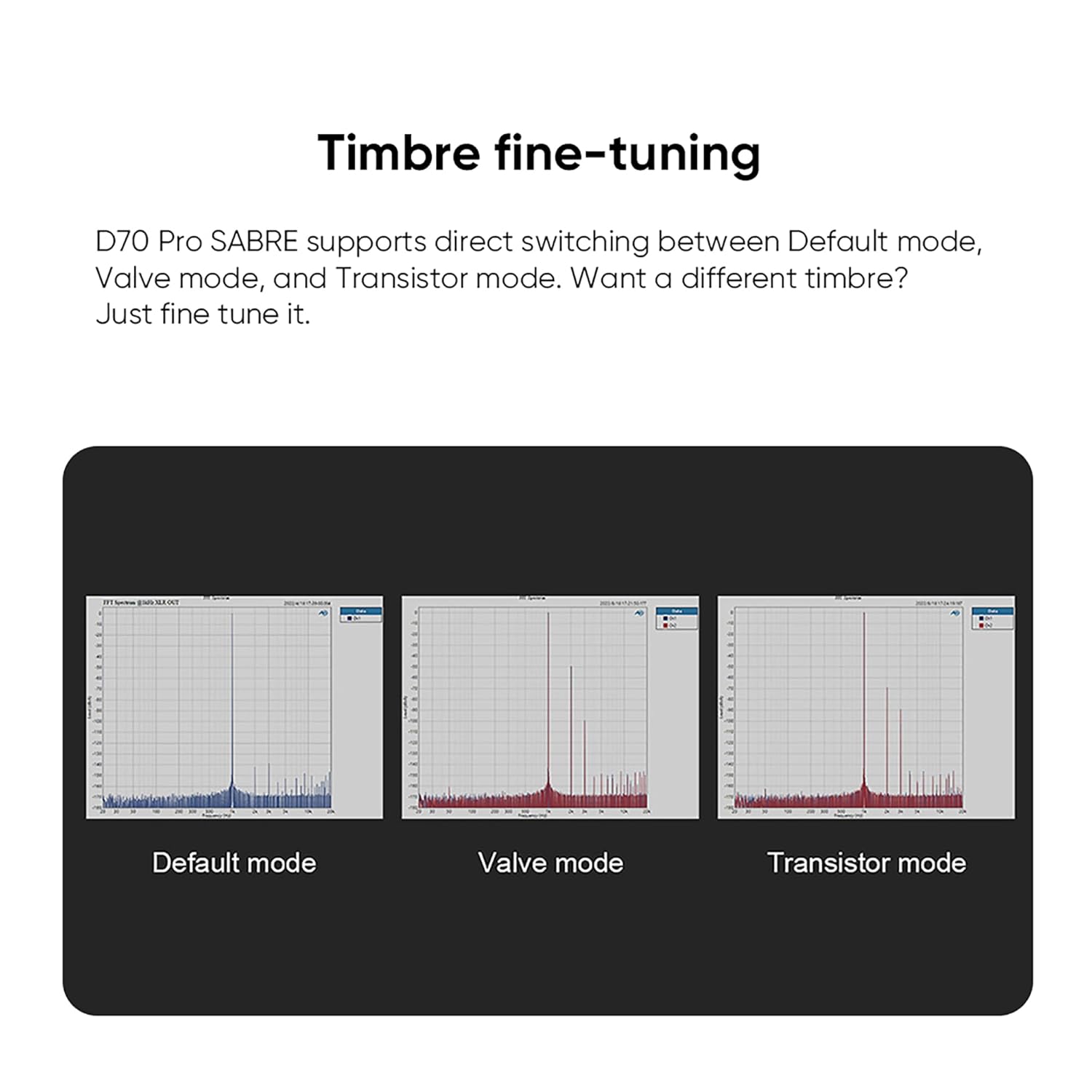
Image: Visual representation of the Default, Valve, and Transistor timbre modes available on the D70 Pro Sabre.
7. Údržba
- Zařízení pravidelně čistěte měkkým, suchým hadříkem. Nepoužívejte abrazivní čisticí prostředky ani rozpouštědla.
- Ujistěte se, že všechna připojení jsou bezpečná a bez prachu.
- Pokud zařízení nepoužíváte, skladujte jej na chladném a suchém místě.
8. Řešení problémů
| Problém | Možná příčina | Řešení |
|---|---|---|
| Žádný zvukový výstup | Incorrect input selected, cables loose, amplifier off, volume too low. | Verify input selection, check all cable connections, ensure amplifier is on and volume is adequate. |
| Nestabilní připojení Bluetooth | Antenna not connected, interference, device too far. | Ensure Bluetooth antenna is securely attached. Reduce distance between devices. Avoid sources of interference. |
| Žádný displej | Device not powered on, display settings. | Check power connection and power button. Adjust display settings via menu. |
| Zkreslený zvuk | Nesprávné sample rate, faulty cable, source issue. | Check source sample rate matches DAC capabilities. Try different cables. Test with another audio source. |
9. Specifikace
The TOPPING D70 Pro Sabre DAC features the powerful ES9039SPro chip and advanced I/V conversion circuitry. Below are key performance parameters (Line Out/USB In@96kHz):
| Parametr | RCA výstup | Výstup XLR |
|---|---|---|
| THD+N (A-wt) @1kHz | <0.00008 % | <0.00006 % |
| THD @90kBw (No-wt) @20-20kHz | <0.0004 % | <0.0002 % |
| SNR (A-wt) @1kHz | 128 dB | 133 dB |
| Dynamic Range (A-wt) @1kHz | 128 dB | 133 dB |
| Frekvenční odezva | 20Hz-20kHz (+0.05dB), 20Hz-40kHz (+0.2dB) | 20Hz-20kHz (+0.05dB), 20Hz-40kHz (+0.2dB) |
| Output Level @0dBFS (4V mode) | 2.1Vrms | 4.2Vrms |
| Output Level @0dBFS (5V mode) | 2.5Vrms | 5.0Vrms |
| Hlučnost (A-wt) | <1.0uVrms | <1.0uVrms |
| Přeslechy kanálu @1kHz | -128 dB | -140 dB |
| Vyvážení kanálů | 0.3 dB | 0.3 dB |
| Výstupní impedance | 50Ω | 100Ω |
Note: The above data is the result obtained from TOPPING's laboratory tests at AC220V 50Hz, with D70 Pro SABRE set to 5V output mode.
Obecné specifikace:
- Výrobce: POLEVA
- Číslo dílu: D70Pro SE
- Hmotnost produktu: 2.02 kg
- Rozměry produktu: 22.2 x 17.6 x 4.8 cm
- Barva: Černý
- Typ rozhraní: RCA, USB
- Minimum/Maximum Supply Voltage: 5 V (DC)
10. Záruka a podpora
TOPPING provides after-sales support and technical assistance for its products. If you encounter any issues during purchase or use, please contact the seller directly for assistance. For general inquiries or technical support, refer to the official TOPPING webnebo kontaktujte jejich zákaznický servis.
The seller, AOSHIDA Audio-JP, is available to assist with product-related concerns. You can find their contact information on the Amazon platform.