
Della 048-OPAC-6H
Della 10000 BTU Portable Air Conditioner User Manual
Model: 048-OPAC-6H | Značka: Della
1. Důležité bezpečnostní informace
Please read this manual carefully before operating your portable air conditioner. Keep this manual for future reference. Always follow basic safety precautions to reduce the risk of fire, electric shock, or injury.
- Ujistěte se, že je jednotka umístěna na rovném a stabilním povrchu, aby se zabránilo převrácení.
- Neprovozujte jednotku s poškozeným kabelem nebo zástrčkou.
- Nevkládejte prsty ani žádné předměty do vstupu nebo výstupu vzduchu.
- Udržujte jednotku mimo dosah hořlavých materiálů a otevřeného ohně.
- Před čištěním nebo jakoukoli údržbou vždy odpojte přístroj ze zásuvky.
- Tento spotřebič není určen pro použití osobami (včetně dětí) se sníženými fyzickými, smyslovými nebo duševními schopnostmi nebo nedostatečnými zkušenostmi a znalostmi, pokud na ně nedohlíží osoba odpovědná za jejich bezpečnost nebo jim nebyla poskytnuta instrukce ohledně používání spotřebiče.
2. Konec produktuview
The Della 10000 BTU Portable Air Conditioner is a versatile unit designed to provide cooling, heating, dehumidification, and fan functions for spaces up to 450 sq. ft. It features smart WiFi connectivity for convenient control via a mobile app, a remote control, and an intuitive soft-touch control panel.

Image: Della Portable Air Conditioner unit, remote control, and smartphone displaying the control app.
Key components include the main unit with integrated handle, exhaust hose, window installation kit, and remote control.

Image: Diagram showing the dimensions of the portable air conditioner: 12.2 inches (width) x 12.2 inches (depth) x 27.6 inches (height).
3. Nastavení
3.1 Vybalení
Carefully remove the unit and all accessories from the packaging. Retain the original packaging for future storage or transport. Allow the unit to stand upright for at least 24 hours before initial use to allow the refrigerant to settle.
3.2 Umístění
Place the air conditioner on a firm, level surface in a location that allows for proper air circulation. Ensure there is at least 20 inches (50 cm) of space from walls or other objects to allow for adequate airflow around the unit.
3.3 Instalace okenní sady
The included window kit is designed for easy installation in both horizontal and vertical sliding windows. No drilling is required.

Image: Diagrams illustrating the installation of the window kit in both horizontal and vertical sliding windows, showing compatibility with window openings from 25.5 to 64.1 inches.
- Assemble the window slider kit by sliding the adjustable panels together to fit your window opening. The kit is compatible with window sizes from 25.5 to 64.1 inches.
- Secure the panels with the provided screws.
- Open the window and place the assembled window kit into the window frame. Extend the panels to fit snugly and close the window against the kit to secure it.
- Ensure the window kit is sealed properly to prevent air leakage. Use foam seals if necessary.
3.4 Připojení výfukové hadice
- Attach the exhaust hose connector to one end of the exhaust hose.
- Na druhý konec výfukové hadice připevněte adaptér okenní sady.
- Insert the exhaust hose connector into the exhaust outlet on the back of the air conditioner unit.
- Insert the window kit adapter into the opening on the window slider kit.
- Ujistěte se, že jsou všechna připojení bezpečná, aby se zabránilo opětovnému vnikání horkého vzduchu do místnosti.
3.5 Připojení napájení
Zapojte napájecí kabel do uzemněné elektrické zásuvky 115 V/60 Hz. Nepoužívejte prodlužovací kabely ani prodlužovací kabely.
4. Návod k obsluze
4.1 Ovládací panel
The unit features an intuitive soft-touch control panel on the top of the unit.
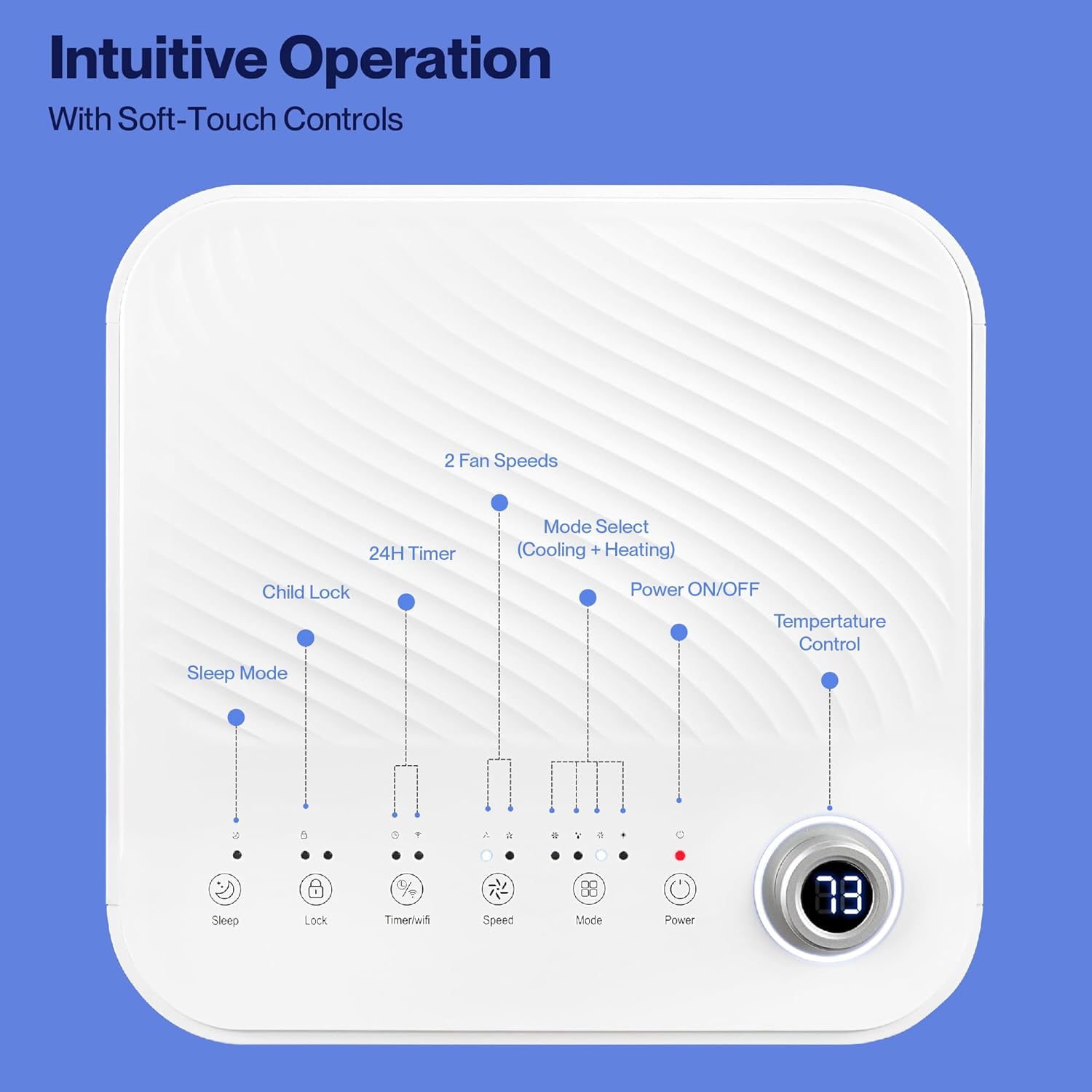
Image: Detailed diagram of the control panel with labels for each button: Sleep, Child Lock, Timer/WiFi, Fan Speed, Mode Select (Cooling + Heating), Power ON/OFF, and Temperature Control with digital display.
- Zapnutí/vypnutí: Stiskněte pro zapnutí nebo vypnutí jednotky.
- Výběr režimu: Cycle through Cooling, Heating, Dehumidification, Ventilation (Fan), and Sleep modes.
- Ovládání teploty: Pomocí šipek nahoru/dolů nastavte požadovanou teplotu.
- Rychlost ventilátoru: Select between 2 fan speeds (Low, High).
- Časovač: Nastavte 24hodinový časovač pro automatické zapnutí/vypnutí.
- Dětský zámek: Aktivuje nebo deaktivuje funkci dětské pojistky.
- Režim spánku: Aktivuje režim spánku pro tišší provoz a postupné nastavení teploty.
4.2 Dálkové ovládání
The unit comes with a remote control for convenient operation from a distance. All functions available on the control panel can be accessed via the remote.
4.3 WiFi/Smart App Control
Control your Della Portable Air Conditioner from anywhere using the free DELLA+ app on your smartphone. The unit is compatible with Google Assistant and Amazon Alexa for voice control.

Image: A person relaxing on a couch, using a smartphone to control the air conditioner, with text indicating compatibility with Google Assistant and Amazon Alexa.
- Download the DELLA+ app from your smartphone's app store.
- Postupujte podle pokynů v aplikaci a připojte klimatizaci k domácí WiFi síti.
- Once connected, you can control modes, temperature, fan speed, and set schedules remotely.
The app also supports Smart Geo Location, allowing the unit to automatically turn on or off based on your proximity to home.

Image: A smartphone screen showing a map with a car icon and a notification indicating the AC unit automatically turned on due to Smart Geo Location.
5. Údržba
Regular maintenance ensures optimal performance and extends the lifespan of your unit. Always unplug the unit before cleaning.
5.1 Čištění vzduchového filtru
Vzduchový filtr by se měl čistit každé dva týdny nebo častěji v závislosti na používání a kvalitě vzduchu.
- Vyhledejte panel vzduchového filtru (obvykle na zadní nebo boční straně jednotky).
- Vyjměte filtr.
- Filtr omyjte teplou mýdlovou vodou. Důkladně jej opláchněte a před opětovným vložením nechte zcela uschnout na vzduchu.
5.2 Vypouštění vody
The unit has a self-evaporating system, but in high humidity conditions, water may accumulate. The "Water-full indicator" will illuminate when the water tank needs draining.
- Pod odtokový otvor (umístěný ve spodní zadní části jednotky) umístěte mělkou pánev nebo tác.
- Odstraňte vypouštěcí zátku.
- Nechte veškerou nahromaděnou vodu odtéct.
- Bezpečně nasaďte vypouštěcí zátku.
5.3 Skladování
Pokud budete jednotku skladovat po delší dobu:
- Vypusťte veškerou nahromaděnou vodu.
- Vyčistěte vzduchový filtr.
- Run the unit in fan-only mode for a few hours to dry the interior.
- Odpojte napájecí kabel a úhledně jej smotejte.
- Skladujte jednotku na chladném a suchém místě, nejlépe v původním obalu.
6. Řešení problémů
V této části naleznete běžné problémy a jejich řešení.
| Problém | Možná příčina | Řešení |
|---|---|---|
| Jednotka se nezapne | No power; Power cord unplugged; Circuit breaker tripped; Water tank full | Check power outlet; Plug in power cord; Reset circuit breaker; Drain water tank |
| Jednotka nechladí efektivně | Air filter dirty; Exhaust hose not properly installed; Room too large; Doors/windows open; Temperature setting too high | Clean air filter; Ensure exhaust hose is sealed; Close doors/windows; Lower temperature setting |
| Jednotka je hlučná | Unit not on level surface; Air filter dirty; Obstruction in fan | Place unit on level surface; Clean air filter; Check for obstructions |
| Únik vody | Drain plug loose or missing; Unit tilted | Zajistěte vypouštěcí zátku; Ujistěte se, že je jednotka vodorovná |
| Problémy s připojením k Wi-Fi | Incorrect WiFi password; Unit too far from router; Router issues | Ověřte heslo; Přesuňte zařízení blíže k routeru; Restartujte router |
Pokud problém přetrvává i po vyzkoušení těchto řešení, kontaktujte zákaznickou podporu.
7. Specifikace
| Funkce | Specifikace |
|---|---|
| Číslo modelu | 048-OPAC-6H |
| Chladicí kapacita | 10000 XNUMX BTU |
| Oblast pokrytí | Až 450 mXNUMX. Ft. |
| Funkce | Cooling, Heating, Dehumidifier, Fan, Sleep Mode |
| svtage | 115 voltů |
| Úroveň hluku | 54 dB |
| Chladivo | R 410A |
| Rozměry (D x Š x V) | 12.2 x 12.2 x 27.6 palce |
| Materiál | ABS plast |
| Speciální funkce | Portable, Dehumidifier, WiFi Enabled, Remote Control, Built-in Handle, 24-hour timer, Child Lock |
8. Záruka a zákaznická podpora
For warranty information or technical assistance, please refer to the warranty card included with your product or visit the official Della website. You may also contact Della customer support directly for further assistance with troubleshooting or parts replacement.
Ask a question about this manual
Ask about setup, troubleshooting, compatibility, parts, safety, or missing instructions. Manuals+ will review the question and use this page’s manual context to help answer it.