
RC-401-0A, LC-42LT46, DX-32L-151A11, DX-L37-10A, DX-L42-10A, LC-15KT46, DX-37L-130A11
Návod k obsluze pro univerzální náhradní dálkový ovladač
Model: RC-401-0A and compatible models
1. Úvod
This manual provides essential information for the proper setup, operation, and maintenance of your new Generic replacement infrared (IR) remote control. This remote is designed to function as a direct replacement for specific Dynex and other compatible television models. Please read this manual thoroughly before use to ensure optimal performance and longevity of your device.

Obrázek 1: Přední úhel view náhradního dálkového ovladače.
2. Kompatibilita
This replacement remote control is specifically designed to be compatible with the following television models. Please verify your television's model number against this list to ensure compatibility.
- Dynex LC-42LT46
- Dynex DX-32L-151A11
- Dynex DX-L37-10A
- Dynex DX-L42-10A
- Dynex LC-15KT46
- Dynex DX-37L-130A11
- RC-401-0A (original remote model)
- Other Smart LCD LED DVD TV Television models as specified by the manufacturer.
Important: If your television model number is not included in this list, this remote control may not be compatible. Refer to the product images for the actual remote's appearance.
3. Nastavení
3.1 Instalace baterie
Dálkový ovladač vyžaduje k provozu dvě (2) baterie typu AAA. Baterie nejsou součástí dálkového ovladače a je nutné je zakoupit samostatně.
- Najděte kryt prostoru pro baterie na zadní straně dálkového ovladače.
- Stiskněte jazýček a posuňte kryt dolů, abyste otevřeli přihrádku.
- Vložte dvě nové baterie AAA a ujistěte se, že kladný (+) a záporný (-) pól správně odpovídají označením uvnitř přihrádky.
- Zasuňte kryt přihrádky na baterie zpět na místo, dokud bezpečně nezacvakne.
Once the batteries are correctly inserted, the remote control is ready for use. No additional programming or setup is typically required for compatible models; simply insert new brand batteries to get it to work.

Obrázek 2: Přihrádka na baterie na zadní straně dálkového ovladače.
4. Návod k obsluze
This remote control operates using infrared (IR) technology. Ensure there is a clear line of sight between the remote control and the television's IR receiver for proper functionality. Point the remote directly at the television when pressing buttons.
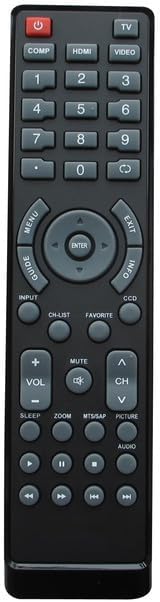
Figure 3: Layout of the remote control buttons.
4.1 Funkce tlačítekview
| Tlačítko | Funkce |
|---|---|
| MOC | Zapíná nebo vypíná televizi. |
| TV / VIDEO / HDMI / COMP | Selects input sources (e.g., TV tuner, external video devices, HDMI inputs, Component video). |
| 0-9 Číselná klávesnice | Přímé zadávání čísel kanálů. |
| VOL +/- | Zvýší nebo sníží úroveň hlasitosti. |
| CH +/- | Přepíná televizní kanál nahoru nebo dolů. |
| ZTLUMIT | Ztlumí nebo zruší ztlumení zvuku televizoru. |
| MENU | Přístup k hlavní nabídce televizoru. |
| Navigation (Up/Down/Left/Right) & ENTER | Prochází položkami nabídky a potvrzuje výběr. |
| EXIT | Ukončí aktuální nabídku nebo zobrazení na obrazovce. |
| INFO | Zobrazuje informace o aktuálním programu nebo vstupu. |
| GUIDE / CH-LIST | Accesses the electronic program guide or channel list. |
| OBLÍBENÝ | Accesses favorite channels or settings. |
| CCD | Aktivuje nebo deaktivuje skryté titulky. |
| SPÁT | Nastaví časovač vypnutí pro televizi. |
| ZOOM | Upraví úroveň přiblížení obrazovky. |
| MTS/SAP | Vybírá možnosti Vícekanálový televizní zvuk (MTS) nebo Sekundární zvukový program (SAP). |
| OBRÁZEK | Přístup k nastavení obrazu. |
| AUDIO | Přístup k nastavení zvuku. |
| Playback Controls (e.g., Play, Pause, Stop, Rewind, Fast Forward) | Controls playback for integrated DVD players or media functions (if supported by TV). |
Note: Not all buttons may be functional on every compatible television model, as functionality depends on the original remote's capabilities and the television's features.
5. Údržba
Abyste zajistili dlouhou životnost a správnou funkci dálkového ovladače, dodržujte tyto pokyny pro údržbu:
- Čištění: Dálkový ovladač pravidelně otírejte měkkým, suchým hadříkem. V případě odolných nečistot lehceampOmyjte hadřík vodou nebo jemným neabrazivním čisticím prostředkem. Nepoužívejte agresivní chemikálie nebo abrazivní materiály.
- Výměna baterie: Replace batteries when the remote's response becomes sluggish or it stops functioning. Always replace both batteries at the same time with new ones. Do not mix old and new batteries, or different types of batteries.
- Skladování: Dálkový ovladač skladujte na chladném a suchém místě mimo přímé sluneční světlo a extrémní teploty.
- Vyhněte se tekutinám: Nevystavujte dálkový ovladač vodě ani jiným kapalinám.
- Vypuštění: Zabraňte pádu dálkového ovladače, mohlo by dojít k poškození vnitřních součástí.
6. Řešení problémů
Pokud máte problémy s dálkovým ovladačem, postupujte podle následujících běžných kroků pro řešení problémů:
| Problém | Možná příčina / řešení |
|---|---|
| Dálkové ovládání vůbec nefunguje. |
|
| Some buttons are not working. |
|
| Dálkové ovládání funguje přerušovaně. |
|
| "Replacement may not work as Original" | This remote is a replacement and may not replicate every single function or the exact responsiveness of the original manufacturer's remote. Its primary function is to provide basic and common controls for the listed compatible models. |
7. Specifikace
| Funkce | Detail |
|---|---|
| Značka | Obecný |
| Kompatibilní zařízení | Television (Specific Dynex models listed in Compatibility section) |
| Technologie připojení | Infračervený (IR) |
| Typ ovladače | Ovládání tlačítkem |
| Zdroj napájení | 2 x AAA baterie (nejsou součástí balení) |
| Výrobce | SZHKHXD |
| Země původu | Čína |
| ASIN | B0C7VF4P31 |
| Datum první dostupnosti | 13. června 2023 |
8. Záruka a podpora
Specific warranty details for this Generic replacement remote control are not provided in the product information. For any questions regarding product functionality, compatibility, or potential defects, please contact the seller directly through the platform where the purchase was made.
Výrobce: SZHKHXD
Prodejce: SZHKHXD
Uschovejte si prosím účtenku jako doklad o koupi pro případné dotazy ohledně podpory.
Ask a question about this manual
Ask about setup, troubleshooting, compatibility, parts, safety, or missing instructions. Manuals+ will review the question and use this page’s manual context to help answer it.