
NT-4001, NT-2208, NT-2410B, NT-1502, NT-1506, NT-1508
Návod k obsluze náhradního dálkového ovladače
For NAXA NT-4001, NT-2208, NT-2410B, NT-1502, NT-1506, NT-1508 Smart LCD LED HDTV Televisions
Zavedení
This document provides instructions for the use and maintenance of your replacement infrared (IR) remote control. This remote is designed to be compatible with various NAXA Smart LCD LED HDTV Television models, including NT-4001, NT-2208, NT-2410B, NT-1502, NT-1506, and NT-1508. It functions as a direct replacement for your original remote, offering essential control over your television.
Obsah balení
- 1 x Náhradní dálkové ovládání
Please note: Batteries and a printed instruction manual are not included with this replacement remote control.
Nastavení
Instalace baterie
Dálkový ovladač vyžaduje k provozu dvě (2) baterie typu AAA. Pro instalaci baterií postupujte takto:
- Locate the battery compartment on the back of the remote control. The compartment cover is typically located at the bottom rear.
- Gently slide the battery compartment cover downwards or press the latch and lift to open it.
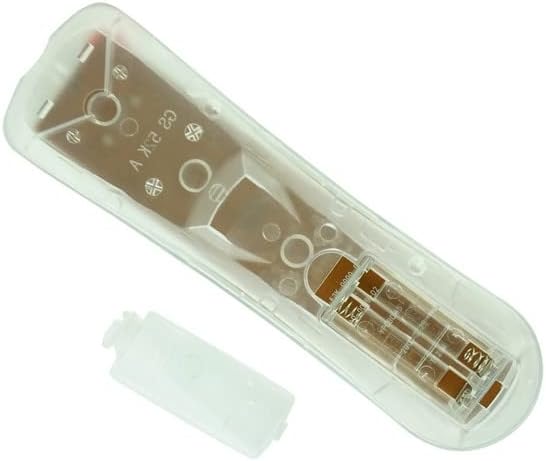
Obrázek: Zadní view of the remote control with the battery cover open, revealing the battery compartment.
- Insert two (2) AAA batteries into the compartment, ensuring that the positive (+) and negative (-) ends align correctly with the polarity indicators inside the compartment. Incorrect insertion can prevent the remote from functioning.

Obrázek: Úhlový view of the remote control with the battery cover detached, showing the open battery slots.
- Zasuňte kryt přihrádky na baterie zpět na místo, dokud bezpečně nezacvakne.
Once batteries are installed, the remote control is ready for use. No programming is typically required for this replacement remote.
Návod k obsluze
This remote control operates via infrared (IR) signals. Ensure there is a clear line of sight between the remote's IR emitter (located at the top front of the remote) and the IR receiver on your television.

Obrázek: Přední strana view dálkového ovladače a zobrazí se rozložení jeho tlačítek.
Základní funkce:
- Napájení (červené tlačítko): Zapíná nebo vypíná televizi.
- Ztlumit: Ztlumí nebo zruší ztlumení zvuku televizoru.
- Číselná tlačítka (0-9): Used for direct channel selection.
- Hlasitost (+/-): Increases or decreases the television volume.
- Channel (PROG +/-): Přepíná televizní kanál nahoru nebo dolů.
- Zdroj: Cycles through input sources (HDMI, AV, Component, etc.).
- Navigační tlačítka (nahoru, dolů, vlevo, vpravo, Enter): Používá se k navigaci v nabídkách a potvrzování výběrů.
- Menu: Otevře hlavní nabídku televizoru.
- Výstup: Opustí aktuální nabídku nebo funkci.
- EPG (elektronický programový průvodce): Accesses the program guide (if supported by TV).
- Info: Zobrazuje informace o aktuálním programu nebo vstupu.
- Lupa: Upraví úroveň přiblížení obrazovky.
- MTS (Vícekanálový televizní zvuk): Selects audio modes (Stereo, SAP, Mono).
- Spát: Nastaví časovač pro automatické vypnutí televizoru.
- Other buttons may provide specific functions depending on your NAXA TV model.
Údržba
- Čištění: K čištění dálkového ovladače používejte měkký, suchý hadřík. Nepoužívejte tekuté čisticí prostředky ani abrazivní materiály.
- Výměna baterie: Replace batteries when the remote's response becomes sluggish or it stops working. Always replace both batteries at the same time with new ones.
- Skladování: Dálkový ovladač skladujte na chladném a suchém místě mimo dosah přímého slunečního záření a extrémních teplot. Pokud jej delší dobu nepoužíváte, vyjměte baterie, abyste zabránili vytečení.
- Vyhněte se kapkám: Chraňte dálkový ovladač před fyzickými nárazy, protože pády mohou poškodit vnitřní součásti.
Odstraňování problémů
- Dálkové ovládání nefunguje:
- Ensure new AAA batteries are correctly installed with the correct polarity (+/-).
- Zkontrolujte, zda nejsou baterie vybité a v případě potřeby je vyměňte.
- Verify there is a clear line of sight between the remote and the TV's IR receiver. Obstructions can block the signal.
- Ujistěte se, že dálkový ovladač míří přímo na televizor.
- Some buttons or functions do not work:
- This is a replacement remote. While designed for compatibility, some advanced or specific functions of your original TV remote may not be supported.
- Refer to your television's original user manual for specific functions if this remote does not provide them.
- TV responds intermittently:
- Baterie mohou být vybité. Vyměňte je.
- Ensure no strong light sources (like direct sunlight) are interfering with the TV's IR receiver.
Specifikace
| Funkce | Detail |
|---|---|
| Typ produktu | Náhradní dálkový ovladač |
| Značka | Generic (Compatible with NAXA) |
| Kompatibilní zařízení | NAXA NT-4001, NT-2208, NT-2410B, NT-1502, NT-1506, NT-1508 Smart LCD LED HDTV Televisions |
| Technologie připojení | Infračervený (IR) |
| Typ ovladače | Ovládání tlačítkem |
| Jsou vyžadovány baterie | 2 x AAA baterie (nejsou součástí balení) |
| Výrobce | SZHKHXD |
| Země původu | Čína |
Důležité poznámky
- This remote is a replacement unit and may not offer all the exact functions or features of your original equipment manufacturer (OEM) remote.
- No programming is required; simply insert new batteries to begin use.
- Ensure your television model is listed as compatible before purchase.
Záruka a podpora
As this is a generic replacement product, specific warranty details may vary. For any issues or support inquiries regarding this remote control, please contact the seller directly through the platform where it was purchased. They can provide assistance with product functionality or returns if necessary.
Ask a question about this manual
Ask about setup, troubleshooting, compatibility, parts, safety, or missing instructions. Manuals+ will review the question and use this page’s manual context to help answer it.