
1. Úvod
Welcome to your WOOXGEHM 4-in-1 Wired Arcade Fight Stick Joystick. This manual provides essential information for setting up, operating, and maintaining your new arcade controller. Designed for compatibility with Nintendo Switch, PC, PlayStation 3, and Android devices, this joystick enhances your gaming experience with precise control and turbo functions.
2. Bezpečnostní informace
Bezpečnostní pokyny
- Udržujte zařízení mimo dosah vody a vlhkosti.
- Nevystavujte zařízení extrémním teplotám.
- Nepokoušejte se zařízení sami rozebírat nebo opravovat.
- Používejte pouze dodané kabely a příslušenství.
- Uchovávejte mimo dosah malých dětí.
3. Obsah balení
Co je zahrnuto
- 1 x Universal Arcade Fight Stick
- 1 x Remote Lever Handle (Joystick)
- 1 x Fixed Small Parts (e.g., suction cups)
- 1 x Návod k použití
4. Konec produktuview
The WOOXGEHM Arcade Fight Stick is designed for comfort and precision, featuring a spherical metal joystick and six round control buttons. It also includes additional buttons for various functions and platform compatibility.

Obrázek 1: WOOXGEHM 4-in-1 Wired Arcade Fight Stick Joystick, top view. A black arcade fight stick with a red spherical joystick on the left and six red circular action buttons on the right. Smaller function buttons are located above the main action buttons. The surface features a racing car graphic.
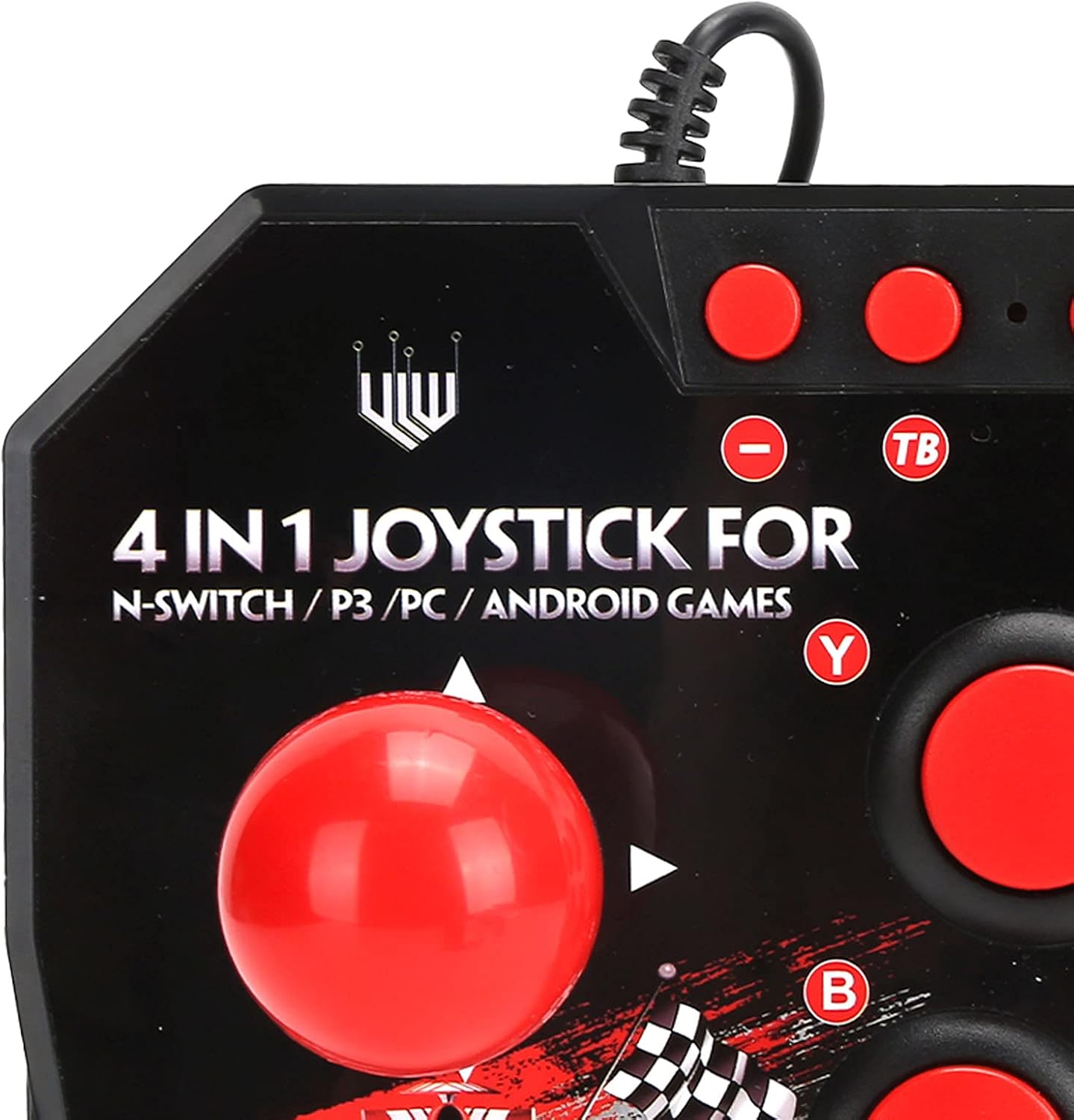
Obrázek 2: Close-up of WOOXGEHM 4-in-1 Wired Arcade Fight Stick Joystick buttons. A detailed view of the joystick's top panel, showing the "4 IN 1 JOYSTICK FOR N-SWITCH / P3 / PC / ANDROID GAMES" text, along with the red spherical joystick and several red action buttons labeled Y, B, X, A, L, R, and smaller buttons for Turbo functions.

Obrázek 3: Dno view of WOOXGEHM 4-in-1 Wired Arcade Fight Stick Joystick with suction cups. The underside of the arcade fight stick, showing four clear suction cups designed to secure the device to a flat surface during use. The label indicates "Input: DC5V / 500mA", "Working current: 20mA", and "MADE IN CHINA".
5. Nastavení a připojení
The arcade fight stick connects via a wired USB cable. Ensure your console or device is powered on before connecting.
5.1 Připojení k konzoli Nintendo Switch
- Connect the USB cable from the arcade fight stick to an available USB port on your Nintendo Switch dock.
- Ensure "Pro Controller Wired Communication" is enabled in your Switch System Settings.
- The controller should be automatically recognized.
5.2 Připojení k PC
- Connect the USB cable from the arcade fight stick to an available USB port on your PC.
- The system should automatically install the necessary drivers. If not, manual driver installation may be required (refer to your PC's operating system documentation).
- The controller will be recognized as a standard USB gamepad.
5.3 Připojení k PlayStationu 3 (PS3)
- Connect the USB cable from the arcade fight stick to an available USB port on your PS3 console.
- Ovladač by měl být automaticky rozpoznán a připraven k použití.
5.4 Připojení zařízení Android
- Connect the USB cable from the arcade fight stick to your Android device using an OTG (On-The-Go) adapter (not included).
- Ujistěte se, že vaše zařízení se systémem Android podporuje funkci OTG.
- The controller should be recognized as an external gamepad.

Obrázek 4: Multi-platform compatibility. This image illustrates the multi-platform compatibility of the arcade fight stick, showing it connected to a Nintendo Switch console, a PlayStation 3, a PC monitor, and an Android device, highlighting its versatility.

Obrázek 5: Plug-and-Play functionality. This image highlights the plug-and-play nature of the arcade fight stick, showing it connected to a PlayStation console, a Nintendo Switch, and a monitor displaying game content, emphasizing ease of use across platforms.
6. Návod k obsluze
6.1 Základní ovládací prvky
- joystick: Use the spherical metal joystick for directional movement.
- Akční tlačítka: The six large round buttons (A, B, X, Y, L, R) are for primary game actions.
- Funkční tlačítka: Smaller buttons above the main action buttons provide additional controls (e.g., Home, Select, Start).
6.2 Turbo Functions
The controller features turbo functions for rapid button presses.
- To activate Turbo for a button, press and hold the desired action button, then press the "TB" (Turbo) button. The button will now rapidly repeat its input when held down.
- To deactivate Turbo, press and hold the same action button, then press the "TB" button again.
6.3 Přepínání režimů
The joystick may have a mode switch to toggle between different input modes (e.g., D-Pad, Left Analog Stick, Right Analog Stick) for specific games or platforms. Refer to the small buttons near the top left of the controller for these options.
7. Údržba a péče
Péče o produkt
- Čištění: Wipe the surface of the joystick with a soft, dry cloth. Do not use abrasive cleaners or solvents.
- Skladování: Pokud zařízení nepoužíváte, skladujte jej na chladném a suchém místě mimo dosah přímého slunečního záření.
- Správa kabelů: Abyste předešli poškození, vyhněte se ostrým ohybům nebo nadměrnému tahání za kabel USB.
8. Řešení problémů
Běžné problémy a řešení
- Controller not recognized:
Řešení: Ensure the USB cable is securely connected to both the joystick and the device/console.
Řešení: U konzole Nintendo Switch ověřte, zda je v nastavení systému povolena možnost „Drátová komunikace s ovladačem Pro Controller“.
Řešení: Zkuste se připojit k jinému portu USB.
Řešení: Restart your console/PC/Android device. - Buttons or joystick unresponsive:
Řešení: Disconnect and reconnect the joystick.
Řešení: Test the joystick on another compatible device to determine if the issue is with the controller or the device. - Turbo function not working:
Řešení: Ensure you are correctly activating/deactivating the turbo mode as described in the Operating Instructions.
9. Specifikace
Technické specifikace
| Funkce | Detail |
|---|---|
| Model | B0C7GYXMLZ |
| Značka | WOOXGEHM |
| Typ ovladače | Ovládání tlačítky, joystick |
| Hardwarové rozhraní | USB |
| Materiál | Akrylonitrilbutadienstyren (ABS) |
| Hmotnost položky | 0.52 kilogramů (1.14 liber) |
| Velikost (přibližně) | 21 x 15 x 6 cm (8.3 x 5.9 x 2.4 palce) |
| Pracovní svtage/Aktuální | DC 5V/20mA |
| Délka USB kabelu | 3 m / 9.8 stop |
| Kompatibilita | Nintendo Switch, PC, PS3, Android Games |

Obrázek 6: Technické specifikaceview. An image displaying the technical specifications of the arcade fight stick, including item type, material (ABS), size (21 x 15 x 6 cm), working voltage/current (DC5V/20mA), and USB cable length (3m/9.8ft), along with a list of package contents.
10. Záruka a podpora
Informace o záruce
This WOOXGEHM product comes with a standard manufacturer's warranty. For specific warranty terms and conditions, please refer to the warranty card included in your package or contact WOOXGEHM customer support.
Zákaznická podpora
If you encounter any issues or have questions regarding your Arcade Fight Stick, please visit the official WOOXGEHM webnebo se obraťte na jejich zákaznický servis a požádejte o pomoc.