
1. Úvod
This manual provides detailed instructions for the installation, operation, and maintenance of your Alpine PXE-C80-88 8-Channel Hi-Res Amplifier with Automatic Digital Signal Processing. Please read this manual thoroughly before using the product to ensure proper functionality and to prevent damage.
Klíčové vlastnosti:
- 8-kanálový amplifier with High-Resolution Class D technology.
- Digital signal processing with a 96 kHz, 24-bit resolution.
- Automatic tuning via iPhone or PC, with built-in mic or external measurement microphone.
- Versatile input options, including coaxial, USB, high-level speaker, and RCA.
- Compact dimensions of 8.82"W x 2.14"H x 10.43"D for easy installation.

2. Nastavení a instalace
Správná instalace je klíčová pro optimální výkon. Doporučuje se, aby instalaci provedl kvalifikovaný odborník.
2.1 Vybalení
Carefully unpack all components and verify that all items listed in the "What's in the Box" section are present. Retain all packaging materials for future use or shipping.
- PXE-C80-88 AmpLifikační jednotka
- Kabelové svazky
- Montážní hardware
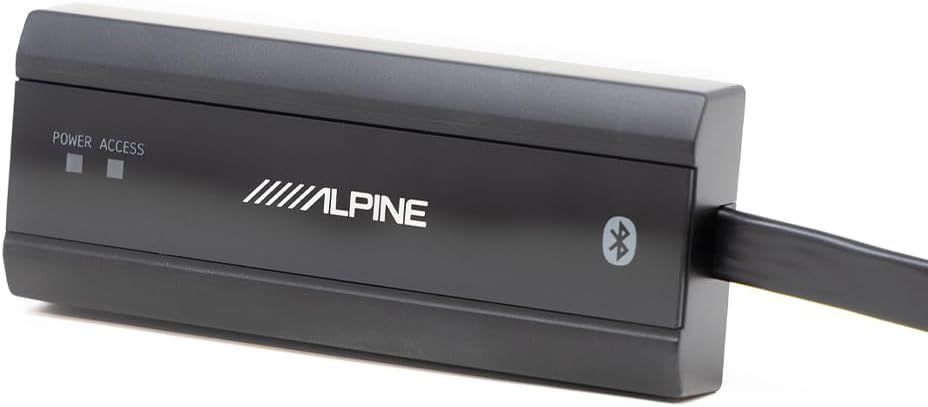
- External Bluetooth Module (if included)
- Remote Controller (if included)

2.2 Místo montáže
Choose a mounting location that is dry, well-ventilated, and away from direct sunlight or excessive heat. Ensure sufficient space for wiring connections and proper air circulation around the unit.
2.3 Zapojení kabeláže
Refer to the diagrams below for proper wiring connections. Ensure all connections are secure to prevent intermittent operation or damage.
Napájení:
- BATT (Baterie): Connect to the positive (+) terminal of the vehicle's battery. Use appropriate gauge wire and an inline fuse (40A recommended).
- GND (zem): Připojte k čistému, nenatřenému kovovému povrchu podvozku vozidla.
- Příslušenství (ACC): Připojte ke spínanému zdroji 12V, který se zapne spolu se zapalováním vozidla.
Vstupní připojení:
The PXE-C80-88 supports multiple input types:
- RCA Inputs (1-6): For low-level audio signals from a head unit or other source.
- High-Level Speaker Inputs (H1+ to H8-): For connecting directly to speaker outputs from a factory or aftermarket head unit.
- Koaxiální vstup: Pro digitální audio vstup.
- Vstup USB: For connecting to a PC for tuning and firmware updates.
- Vstup MIC: For connecting the measurement microphone for automatic tuning.


Výstupní připojení:
The amplifier provides 8 output channels for speakers and subwoofers.
- VÝSTUP 1-6: Speaker outputs for main channels.
- OUTPUT 7 (SUB W.1) & OUTPUT 8 (SUB W.2): Dedicated subwoofer outputs.


2.4 External Modules
Connect the external Bluetooth module and remote controller as per the provided instructions for enhanced control and connectivity.

3. Provoz
The Alpine PXE-C80-88 features advanced digital signal processing and automatic tuning capabilities to optimize your audio experience.
3.1 Počáteční zapnutí
After all connections are made, turn on your vehicle's ignition. The amplifier should power on, indicated by the power LED. If the LED does not illuminate, refer to the Troubleshooting section.
3.2 Automatic Tuning (via iPhone or PC)
The PXE-C80-88 offers automatic sound tuning using a dedicated application on your iPhone or PC. This process uses a measurement microphone (either built-in to the iPhone or an external microphone for PC) to analyze the acoustic environment of your vehicle and optimize the amplifier's settings.
- Download the Alpine tuning application for your device (iOS or PC).
- Připojte své zařízení k amplifier (via USB for PC, or Bluetooth for iPhone if the external module is used).
- Follow the on-screen instructions within the application to perform the automatic tuning process. This typically involves placing the microphone in the listening position and playing test tones.
- The application will measure and adjust parameters such as equalization, time alignment, and crossover settings for optimal sound.

3.3 Ruční nastavení
After automatic tuning, you can make manual adjustments using the PC application or the optional remote controller (RUX-ESP1) to fine-tune the sound to your personal preferences. This includes adjusting individual channel levels, equalization, and crossover points.
4. Údržba
Pravidelná údržba zajistí dlouhou životnost a optimální výkon vašeho ampživější.
- Čištění: K čištění vnějších částí používejte měkký, suchý hadřík amplifier. Do not use harsh chemicals or abrasive cleaners.
- Větrání: Ujistěte se, že amplifier's ventilation openings are not blocked. Proper airflow is essential to prevent overheating.
- Spojení: Pravidelně kontrolujte všechna kabelová připojení, abyste se ujistili, že jsou bezpečná a bez koroze.
- Výměna pojistky: Pokud amplifier does not power on, check the inline fuse. Replace it with a fuse of the same type and rating (40A).
5. Řešení problémů
If you encounter issues with your Alpine PXE-C80-88, refer to the following common problems and solutions:
5.1 Bez napájení
- Zkontrolujte připojení napájení: Ensure the BATT, GND, and ACC wires are securely connected and receiving proper voltage.
- Zkontrolujte pojistku: Verify the 40A fuse is intact. Replace if blown.
- Baterie vozidla: Ujistěte se, že je baterie vozidla dostatečně nabitá.
5.2 Žádný zvukový výstup
- Vstupní zdroj: Confirm the audio source (head unit, etc.) is functioning and sending a signal to the ampživější.
- Připojení reproduktorů: Check all speaker wiring for proper polarity and secure connections.
- AmpNastavení čističky: Ověřte, že amplifier's volume levels are not set to minimum and that input/output routing is correctly configured in the tuning application.
- Funkce ztlumení: Zajistěte amplifier is not in mute mode.
5.3 Zkreslený zvuk
- Vstupní úroveň: Adjust the input gain settings to prevent clipping.
- Impedance reproduktoru: Ujistěte se, že jsou reproduktory kompatibilní s ampvýstupní impedance zhášeče.
- Zemní smyčka: Check for proper grounding to eliminate hum or noise.
- Tuning Settings: Re-run the automatic tuning process or adjust EQ settings manually.
5.4 Remote Controller Display Not Working
- Spojení: Ensure the remote controller cable is securely connected to the ampživější.
- Moc: Ověřte amplifier je zapnutý.
- Software/Firmware: Zajistěte amplifier and remote controller have the latest compatible firmware.
5.5 Software/App Issues
- Kompatibilita: Ensure your device (iPhone/PC) meets the minimum system requirements for the Alpine tuning application.
- Aktualizace: Check for updates to the tuning application and ampfirmware čističky.
- Přeinstalace: Zkuste aplikaci znovu nainstalovat.
- Konektivita: Verify USB or Bluetooth connection is stable.
6. Specifikace
| Funkce | Specifikace |
|---|---|
| Číslo modelu | PXE-C80-88 |
| Značka | Vysokohorský |
| Počet kanálů | 8 |
| Výstupní výkon | 300 Watts (Total, specific per channel not provided) |
| Digitální zpracování signálu | 96 kHz, 24-bit resolution |
| svtage | 12 V (DC) |
| Maximální objem dodávkytage | 30 V (DC) |
| Typ montáže | Povrchová montáž |
| Rozměry produktu (D x Š x V) | 12 x 11.5 x 5 palce |
| Hmotnost položky | 7.8 libry |
| Specifikace splněna | FCC, Hi-Res Audio Certified |
| UPC | 793276085207 |
7. Záruka a podpora
Informace o záruce a technickou podporu získáte od oficiálního prodejce Alpine. webnebo se obraťte přímo na zákaznický servis Alpine. Uschovejte si účtenku jako doklad o koupi pro případ reklamace.
Výrobce: Vysokohorský
Webmísto: www.alpine-usa.com (Napřampodkaz, skutečný odkaz se může lišit)