
1. Úvod
Thank you for choosing the EKSA Wireless Headset H5. This headset is designed to provide clear communication and comfortable wear for various professional environments, including office work, call centers, and trucking. It features AI noise-cancelling technology, dual connectivity options (Bluetooth and USB dongle), and extended battery life. This manual provides detailed instructions for setup, operation, maintenance, and troubleshooting to ensure optimal performance.
2. Obsah balení
Prosím, ověřte, zda jsou v balení přítomny všechny položky:
- EKSA Wireless Headset H5
- USB dongle
- Nabíjecí základna
- Nabíjecí kabel USB-C
- Uživatelská příručka
3. Konec produktuview
Familiarize yourself with the components of your EKSA Wireless Headset H5.
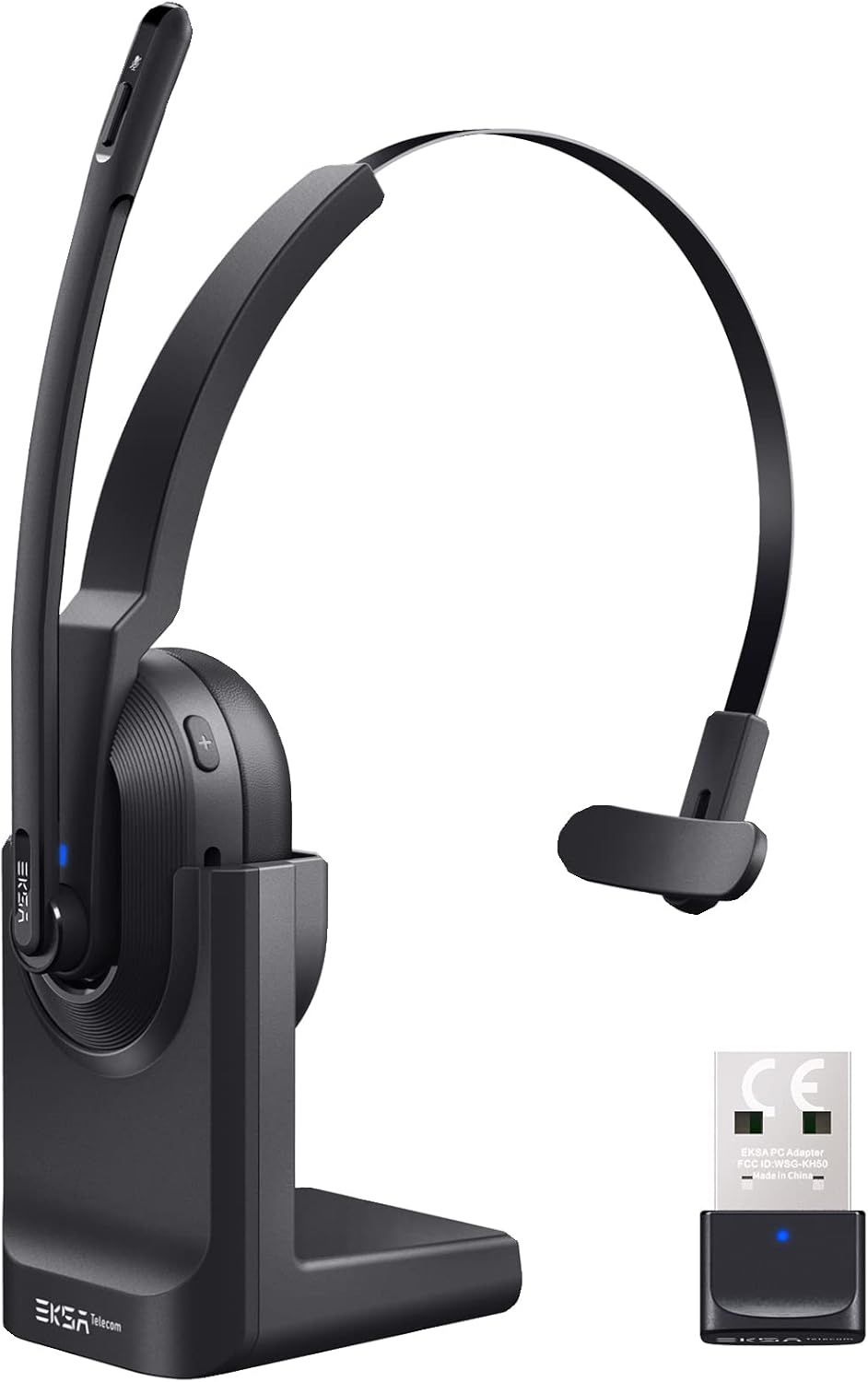

4. Nastavení
4.1 Nabíjení headsetu
The headset supports two charging methods:
- Přímé nabíjení: Connect the USB-C charging cable directly to the headset's Type-C port and a power source.
- Nabíjecí základna: Place the headset onto the included charging base. Ensure the charging contacts align. Connect the charging base to a power source using the USB-C cable.

A full charge takes approximately 1.5 hours. The headset provides up to 25 hours of talk time and 45 hours of music playback at 70% volume.

4.2 Připojení pomocí USB adaptéru
For PC and laptop connections, the USB dongle provides a stable wireless link.
- Insert the USB dongle into an available USB port on your PC or laptop.
- The LED indicator on the dongle will turn solid blue when successfully paired with the headset.
- On your PC/laptop, navigate to Nastavení > Zvuk.
- Soubor EKSA Telecom H5 as both the input and output device.

4.3 Připojení přes Bluetooth 5.0
The headset can connect to mobile phones, tablets, and other Bluetooth-enabled devices.
- Ensure the headset is powered on and in pairing mode (the Bluetooth indicator will flash).
- Na svém mobilním zařízení přejděte na Settings > Bluetooth & other devices.
- Vybrat „Přidat Bluetooth nebo jiné zařízení“ a hledat "EKSA Telecom H5".
- Vybrat EKSA Telecom H5 spárovat.
- Once connected, set EKSA Telecom H5 as the input and output device in your device's sound settings.


4.4 Meeting Application Settings
For applications like Zoom or Skype:
- In the application's audio/video settings, select EKSA Telecom H5 as both the microphone and speaker.

5. Návod k obsluze
5.1 Základní ovládací prvky
- Zapnutí/vypnutí: Stiskněte a podržte multifunkční tlačítko.
- Zvýšení hlasitosti/další skladba: Press the '+' button. Hold for next track.
- Snížit hlasitost/předchozí stopa: Press the '-' button. Hold for previous track.
- Přijmout/ukončit hovor: Press the Multi-Function Button during an incoming call or active call.
- Odmítnout hovor: Press and hold the Multi-Function Button during an incoming call.
- Ztlumit/zapnout mikrofon: Press the Mute Button located on the microphone arm.
5.2 Nošení headsetu
The headset is designed for comfort and flexibility:
- The microphone arm can be rotated up to 270 degrees, allowing you to wear the headset on either your left or right ear.
- Upravte si čelenku pro bezpečné a pohodlné nošení.

5.3 AI Noise Cancelling Microphone
The headset features an AI-powered Environmental Noise Cancelling (ENC) microphone with a Qualcomm chip. This technology intelligently suppresses up to 99.6% of environmental noise, ensuring your voice is clear during calls, even in noisy environments.


6. Údržba
Pro zajištění dlouhé životnosti a optimálního výkonu vaší náhlavní soupravy:
- Pravidelně čistěte sluchátka s mikrofonem měkkým, suchým hadříkem.
- Nevystavujte sluchátka extrémním teplotám, vlhkosti nebo přímému slunečnímu záření.
- Nepoužívejte abrazivní čisticí prostředky nebo rozpouštědla.
- Store the headset in a cool, dry place when not in use, preferably on its charging base or in a protective case.
7. Řešení problémů
| Problém | Možná příčina | Řešení |
|---|---|---|
| Náhlavní souprava se nezapne | Slabá baterie | Charge the headset using the USB-C cable or charging base. |
| No sound/microphone not working | Not connected or incorrect audio settings | Ensure the headset is paired via Bluetooth or dongle. Check your device's sound settings to confirm "EKSA Telecom H5" is selected as input/output. |
| Poor sound quality/intermittent connection | Out of range, interference, or low battery | Move closer to the connected device (within 10 meters). Avoid strong electromagnetic interference. Charge the headset. |
| Nelze spárovat přes Bluetooth | Headset not in pairing mode or device already connected | Ensure the headset is in pairing mode (flashing indicator). Disconnect from any other devices. Restart Bluetooth on your device. |
| AI Noise Cancelling not effective | Pozice mikrofonu | Ensure the microphone is positioned correctly near your mouth for optimal voice pickup and noise suppression. |
8. Specifikace
| Funkce | Detail |
|---|---|
| Název modelu | H5 |
| Technologie připojení | Wireless (Bluetooth 5.0, USB Dongle) |
| Bezdrátové Dosah | Až 10 metrů |
| Výdrž baterie (hudba) | Až 45 hodin (při 70% hlasitosti) |
| Životnost baterie (Talk) | Až 25 hodin (při 70% hlasitosti) |
| Doba nabíjení | Přibl. 1.5 hodin |
| Kontrola hluku | Active Noise Cancellation (AI Environmental Noise Cancelling) |
| Mikrofon | 270° Rotatable, AI ENC |
| Hmotnost | Approx. 75g (headset only) / 0.54 kg (packaged) |
| Materiál | Kov, Plast |
| Zahrnuté komponenty | Charging Base, USB Dongle |
| Frekvenční rozsah | 20 Hz - 20,000 XNUMX Hz |
9. Záruka a podpora
EKSA products come with a standard manufacturer's warranty. For specific warranty details, please refer to the warranty card included in your package or visit the official EKSA website. For technical support, troubleshooting assistance, or any inquiries, please contact EKSA customer service through their official channels. You can find contact information on the EKSA webwebu nebo prostřednictvím vaší nákupní platformy.