
1. Úvod
This manual provides comprehensive instructions for the Walimex pro Mover 200 Accessory Kit, a 13-piece light shaper set designed to enhance flash photography with the Walimex pro Mover 200 TTL flash unit. It details the components, setup, and usage of each accessory to achieve various lighting effects. Please read this manual carefully before using the product to ensure proper operation and longevity.
2. Konec produktuview
The Walimex pro Mover 200 Accessory Kit includes a variety of light shaping tools and accessories for the Walimex pro Mover 200 TTL flash. The kit is designed for intuitive magnetic mounting and offers extensive possibilities to modify light characteristics.

Figure 2.1: The complete Walimex pro Mover 200 Accessory Kit, showcasing the range of light modifiers, filters, and the protective transport bag.
The 13-piece kit includes:
- 1x Barndoor Attachment
- 1x Bounce Panel Attachment
- 1x Snoot Attachment
- 1x Diffuser Plate Attachment
- 1x Diffuser Dome Attachment
- 1x Honeycomb Attachment
- 1x Filter Holder
- 6x Filters (4x Color Correction, 2x Transparent)
- 1x přepravní taška

Figure 2.2: A visual breakdown of the kit's contents, detailing each component and its quantity.
3. Nastavení
All attachments are designed for easy and intuitive magnetic mounting directly onto the Walimex pro Mover 200 TTL flash unit. No tools are required for assembly.
3.1 Připevnění příslušenství
- Ensure your Walimex pro Mover 200 TTL flash unit is powered off before attaching or detaching accessories.
- Select the desired accessory from the kit.
- Align the accessory with the magnetic mounting points on the front of the flash head.
- Allow the magnets to secure the accessory firmly in place. Gently tug on the accessory to confirm it is securely attached before use.
3.2 Detaching Accessories
- Grasp the accessory firmly.
- Gently pull the accessory away from the flash head to disengage the magnetic connection.

Figure 3.1: Illustration of the simple and intuitive magnetic attachment method for accessories directly onto the flash unit.
4. Návod k obsluze
Each accessory in the kit serves a specific purpose to modify the light output of your flash. Experiment with different combinations and distances to achieve desired photographic effects.
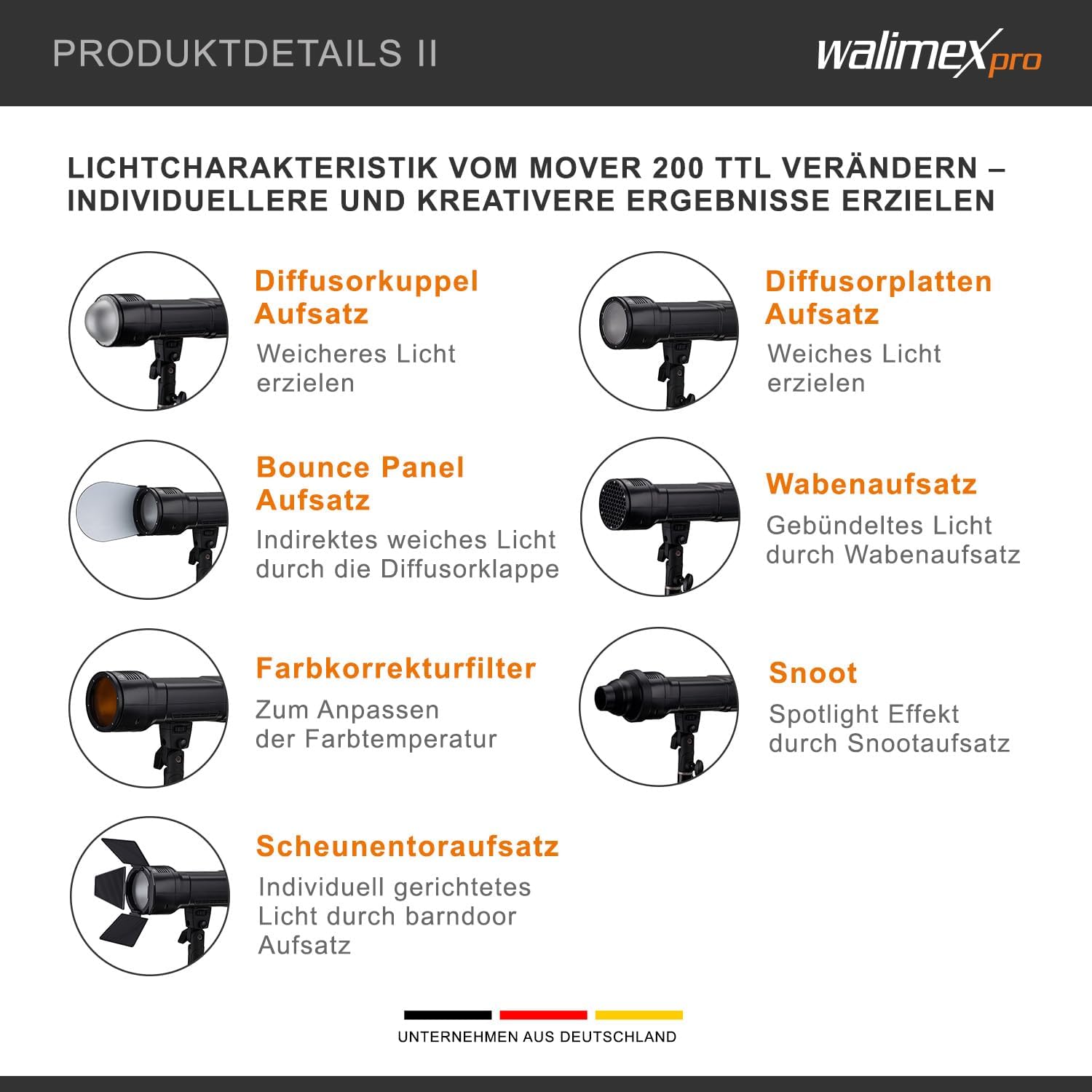
Figure 4.1: Visual guide to the light shaping effects of various Walimex pro Mover 200 accessories.
4.1 Diffuser Plate and Diffuser Dome
These attachments are used to create soft, even light, reducing harsh shadows and providing a more flattering illumination. The diffuser dome offers a broader spread of soft light, while the diffuser plate provides a more controlled soft light, ideal for portraits and product photography.
4.2 Bounce Panel (Diffuser Flap)
The bounce panel allows for indirect soft light by redirecting the flash output. This is useful for softening light and filling shadows without direct flash, creating a more natural look, especially when bouncing off ceilings or walls.
4.3 Snoot Attachment
The snoot attachment narrows the light beam, creating a concentrated spotlight effect. This is ideal for highlighting specific areas or subjects, such as hair lights or accentuating details, by precisely controlling light spill.
4.4 Honeycomb Attachment
The honeycomb attachment bundles the light, providing a more directional and controlled light output with a gradual fall-off. It helps to prevent light spill and create a more dramatic, focused light, often used for background separation or specific subject illumination.
4.5 Barndoor Attachment
The barndoor attachment features adjustable flaps that allow for precise control over the light beam. This enables individually directed light, shaping the light to illuminate only desired areas and block light from others, useful for creative lighting and preventing lens flare.
4.6 Color Correction Filters
These filters are used to adjust the color temperature of the flash light to match ambient light conditions, such as artificial light (tungsten) or daylight. This helps in achieving accurate color balance in photographs, preventing unwanted color casts.
4.7 Transparent Filters
These filters can be used for various creative effects or to protect the flash head from dust and minor impacts while still allowing full light transmission.
5. Údržba
Proper maintenance ensures the longevity and optimal performance of your Walimex pro Mover 200 Accessory Kit.
5.1 Čištění
- Keep all components clean and free from dust and debris.
- Use a soft, dry, lint-free cloth for general cleaning.
- Pro odolné skvrny je potřeba mírněamp cloth can be used, followed by immediate drying with a dry cloth.
- Avoid using abrasive cleaners, solvents, or harsh chemicals, as these can damage the surfaces and coatings of the accessories.
5.2 Skladování
- Always store the kit in the provided transport bag when not in use. This protects the accessories from dust, scratches, and impacts.
- Sadu skladujte na chladném a suchém místě, mimo dosah přímého slunečního záření a extrémních teplot.
6. Řešení problémů
If you encounter any issues with your Walimex pro Mover 200 Accessory Kit, please refer to the following common troubleshooting tips:
- Příslušenství není bezpečně připevněno: Check for any obstructions or debris on the magnetic mounting points of both the accessory and the flash unit. Ensure the surfaces are clean and free from foreign particles.
- Desired Lighting Effect Not Achieved: Review the operating instructions for the specific accessory. Experiment with different distances between the flash and the subject, as well as various angles. Adjust flash power settings as needed.
- Color Cast Issues: Ensure you are using the correct color correction filter for the ambient light conditions. White balance settings on your camera should also be adjusted accordingly.
For issues not covered in this section, please refer to the Walimex Pro support webwebu nebo kontaktujte zákaznický servis pro další pomoc.
7. Specifikace
- Značka: Walimex Pro
- Název modelu: Mover 200 Accessory Kit
- Číslo modelu položky: 23394
- ASIN: B0C6Y1KYKB
- Rozměry balení: 18.9 x 11.2 x 6.7 cm
- Hmotnost balení: Přibližně 310 g
- Zahrnuté komponenty: 13-piece accessory kit (Barndoor, Bounce Panel, Snoot, Diffuser Plate, Diffuser Dome, Honeycomb, Filter Holder, 6x Filters, Transport Bag)
8. Záruka a podpora
For detailed warranty information, terms, and conditions, please refer to the official Walimex Pro website or the documentation provided with your purchase. Keep your purchase receipt as proof of purchase for any warranty claims.
For technical support, product inquiries, or assistance with any issues, please visit the Walimex Pro support portal or contact their customer service department through the contact information provided on their official webmísto.