
USHINING T3105
Uživatelská příručka k rozkládacímu telefonu USHINING 4G pro seniory
Model: T3105
Zavedení
Thank you for choosing the USHINING 4G Senior Flip Phone. This device is specifically designed for ease of use, featuring large buttons, clear sound, and a simple operating system, making it ideal for seniors. This manual provides comprehensive instructions to help you set up, operate, and maintain your new phone.
Obsah balení
Zaškrtněte prosím políčko u následujících položek:
- USHINING 4G Senior Cell Phone
- Nabíjecí dok
- Long Lasting Battery (1000mAh)
- Uživatelská příručka
- Charging Cord (Power Adapter)
- Speedtalk SIM Card (Included with some packages)
- Pouzdro na telefon
- Vysunutí zásobníku SIM
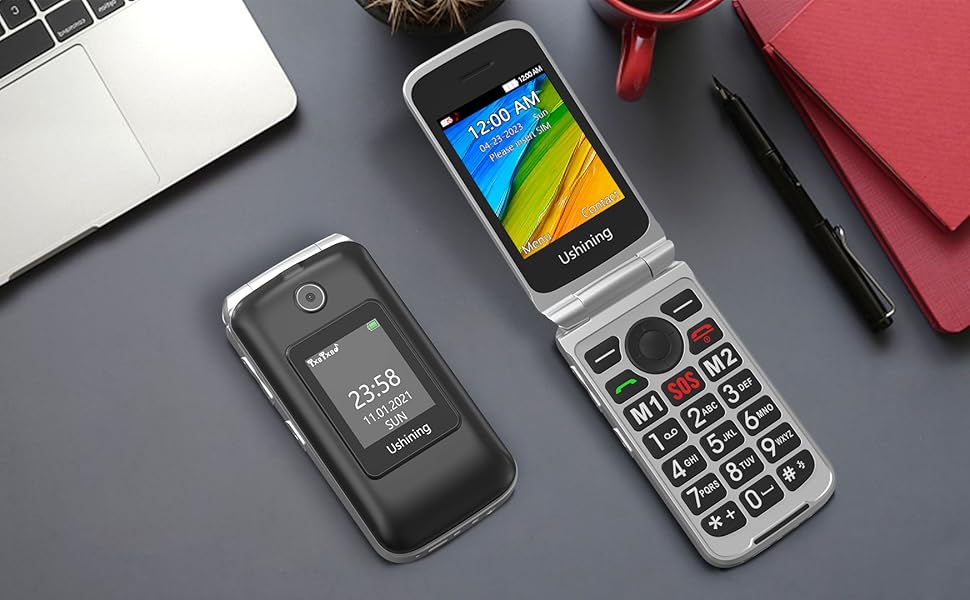
Image: All items included in the USHINING 4G Senior Flip Phone package.
Konec produktuview
The USHINING 4G Senior Flip Phone features a user-friendly design with essential functions for clear communication.

Obrázek: Přední strana view of the USHINING 4G Senior Flip Phone, both open and in its charging dock.
Klíčové vlastnosti:
- Velká tlačítka: Easy to press and navigate.
- Čistý zvuk: High-definition loudspeakers for clear calls.
- Dvě obrazovky: 2.8-inch inner screen and 1.77-inch external screen.
- SOS tlačítko: For emergency calls.
- Rychlé vytáčení: Quick access to important contacts.
- Svítilna: Built-in 30M powerful flashlight.
- FM rádio: External FM radio.
- Nabíjecí dok: Convenient and easy charging.
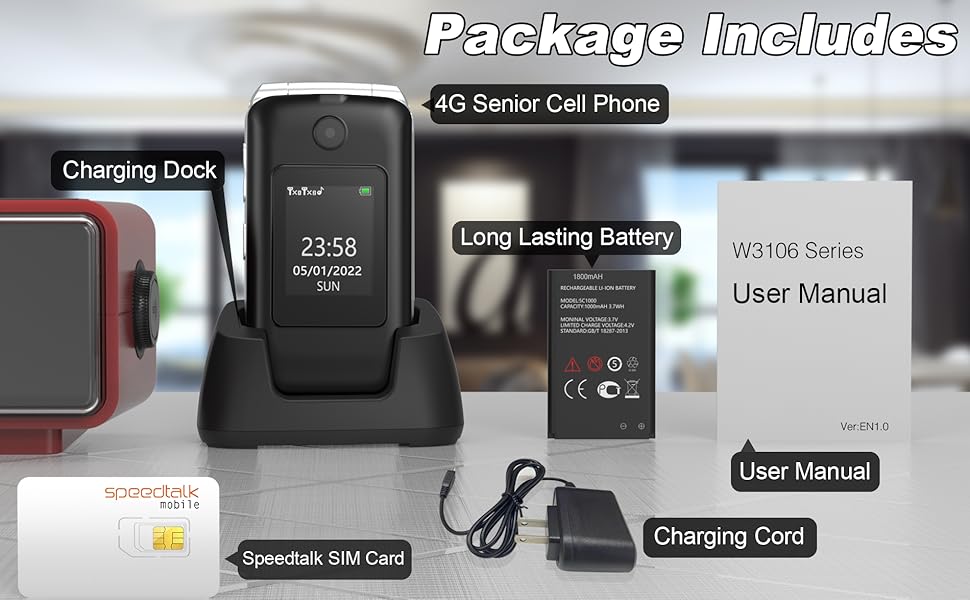
Image: Visual representation of the phone's main features.
Průvodce nastavením
1. Vložení SIM karty a baterie
- Sejměte zadní kryt: Jemně vypáčte zadní kryt telefonu.
- Vložte SIM kartu(y): Locate the SIM card slots. This phone supports dual SIM cards. Insert your 4G compatible SIM card(s) into the designated slots with the gold contacts facing down. Ensure the SIM card is correctly oriented as indicated by the diagram near the slot.
- Vložte baterii: Vložte baterii do přihrádky na baterii a zarovnejte zlaté kontakty na baterii s kontakty v telefonu.
- Vyměňte zadní kryt: Securely snap the back cover into place.

Obrázek: Interní view of the phone showing SIM card and battery placement. IMEI numbers: 359031100341173, 359031100351057.
2. Nabíjení telefonu
Before first use, fully charge the phone battery. The phone can be charged using the included charging dock or directly via the charging cable.
- Používání nabíjecího doku: Connect the charging cord to the charging dock and plug the adapter into a power outlet. Place the phone into the charging dock, ensuring it sits securely. The phone will indicate charging.
- Přímé nabíjení: Connect the charging cord directly to the phone's charging port and plug the adapter into a power outlet.
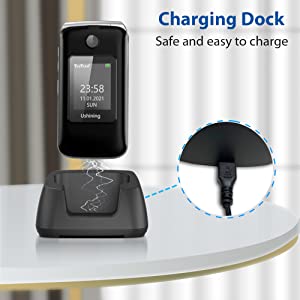
Image: Illustration of the phone being charged using the convenient charging dock.
Návod k obsluze
Zapnutí/vypnutí
- Zapnutí: Stiskněte a podržte tlačítko Napájení/Ukončení hovoru (červené tlačítko), dokud se obrazovka nerozsvítí.
- Vypnout: Stiskněte a podržte tlačítko Napájení/Ukončení hovoru, dokud se nezobrazí možnosti vypnutí, poté vyberte „Vypnout“.
Uskutečňování a přijímání hovorů
- Uskutečnění hovoru: Dial the number using the keypad and press the Call button (green button).
- Příjem hovoru: Když telefon zvoní, stiskněte tlačítko Volat (zelené tlačítko) pro přijetí hovoru. Chcete-li hovor ukončit, stiskněte tlačítko Napájení/Ukončit hovor (červené tlačítko).
Nouzové tlačítko SOS
The SOS button on the rear cover is designed for emergencies. You can preset up to 5 emergency contacts.
- Nastavení SOS kontaktů: Navigate to the SOS settings in the phone's menu to add or edit emergency numbers.
- Aktivace SOS: In an emergency, press and hold the SOS button for a few seconds. The phone will automatically dial the preset emergency contacts one by one until a connection is made. It will also send an emergency SMS message to these contacts.
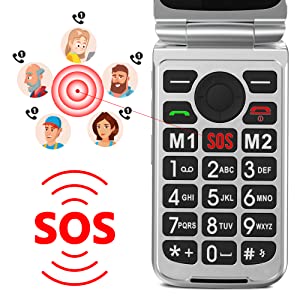
Image: Illustration of the SOS emergency call function and its reach to pre-set contacts.
Rychlá volba
Assign frequently called numbers to speed dial keys (2-9) for quick access.
- Nastavení rychlé volby: Go to Phonebook or Settings, find Speed Dial options, and assign contacts to numbers 2-9.
- Používání rychlé volby: Press and hold the assigned number key to dial the contact.
Svítilna
To activate the built-in flashlight, locate the dedicated flashlight button on the side of the phone or access it through the menu.
FM rádio
The phone features an external FM radio. Access it through the main menu. Headphones may be required for optimal reception.
Kompatibilita v síti
This USHINING 4G Senior Flip Phone is designed to work with specific 4G LTE networks. Please ensure your carrier is compatible before use.
- Compatible Carriers (using T-Mobile service): T-Mobile (Prepaid Plan), MetroPCS, Tello Mobile, Ultra Mobile, SpeedTalk, Simple Mobile, Mint Mobile, Red Pocket (GSMT).
- NOT Compatible with: CDMA Carriers (Verizon, Sprint, Boost, PagePlus) or AT&T.
Image: Visual guide to compatible and incompatible network carriers.
Údržba
Péče o baterie
- Vyhněte se extrémním teplotám, které mohou zkrátit životnost baterie.
- Nenechávejte telefon delší dobu nenabíjený.
- Use only the original or certified compatible charger and battery.
Čištění
- Otřete telefon měkkým, suchým hadříkem.
- Nepoužívejte drsné chemikálie ani abrazivní čisticí prostředky.
- Udržujte nabíjecí port bez prachu a nečistot.
Odstraňování problémů
| Problém | Možná příčina | Řešení |
|---|---|---|
| Telefon se nezapne. | Baterie je vybitá nebo není správně vložena. | Charge the phone for at least 30 minutes. Ensure the battery is properly seated. |
| No network signal / "Emergency calls only". | SIM card not inserted correctly, incompatible carrier, or incorrect APN settings. |
|
| Neslyším volajícího / Volající neslyší mě. | Volume too low, microphone blocked, or network issue. | Adjust call volume. Ensure microphone is not covered. Try moving to an area with better network coverage. |
| Telefon se zasekává nebo nereaguje. | Dočasná softwarová závada. | Vyjměte a znovu vložte baterii pro provedení tvrdého resetu. |
Specifikace
| Název modelu | USHINING 4G Senior Flip Phone |
| Číslo modelu položky | T3105 |
| Rozměry produktu | 4.09 x 2.11 x 0.83 palce |
| Hmotnost položky | 9.1 unce |
| Kapacita baterie | 1000 mAh lithium-iontová (součástí balení) |
| Doba hovoru | 5-6 hodin |
| Pohotovostní doba | Over 100 hours (4 days) |
| Internal Screen Size | 2.8 palce |
| Velikost externí obrazovky | 1.77 palce |
| Rezoluce | 240 x 320 |
| BERAN | 64 MB |
| Kapacita paměti | 128 MB |
| Buněčná technologie | 4G LTE |
| Bezdrátová komunikace | Bluetooth, mobilní |
| Audio Jack | 3.5 mm |
| Form Factor | Překlopit |
| Barva | Černý |
| Výrobce | USHINING |
Záruka a podpora
For warranty information and technical support, please refer to the warranty card included in your package or contact USHINING customer service. Keep your purchase receipt as proof of purchase.
For further assistance, please visit the official USHINING website or contact their support channels as provided in your product documentation.
Ask a question about this manual
Ask about setup, troubleshooting, compatibility, parts, safety, or missing instructions. Manuals+ will review the question and use this page’s manual context to help answer it.