
BORUIT V3
BORUIT V3 Mini Powerful EDC Flashlight User Manual
Model: V3
Zavedení
Děkuji za nákupasing the BORUIT V3 Mini Powerful EDC Flashlight. This compact and versatile flashlight is designed for everyday carry, offering high lumen output, multiple lighting modes, and a durable, waterproof design. Please read this manual carefully to ensure proper use, maintenance, and to maximize the lifespan of your device.
Konec produktuview
The BORUIT V3 flashlight features a dual-head design, a robust PC+304b stainless steel construction, and a built-in 500mAh rechargeable battery. It offers 12 lighting modes across main and side lights, including white, UV, red, and red-blue flash. Its compact size and tail magnet enhance portability and utility.

Figure 1: BORUIT V3 Flashlights (Fluorescent and Black Models)
This image displays both the clear fluorescent and black versions of the BORUIT V3 flashlight, highlighting their compact form factor and the dual light heads at the front. The clear model allows visibility of internal components, while the black model offers a sleek, opaque finish.

Figure 2: BORUIT V3 Fluorescent Model in Use
This image shows the clear fluorescent BORUIT V3 flashlight. One unit is depicted glowing green, illustrating its fluorescent property, while another unit has its main lights activated, demonstrating its illumination capability.
Co je v krabici
Upon unboxing your BORUIT V3 Flashlight, please verify that all components are present:
- BORUIT V3 Mini Powerful EDC Flashlight (Fluorescent or Black model)
- Vestavěná 500mAh polymerová lithiová baterie
- Nabíjecí kabel USB-C

Obrázek 3: Dodávané příslušenství
This image displays the black BORUIT V3 flashlight alongside its USB-C charging cable, which is essential for recharging the device's internal battery.
Nastavení
Počáteční nabíjení
Before first use, it is recommended to fully charge your BORUIT V3 flashlight. The device comes with a built-in 500mAh polymer lithium battery.
- Najděte nabíjecí port USB-C na svítilně.
- Připojte dodaný kabel USB-C k nabíjecímu portu svítilny.
- Connect the other end of the USB-C cable to a compatible USB power source (e.g., computer USB port, wall adapter, power bank).
- During charging, a red light will flash. Once fully charged, the indicator light will turn green.

Figure 4: Type-C Charging Process
This diagram illustrates the USB-C charging process for the BORUIT V3 flashlight. It shows the location of the Type-C charging port and the LED indicators: a flashing red light indicates charging, and a solid green light indicates a full charge.
Attaching to Keychain/Belt
The BORUIT V3 is designed for portability and can be easily attached to a keychain, backpack, or belt for convenient access.
- Utilize the integrated loop on the flashlight body to attach a keyring or carabiner.
- Ensure the attachment is secure to prevent accidental loss.

Figure 5: Portable Keychain Feature
This image demonstrates the portability of the BORUIT V3 flashlight, showing it conveniently attached to a backpack and a set of car keys, illustrating its suitability for everyday carry.
Návod k obsluze
The BORUIT V3 features two main buttons for operation: the main light switch and the side light switch. It offers 12 distinct lighting modes.
Main Light Modes (5 Modes)
- Režimy: Super Bright, High Light, Medium Bright, Low Light, Economic
- Zapnutí/vypnutí: Press the main light switch button to turn on. Release to turn off.
- Cyklování režimů: Double-click the main light switch button to turn on. Click again to cycle through modes (Super Bright → High → Medium → Low → Economic). Press and hold to turn off.
Side Light Modes (7 Modes)
- Režimy: White Light, UV, Red Light, Red Light Flash, Red Blue Light Flash
- To Turn On White Light: Long press the side light switch. Release to turn off.
- Cyklování režimů: Double-click the side light switch to turn on the side light mode. Click again to cycle through modes (White Light → UV → Red Light → Red Light Flash). Press and hold to turn off.
- To Activate Red-Blue Flash: Triple-click the side light switch.
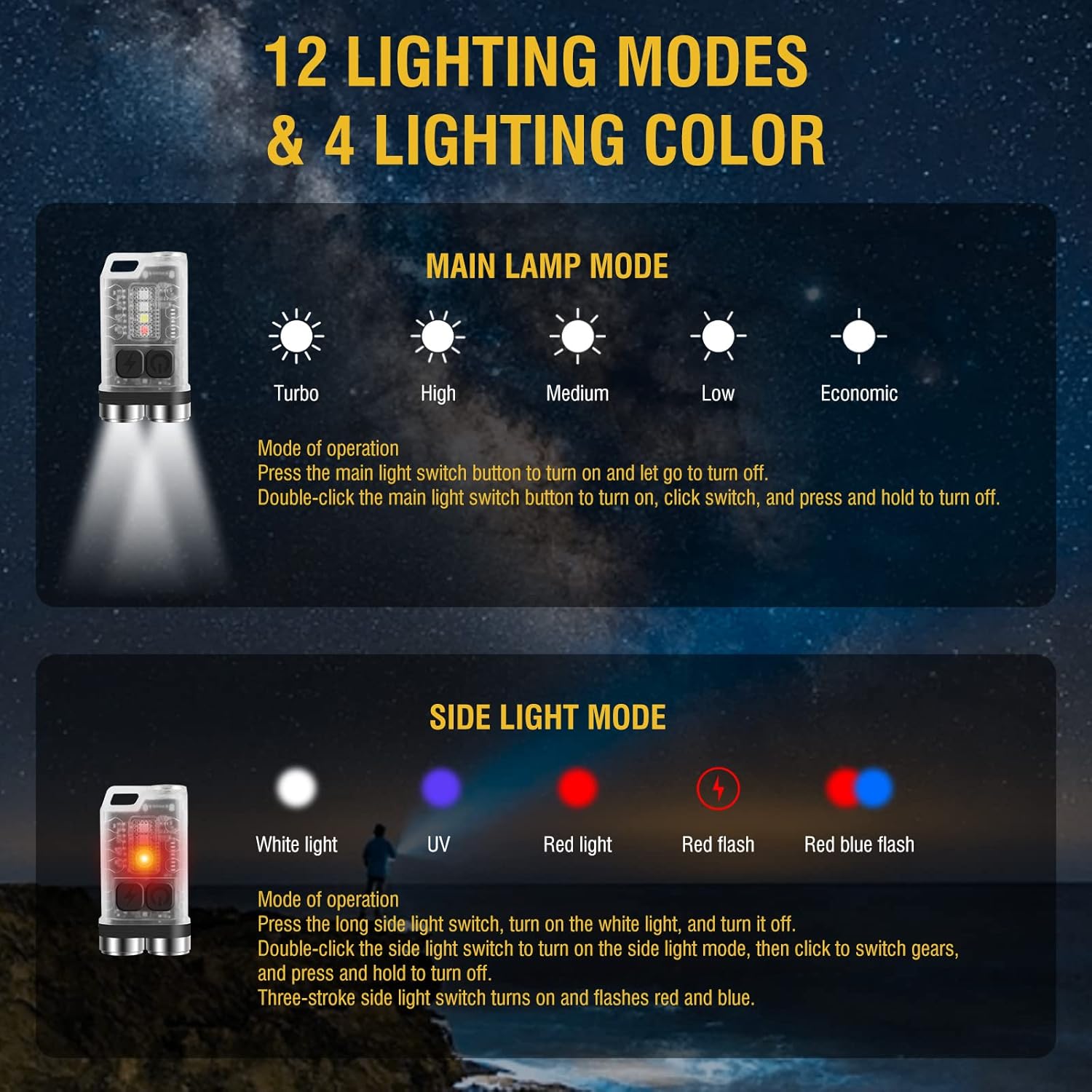
Figure 6: Lighting Modes and Colors
This detailed diagram outlines the 12 distinct lighting modes and 4 color options available on the BORUIT V3 flashlight. It visually separates the main lamp modes (Turbo, High, Medium, Low, Economic) and the side light modes (White, UV, Red, Red Flash, Red Blue Flash), along with their respective operation instructions.
Magnetic Tail Feature
The flashlight features a magnet at its tail, allowing it to be securely attached to any iron-containing surface for hands-free operation. This is particularly useful for tasks requiring illumination in fixed positions.
Údržba
Proper maintenance ensures the longevity and optimal performance of your BORUIT V3 flashlight.
- Čištění: Otřete tělo svítilny měkkým hadříkemamp tkanina. Nepoužívejte abrazivní čisticí prostředky nebo rozpouštědla.
- Nabíjení: Recharge the battery regularly, especially if the flashlight will not be used for an extended period, to prevent deep discharge.
- Skladování: Uchovávejte svítilnu na chladném a suchém místě mimo přímé sluneční světlo a extrémní teploty.
- Voděodolnost: While rated IP65 waterproof, avoid prolonged submersion. Ensure the USB-C port cover is securely closed when exposed to water or dust.

Figure 7: IP65 Outdoor Waterproof Feature
This image illustrates the BORUIT V3 flashlight's IP65 outdoor waterproof capability, showing it functioning effectively in a rainy environment, emphasizing its durability against dust and water splashes.
Odstraňování problémů
If you encounter issues with your BORUIT V3 flashlight, refer to the following common problems and solutions:
| Problém | Možná příčina | Řešení |
|---|---|---|
| Svítilna se nezapne. | Slabá baterie nebo žádný proud. | Charge the flashlight fully using the provided USB-C cable. |
| Světelný výkon je slabý. | Slabá baterie. | Dobijte baterku. |
| Nelze změnit režimy osvětlení. | Nesprávné pořadí stisknutí tlačítek. | Refer to the "Operating Instructions" section for correct button usage (single click, double-click, long press, triple-click). |
| Indikátor nabíjení nefunguje. | Vadný kabel nebo zdroj napájení. | Zkuste jiný kabel USB-C nebo napájecí adaptér. Ujistěte se, že je kabel zcela zasunutý. |
Specifikace
Detailed technical specifications for the BORUIT V3 Mini Powerful EDC Flashlight:
| Funkce | Detail |
|---|---|
| Název produktu | BORUIT V3 fluorescent flashlight + V3 black flashlight |
| Materiál | PC + 304b Stainless Steel |
| Lumens (Max) | 900 LM |
| Světelný zdroj | LED |
| Hlavní světelné režimy | 5 modes (Super Bright, High Light, Medium Bright, Low Light, Economic) |
| Režimy bočního světla | 7 modes (White Light, UV, Red Light, Red Light Flash, Red Blue Light Flash) |
| Světlá barva | UV, White, Red, Blue Light |
| Baterie | 500 mAh Polymer Lithium Battery (Built-in) |
| Typ nabíjení | nabíjecí port TYPE-C |
| Vodotěsná třída | IP65 |
| Vzdálenost ozařování | 100 metrů |
| Velikost produktu | 15 mm x 31 mm x 56 mm (0.6" x 1.2" x 2.2") |
| Čistá hmotnost | 33 g (1.17 oz) |

Obrázek 8: Rozměry a hmotnost produktu
This image provides a visual representation of the BORUIT V3 flashlight's compact size, detailing its length (2.2 inches / 56mm), width (1.2 inches / 31mm), thickness (0.6 inches / 15mm), and net weight (1.17 oz / 33g), emphasizing its slim and lightweight design.
Záruka a podpora
For warranty information or technical support, please refer to the official BORUIT webnebo se obraťte přímo na jejich zákaznický servis. Uschovejte si účtenku jako doklad o koupi pro případné reklamace.
Navštivte BORUIT Store on Amazon pro více informací a aktualizace produktů.
Ask a question about this manual
Ask about setup, troubleshooting, compatibility, parts, safety, or missing instructions. Manuals+ will review the question and use this page’s manual context to help answer it.