
1. Důležité bezpečnostní pokyny
Před použitím tohoto výrobku si prosím přečtěte a pochopte všechny bezpečnostní pokyny. Nedodržení těchto pokynů může vést k úrazu elektrickým proudem, požáru nebo vážnému zranění.
- Nevystavujte zařízení extrémním teplotám, přímému slunečnímu záření nebo vysoké vlhkosti.
- Keep the device away from water and other liquids. If it gets wet, turn it off immediately and allow it to dry completely before reuse.
- Nepokoušejte se zařízení rozebírat, opravovat ani upravovat. Veškerý servis svěřte kvalifikovanému personálu.
- Use only specified charging methods (USB-C, solar, hand crank).
- Uchovávejte mimo dosah dětí.
- Zlikvidujte baterie v souladu s místními předpisy.
2. Konec produktuview
The FosPower Emergency Weather Radio Model A6 is a versatile device designed for emergency preparedness and outdoor activities. It features multiple power sources, radio reception, lighting, and a power bank function.
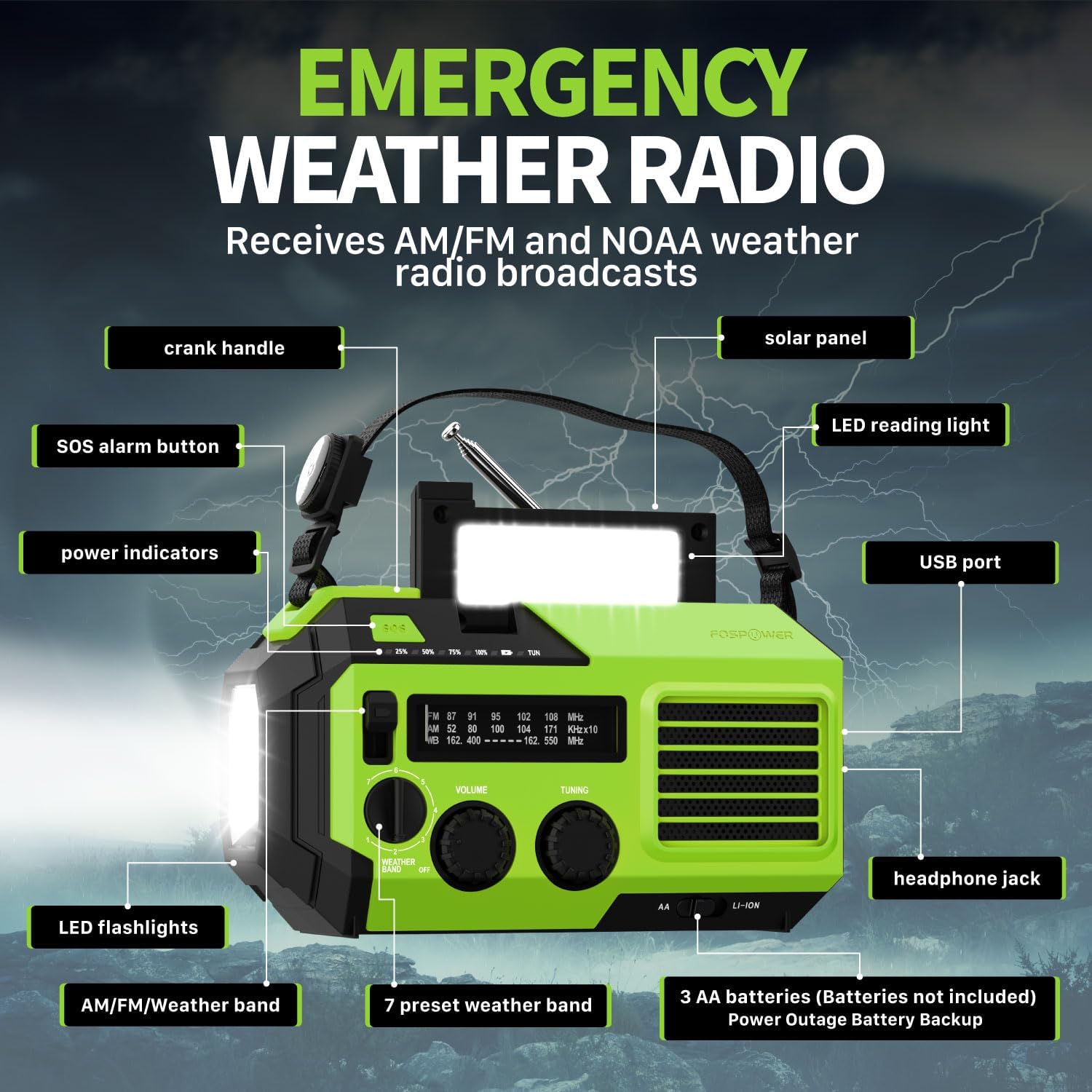
Obrázek 2.1: Přední strana view of the FosPower Emergency Weather Radio with key components labeled, including the crank handle, solar panel, SOS alarm button, power indicators, LED reading light, USB port, LED flashlights, AM/FM/Weather band selector, volume and tuning knobs, and headphone jack.
Klíčové vlastnosti:
- NOAA/AM/FM Radio: Access local weather information and emergency hazard alerts, as well as standard AM/FM broadcasts.
- 19240mWh (5200mAh) Power Bank: Charge USB devices during power outages or in outdoor settings.
- Více zdrojů napájení: Recharge via USB-C cable, solar panel, or hand crank. Can also be powered by AA batteries (not included).
- SOS alarm: Aktivuje hlasitou sirénu a blikající světlo pro nouzovou signalizaci.
- Integrované osvětlení: Features a powerful flashlight and a reading light.
- IPX3 voděodolnost: Poskytuje ochranu před stříkající vodou.
3. Nastavení
3.1 Počáteční nabíjení
Before first use, fully charge the internal battery using the provided USB-C cable. Connect the USB-C cable to the radio's USB-C port and the other end to a USB power adapter (not included) or a computer USB port. The power indicators will illuminate to show charging progress.
3.2 AA Battery Installation (Optional)
The radio can also operate on 3 AA batteries (not included) as a backup power source. Open the battery compartment cover on the back of the radio and insert 3 AA batteries, ensuring correct polarity. Close the cover securely.

Obrázek 3.1: Zadní strana view of the radio highlighting the solar panel, hand-crank, AA battery compartment, and USB charging port, illustrating the multiple power sources.
4. Návod k obsluze
4.1 Provoz rádia
- Zapnutí/vypnutí: Rotate the 'VOLUME' knob clockwise to turn the radio on and adjust the volume. Rotate counter-clockwise until it clicks to turn off.
- Výběr kapely: Use the 'WEATHER BAND' switch to select between AM, FM, or WB (Weather Band).
- tuning: Rotate the 'TUNING' knob to scan for radio stations. Extend the telescopic antenna for improved reception, especially for FM and WB.
- NOAA Weather Band: When WB is selected, the radio will receive NOAA weather alerts. The radio supports 7 preset weather bands.
- Sluchátkový jack: For private listening, connect 3.5mm headphones to the headphone jack.
4.2 Svítilna a lampička na čtení

Image 4.1: The radio demonstrating its high-power flashlight and cool-tone reading lamp funkce.
- Svítilna: Press the flashlight button located on the front of the radio to turn the flashlight on or off.
- Světlo na čtení: Lift the solar panel to reveal the LED reading light. Press the reading light button to turn it on or off.
4.3 SOS alarm
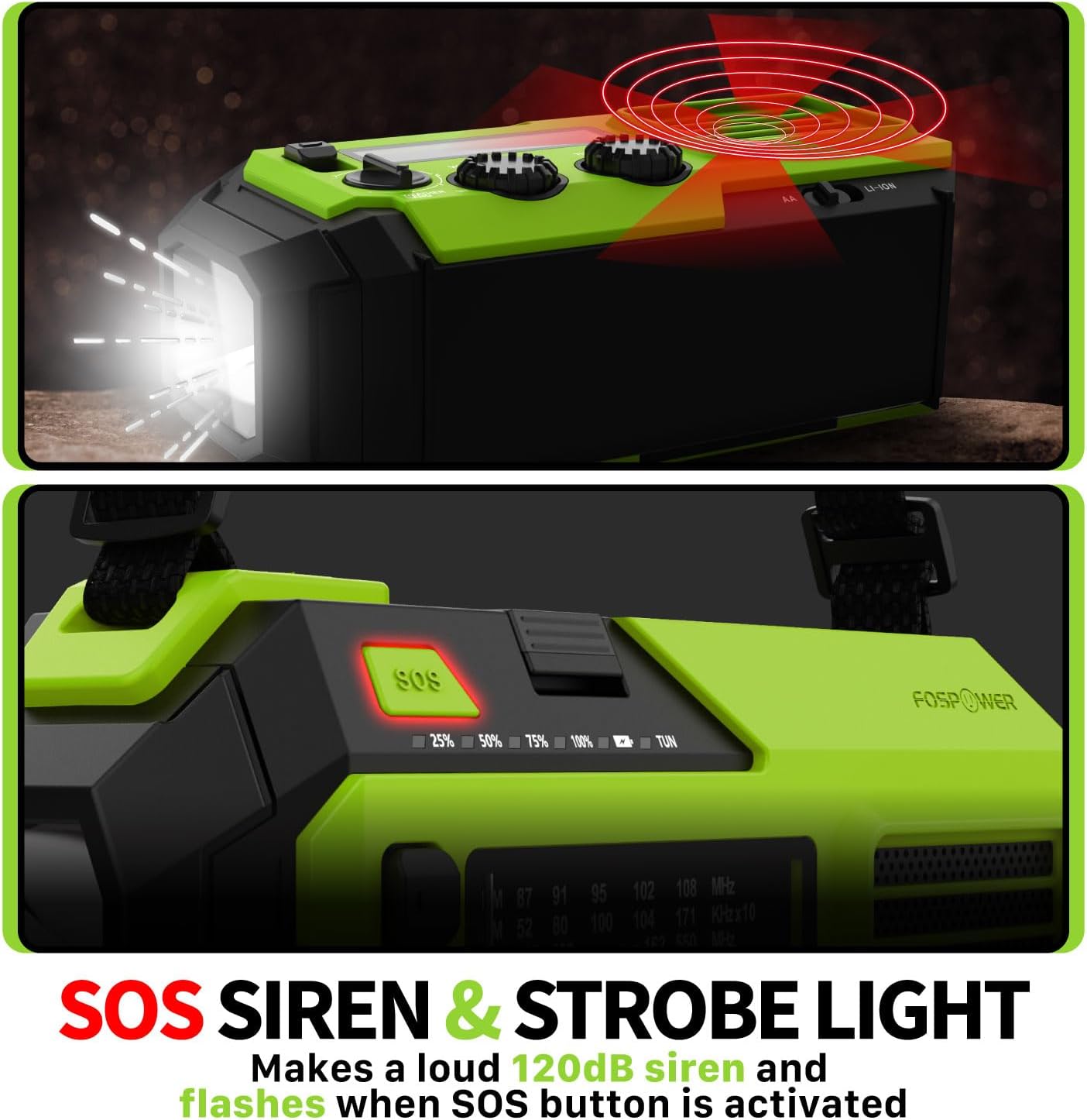
Image 4.2: Close-up of the radio's SOS button and an illustration of the siren and strobe light being activated.
In an emergency, press and hold the 'SOS' button to activate a loud 120dB siren and a flashing strobe light. Press the 'SOS' button again to deactivate.
4.4 Nabíjení externích zařízení (powerbanky)

Image 4.3: The radio connected via USB to a smartphone, demonstrating its power bank capability for charging small electronics.
Connect your USB-powered device (e.g., smartphone, tablet) to the radio's USB-A output port using your device's charging cable. The radio's internal battery will begin charging your device.
4.5 Nabíjení rádia
- Nabíjení USB-C: Connect the provided USB-C cable to the radio's USB-C input port and a USB power source. This is the most efficient charging method.
- Solární nabíjení: Place the radio with the solar panel facing direct sunlight. The solar panel charges the internal battery, primarily for maintaining charge or slow charging in emergencies.
- Nabíjení ruční klikou: Rotate the hand crank clockwise or counter-clockwise at a steady pace (approximately 130-150 RPM) for 3-5 minutes to generate power for short-term use or to initiate charging.
5. Údržba
- Čištění: Rádio otírejte měkkým, suchým hadříkem. Nepoužívejte abrazivní čisticí prostředky ani rozpouštědla.
- Skladování: Store the radio in a cool, dry place away from direct sunlight when not in use for extended periods. For optimal battery health, fully charge the internal battery every 3-6 months.
- Péče o baterie: If using AA batteries, remove them if the radio will not be used for a long time to prevent leakage.
6. Řešení problémů
| Problém | Možná příčina | Řešení |
|---|---|---|
| Rádio se nezapíná. | Internal battery is depleted; AA batteries are depleted or incorrectly installed. | Charge the internal battery via USB-C or hand crank. Check and replace AA batteries if used. |
| Špatný příjem rádia. | Anténa není vysunutá; oblast se slabým signálem; rušení. | Fully extend the telescopic antenna. Adjust radio position. Try tuning to a stronger station. |
| Externí zařízení se nenabíjí. | Radio's internal battery is low; incorrect cable; device not compatible. | Ensure the radio's internal battery is sufficiently charged. Use a functional USB charging cable. Verify device compatibility. |
| Ruční klika je tuhá nebo negeneruje žádný výkon. | Mechanism obstruction; improper cranking speed. | Ensure no obstructions. Crank at a steady, moderate pace (130-150 RPM). |
7. Specifikace
| Funkce | Detail |
|---|---|
| Číslo modelu | FOSPWB-2419 |
| Rozměry produktu | 6.76 x 3.52 x 2.59 palce |
| Hmotnost položky | 1.08 libry |
| Interní baterie | 19240mWh (5200mAh) |
| Podpora externí baterie | 3 x AA baterie (nejsou součástí balení) |
| Rozhlasové kapely | AM, FM, NOAA Weather Band (WB) |
| Způsoby nabíjení | USB-C, Solar, Hand Crank |
| Speciální funkce | Built-In Flashlight, Reading Light, SOS Alarm, Power Bank |
| Voděodolnost | IPX3 |
8. Záruka a podpora
FosPower provides a limited lifetime warranty for this product. For warranty claims, technical assistance, or customer service inquiries, please contact FosPower's USA-based customer support team. Refer to the official FosPower webkontaktní údaje naleznete na webových stránkách nebo v dokumentaci k nákupu.