
1. Úvod
Thank you for choosing the Maxcom FW36 Aurum SE Smartwatch. This manual provides detailed instructions to help you set up, operate, and maintain your device, ensuring optimal performance and longevity. Please read this manual carefully before using your smartwatch.

Obrázek 1: Přední strana view of the Maxcom FW36 Aurum SE Smartwatch, displaying time and health metrics.
2. Nastavení
2.1 Vybalení a úvodní kontrola
Upon opening the package, verify that all components are present: Maxcom FW36 Aurum SE Smartwatch, charging cable, and this user manual. Inspect the device for any visible damage.
2.2 Nabíjení chytrých hodinek
Before first use, fully charge your smartwatch. Connect the charging cable to the charging port on the back of the watch and to a standard USB power adapter (not included). The battery icon on the screen will indicate charging status. A full charge typically takes approximately 2 hours.
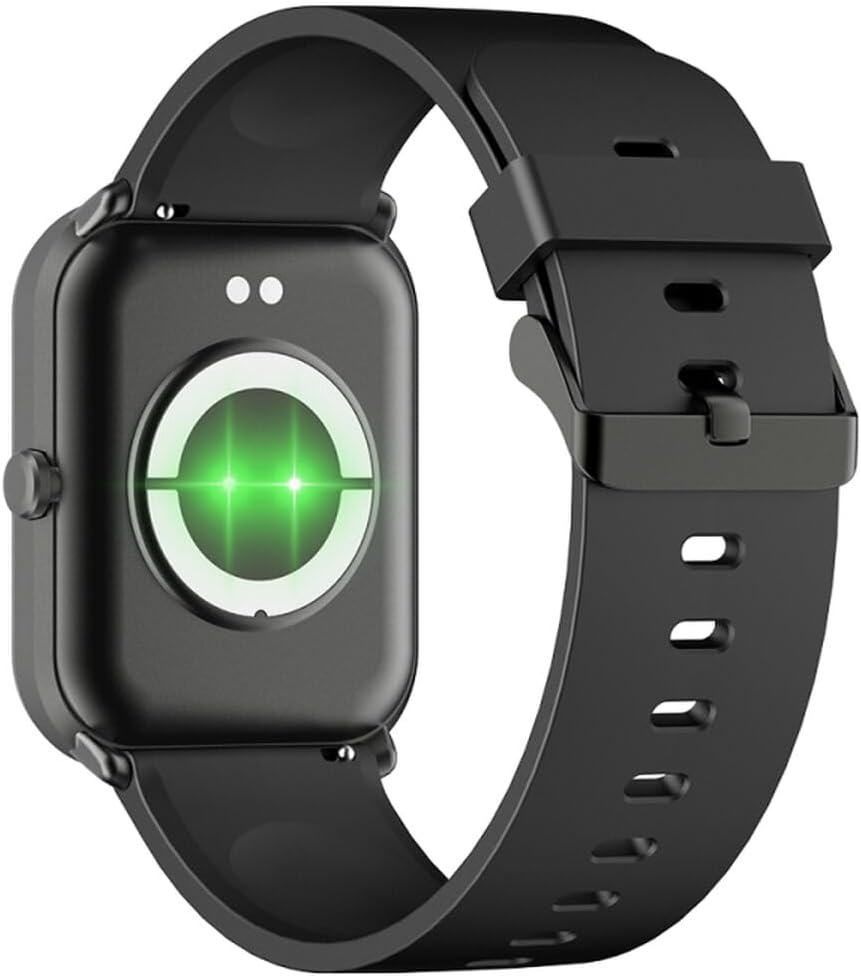
Obrázek 2: Zadní view of the smartwatch, highlighting the charging contacts and health sensors.
2.3 Zapnutí/vypnutí
- Zapnutí: Stiskněte a několik sekund podržte boční tlačítko, dokud se obrazovka nerozsvítí.
- Vypnout: From the watch face, swipe down to access quick settings, then tap the power icon, or navigate to "Settings" > "System" > "Power Off". Confirm your selection.
2.4 Instalace a párování aplikace
- Stáhněte si aplikaci: Scan the QR code in the manual (if provided) or search for "GLORY FIT" in your smartphone's app store (Google Play Store for Android, Apple App Store for iOS).
- Registrace/Přihlášení: Open the GLORY FIT app and follow the on-screen instructions to create an account or log in.
- Párování:
- Ujistěte se, že je na vašem smartphonu povoleno Bluetooth.
- Open the GLORY FIT app, go to "Device" or "My Device", and tap "Add Device".
- The app will search for nearby devices. Select "FW36 Aurum SE" from the list.
- Potvrďte požadavek na párování na smartphonu i na chytrých hodinkách.
Once paired, the smartwatch will synchronize data with your phone, including time and date settings.
3. Návod k obsluze
3.1 Základní navigace
- Dotyková obrazovka: Swipe left/right to navigate between main functions (e.g., activity, heart rate). Swipe up to view notifications. Swipe down to access quick settings.
- Boční tlačítko: Press once to return to the watch face or wake the screen. Press and hold for power options.

Obrázek 3: Strana view of the smartwatch, illustrating the physical button and strap design.
3.2 Monitorování zdraví
The Maxcom FW36 Aurum SE Smartwatch features several health monitoring functions:
- Monitor srdečního tepu: Swipe to the heart rate interface and wait for the measurement to complete. Ensure the watch is snug on your wrist.
- Senzor krevního kyslíku: Similar to heart rate, navigate to the SpO2 interface for measurement.
- Monitor krevního tlaku: Access this function from the main menu or by swiping to its dedicated screen.
- Monitorování kvality spánku: Hodinky automaticky sledují vaše spánkové vzorce, když je nosíte během spánku. View detailed reports in the GLORY FIT app.
- krokoměr: Tracks your daily steps, distance, and calories burned automatically.
Důležité: The health data provided by this device is for reference only and should not be used for medical diagnosis or treatment.
3.3 Režim Multi-Sport
Access the multi-sport mode from the main menu to select various activities such as running, walking, cycling, etc. The watch will track specific metrics relevant to your chosen activity.
3.4 Oznámení
Once paired with your smartphone and notification permissions are granted in the GLORY FIT app, your smartwatch will display incoming calls, messages, and app notifications. Swipe up from the watch face to view historii oznámení.
4. Údržba
4.1 Čištění
Regularly clean your smartwatch and strap with a soft, dry cloth. For stubborn dirt, use a slightly damp hadříkem a poté důkladně osušte. Nepoužívejte agresivní chemikálie ani abrazivní materiály.
4.2 Odolnost proti vodě a prachu
The Maxcom FW36 Aurum SE Smartwatch is designed to be dust resistant and water resistant. This means it can withstand splashes, rain, and brief immersion in shallow water. However, it is not suitable for hot showers, saunas, diving, or high-speed water sports. Avoid pressing buttons underwater.
4.3 Péče o baterii
Chcete-li prodloužit životnost baterie, vyvarujte se častého úplného vybíjení. Zařízení pravidelně nabíjejte, i když jej delší dobu nepoužíváte. Zařízení skladujte na chladném a suchém místě.
5. Řešení problémů
- Chytré hodinky se nezapínají: Ensure the device is fully charged. Press and hold the side button for an extended period (10-15 seconds).
- Nelze spárovat se smartphonem:
- Ensure Bluetooth is enabled on your phone and the smartwatch is within range.
- Restartujte chytrý telefon i chytré hodinky.
- Check if the GLORY FIT app has necessary permissions.
- Pokud bylo zařízení dříve spárováno, zkuste jej zrušit a znovu spárovat.
- Nepřesné údaje o zdravotním stavu: Ensure the watch is worn snugly on your wrist, not too tight or too loose. Clean the sensors on the back of the watch. Avoid excessive movement during measurement.
- Neobdržená oznámení: Verify that notification permissions are enabled for the GLORY FIT app in your phone's settings. Ensure the app is running in the background.
6. Specifikace
| Model | FW36 Aurum SE |
| Značka | Maxcom |
| Operační systém | Android |
| Zobrazit | 1.69" (4.29 cm) Color Touchscreen, 240 x 280 pixels, Digital, Rounded Corners |
| Kapacita baterie | 220 mAh Lithium-ion |
| Konektivita | Bluetooth |
| Senzory | Heart Rate Monitor, Blood Oxygen Sensor, Blood Pressure Monitor, Pedometer |
| Ochrana | Dust Resistant, Water Resistant |
| Kompatibilní aplikace | GLORY FIT |
| Dimensions (W x T x D) | 44.6 mm x 1.04 cm x 35 mm |
| Funkce GPS | Není k dispozici |
7. Záruka a podpora
The Maxcom FW36 Aurum SE Smartwatch comes with a dvouletá záruka against factory defects. Please retain your proof of purchase for warranty claims.
For technical support, troubleshooting assistance, or warranty inquiries, please contact Maxcom customer service through their official webwebu nebo kontaktních informací uvedených v dokumentaci k nákupu.