
1. Úvod
This manual provides detailed instructions for the installation, operation, and maintenance of your FOSCAM V8EP 4K IP PoE Security Camera. The V8EP is an 8-megapixel outdoor camera designed for home and business surveillance, featuring 4K Ultra HD resolution, AI human and vehicle detection, color night vision, two-way audio, and Power over Ethernet (PoE) for simplified setup.

Image 1.1: FOSCAM V8EP Camera and App Interface
2. Konec produktuview
2.1 Obsah balení
- 1x FOSCAM V8EP 8MP Outdoor IP Camera
- 1x Stručný návod k obsluze
- 1x ethernetový kabel
- 1x Surveillance Sign
- 1x Voděodolné víko
2.2 Klíčové vlastnosti
- Rozlišení 4K 8MP Ultra HD: Captures video at 3840x2160p with 6X digital zoom for clear details.
- Detekce osob a vozidel pomocí umělé inteligence: Advanced algorithms identify humans and vehicles, reducing false alarms.
- Barevné noční vidění: Provides full-color video in low-light conditions up to 66 feet using built-in spotlights.
- Siren Alert & Spotlights: Deters intruders with an audible siren and bright spotlights upon detection.
- Obousměrný zvuk: Vestavěný mikrofon a reproduktor umožňují komunikaci v reálném čase.
- Napájení přes Ethernet (PoE): Simplifies installation by delivering power and data through a single Ethernet cable.
- IP66 Odolnost proti povětrnostním vlivům: Navrženo tak, aby odolalo různým venkovním povětrnostním podmínkám.

Image 2.1: 4K Ultra HD Clarity Comparison
3. Nastavení
3.1 PoE Installation
The FOSCAM V8EP camera utilizes Power over Ethernet (PoE) technology, requiring only one Ethernet cable for both power supply and data transmission. This simplifies wiring and installation.
- Montáž kamery: Securely mount the camera to a wall or desired surface using the provided mounting hardware. Ensure the camera is positioned to cover the desired surveillance area.
- Připojení ethernetového kabelu: Connect one end of the Ethernet cable to the camera's PoE port.
- Připojení k PoE přepínači/NVR: Connect the other end of the Ethernet cable to a PoE switch, PoE injector, or a Foscam NVR. Ensure the PoE device is powered on.
- Internetové připojení: Connect your PoE switch or NVR to your router for network access.

Image 3.1: PoE Installation Diagram
3.2 App Setup and Initial Connection
To access and manage your camera, download the Foscam app on your smartphone.
- Stáhněte si aplikaci Foscam: Hledat "Foscam" in your device's app store (iOS or Android) and install the application.
- Vytvořit účet: Open the app and follow the prompts to create a new Foscam account or log in if you already have one.
- Přidat fotoaparát: In the app, select the option to add a new camera. Follow the on-screen instructions, which typically involve scanning a QR code on the camera or manually entering its details.
- Konfigurace nastavení: Once connected, you can configure various camera settings, including network preferences, recording schedules, and alert notifications.
4. Provoz
4.1 AI Detection
The FOSCAM V8EP camera features intelligent AI detection capabilities to distinguish between different types of motion.
- Detekce člověka: Identifies human figures, reducing alerts from non-human movements.
- Detekce vozidla: Recognizes vehicles, useful for monitoring driveways or parking areas.
- Custom Motion Zones: You can define specific areas within the camera's field of view where motion detection should be active, ignoring irrelevant areas to minimize false alarms.
- Nastavitelná citlivost: Sensitivity levels for detection can be adjusted via the Foscam app to suit your environment.

Image 4.1: AI Human and Vehicle Detection
4.2 Noční vidění
The camera provides advanced night vision options for clear surveillance in low-light conditions.
- Color Starlight Night Vision: Utilizes a high-quality sensor and F/1.6 aperture to capture color video in very low ambient light, extending up to 66 feet.
- Integrated Spotlights: Built-in spotlights (4500K) can be activated manually or automatically upon motion detection to illuminate the area and enable full-color night vision.
- Infračervené (IR) noční vidění: When spotlights are off, the camera automatically switches to infrared mode for black and white video in complete darkness.
- Schedule Spotlights: You can set schedules for when the spotlights should be active.

Image 4.2: Color Night Vision with Spotlights
4.3 Obousměrný zvuk
Communicate directly through the camera using its integrated microphone and speaker.
- Komunikace v reálném čase: Speak to visitors or deter unwanted individuals from your smartphone via the Foscam app.
- Monitorování zvuku: Poslouchejte zvuk z místa, kde se nachází kamera.
Image 4.3: Two-Way Audio Functionality
Poplašný systém 4.4
When abnormal activity is detected, the camera can trigger an alarm to deter intruders and notify you.
- Aktivace sirény: An audible siren can be triggered automatically or manually.
- Aktivace reflektoru: Spotlights can flash to draw attention and illuminate the scene.
- Okamžitá upozornění: Receive push notifications, emails, or alerts on your device, allowing you to respond promptly.
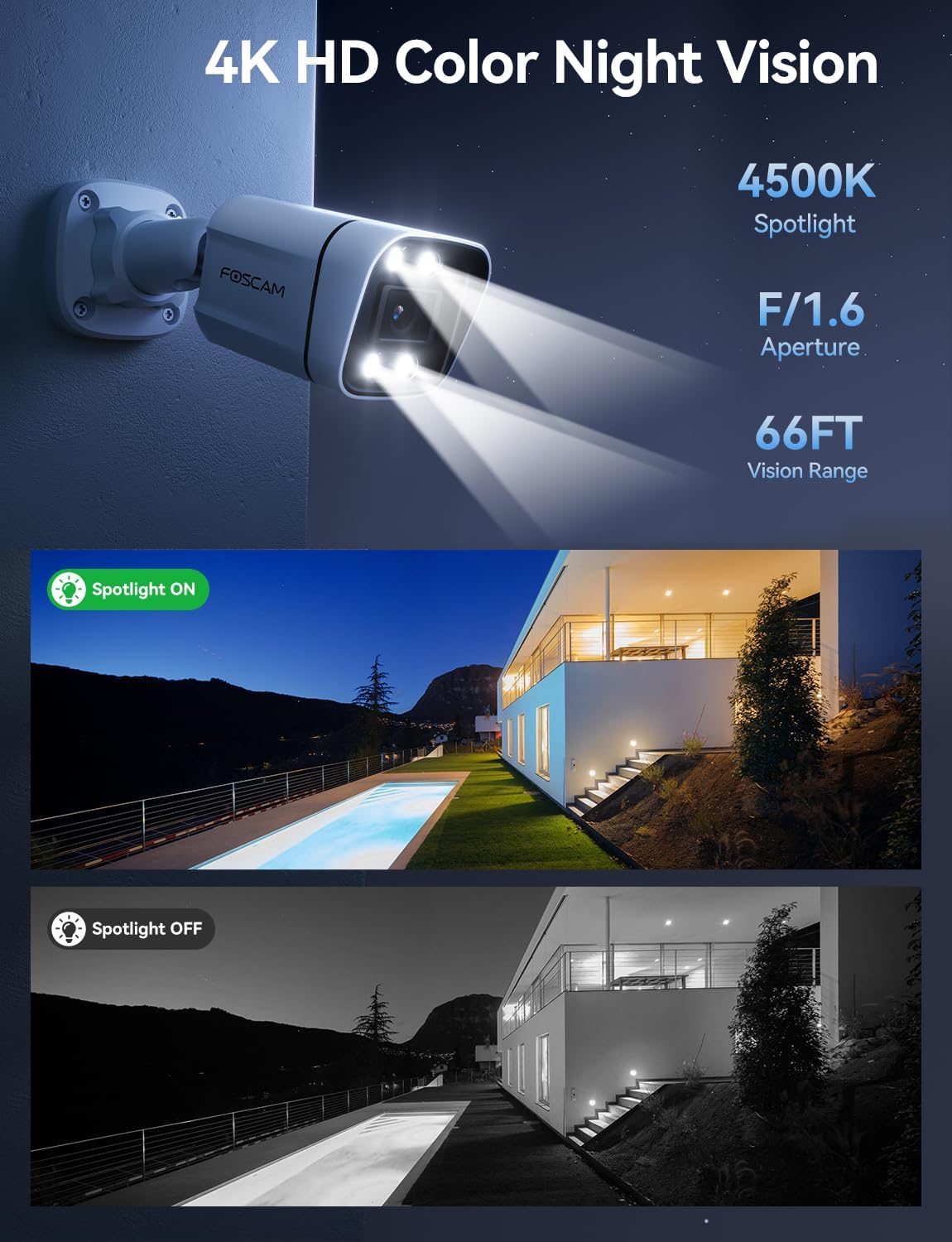
Image 4.4: Sound and Light Alarm System
4.5 Vzdálený přístup a kompatibilita
Monitor your property from anywhere at any time.
- Foscam App/VMS: Přístup živě view, recordings, and settings through the Foscam mobile app or Foscam VMS software on a computer.
- Integrace chytré domácnosti: Compatible with Alexa and Google Assistant for voice control and integration into smart home ecosystems.
- NVR/NAS Compatibility: Supports Blue Iris, Homey, Synology NAS, Qnap NAS, and ONVIF-enabled NVRs for local storage and advanced management.

Image 4.5: Remote Access Across Devices
5. Údržba
5.1 Odolnost vůči povětrnostním vlivům
The FOSCAM V8EP camera features an IP66 weatherproof housing, ensuring reliable operation in various outdoor conditions, including rain, snow, and dust.

Image 5.1: IP66 Weatherproof Design
5.2 Obecná péče
- Čištění: Pravidelně čistěte objektiv a kryt fotoaparátu měkkým hadříkemamp cloth to remove dirt and debris that may affect image quality. Do not use harsh chemicals.
- Kontrola kabelů: Regularly inspect the Ethernet cable and connections for any signs of wear or damage.
- Aktualizace firmwaru: Keep the camera's firmware updated through the Foscam app to ensure optimal performance and access to new features.
6. Řešení problémů
- Bez napájení/připojení: Ensure the Ethernet cable is securely connected to both the camera and a powered PoE device (switch/injector/NVR). Verify the PoE device is functioning correctly and connected to your network.
- Nelze se připojit k aplikaci: Ensure your smartphone is connected to the same network as the camera during initial setup. Restart the camera and your router. Verify the Foscam app is updated to the latest version.
- Časté falešné poplachy: Adjust the AI detection sensitivity settings in the Foscam app. Utilize custom motion zones to exclude areas with irrelevant movement (e.g., swaying trees, busy roads).
- Špatné noční vidění: Ensure the camera lens is clean. Check if the spotlights are enabled and functioning. Verify there are no obstructions blocking the camera's view.
- Žádný Web Rozhraní: Note that this camera model primarily uses the Foscam app for configuration and live viewing. A direct web interface may not be available for all settings.
7. Specifikace
| Funkce | Specifikace |
|---|---|
| Název modelu | V8EP |
| Rozlišení záznamu videa | 4K (3840x2160p) |
| Efektivní rozlišení | 8 MP |
| Snímková frekvence | 20 snímků za sekundu |
| Pole View | 110 stupňů |
| Digital Zoom Ratio | 20X |
| Technologie připojení | Kabelové (PoE) |
| Protokol připojení | Ethernet |
| Zdroj napájení | Kabelové napájení (přes PoE) |
| Vnitřní/venkovní použití | Uvnitř, venku |
| Hodnocení mezinárodní ochrany | IP66 |
| Rozsah nočního vidění | 66 Feet (Color Starlight) |
| Maximální podporovaná velikost paměti Flash | 256 GB (microSD) |
| Rozměry položky (D x Š x V) | 4.3 x 3.94 x 7.6 palce |
| Hmotnost položky | 1.34 libry |
| Typ ovladače | Alexa, Google Assistant, Blue Iris, Homey, Synology NAS, Qnap NAS, NVR |
8. Záruka a podpora
FOSCAM is committed to providing reliable products and customer service.
- Technická podpora: FOSCAM offers 24/7 fast reply and lifetime technical support for its products.
- Záruka kvality: Produkt je dodáván se 180denní zárukou kvality.
- Vrácení: Využijte 30denní vrácení zdarma.
- Nahrazení: Free replacement and fast delivery are provided for eligible issues.
For further assistance, please visit the official FOSCAM webnebo kontaktujte jejich zákaznickou podporu.