
1. Úvod
Thank you for choosing the CAMKORY DC403 Digital Camera. This compact and easy-to-use camera is designed for capturing high-quality photos and videos, making it suitable for beginners and children. This manual provides essential information on setting up, operating, and maintaining your camera to ensure optimal performance and longevity.

Image 1.1: The CAMKORY DC403 camera is designed to be pocket-sized and easy to use, making it ideal for children and beginners. It has passed drop tests for durability.
2. Konec produktuview
2.1 Klíčové vlastnosti
- Vysoké rozlišení: 44 Megapixel photos and 1080p Full HD video recording.
- Digitální zoom: 16x digital zoom for capturing distant subjects.
- Stabilizace obrazu: Optical image stabilization to reduce blur.
- Zobrazit: 2.5-inch LCD screen for clear viewIng.
- Všestranné režimy: Includes self-timer, fill light, fun filters, smile capture, burst shooting, and webfunkčnost vaček.
- Přenosnost: Compact and lightweight design (9.5 x 5.5 x 2 cm, 120g) for easy carrying.
- Moc: Comes with two 3.7V 700mAh rechargeable lithium-polymer batteries.
- Konektivita: USB Type-C for charging and data transfer to PC.
2.2 Součásti kamery
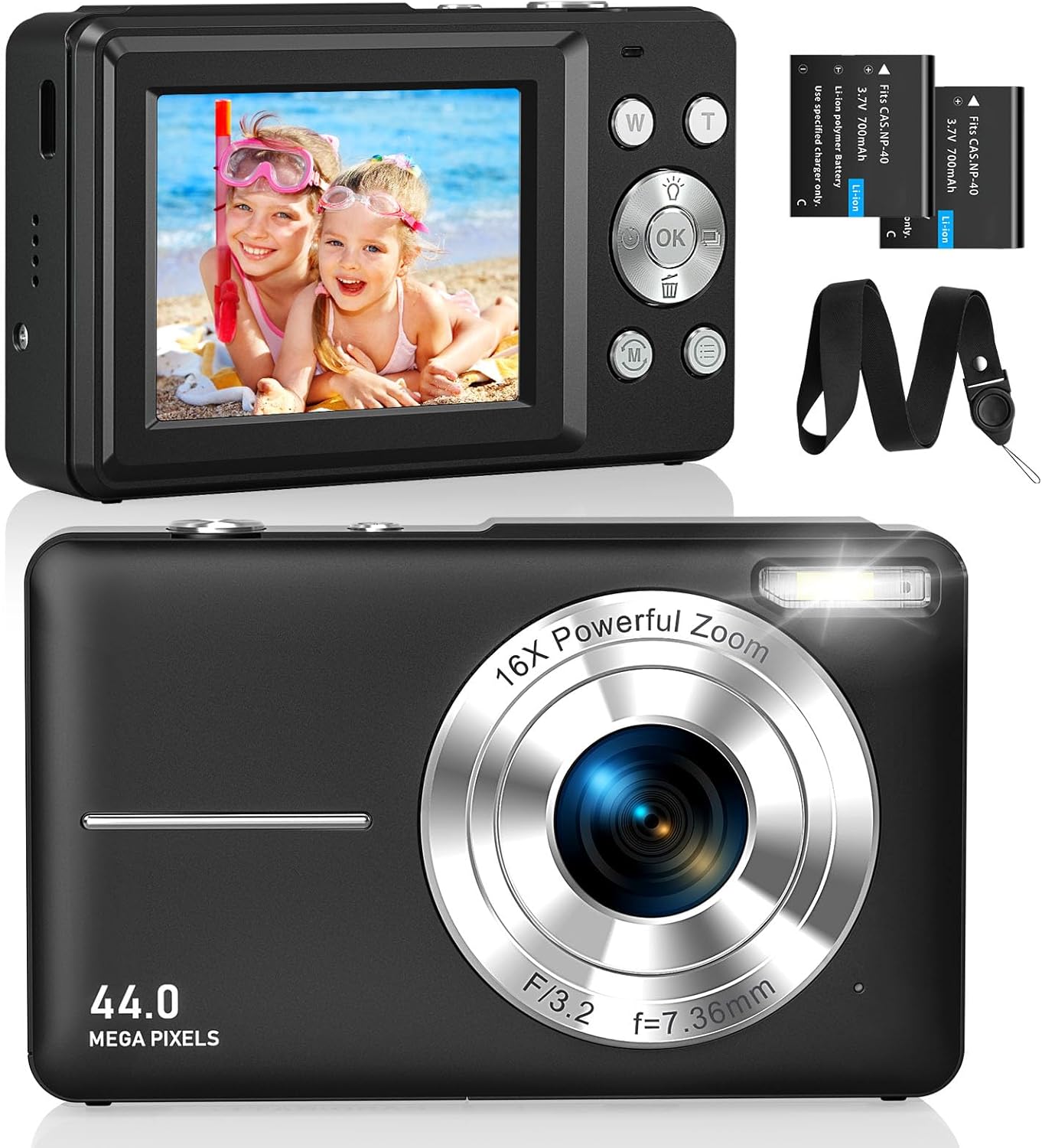
Obrázek 2.1: Přední a zadní část views of the CAMKORY DC403 Digital Camera, illustrating the lens, flash, LCD display, and various control buttons. Two rechargeable batteries are also shown.
The camera features an intuitive layout with ergonomically placed buttons suitable for small hands. Key controls include the power button, shutter button, zoom (W/T) buttons, mode button, and an OK button for menu navigation.

Obrázek 2.2: Detailní view of the camera's side controls, including the ON/OFF button, Shutter, W/T (Zoom), Fill Light, and Mode button.
3. Nastavení
3.1 Instalace a nabíjení baterie
- Otevřete kryt přihrádky na baterie na spodní straně fotoaparátu.
- Insert the two provided 3.7V 700mAh rechargeable lithium-polymer batteries, ensuring correct polarity.
- Bezpečně zavřete kryt bateriového prostoru.
- Connect the camera to a power source using the supplied USB Type-C cable for charging. The charging indicator will show the charging status.
3.2 Instalace paměťové karty
The camera supports Micro SD memory cards from 4GB to 32GB. A memory card is required to save photos and videos.
- Locate the Micro SD card slot, usually near the battery compartment.
- Insert the Micro SD card with the metal contacts facing the front of the camera until it clicks into place.
- Before first use, it is recommended to format the memory card directly within the camera's settings menu. This ensures compatibility and optimal performance.
3.3 Počáteční zapnutí
Press and hold the power button (usually located on the top or side of the camera) to turn on the device. The LCD screen will illuminate, and the camera will be ready for use.
4. Návod k obsluze
4.1 Fotografování
- Zapněte fotoaparát.
- Komponujte snímek pomocí 2.5palcového LCD displeje.
- Use the W/T buttons to adjust the 16x digital zoom.
- Press the shutter button halfway down to focus, then press it fully to capture the 44MP image.

Image 4.1: The camera captures 44MP images, allowing for detailed and clear photographs.
4.2 Nahrávání videí
- Switch to video mode using the Mode button.
- Press the shutter button to start recording 1080p FHD video.
- Press the shutter button again to pause or stop recording.

Image 4.2: The camera supports 1080p Full HD video recording, allowing users to capture moments with clarity.
4.3 Speciální funkce
- Digitální zoom: Use the W/T buttons to zoom in and out. The camera features 16x digital zoom.
- Stabilizace obrazu: The optical image stabilization feature helps reduce blur from camera shake.
- Vyplnit světlo: Activate the fill light for better illumination in low-light conditions.
- Samospoušť: Set a delay (e.g., 2s, 5s, 10s) before taking a photo, useful for group shots or selfies.
- Souvislé fotografování: Pořiďte rychlou sekvenci fotografií podržením tlačítka spouště.
- Filtry: Experiment with 20 different built-in filters to add creative effects to your photos.
- Detekce úsměvu: The camera can automatically detect and capture a photo when a smile is detected.
- Webrežim kamery: Připojte fotoaparát k počítači přes USB, abyste jej mohli používat jako webkamera pro živé vysílání nebo videohovory.

Image 4.3: Demonstrations of 16x digital zoom and image stabilization. The zoom feature allows for closer shots, while stabilization helps maintain clarity during movement.

Obrázek 4.4: Příkladamples of self-timer, continuous shooting, and fill light functions. These features enhance photographic flexibility and quality in various scenarios.

Image 4.5: The camera can be used as a webcam when connected to a computer, suitable for streaming or video calls.
5. Údržba
5.1 Čištění fotoaparátu
- K čištění těla fotoaparátu použijte měkký hadřík, který nepouští vlákna.
- Pro čištění objektivu a LCD obrazovky použijte speciální hadřík a roztok na čištění objektivů. Vyhněte se agresivním chemikáliím.
- Před čištěním se ujistěte, že je fotoaparát vypnutý.
5.2 Skladování
- Fotoaparát skladujte na chladném a suchém místě mimo dosah přímého slunečního záření a extrémních teplot.
- Pokud skladujete po delší dobu, vyjměte baterie, abyste zabránili vytečení.
- Use the provided long strap and pouch to protect the camera from drops and scratches during transport.
6. Řešení problémů
If you encounter issues with your CAMKORY DC403 camera, please refer to the following common solutions:
| Problém | Možné řešení |
|---|---|
| Fotoaparát se nezapne | Ensure batteries are correctly inserted and fully charged. Try using the second battery if available. |
| Nelze pořizovat fotografie/videa | Check if a Micro SD card is inserted and has sufficient free space. Ensure the card is formatted in the camera. |
| Obrázky jsou rozmazané | Ensure the lens is clean. Hold the camera steady or use the image stabilization feature. Check lighting conditions. |
| Camera not recognized by PC | Ensure the USB Type-C cable is securely connected to both the camera and the PC. Try a different USB port or cable. |
| Baterie se rychle vybíjí | Reduce screen brightness. Turn off features like flash or continuous shooting when not needed. Ensure batteries are fully charged before use. |
7. Specifikace
| Funkce | Detail |
|---|---|
| Značka | CAMKORY |
| Název modelu | DC403 |
| Barva | Černý |
| Typ produktu | Kompaktní digitální fotoaparát |
| Efektivní rozlišení | 44 megapixelů |
| Rozlišení videa | 1080p Full HD |
| Digitální zoom | 16x |
| Optický zoom | 16x (Note: This appears to be a mislabeling in the source data, likely referring to digital zoom) |
| Stabilizace obrazu | Optický |
| Velikost obrazovky | 2.5palcový LCD |
| Technologie připojení | USB (typ C) |
| Podporovaná paměťová karta | Micro SD (4-32GB) |
| Typ baterie | Lithium-polymer (2 x 3.7V 700mAh included) |
| Rozměry (D x Š x V) | 9.5 x 2 x 5.5 cm |
| Hmotnost položky | 120 gramů |
| Burst Mode Speed | 30 snímků za sekundu |
| Rozsah ISO | ISO 100 to ISO 1600 |
| Otvor | F3.5-F5.6 |
| Typ zaměření | Automatické ostření |
| Úroveň odolnosti proti vodě | Není vodotěsný |
8. Záruka a podpora
For any questions, technical support, or warranty inquiries regarding your CAMKORY DC403 Digital Camera, please contact CAMKORY customer service through the retailer's platform or the official CAMKORY webstránky. Uschovejte si prosím doklad o koupi pro případ reklamace.