
Dyzeryk JS-01
Dyzeryk 4GB MP3 Player (Model JS-01) User Manual
Model: JS-01
Značka: Dyzeryk
Zavedení
Welcome to the user manual for your new Dyzeryk 4GB MP3 Player, Model JS-01. This guide provides comprehensive instructions on how to set up, operate, maintain, and troubleshoot your device. Please read this manual carefully to ensure optimal performance and longevity of your MP3 player.
Konec produktuview
The Dyzeryk JS-01 is a portable and compact MP3 player designed for high-fidelity lossless sound playback. It features 4GB of internal memory and supports expandable storage up to 64GB via a TF card slot. Its simple design makes it easy to carry and operate.

Obrázek 1: Přední view of the Dyzeryk JS-01 MP3 Player, showcasing its sleek black design and central control buttons.

Obrázek 2: Detailed diagram of the Dyzeryk JS-01 MP3 Player, highlighting the functions of each button and port. This includes the power button, TF card slot, volume controls, track navigation, and play/pause button.
Obrázek 3: The Dyzeryk JS-01 MP3 Player with its compact dimensions, measuring approximately 3.3 inches in length and 0.9 inches in width, emphasizing its portability.
Nastavení
- Počáteční poplatek: Before first use, fully charge the MP3 player. Refer to the "Charging" section for detailed instructions.
- Vložení TF karty (volitelné): If you wish to expand storage, gently insert a TF (microSD) card (up to 64GB) into the TF card slot until it clicks into place. Ensure the card is inserted in the correct orientation.
- Přenos hudby: Connect the MP3 player to your computer using a USB cable. The device will appear as a removable disk. Drag and drop your MP3, WMA, or WAV audio files into the player's storage.
- Připojení sluchátek: Plug the included earphones into the 3.5mm audio jack on the player.
Návod k obsluze
Zapnutí/vypnutí
- Pro zapnutí posuňte ON/OFF přepnout na ON pozice.
- Chcete-li vypnout, posuňte ON/OFF přepnout na VYPNUTO pozice.
Přehrávání hudby
- Přehrát/pozastavit: Press the central ►▮▮ tlačítko pro přehrávání nebo pozastavení aktuální skladby.
- Ovládání hlasitosti:
- Stiskněte tlačítko + tlačítko pro zvýšení hlasitosti.
- Stiskněte tlačítko - tlačítko pro snížení hlasitosti.
- Předchozí/následující skladba:
- Stiskněte tlačítko ◀◀ pro přechod na předchozí skladbu.
- Stiskněte tlačítko ►► tlačítko pro přechod na další skladbu.
- Switch Playback Modes:
- Sequential Playback: The green light flashes.
- Random Play Mode: Dlouze stiskněte + button to switch to random play mode. The red light flashes.
- Single Loop Mode: Dlouze stiskněte - button to switch to single loop mode. The green and red lights alternately flash.
- Přepnout složky: Long press the central ►▮▮ button to switch between music folders.
Nabíjení
The Dyzeryk MP3 player is equipped with a 180mAh battery. Please charge the device when it is turned on. When the battery is low, the player will stop playing and shut down automatically.
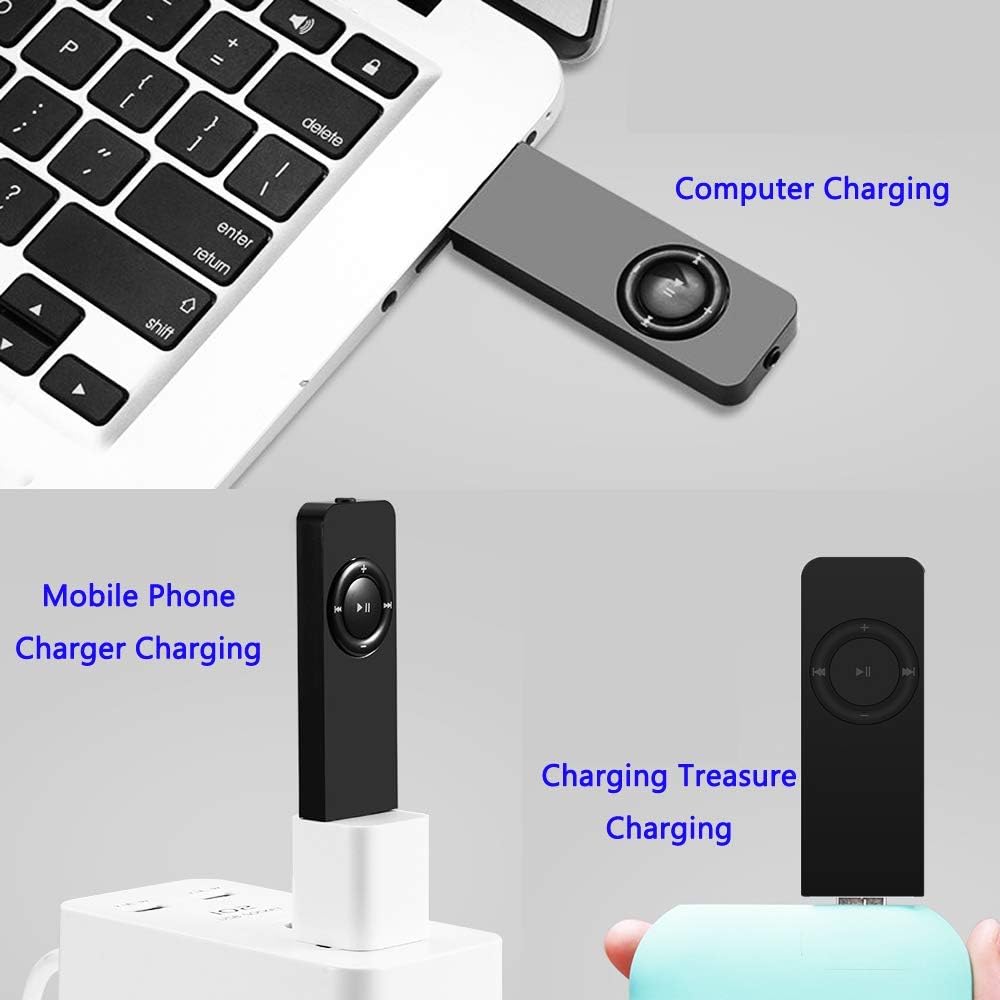
- Connect the MP3 player to a USB power source (e.g., computer USB port, mobile phone charger, or power bank) using a compatible USB cable.
- Upon entering the charging state, the red light will flash.
- Once charging is complete, the red light will remain steadily on.

Obrázek 4: Various methods for charging the Dyzeryk JS-01 MP3 Player, including connection to a computer, a mobile phone charger, and a portable power bank.
Údržba
- Uchovávejte zařízení v suchu. Zabraňte vystavení vlhkosti nebo tekutinám.
- Zařízení čistěte měkkým, suchým hadříkem. Nepoužívejte agresivní chemikálie ani abrazivní čisticí prostředky.
- Zabraňte pádu zařízení nebo jeho vystavení silným nárazům.
- Pokud přehrávač nepoužíváte, skladujte jej na chladném a suchém místě.
Odstraňování problémů
| Problém | Možná příčina | Řešení |
|---|---|---|
| Přehrávač se nezapne. | Baterie je vybitá. | Charge the device fully. Ensure the ON/OFF switch is in the ON position. |
| Player stops playing and shuts down. | Slabá baterie. | Zařízení ihned nabijte. |
| Ze sluchátek není slyšet žádný zvuk. | Earphones not properly connected; Volume too low; Corrupted audio file. | Ensure earphones are fully plugged in. Increase volume. Try a different audio file. |
| Nelze přenést files hráčem. | Incorrect USB connection; Driver issue; Player not recognized by computer. | Ensure the USB cable is securely connected. Try a different USB port or cable. Restart your computer and the player. |
| Audio playback is choppy or distorted. | Poškozený zvuk file; Low battery; Interference. | Zkuste přehrát jiný zvuk file. Charge the device. Avoid strong electromagnetic interference. |
Specifikace
| Funkce | Detail |
|---|---|
| Model | JS-01 |
| Rozměry (D x Š x V) | 3.3 x 0.9 x 0.4 palce (přibližně) |
| Hmotnost | 33.2 g (0.634 uncí) |
| Vnitřní paměť | 4 GB |
| Rozšiřitelná paměť | Podporuje TF kartu až do 64 GB |
| Kapacita baterie | 180 XNUMX mAh |
| Music Formats Supported | MP3, WMA, WAV |
| Konektivita | Hi-Speed USB 2.0 (for data transfer and charging) |
| Životnost baterie | Approximately 10 Hours (playback time, actual results may vary) |
Záruka a podpora
For information regarding warranty coverage, technical support, or service inquiries for your Dyzeryk MP3 Player (Model JS-01), please refer to the warranty card included with your product packaging or visit the official Dyzeryk website. This manual does not contain specific warranty terms or direct support contact information.
Ask a question about this manual
Ask about setup, troubleshooting, compatibility, parts, safety, or missing instructions. Manuals+ will review the question and use this page’s manual context to help answer it.