
1. Úvod
Thank you for choosing the AZDOME GS63H 4K Dash Cam. This device is designed to provide high-quality video recording of your journeys, offering enhanced safety and peace of mind. With advanced features such as 4K UHD resolution, built-in WiFi, GPS tracking, superior night vision, and comprehensive parking modes, the GS63H is a reliable companion for every drive.
This manual provides detailed instructions for setting up, operating, and maintaining your dash cam to ensure optimal performance.

The AZDOME GS63H 4K Dash Cam, showcasing its compact design, suction mount, and connectivity with a smartphone application displaying GPS and video feed.
2. Co je v krabici
Zkontrolujte prosím obsah balení a ujistěte se, že jsou v něm přítomny všechny položky:
- AZDOME GS63H Dash Cam x 1
- Car Mount (Suction Bracket) x 1
- Nabíječka do auta x 1
- Mini USB Charging Cable (3.5m/12ft) x 1
- Páčidlo x 1
- Kabelové spony x 5
- Návod k použití x 1

An illustration showing all components included in the AZDOME GS63H Dash Cam package.
3. Nastavení
3.1 Montáž palubní kamery
- Vyčistěte oblast čelního skla, kam chcete namontovat palubní kameru.
- Připevněte přísavný držák k palubní kameře.
- Pevně přitlačte přísavku k čelnímu sklu a zajistěte ji přepnutím páčky.
- Upravte úhel kamery pro zajištění jasného obrazu view cesty před sebou.
3.2 Vložení karty MicroSD
The AZDOME GS63H requires a MicroSD card (not included) for recording. It supports cards up to 128GB. Ensure the card is a high-speed Class 10 or U3 for optimal performance.
- Najděte slot pro kartu MicroSD na boku palubní kamery.
- Vložte kartu MicroSD zlatými kontakty směrem k zadní straně fotoaparátu, dokud nezacvakne.
- It is recommended to format the MicroSD card within the dash cam's settings before first use and periodically thereafter to maintain performance.
3.3 Připojení napájení
- Connect the Mini USB Charging Cable to the dash cam's power port.
- Zapojte autonabíječku do zásuvky zapalovače cigaret ve vozidle.
- Route the cable neatly along the windshield and dashboard using the provided pry tool and cable clips to conceal it and prevent obstruction.

Visual guide for easy installation, demonstrating cable routing and camera placement.
4. Návod k obsluze
4.1 4K UHD nahrávání
The AZDOME GS63H records videos at 2880x2160P, providing exceptional detail and clarity. This 4K resolution captures more information than standard HD, which can be crucial for identifying license plates or other important details.
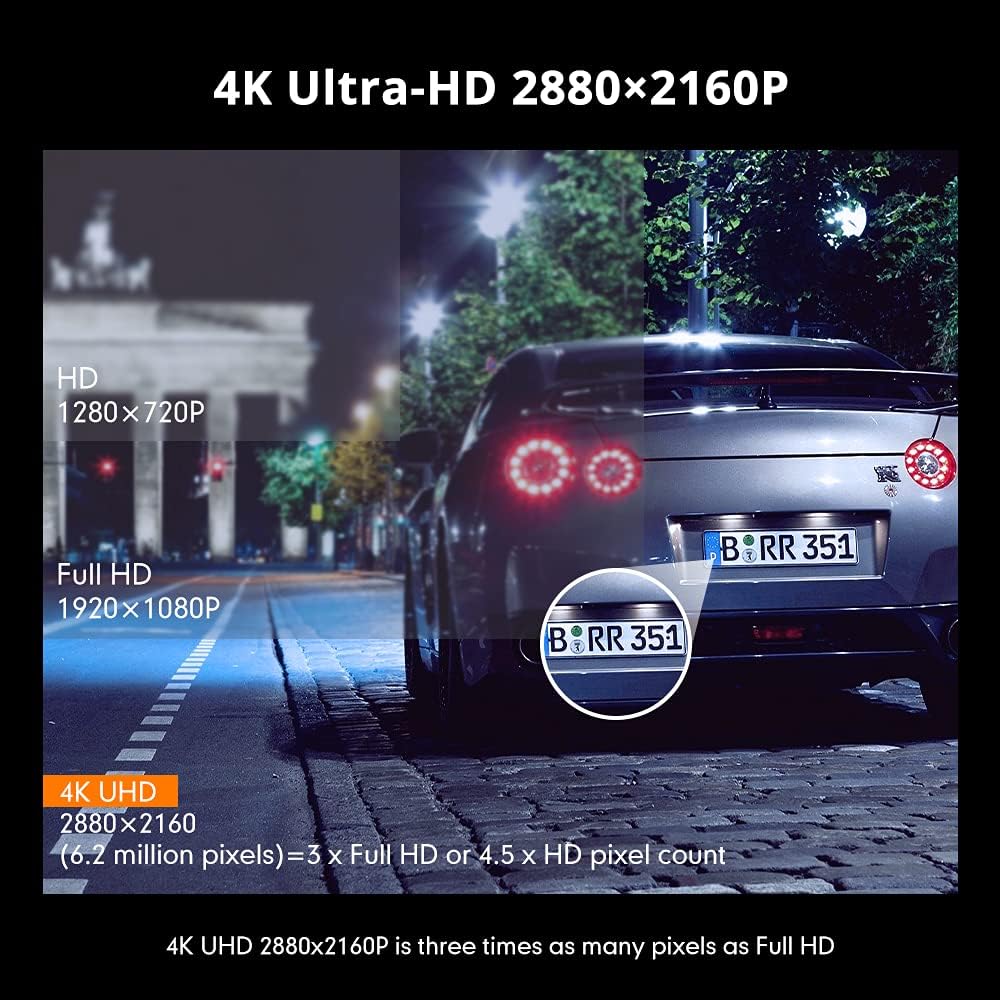
A visual comparison highlighting the superior detail captured by 4K UHD resolution compared to lower resolutions.
4.2 Built-in WiFi & AZDOME App
Connect your dash cam to your smartphone via built-in WiFi to easily view, share, and download recorded videos in real-time. The AZDOME APP allows for immediate playback of footage, especially useful after an emergency incident.

The AZDOME app interface on a smartphone, demonstrating real-time video streaming and download options via WiFi.
4.3 Vestavěná GPS
The integrated GPS module allows the AZDOME GPS Player software (available for PC/Mac) to display your driving speed, route, latitude, and longitude alongside the recorded video. This provides comprehensive data for incident analysis and route tracking.

A laptop displaying the AZDOME GPS Player, showing synchronized video footage with map data, speed, and coordinates.
4.4 Super noční vidění
Equipped with WDR (Wide Dynamic Range) technology and a SONY IMX335 sensor, the GS63H delivers superior night vision capabilities. It clearly records details in both day and night environments, ensuring visibility in low-light conditions.

An illustration demonstrating the effectiveness of Super Night Vision and WDR in various lighting conditions, from dark to bright.
4.5 24hodinový parkovací režim
The dash cam offers three parking modes to protect your vehicle when parked (requires a 3-lead Hardwire Kit with 1.5A output, ASIN: B09R1CGSPZ):
- Parkovací režim detekce kolize: The built-in G-sensor detects collisions and automatically locks the video footage.
- Parkovací režim detekce pohybu: Kamera automaticky spustí nahrávání, jakmile detekuje pohyb v okolí vašeho vozidla.
- Režim časosběrného parkování: Records continuously for 24 hours by taking still pictures at set intervals and merging them into a video, saving storage space.

Visual representation of the dash cam's multifunctional capabilities, including motion detection, G-sensor impact detection, and parking monitoring.
4.6 Nahrávání ve smyčce
When the MicroSD card reaches its storage limit, the dash cam will automatically overwrite the oldest unlocked footage. This ensures continuous recording without manual intervention. You can set loop recording segments to 1, 3, or 5 minutes.

An illustration detailing the loop recording feature, showing how the dash cam continuously records by overwriting older files.
4.7 Oficiální video produktu
Oficiální video s produktemasing the AZDOME GS63H 4K Ultra HD Dash Cam's features, including GPS and WiFi capabilities.
5. Údržba
5.1 Správa karet MicroSD
Regularly format your MicroSD card (at least once a month) to prevent data corruption and ensure smooth recording. Back up any important footage před formátováním.
5.2 Čištění palubní kamery
Use a soft, dry cloth to clean the dash cam's lens and screen. Avoid using abrasive cleaners or solvents that could damage the device. Keep the suction cup clean for a secure mount.
6. Řešení problémů
If you encounter any issues with your AZDOME GS63H Dash Cam, please refer to the following common solutions:
- Kamera se nezapíná: Ensure the car charger is properly connected to both the dash cam and the vehicle's power outlet. Check the vehicle's cigarette lighter fuse.
- Problémy s nahráváním: Verify that a high-speed MicroSD card (Class 10 or U3) is inserted and formatted correctly. The card might be full; enable loop recording or format it.
- GPS signál nenalezen: Ujistěte se, že palubní kamera má volný view of the sky. Avoid mounting near metallic objects that could interfere with the signal.
- Problémy s připojením k Wi-Fi: Make sure the AZDOME app is updated to the latest version. Keep your smartphone within 9 feet of the dash cam for a stable connection.
- Problémy s kvalitou videa: Check the selected recording resolution in the settings. Ensure the lens is clean and free from smudges.
For more complex issues or persistent problems, please contact AZDOME customer support.
7. Specifikace
| Funkce | Detail |
|---|---|
| Rozměry produktu | 7.5 x 2.8 x 5.5 palce |
| Hmotnost položky | 15.5 unce |
| Číslo modelu položky | GS63H |
| Baterie | Vyžadovány 1 lithium -polymerové baterie (součástí balení) |
| Technologie připojení | Wi-Fi, USB |
| Speciální funkce | Built-In WiFi, Night Vision, App Control, Automatic Incident Detection, Built-In GPS |
| Barva | Černý |
| Výrobce | AZDOME Tech |
| Datum první dostupnosti | 22. května 2023 |
| Rozlišení záznamu videa | 1080p, 2160p |
| Typ montáže | Držák na čelní sklo |
8. Záruka a podpora
AZDOME GS63H dash cam provides a Záruka 12 měsíců from the date of purchase. We are committed to providing excellent customer service and technical support.
For any problems or inquiries regarding your product, please do not hesitate to contact our technical support team. We offer 24/7 technická podpora.
E-mail: service@azdomevip.com
The AZDOME R&D team strives to provide feedback within 24 hours on working days.

Contact information for AZDOME customer support, including email and phone number.