
1. Úvod
Thank you for choosing the Edifier WH950NB Wireless Headphones. These headphones are designed to provide a high-quality audio experience with advanced features such as Active Noise Cancellation, Hi-Res Audio support, and Google Fast Pairing. This manual provides detailed instructions for setup, operation, and maintenance to ensure optimal performance and longevity of your device.
2. Obsah balení
Ujistěte se prosím, že balení obsahuje všechny položky:
- Edifier WH950NB Wireless Headphones
- Audio kabel
- USB nabíjecí kabel
- Přenosné pouzdro (pokud je součástí vašeho konkrétního modelu)
- Uživatelská příručka (tento dokument)
3. Konec produktuview
Familiarize yourself with the main components and controls of your Edifier WH950NB headphones.

Obrázek 1: A pair of black Edifier WH950NB over-ear wireless headphones, showcasinjejich elegantní design.
Klíčové vlastnosti:
- Hi-Res Audio Wireless: Supports LDAC certification for detailed and clear sound.
- Aktivní potlačení hluku (ANC): Two modes for ambient sound or wind reduction.
- Křišťálově čisté hovory: Integrated 4-microphone system for enhanced voice clarity.
- 40mm dynamický měnič: Delivers natural and balanced audio.
- Rychlé párování Google: Quick and effortless Bluetooth pairing with Android devices.
- Dlouhá doba hraní: Až 55 hodin přehrávání.
- Připojení dvou zařízení: Připojte se ke dvěma zařízením současně.
4. Nastavení
4.1 Nabíjení sluchátek
- Připojte nabíjecí kabel USB k nabíjecímu portu na sluchátkách.
- Druhý konec kabelu připojte k napájecímu adaptéru USB (není součástí balení) nebo k portu USB počítače.
- Kontrolka bude ukazovat stav nabíjení. Úplné nabití obvykle trvá přibližně 2 hodiny.
- Desetiminutové nabíjení vydrží až 7 hodin přehrávání.

Obrázek 2: This image emphasizes the headphones' extended playtime and fast charging capability, providing 7 hours of listening from just 10 minutes of charging.
4.2 Párování Bluetooth
- Ujistěte se, že jsou sluchátka vypnutá.
- Stiskněte a podržte tlačítko napájení, dokud kontrolka nezačne rychle blikat, což signalizuje režim párování.
- Na svém zařízení (chytrý telefon, tablet, počítač) povolte Bluetooth a vyhledejte dostupná zařízení.
- Select "Edifier WH950NB" from the list of devices.
- Po připojení kontrolka přestane blikat a zůstane svítit modře.
Rychlé párování Google:
For Android devices, the WH950NB supports Google Fast Pairing. Simply turn on the headphones near your Android device, and a pairing notification will appear on your screen for quick connection.

Obrázek 3: The headphones are shown alongside a smartphone, indicating the Google Fast Pairing feature for quick and effortless Bluetooth connection with Android devices.
5. Návod k obsluze
5.1 Aktivní potlačení hluku (ANC) a okolní zvuk
The WH950NB offers two active noise cancellation modes and an ambient sound mode to adapt to your environment.
- Press the ANC button to cycle through modes: ANC On, Ambient Sound, and Standard (ANC Off).
- ANC zapnuto: Snižuje vnější hluk a zajišťuje pohlcující poslechový zážitek.
- Okolní zvuk: Umožňuje vám slyšet své okolí při poslechu zvuku.
- Norma: Disables noise cancellation and ambient sound.

Obrázek 4: This image demonstrates the active noise cancellation feature and the 4-microphone system designed for clear voice calls, effectively reducing environmental noise for both listening and speaking.
5.2 Funkce volání
The integrated 4-microphone system ensures clear voice calls.
- Přijmout/ukončit hovor: Stiskněte jednou multifunkční tlačítko.
- Odmítnout hovor: Stiskněte a podržte multifunkční tlačítko po dobu 2 sekund.
5.3 Připojení dvou zařízení
The headphones can be connected to two Bluetooth devices simultaneously.
- Připojte sluchátka k prvnímu zařízení, jak je popsáno v části 4.2.
- Disconnect the headphones from the first device (or put them back into pairing mode).
- Připojte sluchátka k druhému zařízení.
- Reconnect the headphones to the first device. The headphones will now be connected to both devices.
- Audio playback will switch automatically between devices.
5.4 Edifier Connect App
Download the Edifier Connect app from your device's app store to unlock additional features and customization options, including:
- Equalizer (EQ) adjustments.
- ANC mode customization.
- Aktualizace firmwaru.

Obrázek 5: This image illustrates the headphones' support for Hi-Res Audio Wireless with LDAC certification, allowing for detailed and clear sound. Users can customize their audio experience via the Edifier app.
6. Údržba a péče
Správná údržba zajistí dlouhou životnost a výkon vašich sluchátek.
- Clean the headphones regularly with a soft, dry cloth. Do not use liquid cleaners.
- Avoid exposing the headphones to extreme temperatures, humidity, or dust.
- Store the headphones in their carrying case when not in use to protect them from damage.
- Nepokoušejte se sluchátka rozebírat ani upravovat, jinak by došlo ke ztrátě záruky.
- Udržujte nabíjecí port bez nečistot.
7. Řešení problémů
Pokud narazíte na problémy, podívejte se na následující běžné problémy a jejich řešení.
| Problém | Řešení |
|---|---|
| Žádný zvuk | Ensure headphones are charged and connected. Check volume levels on both headphones and device. |
| Nelze spárovat přes Bluetooth | Ensure headphones are in pairing mode. Turn off and on Bluetooth on your device. Clear previous Bluetooth connections. |
| Potlačení hluku není účinné | Ensure ANC mode is activated. Adjust headphone fit for a proper seal. |
| Špatná kvalita hovoru | Ensure microphone is not obstructed. Move to a quieter environment. |
| Sluchátka se nenabíjejí | Check charging cable and power source. Ensure charging port is clean. |
8. Specifikace
Technical specifications for the Edifier WH950NB Wireless Headphones.
- Model: WH950NB
- Verze Bluetooth: 5.3
- Ovladač zvuku: 40mm dynamický ovladač
- Frekvenční odezva: 20 Hz - 20 kHz
- Doba nabíjení: Přibližně 2 hodiny
- Prázdno: Up to 55 hours (ANC off), up to 34 hours (ANC on)
- Konektivita: Bluetooth 5.3, 3.5mm audio konektor
- Kontrola hluku: Aktivní potlačení hluku
- Hmotnost: 1.54 liber (cca)
- Materiál: Plast
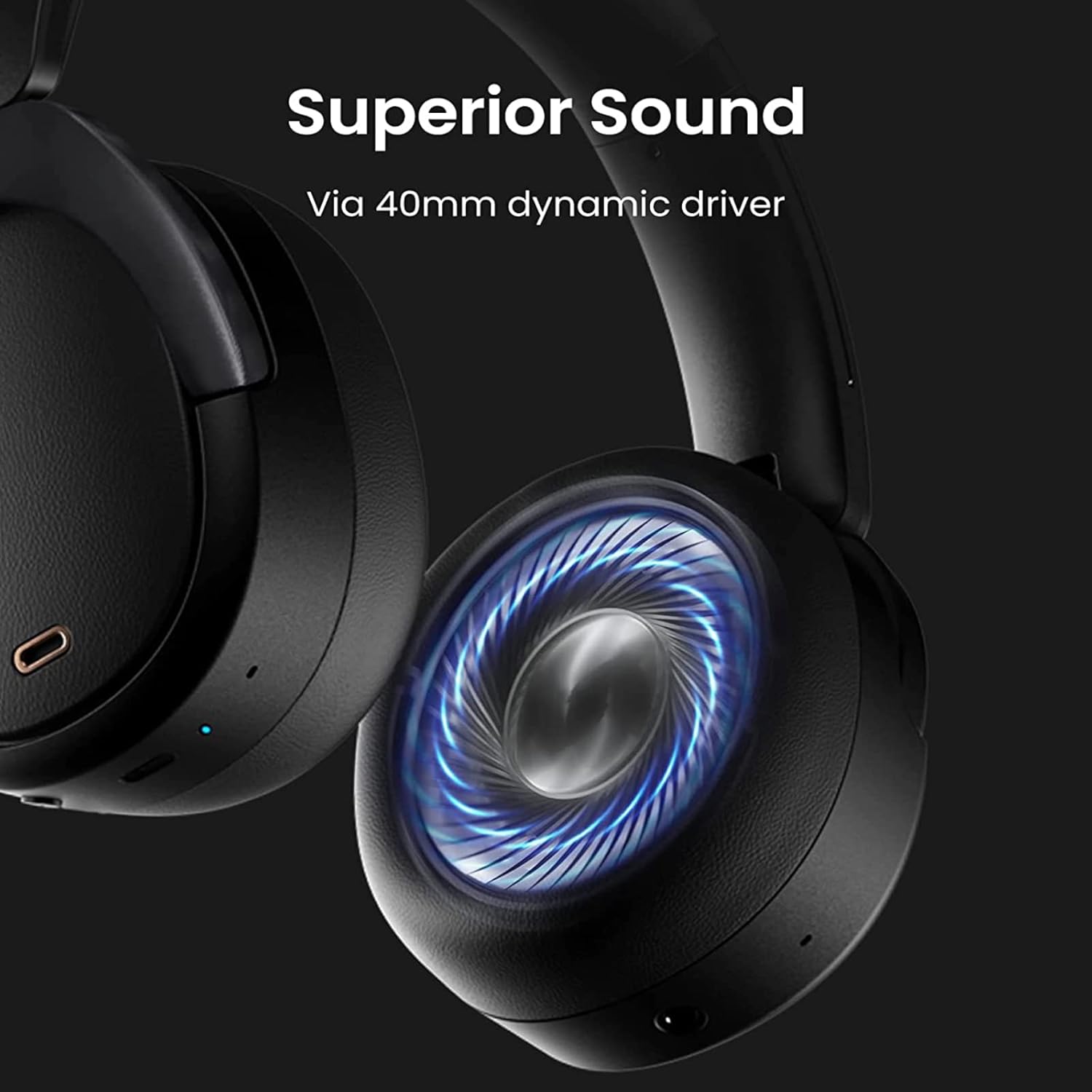
Obrázek 6: Detailní záběr view of the headphone's ear cup, highlighting the 40mm composite titanium film dynamic driver responsible for delivering exceptional and balanced audio across all music genres.
9. Bezpečnostní informace
Přečtěte si prosím a dodržujte tyto bezpečnostní pokyny:
- Do not use headphones at high volume for extended periods to prevent hearing damage.
- Nepoužívejte sluchátka v situacích, kdy by neschopnost slyšet okolní zvuky mohla být nebezpečná (např. při řízení, jízdě na kole, chůzi v dopravní zácpě).
- Chraňte výrobek před vodou a vlhkostí.
- Výrobek a jeho baterii zlikvidujte zodpovědně v souladu s místními předpisy.
10. Záruka a podpora
Pro informace o záruce, technickou podporu nebo servisní dotazy se prosím obraťte na oficiální stránky Edifier. webnebo se obraťte přímo na jejich zákaznický servis. Uschovejte si doklad o koupi pro případ reklamace.