
1. Úvod a konecview
The DIHOOL Adjustable Voltage Protector DHOV3-110V is an advanced electrical protection device designed to safeguard your valuable appliances and electrical systems from various power anomalies. It provides comprehensive protection against overvoltage, podpaltage, and overcurrent conditions, ensuring the stability and longevity of your connected equipment. This device features customizable settings and an intelligent automatic recovery function for seamless operation.

Obrázek: Overview of the DIHOOL Voltage Protector's capabilities.
2. Bezpečnostní informace
Your safety is paramount. The DIHOOL Voltage Protector is constructed with a high-quality, fire-resistant polycarbonate material to minimize fire risks. Always adhere to local electrical codes and safety standards during installation and operation. It is recommended that installation be performed by a qualified electrician to ensure proper wiring and functionality. Do not attempt to open or modify the device.

Image: Device casing made from flame-retardant material for enhanced safety.
3. Vlastnosti produktu
- 12 Customizable Presets: Precisely adjust overvoltage (140-300V), undervoltage (70-200V), and overcurrent (1-63A) settings, along with other parameters, using the intuitive interface.
- Maximální bezpečnost: The device's casing is made from high-quality, fire-resistant polycarbonate material, rigorously tested to prevent fire hazards.
- All-in-One Protection: Provides comprehensive protection against overcurrent, overvoltage, a podvoltage, automatically disconnecting power to prevent damage.
- Smart Automatic Recovery: Automatically restores electricity supply once power conditions stabilize and return to safe, normal levels, requiring no manual intervention.
- Universal DIN Rail Mounting: Features a quick-fix design for easy installation on standard 35mm DIN rails, ideal for electrical panels and industrial control cabinets.
- Široká aplikace: Protects a broad range of equipment, including industrial motors, home lighting systems, gaming PCs, and kitchen appliances from sudden power surges and fluctuations.

Image: Key features of the DIHOOL Smart Circuit Breaker.

Image: Comparison of Smart Circuit Breaker features versus a standard Circuit Breaker.
4. Obsah balení
Po otevření balení se prosím ujistěte, že jsou všechny součásti přítomny a nepoškozené:
- DIHOOL Adjustable Voltage Protector Unit
- 4 Terminal Connectors
- DIN lišta (80 mm)
- Montážní šrouby
- Uživatelská příručka (tento dokument)

Image: Contents included in the product package.
5. Specifikace
Refer to the table below for detailed technical parameters and default settings of the DIHOOL Adjustable Voltage Chránič.
| Parametr | Hodnota |
|---|---|
| Rated Supply Voltage | AC 110-240V |
| svtage Setting Range (U) | AC 70-300V |
| Current Setting Range (A) | 1-63A |
| Jmenovitá frekvence | 50/60 Hz |
| svtage Error Range | ±5V |
| U And <U Trip Delay | 0.1-60.0s |
| Delay Setting Range | 1 s - 600 s |
| Jmenovitý Insulation Voltage | 400V |
| Výstupní kontakt | 1 Č |
| Elektrická životnost | 10000 |
| Stupeň ochrany | IP20 |
| Stupeň znečištění | 3 |
| Nadmořská výška | ≤2000 m |
| Provozní teplota | -50°C ~ +55°C at 40°C ≤ 50% |
| Vlhkost | ≤ 50 % |
| Skladovací teplota | -30 °C ~ +70 °C |
| Spotřeba energie | ≤2W |
| Způsob připojení | Up Input - Down Output |
Poznámka: Voltage protector is an electronic product with a built-in capacitor. It needs to be powered on within 1 year; otherwise, it is easy to be damaged.
| Technický parametr | Rozsah nastavení | Krok | Výchozí |
|---|---|---|---|
| Doba zpoždění zapnutí | 1-600s | A01 | 5s |
| PřepětítagHodnota jízdy e | 140-300V | A02 | 260V |
| Přepětítage Recovery Value | 135-295V | A03 | 255V |
| PřepětítagDoba zotavení | 1-600s | A04 | 30s |
| Přepětítage Tripping Time | 0.1-60.0s | A05 | 1.0s |
| PodpětítagHodnota jízdy e | 70-200V | A06 | 90V |
| Podpětítage Recovery Value | 75-215V | A07 | 95V |
| PodpětítagDoba zotavení | 1-600s | A08 | 30s |
| Podpětítage Tripping Time | 0.1-60.0s | A09 | 1.0s |
| Hodnota nadproudové ochrany | 1-63A | A10 | 63.0A |
| Doba zotavení z nadproudu | 1-600s | A11 | 30s |
| Overcurrent Tripping Time | 0.1-60.0s | A12 | 1.0s |
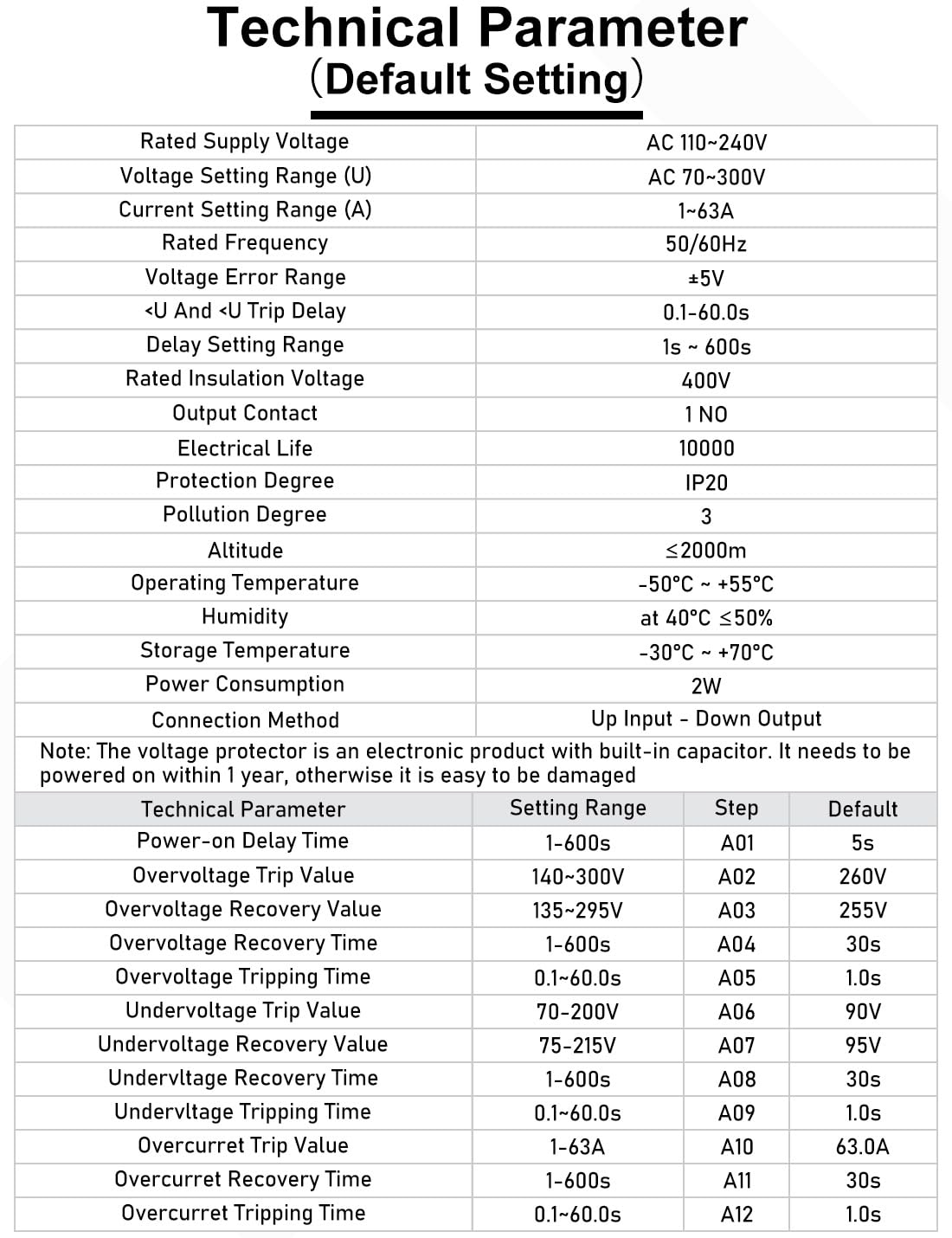
Image: Technical parameters and default settings table.

Image: Device dimensions and key default settings.
6. Nastavení a instalace
The DIHOOL Voltage Protector is designed for easy installation on standard 35mm DIN rails. Ensure the main power supply is disconnected before beginning installation.
6.1 Montáž
- Locate a suitable position on a standard 35mm DIN rail within your electrical panel or control cabinet.
- Align the device with the DIN rail.
- Press the device firmly onto the rail until it clicks into place, ensuring it is securely fastened. The quick-fix design allows for easy attachment and removal.

Image: DIN rail mounting procedure.
6.2 Zapojení
- Ujistěte se, že je hlavní napájení VYPNUTÉ.
- Connect the incoming power lines (Line and Neutral) to the 'IN' terminals at the top of the device.
- Connect the outgoing load lines (Line and Neutral) to the 'OUT' terminals at the bottom of the device.
- Ujistěte se, že všechna připojení jsou pevná a bezpečná, abyste zabránili uvolnění kontaktů a přehřátí.
The connection method is 'Up Input - Down Output'.

Image: Quick wiring connections for the device.
7. Návod k obsluze
The device features an intuitive interface with 'SET', 'Up', and 'Down' buttons for parameter adjustment and an LED display for real-time monitoring.

Image: LED display screen showing real-time voltage a aktuální.
7.1 První zapnutí
Upon initial power-on, the smart circuit breaker supports 120V/240V. The default overvoltage setting is 260V and undervoltage je 90V.
7.2 Function Setting Instructions
To adjust parameters, follow these steps:
- Stiskněte a podržte SOUBOR button for 3 seconds to enter the setting mode. The display will show the current parameter (e.g., Power-on Delay Time).
- Použijte Up (▲) a Dolů (▼) buttons to adjust the value of the displayed parameter.
- Stiskněte tlačítko SOUBOR button briefly to cycle through the different adjustable parameters (A01 to A12).
- After adjusting all desired parameters, press and hold the SOUBOR button again for 3 seconds to save the settings and exit the setting mode. The display will show 'SAVE' or similar confirmation.

Image: Step-by-step guide for function settings.
Důležitá poznámka:
- For 110V/120V circuits: Adjust overvoltage parameters A02 and A03 to 140V and 135V respectively.
- For 230V/240V circuits: Adjust undervoltage parameters A06 and A07 to 220V and 225V respectively.
- Parameters are user-adjustable as needed to suit specific requirements.
8. Údržba
The DIHOOL Adjustable Voltage Protector is designed for minimal maintenance. To ensure optimal performance and longevity:
- Udržujte zařízení čisté a bez prachu a nečistot. K čištění používejte suchý, měkký hadřík.
- Pravidelně kontrolujte kabeláž, abyste se ujistili, že je pevná a bezpečná.
- Na zařízení nepoužívejte abrazivní čisticí prostředky nebo rozpouštědla.
- Nepokoušejte se otevřít casing or repair the device yourself. This may void the warranty and pose a safety risk.
9. Řešení problémů
Tato část obsahuje pokyny k řešení běžných problémů, se kterými se můžete setkat.
9.1 Zařízení se nezapíná
- Check the incoming power supply to ensure it is active.
- Zkontrolujte, zda jsou všechna zapojení kabeláže správná a bezpečná.
- Ensure the device has been powered on within one year of purchase, as prolonged unpowered storage can affect internal components.
9.2 Frequent Tripping
- Review přepětí vašeho setutage, podpaltage, and overcurrent parameters. They might be set too sensitively for your electrical environment.
- Check the connected load for any faults or excessive current draw.
- Monitor the incoming voltage and current for frequent fluctuations that might be triggering the protection.
9.3 Automatic Recovery Failure
- Ensure the power conditions (voltage and current) have returned to within the safe, set parameters. The device will only recover once stable conditions are detected.
- Check the recovery time setting (e.g., Overvoltage Recovery Time, Undervoltage Recovery Time, Overcurrent Recovery Time) to ensure it is not set to an excessively long duration.
If issues persist after performing these checks, please contact customer support or consult a qualified electrician.
10. Záruka a podpora
For detailed warranty information, including coverage period and terms, please refer to the documentation provided with your purchase or contact the seller directly. DIHOOL is committed to providing reliable products and customer satisfaction.
For technical assistance, product inquiries, or support, please reach out to DIHOOL customer service through the contact information provided on the product packaging or the official DIHOOL webmísto.