
1. Úvod
The Crestron HD-CONV-USB-300 is a versatile USB converter designed to seamlessly integrate HDMI and analog audio sources into a USB stream. This device facilitates the capture and conversion of high-definition video and audio signals for various applications, including conferencing, streaming, and recording. This manual provides essential information for the proper installation, operation, and maintenance of your HD-CONV-USB-300 converter.
2. Bezpečnostní informace
Please read and understand all safety instructions before operating this device to prevent injury or damage.
- Moc: Use only the power adapter supplied with the unit. Ensure the power source matches the voltage požadavky.
- Větrání: Do not block ventilation openings. Install the device in a location with adequate airflow.
- vlhkost: Nevystavujte jednotku dešti, vlhkosti ani ji neponořujte do vody.
- Teplo: Udržujte jednotku mimo dosah zdrojů tepla, jako jsou radiátory, topná tělesa, kamna nebo jiná zařízení produkující teplo.
- Čištění: Disconnect power before cleaning. Use a dry cloth only. Do not use liquid cleaners or aerosol sprays.
- Servis: Nepokoušejte se tento výrobek opravit sami. Veškerý servis svěřte kvalifikovanému servisnímu personálu.
3. Obsah balení
Ověřte, zda jsou v balení přítomny všechny položky:
- 1x Crestron HD-CONV-USB-300 USB Converter
- 1x napájecí adaptér
- 1x USB Cable (Type A to Type B)
- 1x Quick Start Guide (or similar documentation)
4. Konec produktuview
The HD-CONV-USB-300 features multiple input and output ports for flexible connectivity.
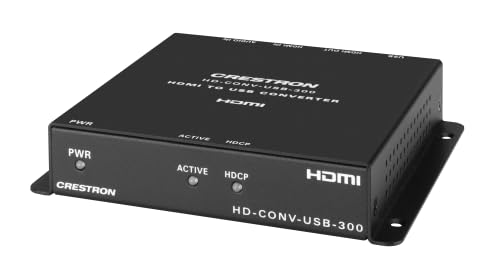
Obrázek 1: Přední strana view of the Crestron HD-CONV-USB-300 USB Converter. This image shows the compact design and the Crestron branding on the device.
4.1. Přední panel
- Stavová LED: Indikuje napájení a provozní stav.
- Tlačítko pro výběr vstupu: Toggles between HDMI and Analog audio inputs.
4.2. Zadní panel
- HDMI vstup: Connect your HDMI video and audio source here.
- Analogový audio vstup (3.5 mm): Připojte analogové zdroje zvuku.
- USB Output (Type B): Connect to your computer for data transfer.
- Vstupní napájení (DC 5V): Připojte dodaný napájecí adaptér.
5. Nastavení
Follow these steps to set up your Crestron HD-CONV-USB-300 converter:
- Připojení zdroje HDMI: Connect an HDMI cable from your video source (e.g., camera, media player) to the Vstup HDMI port on the HD-CONV-USB-300.
- Connect Analog Audio Source (Optional): If using an analog audio source, connect a 3.5mm audio cable from your audio device to the Analogový audio vstup přístav.
- Připojení k počítači: Connect the supplied USB cable from the USB Output (Type B) port on the converter to an available USB port on your computer.
- Připojte napájení: Plug the supplied power adapter into the Napájení (DC 5V) port on the converter, then plug the adapter into a power outlet. The Status LED should illuminate.
- Instalace ovladače: The HD-CONV-USB-300 is typically plug-and-play and does not require specific drivers for most operating systems (Windows, macOS, Linux). It will be recognized as a standard USB Video Class (UVC) and USB Audio Class (UAC) device.
- Konfigurační software: Open your preferred video conferencing, streaming, or recording software (e.g., OBS Studio, Zoom, Microsoft Teams). In the software's settings, select the Crestron HD-CONV-USB-300 as your video and audio input device.
6. Návod k obsluze
Once the device is set up, follow these steps for operation:
- Zapnutí: Ensure the converter is powered on and connected to your computer. The Status LED should be solid green.
- Vyberte vstup: Stiskněte tlačítko Tlačítko pro výběr vstupu on the front panel to switch between HDMI and Analog audio inputs. The Status LED may change color or blink to indicate the active input (refer to specific model documentation for LED behavior).
- Verify Input in Software: In your chosen software, confirm that the video and audio from your selected source are being received. Adjust any necessary settings within the software, such as resolution, frame rate, or audio levels.
- Spustit aplikaci: Begin your video conference, streaming session, or recording.
Poznámka: The quality of the captured video and audio will depend on the source device and the capabilities of your computer and software.
7. Údržba
Proper maintenance ensures the longevity and optimal performance of your HD-CONV-USB-300.
- Čištění: Disconnect the power before cleaning. Use a soft, dry, lint-free cloth to wipe the exterior of the device. Do not use abrasive cleaners, solvents, or chemical sprays.
- Skladování: If storing the device for an extended period, disconnect all cables and store it in a cool, dry place away from direct sunlight and extreme temperatures.
- Správa kabelů: Ensure all cables are routed neatly and are not under strain or sharply bent to prevent damage.
8. Řešení problémů
If you encounter issues with your HD-CONV-USB-300, refer to the following common problems and solutions:
| Problém | Možná příčina | Řešení |
|---|---|---|
| No power / Status LED off | Napájecí adaptér není připojen nebo je vadný. | Ensure the power adapter is securely connected to the converter and a working power outlet. Try a different outlet. |
| No video output in software | Incorrect input selected; HDMI cable issue; Software not configured correctly. |
|
| No audio output in software | Incorrect input selected; Audio cable issue; Software not configured correctly; Source audio settings. |
|
| Computer does not recognize device | USB cable issue; USB port issue; Driver conflict. |
|
9. Specifikace
| Číslo modelu | 6512272 |
| Značka | Crestron |
| Rozhraní | HDMI, USB, Analog Audio (3.5mm) |
| Rozměry (D x Š x V) | 10.69 x 25.9 x 29.4 cm |
| Hmotnost | 730 gramů |
| Výrobce | Crestron |
| Date of Availability | 18. května 2023 |
10. Informace o záruce
Crestron products are typically covered by a limited manufacturer's warranty. The specific terms and duration of the warranty may vary by region and product type. For detailed warranty information, please refer to the warranty card included with your product or visit the official Crestron webmísto.
Poznámka: Uschovejte si doklad o koupi pro záruční reklamaci.
11. Informace o podpoře
For technical support, product updates, or additional resources, please visit the official Crestron webmísto:
You may also find FAQs and community forums on their support pages.