
Zavedení
Welcome to the user manual for your Qubo NEO2NW mobile phone. This device is specifically designed for seniors, featuring large buttons, a clear display, and essential functions for easy communication. Please read this manual carefully to understand how to use your phone safely and effectively.
Konec produktuview
The Qubo NEO2NW is a user-friendly flip phone equipped with features tailored for convenience and safety.

Obraz: The Qubo NEO2NW flip phone in its open position, displaying its large, easy-to-read keypad and clear screen. A charging dock is visible in the background, indicating its charging method.

Obraz: A black flip phone displaying the digital time '22:10' on its screen. This image provides multiple views of the phone, highlighting its large keypad and clear display.
Klíčové vlastnosti:
- Large buttons for easy dialing and navigation.
- Clear 2.4-inch display with adjustable font size.
- SOS emergency button for quick contact with pre-set numbers.
- Loud ringtone and speaker for improved audibility.
- Charging dock for convenient and stable charging.
- Basic functions: Call, SMS, Phonebook, Alarm Clock, Camera, FM Radio, Torch.
Nastavení
1. Vybalení a komponenty
Carefully unpack your Qubo NEO2NW phone and ensure all components are present.

Obraz: Konecview of the box contents, including the Qubo NEO2NW phone, its charging dock, a USB cable, a power adapter, the battery, and printed user manuals.
2. Instalace SIM karty a baterie
- Odstraňte zadní kryt telefonu.
- Insert your Micro SIM card(s) into the designated slot(s) (supports Dual SIM).
- If desired, insert a MicroSD memory card (up to 32GB) into the memory card slot.
- Insert the 800mAh Lithium-ion battery, ensuring the contacts align.
- Nasaďte zadní kryt.
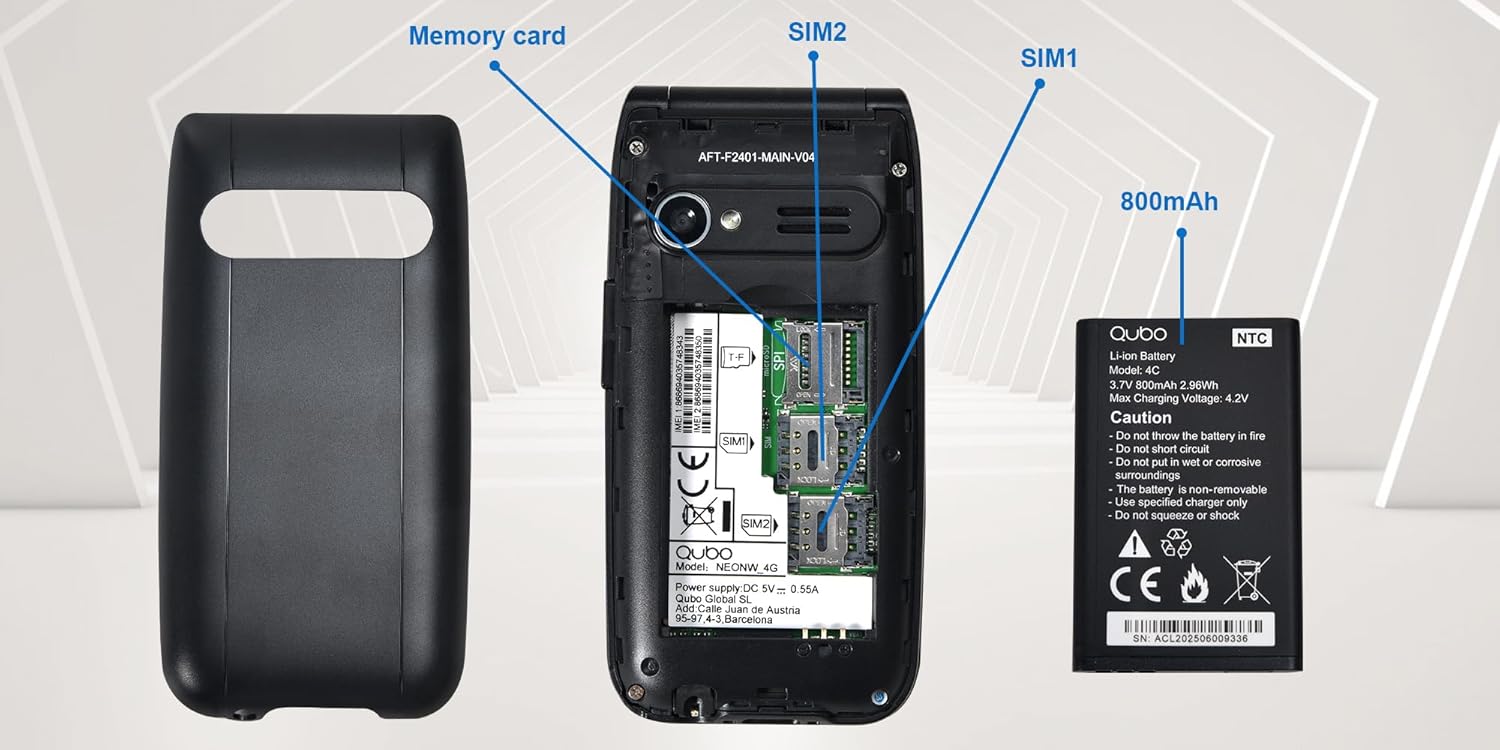
Obraz: Detailní view of the phone's interior, highlighting the slots for two Micro SIM cards (SIM1, SIM2) and a memory card. The 800mAh battery is shown separately.
3. Nabíjení telefonu
Před prvním použitím telefon plně nabijte.
- Connect the USB Type-C cable to the phone and the power adapter. Plug the adapter into a wall outlet.
- Alternatively, place the phone in the charging dock. Ensure it is seated correctly and the charging indicator appears on the screen.
- Plné nabití trvá přibližně 2.3 hodin.

Obraz: This image shows the Type-C charging interface on the Qubo NEO2NW phone, along with an illustration of its battery compartment and icons indicating low power consumption and power-saving technology.
Návod k obsluze
1. Zapnutí/vypnutí
- Zapnutí: Stiskněte a podržte tlačítko Napájení/Ukončení hovoru tlačítko (červené tlačítko), dokud se obrazovka nerozsvítí.
- Vypnutí: Stiskněte a podržte tlačítko Napájení/Ukončení hovoru tlačítko , dokud se nezobrazí možnosti vypnutí, a poté vyberte „Vypnout“.
2. Uskutečňování a přijímání hovorů
- Chcete-li vytočit: Zadejte telefonní číslo pomocí klávesnice a stiskněte Volání tlačítko (zelené tlačítko).
- Z telefonního seznamu: Navigate to the Phonebook, select a contact, and press the Volání tlačítko.
- Odpovědět: Když telefon zvoní, stiskněte Volání tlačítko.
- To end call: Stiskněte tlačítko Napájení/Ukončení hovoru tlačítko.
3. Odesílání a přijímání SMS zpráv
- Přejděte na Zpráva menu.
- Select 'New Message' to compose.
- Zadejte číslo příjemce nebo jej vyberte z kontaktů.
- Napište zprávu pomocí klávesnice.
- Stiskněte tlačítko „Odeslat“.
4. Funkce nouzového volání SOS
Tlačítko SOS umožňuje rychlé kontaktování přednastavených tísňových čísel.
- Nastavení čísel SOS: Přejít na Nastavení > Nastavení SOS přidat až 5 nouzových kontaktů.
- Aktivace SOS: V případě nouze stiskněte a podržte SOS button on the back of the phone for a few seconds.
- The phone will automatically call the pre-set numbers in sequence until one answers. It will also send an emergency SMS to these contacts.

Obraz: This image demonstrates the SOS emergency call feature. It shows the Qubo NEO2NW phone with a highlighted SOS button and a visual representation of how it connects to up to 5 pre-programmed family numbers in an emergency.
5. Display and Font Settings
The phone features a 2.4-inch screen with options for large fonts for better readability.

Obraz: The Qubo NEO2NW phone's screen displaying large, clear fonts and the option to switch font sizes. The image also points out the loud ringtone capability and the large, tactile buttons on the keypad.
Údržba
- Udržujte telefon suchý. Vlhkost může poškodit elektronické obvody.
- Vyhněte se extrémním teplotám. Vysoké teploty mohou zkrátit životnost elektronických zařízení a poškodit baterie.
- K čištění telefonu nepoužívejte agresivní chemikálie, čisticí rozpouštědla ani silné čisticí prostředky. Otřete jej měkkým,amp tkanina.
- S telefonem zacházejte opatrně. Nenechávejte ho upadnout, neklepejte s ním ani s ním netřeste.
- Use only Qubo-approved batteries, chargers, and accessories.
Odstraňování problémů
| Problém | Možná příčina | Řešení |
|---|---|---|
| Telefon se nezapne | Baterie je vybitá nebo není správně nainstalována. | Nabíjejte baterii alespoň 30 minut. Ujistěte se, že je baterie správně vložena. |
| Nelze uskutečňovat ani přijímat hovory | Žádná SIM karta, SIM karta není aktivní nebo je mimo dosah sítě. | Ensure SIM card is inserted and active. Check network signal. Contact your service provider. |
| Tlačítko SOS nefunguje | SOS numbers not set or incorrect. | Verify that emergency numbers are correctly configured in SOS settings. Ensure sufficient network signal. |
| Špatná kvalita zvuku | Low volume, poor network, or speaker/microphone obstruction. | Adjust call volume. Move to an area with better network coverage. Ensure speaker and microphone are clear. |
Specifikace
| Funkce | Detail |
|---|---|
| Název modelu | Qubo Flip Phone Charging Dock |
| Velikost displeje | 2.4 palce |
| Rozlišení displeje | 240 x 320 pixelů |
| Operační systém | KaiOS |
| BERAN | 64 MB |
| Rychlost CPU | 260 MHz |
| Buněčná technologie | 2G, 3G (GSM, UMTS) |
| Sloty pro SIM karty | Dual SIM (Micro SIM) |
| Max Flash Memory Support | 32 GB (MicroSD) |
| Zadní kamera | 0.3 MP |
| Kapacita baterie | 800 mAh (lithium-iontová) |
| Doba nabíjení | Přibl. 2.3 hodin |
| Doba hovoru | Přibl. 4 hodin |
| Pohotovostní doba | Cca. 8 dní |
| Konektivita | USB typu C, 3.5mm konektor pro sluchátka |
| Rozměry | 10.5 x 5.3 x 1.7 cm |
| Speciální funkce | SOS Button, FM Radio, Torch, GPS |
Záruka a podpora
For warranty information, please refer to the warranty card included in your product packaging. For technical support or further assistance, please contact Qubo customer service.
- Výrobce: Qubo
- ASIN: B0C5GXR2VR
- Číslo modelu: 6e39af81-1411-4b00-b5ae-d8778c6ab86c
- Kontakt: Refer to the official Qubo website or documentation for up-to-date contact information.