
1. Úvod
The MOBI CONNECT Smart DualScan Bluetooth Thermometer (Model 700026) is designed for accurate and versatile temperature measurement. It offers multiple reading methods including ear, forehead, room, and object temperature. This device features a backlit screen, LED fever indicators, and memory recall for up to 20 previous readings. It supports both Fahrenheit and Celsius modes and can connect via Bluetooth to the MOBI Smart App for enhanced tracking and management capabilities.

Image: The MOBI CONNECT Smart DualScan Bluetooth Thermometer, its packaging, and a smartphone displaying the companion app.
2. Obsah balení
Ověřte, zda jsou v balení přítomny všechny položky:
- 1 x MOBI CONNECT Smart DualScan Bluetooth Thermometer
- 1 x Protective Cap (for forehead mode)
- 1 x úložné pouzdro
- 1 x Uživatelská příručka
- 1 x Průvodce rychlým startem
- 2 x AAA baterie

Obrázek: Podrobný view of the thermometer with its components labeled for easy identification.
3. Nastavení
3.1. Instalace baterie
- Open the battery compartment cover located on the back of the thermometer.
- Vložte dvě baterie AAA a dbejte na správnou polaritu (+/-).
- Bezpečně zavřete kryt bateriového prostoru.
3.2. Zapnutí/vypnutí
- Pro zapnutí stiskněte SCAN/Power button. The device will perform a self-test and display the last reading.
- The thermometer will automatically power off after approximately 30 seconds of inactivity to conserve battery life.
3.3. Přepínání teplotních jednotek (Fahrenheit/Celsius)
Když je zařízení zapnuté, stiskněte a podržte tlačítko MODE button for 3 seconds to switch between Fahrenheit (°F) and Celsius (°C).
4. Provozní režimy
4.1. Forehead Measurement
- Ensure the protective cap is on the probe.
- Stiskněte tlačítko SCAN/Power tlačítko pro zapnutí teploměru.
- Position the thermometer approximately 0.5 to 1 inch (1-2.5 cm) from the center of the forehead.
- Stiskněte a podržte SKENOVAT button. A beep will sound, and the temperature will be displayed on the LCD screen.

Image: Demonstrating forehead temperature measurement.
4.2. Ear Measurement
- Gently remove the protective cap from the probe.
- Stiskněte tlačítko SCAN/Power tlačítko pro zapnutí teploměru.
- Carefully insert the probe into the ear canal. For children under 1 year, gently pull the ear straight back. For children over 1 year and adults, gently pull the ear up and back.
- Stiskněte a podržte SKENOVAT button. A beep will sound, and the temperature will be displayed on the LCD screen.

Image: Removing the protective cap for ear measurement.

Image: Demonstrating ear temperature measurement.
4.3. Room and Object Temperature Measurement
The thermometer can also measure ambient room temperature and the temperature of objects (e.g., liquids, surfaces). To switch to these modes, press the MODE button repeatedly until the desired icon (room or object) appears on the display. Then, point the thermometer at the object or area and press SKENOVAT.
4.4. Indikátor horečky
The LCD display changes color to indicate temperature status:
- Zelené podsvícení: Indicates a normal body temperature.
- Červené podsvícení: Indicates a high body temperature (fever warning).
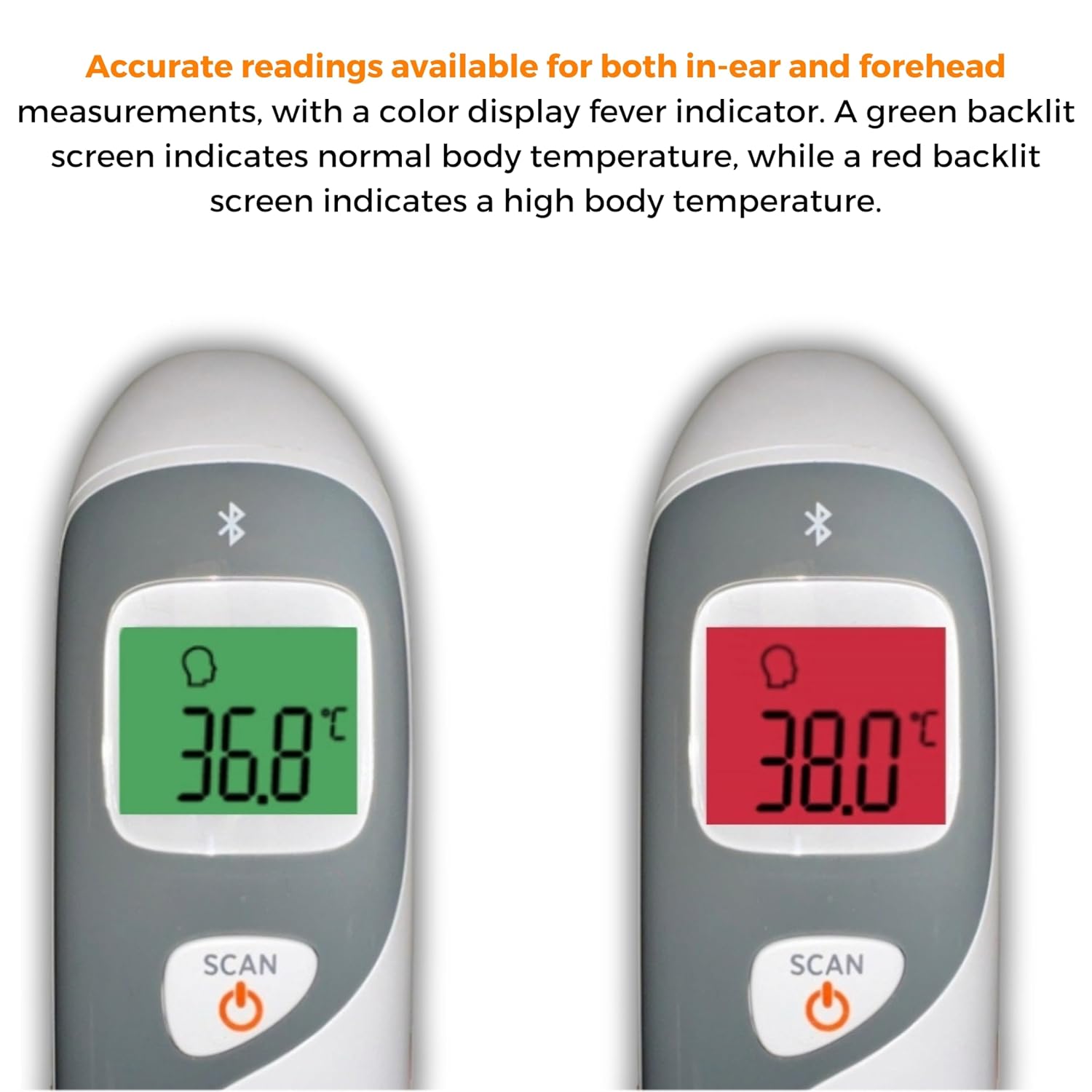
Image: The thermometer's color-changing LCD display indicating normal (green) and high (red) temperatures.
4.5. Vyvolání paměti
The thermometer stores the last 20 temperature readings. To access these readings, press the MEM/MUTE button while the device is on. Each press will cycle through the stored readings.
5. Bluetooth Connectivity and MOBI Smart App
The MOBI CONNECT Smart DualScan Thermometer can be used independently or paired with your smartphone via Bluetooth for enhanced tracking and features through the MOBI Smart App.
5.1. Stažení a spárování aplikace
- Download the "MOBI Smart" app from your device's app store (available on iOS and Android).
- Ujistěte se, že je na vašem smartphonu povoleno Bluetooth.
- Open the MOBI Smart App and follow the on-screen instructions to pair your thermometer.
5.2. Funkce aplikace
- Automatické sledování: Automatically records temperature readings from the thermometer.
- Pro více uživatelůfiles: Vytvořte a spravujte profesionályfiles for each family member to track their health data independently.
- Záznam dat: Add comments to each reading for context.
- Reporting & Graphs: View powerful reports and graphs for daily, weekly, monthly, or yearly temperature trends.
- Možnosti exportu: Export data for sharing with healthcare professionals.
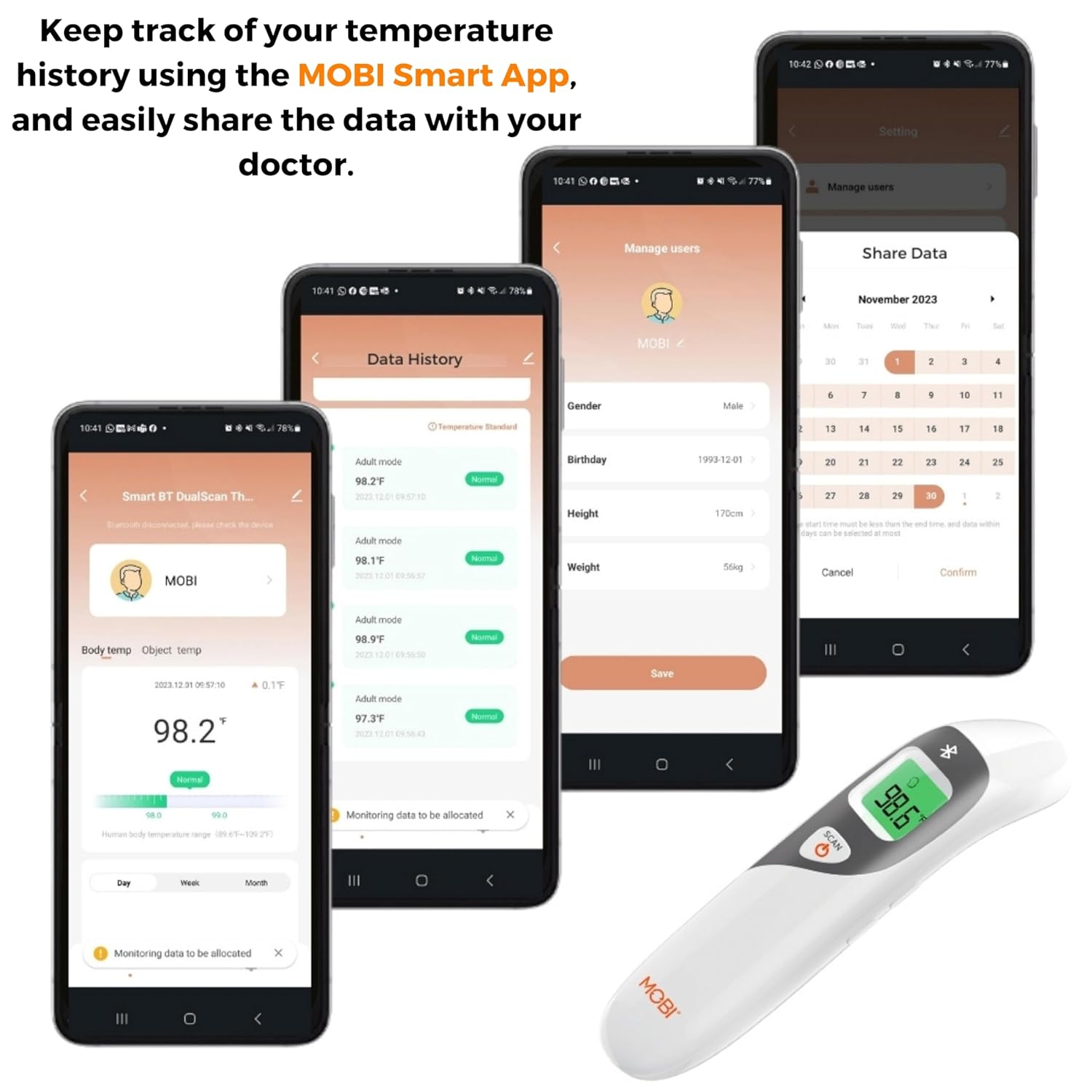
Image: Screenshots of the MOBI Smart App interface, showing data tracking and user management.
5.3. Oficiální video produktu
Video: Úředník u konceview of the MOBI Smart DualScan Bluetooth Ear & Forehead Thermometer, demonstrating its features and usage.
6. Údržba
6.1. Čištění
Teploměr otřete měkkým hadříkemamp cloth. Do not immerse the device in water or use abrasive cleaners. Ensure the probe is clean before each use, especially for ear measurements.
6.2. Skladování
Store the thermometer in its protective pouch in a cool, dry place, away from direct sunlight and extreme temperatures. Remove batteries if the device will not be used for an extended period.
7. Řešení problémů
- "Lo" or "Hi" Reading: Indicates a temperature outside the measurable range. Ensure proper placement and try again.
- Nepřesná čtení:
- Check for proper probe placement (ear or forehead).
- Ensure the probe is clean.
- Verify the correct mode (Adult/Child/Object) is selected if applicable.
- Allow the thermometer to acclimate to room temperature for 30 minutes if it has been in a significantly different environment.
- Problémy s připojením Bluetooth:
- Ujistěte se, že je na vašem smartphonu povoleno Bluetooth.
- Restart the thermometer and the MOBI Smart App.
- Ensure the thermometer is within range of your smartphone.
- Bez displeje: Zkontrolujte instalaci baterie a v případě potřeby baterie vyměňte.
8. Specifikace
| Číslo modelu | 700026 |
| Zdroj napájení | Napájení z baterií (2x AAA) |
| Typ zobrazení | LCD s podsvícením |
| Konektivita | Bluetooth |
| Režimy měření | Ear, Forehead, Room, Object |
| Jednotky teploty | Fahrenheit (°F) / Celsius (°C) |
| Vyvolání paměti | Posledních 20 čtení |
| Péče o produkt | Dočista vyčistit |
| Materiál | Plast |
| Výrobce | Mobi Technologies Inc. |
9. Záruka a podpora
For warranty information or technical support, please contact Mobi Technologies Inc. directly. Refer to the product packaging or the official MOBI webstránky s nejaktuálnějšími kontaktními údaji.