
HOMEPILOT 10501003
HOMEPILOT Roller Shutter Belt Winder Timer 10501003 Instruction Manual
Model: 10501003
1. Úvod
This manual provides detailed instructions for the installation, setup, and operation of your HOMEPILOT Roller Shutter Belt Winder Timer, model 10501003. This device is designed to automate the opening and closing of roller shutters, blinds, or awnings, enhancing comfort and convenience in your home. It is particularly suitable for existing installations, utilizing the space of a standard belt winder housing.
2. Bezpečnostní pokyny
Před instalací a provozem si pečlivě přečtěte tyto bezpečnostní pokyny. Nedodržení těchto pokynů může vést k úrazu elektrickým proudem, požáru nebo vážnému zranění.
- Elektrická bezpečnost: Always disconnect the main power supply before performing any installation or maintenance work. Work on electrical installations should only be carried out by qualified personnel.
- Zamýšlené použití: This device is intended for controlling roller shutter motors. Do not use it for purposes other than those described in this manual.
- Prostředí: Do not expose the device to moisture, extreme temperatures, or direct sunlight. Ensure the installation location is dry and protected.
- Děti: Keep packaging materials and the device out of reach of children.
- Poškození: Do not operate the device if it shows visible signs of damage. Contact customer support for assistance.
3. Obsah balení
Ověřte, zda jsou v balení přítomny všechny položky:
- HOMEPILOT Roller Shutter Belt Winder Timer (Modi Zeitschaltuhr)
- Návod k použití (tento dokument)
4. Konec produktuview
The HOMEPILOT Belt Winder Timer is designed for integration into existing belt winder housings, providing an intelligent control solution for your roller shutters. Below is an overview of the device's components and dimensions.
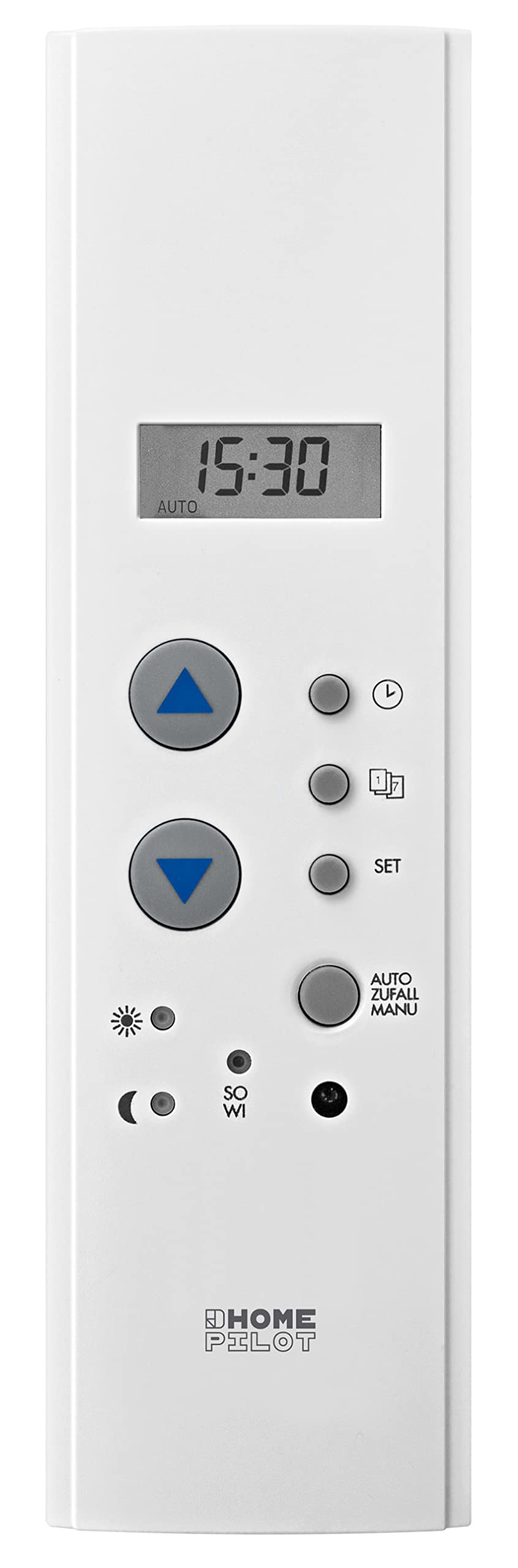
Obrázek 4.1: Přední strana view of the HOMEPILOT Roller Shutter Belt Winder Timer. Shows the digital display, up/down buttons, SET button, and mode indicators.

Obrázek 4.2: Strana view of the timer, illustrating its compact design for flush mounting.

Figure 4.3: Technical drawing showing the precise dimensions (in mm) of the device, crucial for installation into existing belt winder housings.
4.1. Ovládací prvky a displej
- Zobrazit: Shows current time, operating mode, and programming settings.
- Tlačítka nahoru/dolů: Used for manual control of the roller shutter and for navigating/adjusting settings during programming.
- Tlačítko SET: Enters programming mode and confirms selections.
- Indikátory režimu: Icons for automatic mode, manual mode, random function, and sun sensor (if connected).
5. Instalace
The HOMEPILOT Belt Winder Timer is designed for easy integration into existing belt winder housings. A roller shutter motor is required for operation. This timer controls the connected motor.
5.1. Předpoklady
- An existing roller shutter system with a motor.
- Basic electrical knowledge and tools.
- Důležité: Ensure the main power supply to the roller shutter circuit is disconnected before starting installation.
5.2. Kroky instalace
- Odpojit napájení: Turn off the circuit breaker for the roller shutter system at your main electrical panel. Verify that the power is off using a voltage tester.
- Remove Old Winder (if applicable): Carefully remove the existing manual belt winder from its housing.
- Příprava zapojení: Identify the wires for your roller shutter motor (usually Live, Neutral, Up, Down, and Ground). The timer requires a 230V power supply.
- Připojit dráty: Connect the motor wires to the corresponding terminals on the HOMEPILOT timer. Refer to the wiring diagram (if available in a more detailed manual or on the device itself). Ensure secure connections.

Obrázek 5.1: Zadní view of the timer, showing the green terminal block for electrical connections.
- Namontujte časovač: Insert the HOMEPILOT timer into the existing belt winder housing. The design is made to fit perfectly into the opening. Secure it using screws if provided.
- Obnovit napájení: Once the installation is complete and all connections are secure, restore power to the circuit.
- Počáteční test: Briefly test the manual up/down functions to ensure the motor responds correctly.
Note: For detailed wiring diagrams, please consult the full technical documentation or a qualified electrician.
6. Počáteční nastavení a konfigurace
After installation and power-up, the device will require initial setup, including setting the current time and date.
6.1. Nastavení času a data
- Vstupte do režimu nastavení: Stiskněte a podržte SOUBOR tlačítko po dobu přibližně 3 sekund, dokud nezačne blikat zobrazení času.
- Upravit čas: Použijte Up a Dolů buttons to set the current hour. Press SOUBOR pro potvrzení a přechod na minuty. Opakujte pro minuty.
- Set Day of Week: After setting the time, the day of the week will flash. Use the Up a Dolů buttons to select the correct day (e.g., 1 for Monday, 7 for Sunday). Press SOUBOR potvrdit.
- Ukončit nastavení: The device will automatically exit setup mode after a few seconds of inactivity, or you can press SOUBOR repeatedly until the display returns to normal operation.
6.2. Setting End Positions (Calibration)
For optimal operation, the timer needs to learn the upper and lower end positions of your roller shutter. This process is typically done via the connected roller shutter motor's own calibration function or through a specific sequence on the timer.
- Consult your roller shutter motor's manual for specific instructions on setting end positions.
- If the timer has a dedicated calibration mode, it will usually involve pressing and holding the Up a Dolů buttons simultaneously for a period, then manually driving the shutter to its limits.
7. Návod k obsluze
The HOMEPILOT timer offers both manual control and automated programming options.
7.1. Ruční provoz
- Stiskněte tlačítko Up button briefly to open the roller shutter.
- Stiskněte tlačítko Dolů button briefly to close the roller shutter.
- Press either button again during movement to stop the shutter at its current position.
7.2. Programming Automatic Schedules
The timer allows for daily and weekly programs to automatically open and close your roller shutters.
- Vstupte do režimu programu: Stiskněte tlačítko SOUBOR button repeatedly until the program icon (e.g., a clock or schedule symbol) appears and flashes.
- Select Program Slot: Použití Up/Dolů to select a program slot (e.g., P1, P2). Press SOUBOR.
- Set Opening Time: The hour for opening will flash. Use Up/Dolů to set the desired hour, then SOUBOR for minutes.
- Set Closing Time: Repeat the process for the closing time.
- Select Days: Choose the days of the week for this program to be active (e.g., Mon-Fri, Sat-Sun, or all days). Use Up/Dolů to cycle through options, SOUBOR potvrdit.
- Uložit a odejít: Pokračujte v stisknutí SOUBOR to save the program and exit program mode.
Refer to the device's display icons for specific program indicators.
7.3. Náhodná funkce
The integrated random function can delay programmed operating times by a random interval to simulate presence, enhancing security when you are away.
- To activate/deactivate the random function, locate the "AUTO ZUFALL" or "RANDOM" button/setting on your device.
- Press the corresponding button or navigate through the settings menu to toggle this feature on or off. An indicator light or symbol on the display will confirm its status.
7.4. Solar Sensor Integration (Optional)
If combined with a compatible solar sensor (sold separately), the timer can control sun protection based on brightness levels.
- Connect the solar sensor according to its own instructions and the timer's wiring diagram.
- Activate the solar function through the timer's settings menu. This typically involves setting brightness thresholds for automatic lowering/raising of the shutter.
8. Údržba
The HOMEPILOT Belt Winder Timer requires minimal maintenance.
- Čištění: Zařízení otřete měkkým, suchým hadříkem. Nepoužívejte abrazivní čisticí prostředky ani rozpouštědla.
- Power Outage: The device has approximately 8 hours of power reserve for data retention during power outages. After longer outages, you may need to reset the time.
9. Řešení problémů
If you encounter issues with your HOMEPILOT timer, refer to the following common problems and solutions:
| Problém | Možná příčina | Řešení |
|---|---|---|
| Displej zařízení je prázdný. | Žádné napájení. | Zkontrolujte jistič a zapojení kabeláže. |
| Roleta se nepohybuje. | Motor not connected, motor fault, or end positions not set. | Verify motor wiring. Check motor functionality. Perform end position calibration (Section 6.2). |
| Automatic program not running. | Device in manual mode, program not activated, or incorrect time/date. | Ensure the device is in automatic mode. Check program settings and correct time/date. |
| Čas je po výpadku proudu nesprávnýtage. | Power reserve depleted. | Reset the time and date (Section 6.1). |
If the problem persists, please contact HOMEPILOT customer support.
10. Technické specifikace
| Funkce | Specifikace |
|---|---|
| Model | 10501003 |
| Značka | HOMEPILOT |
| Provozní režim | ZAPNUTO VYPNUTO |
| Provozní svtage | 230 voltů |
| Moc | 1920 wattů |
| Třída ochrany | II |
| Hodnocení IP | IP30 |
| Spotřeba v pohotovostním režimu | <0.5 W |
| Externí vstupy | 2 |
| Connection Cross-Section | max. 1.5 mm² |
| Přepínací kapacita | max. 8 A resistive, max. 4 A inductive load |
| Power Reserve (Data Retention) | cca. 8 hodin |
| Provozní teplota | +0°C až +40°C |
| Front Panel Dimensions (H x W) | 210 x 60 mm |
| Device Depth | cca. 56.4 mm |
| Materiál | Plast |
| Hmotnost | 390 gramů |
| Kontrolní metoda | Application (HomePilot), Standalone |
| Kompatibilní zařízení | Roller shutter motor, solar sensor |
| Kompatibilita Smart Home | Kompatibilní s inteligentními domy |
| Barva | Bílý |
| Dodržování | CE |
| Výrobce | DELTA DORE RADEMACHER GmbH |
| Název typu produktu | Programmable Belt Winder Timer |
| Zahrnuté komponenty | Modi Timer |
11. Záruka a podpora
For warranty information and technical support, please refer to the documentation provided with your purchase or visit the official HOMEPILOT webUschovejte si doklad o koupi pro případ reklamace.
Výrobce: DELTA DORE RADEMACHER GmbH
Ask a question about this manual
Ask about setup, troubleshooting, compatibility, parts, safety, or missing instructions. Manuals+ will review the question and use this page’s manual context to help answer it.