
1. Úvod
Thank you for choosing the HARFO Fingerprint Door Lock. This advanced keyless entry system provides enhanced security and convenience for your home or office. Featuring multiple unlocking methods including fingerprint, IC cards, passcode, and backup keys, this smart lock is designed for ease of use and reliable performance. Please read this manual carefully before installation and operation to ensure proper functionality and safety.

Figure 1.1: HARFO Fingerprint Door Lock with handle set and IC cards.
2. Konec produktuview
2.1 Klíčové vlastnosti
- Advanced 3D Tech Fingerprint Recognition: Unlocks within 0.3 seconds with 99.99% accuracy.
- Více způsobů odblokování: Fingerprint, IC Cards, Passcode, and Backup Key.
- Auto-Lock & One-touch Lock: Customizable auto-lock timer (5/10/15/30 seconds) and instant one-touch locking.
- Uživatelská kapacita: Podporuje až 300 uživatelů.
- Bezpečnostní funkce: One-time Passcode for temporary access, Anti-Peeping Password to prevent code exposure.
- Pohodlí: OLED Display with Voice Guide for easy programming, Low Battery Alarm, Mute Mode, 2000 Unlock Records, Emergency USB Power Port.
- Všestranná instalace: Suitable for both left-handed and right-handed doors with adjustable settings.
2.2 Obsah balení
Please verify all components are present before installation:
- Smart Deadbolt Lock (Exterior Unit with Keypad and Fingerprint Sensor)
- Interior Unit (with Battery Compartment and Rotary Knob)
- Door Lock with Handle Set
- 3 x IC karty
- 2 x záložní klíče
- Installation Accessories Package (screws, spindle, strike plate, etc.)
- Uživatelská příručka (tento dokument)
3. Instalační příručka
The HARFO Fingerprint Door Lock is designed for easy installation without the need for extra drilling, typically requiring only a screwdriver. Follow these steps carefully.
3.1 Kompatibilita dveří
Ujistěte se, že vaše dveře splňují následující specifikace:
- Tloušťka dveří: 1 3/8 inch to 2 3/16 inch (35mm-55mm)
- Zadní část: 2-3/8 inch or 2-3/4 inch (60mm or 70mm)
- Křížový otvor: 2-1 / 8 palce (54 mm)
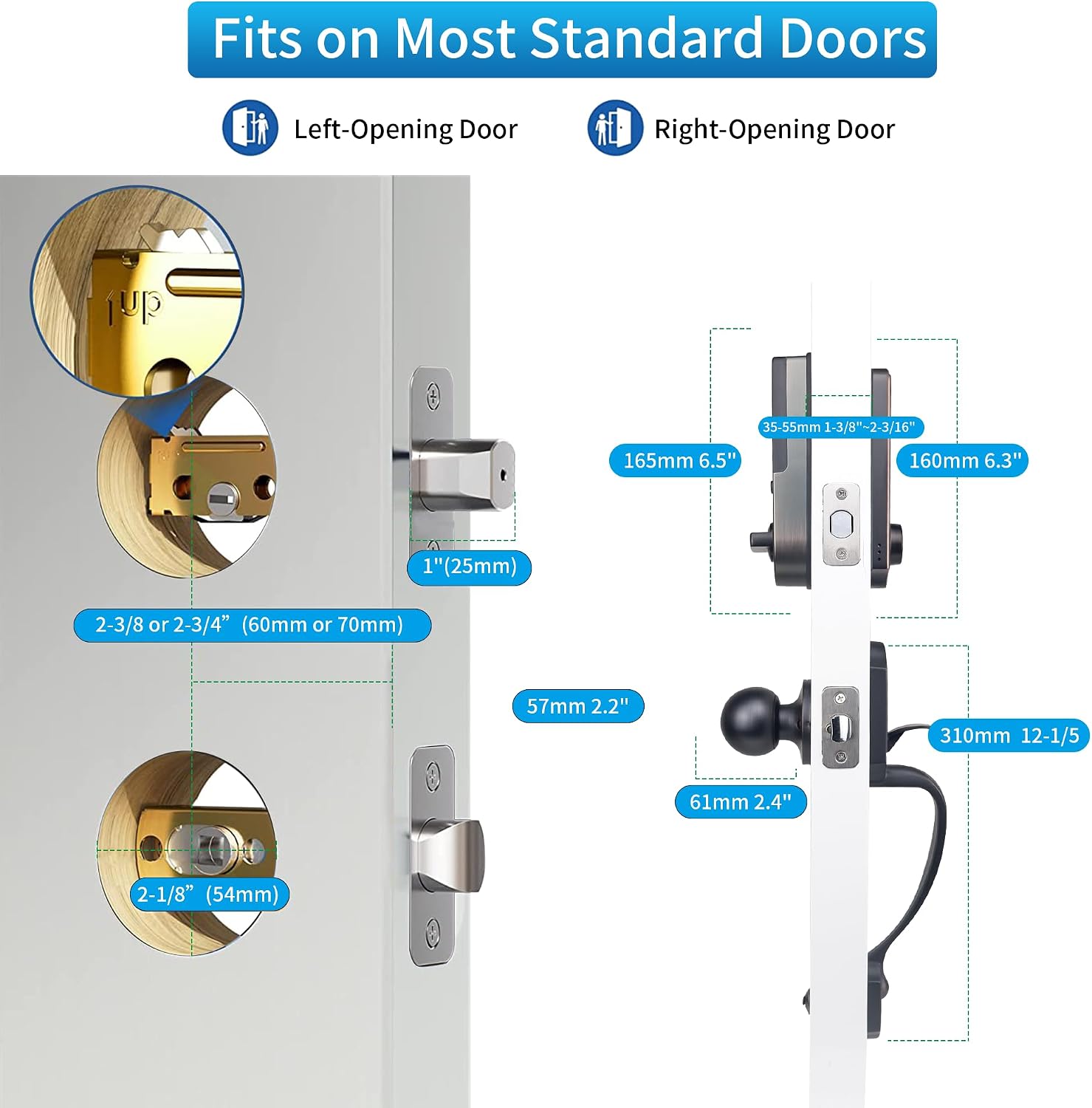
Obrázek 3.1: Kompatibilita dveří a rozměry pro instalaci.
3.2 Adjusting for Left/Right Handed Doors
The lock is suitable for both left-handed and right-handed doors. Adjust the Rotary Knob and "L/R Button" on the interior unit to match your door's orientation before proceeding with the full installation.
3.3 Postup instalace
- Připravte dveře: Ensure existing holes match the required dimensions.
- Nainstalujte západku: Insert the latch into the door edge and secure it with screws. Ensure the latch bolt faces the correct direction.
- Install the Exterior Unit: Feed the cable and spindle through the latch. Align the exterior unit with the door holes.
- Instalace vnitřní montážní desky: Secure the mounting plate to the exterior unit using screws, ensuring the cable passes through the plate.
- Connect Cables and Install Interior Unit: Connect the cable from the exterior unit to the interior unit. Carefully tuck the excess cable into the door. Align the interior unit with the mounting plate and secure it with screws.
- Nainstalujte baterie: Open the battery cover on the interior unit and insert 4 x 1.5V AA dry batteries (not included). Rechargeable batteries are not recommended.
- Install Handle Set: Attach the handle set according to the instructions provided in the accessories package.
- Test funkčnosti: After installation, test the lock and handle to ensure smooth operation before closing the door.
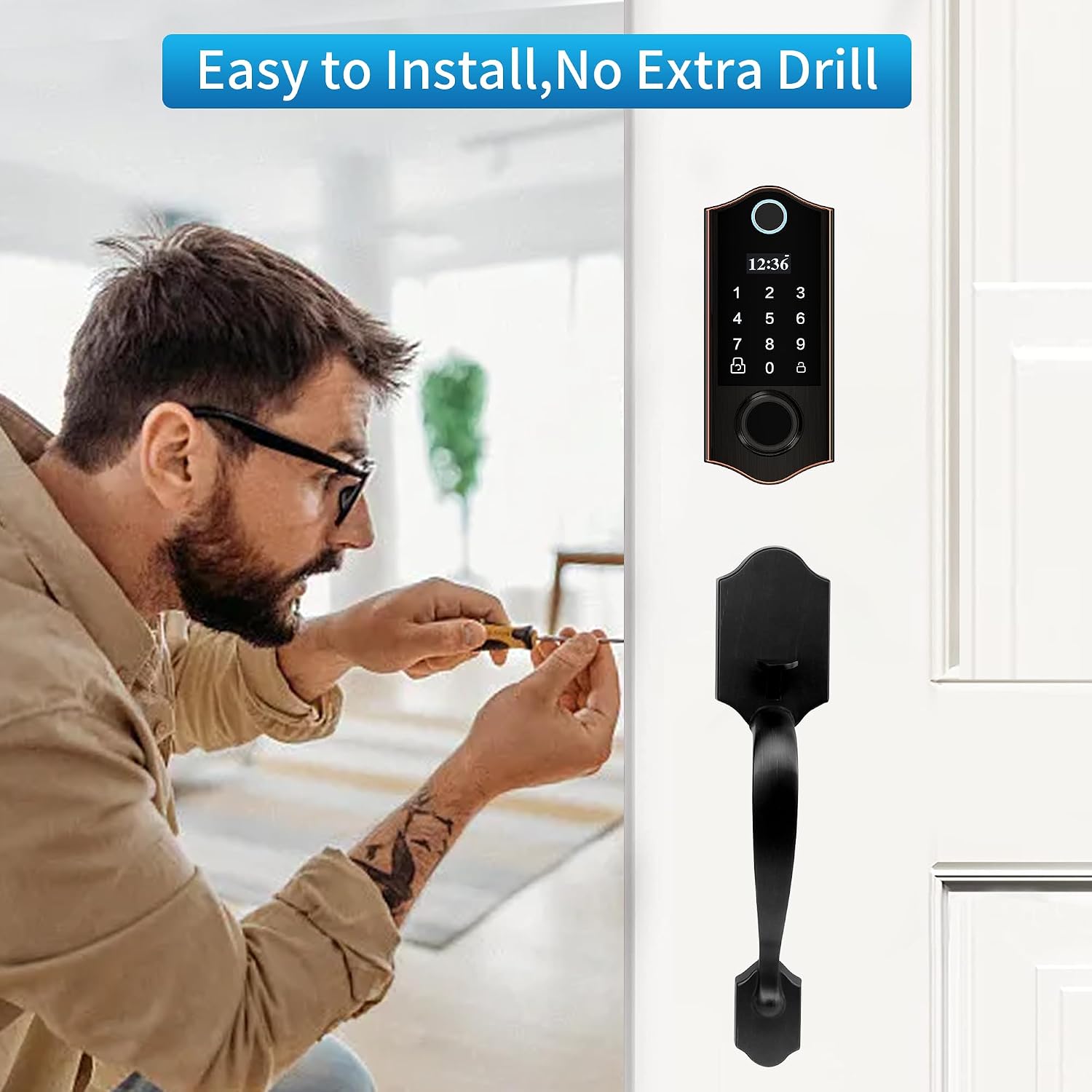
Figure 3.2: Installation is straightforward, requiring minimal tools.
4. Návod k obsluze
The HARFO Fingerprint Door Lock offers multiple convenient ways to unlock your door. The OLED display and voice guide will assist you through the programming process.
4.1 Metody odemykání
- Odemknutí otisků prstů: Place your registered finger on the sensor. The lock will recognize your fingerprint within 0.3 seconds and unlock.
- Odemknutí heslem: Enter your registered passcode on the keypad and press the '#' key.
- Odemknutí IC karty: Tap a registered IC card against the card reader area on the lock.
- Backup Key Unlock: In case of emergency or battery depletion, use the physical backup key to unlock the door. The keyhole is discreetly located.

Figure 4.1: The four primary methods for unlocking your HARFO door lock.
4.2 Metody uzamčení
- Automatický zámek: The lock can be set to automatically lock after a specified duration (5/10/15/30 seconds) once the door is closed. This feature can be enabled or disabled in the settings.
- One-touch Lock: If auto-lock is off, simply press the lock button on the keypad to secure the door.
- Inside Locking: From the interior side, you can lock or unlock the door by turning the rotary knob or pressing the dedicated lock/unlock button.

Figure 4.2: Auto-lock and one-touch lock features for enhanced security.
4.3 Heslo proti peepingu
Abyste zabránili ostatním v uhádnutí vašeho přístupového kódu, můžete zadat náhodné číslice před nebo za skutečný přístupový kód. Napříkladample, if your passcode is "123456", you can enter "90121234568765". The lock will only recognize the correct sequence within the longer string.
5. User Management and Programming
The OLED display and voice guide simplify the process of managing users and settings. The lock supports up to 300 users.
5.1 Nabídka programování
To access the programming menu, press the 'M' button (or similar designated button, refer to your specific lock's physical layout if different from the image) and follow the voice prompts. The main menu options typically include:
- 1. Create User: Add new fingerprints, passcodes, or IC cards.
- 2. Delete User: Remove existing users.
- 3. Systémové nastavení: Configure lock parameters like auto-lock time, mute mode, etc.
- 4. Info Query: View unlock records and user IDs.
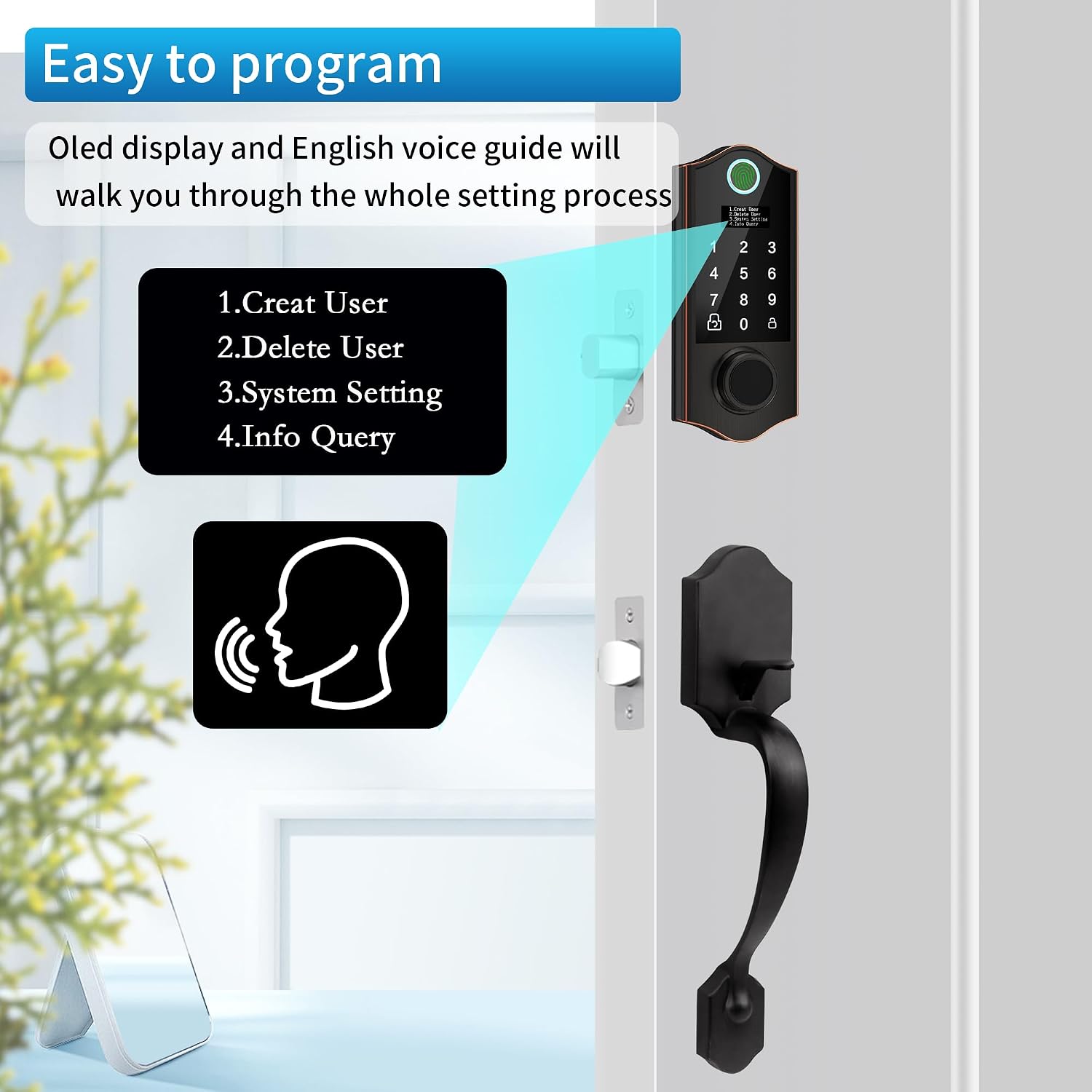
Figure 5.1: The intuitive OLED display and voice guide for programming.
5.2 Přidání uživatelů
Follow the voice prompts after selecting "Create User". You can add different types of users:
- Uživatel správce: Has full access to programming and unlocking. It is recommended to set up at least one admin fingerprint and passcode.
- Normální uživatel: Can unlock the door but cannot access programming settings.
- Casual User (One-time Passcode): A temporary passcode that can be used only once. Ideal for visitors or delivery personnel.

Obrázek 5.2: Přample of using a one-time passcode for temporary access.
5.3 Smazání uživatelů
Select "Delete User" from the menu. You can typically delete users by their ID number or delete all normal/casual users at once.
6. Údržba
6.1 Výměna baterie
The HARFO Fingerprint Door Lock requires 4 x 1.5V AA dry batteries (not included). It is designed for long battery life, typically up to one year. When the battery level is low, the lock will provide a low battery alarm. Replace all four batteries promptly when this alarm sounds.
Note: Rechargeable batteries are not recommended as their typical voltage (1.2V) may not provide optimal performance.
6.2 nouzové napájení
If the batteries completely deplete and you cannot unlock the door, you can use the emergency USB power port located on the exterior unit. Connect a portable power bank to this port to temporarily power the lock and gain entry. Always keep your backup keys in a safe, accessible location outside the door.

Figure 6.1: Emergency power supply via USB and physical backup keys.
6.3 Čištění
Clean the lock's exterior with a soft, dry cloth. Avoid using abrasive cleaners or solvents, which may damage the finish or electronic components.
7. Řešení problémů
| Problém | Možná příčina | Řešení |
|---|---|---|
| Lock does not respond or power on. | Vybité baterie; nesprávná instalace baterií. | Replace all 4 AA dry batteries. Ensure correct polarity. Use emergency USB power if needed. |
| Otisk prstu nebyl rozpoznán. | Fingerprint not registered; dirty sensor; finger not placed correctly. | Ensure fingerprint is registered. Clean the sensor. Try placing your finger in different orientations. Re-register fingerprint if issues persist. |
| Passcode not working. | Incorrect passcode entered; passcode not registered. | Verify the passcode. Ensure it is registered. Try using the Anti-Peeping Password feature correctly. |
| Lock makes unusual noises or cycles open/closed. | Mechanical obstruction; incorrect installation; internal malfunction. | Check for any obstructions around the latch or deadbolt. Re-check installation steps, especially cable connections. If problem persists, contact customer support. |
| Baterie se rychle vybíjí. | Using rechargeable batteries; frequent usage; faulty batteries. | Use only 1.5V AA dry batteries. Try a different brand of batteries. If problem persists, contact customer support. |
8. Specifikace
| Funkce | Detail |
|---|---|
| Název modelu | D02H |
| Značka | HARFO |
| Typ zámku | Biometric, Deadbolt, Combination Lock, Keypad |
| Metody odemykání | Fingerprint, IC Cards, Passcode, Backup Key |
| Materiál | Bronz |
| Barva | Starší bronz |
| Rozměry položky (D x Š x V) | 11 x 4 x 14 palce |
| Hmotnost položky | 4.77 libry |
| Zdroj napájení | 4 x 1.5V AA Dry Batteries (not included) |
| Rozsah tloušťky dveří | 1 3/8 inch to 2 3/16 inch (35mm-55mm) |
| Uživatelská kapacita | Až 300 XNUMX uživatelů |
| Odemknout záznamy | 2000 záznamů |
9. Záruka a podpora
9.1 Informace o záruce
The HARFO Fingerprint Door Lock typically comes with a 1-year limited warranty from the date of purchase. This warranty covers manufacturing defects and malfunctions under normal use. Please retain your proof of purchase for warranty claims. Some customers have reported receiving extended warranty coverage (e.g., 3 years) directly from customer support in specific cases.
9.2 Zákaznická podpora
For technical assistance, troubleshooting, or warranty inquiries, please contact HARFO customer support. You can typically find contact information on the product packaging, the official HARFO webwebu nebo prostřednictvím vaší nákupní platformy.
When contacting support, please be prepared to provide your product model number (D02H), purchase date, and a detailed description of the issue.