
VAIO VJPF11C11N
VAIO Pro PF (VJPF11C11N) Notebook PC User Manual
1. Úvod
This manual provides essential information for setting up, operating, maintaining, and troubleshooting your VAIO Pro PF (Model: VJPF11C11N) notebook PC. Please read this manual thoroughly before using your device to ensure proper and safe operation.
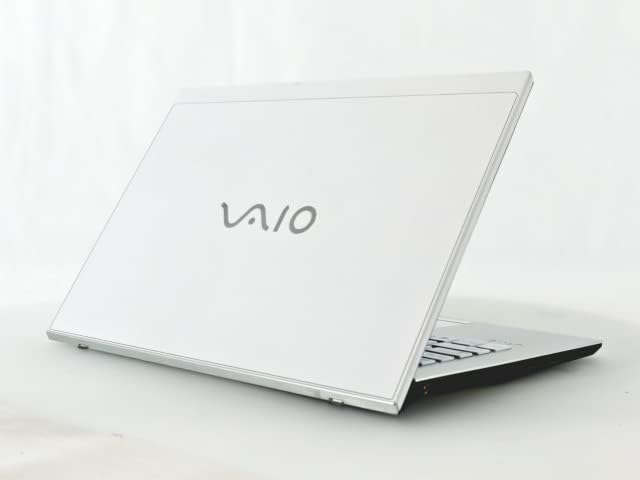
Figure 1: VAIO Pro PF Notebook PC
The VAIO Pro PF is a lightweight and compact mobile notebook designed for productivity. It features an 11.6-inch Full HD display, an Intel 8th Generation Core i5-8250U processor, 8GB of RAM, and a 256GB SSD, running on Windows 11 Pro. The device also includes a backlit keyboard for comfortable typing in various lighting conditions.
2. Nastavení
2.1 Vybalení
Opatrně vyjměte všechny součásti z obalu. Ujistěte se, že jsou přítomny následující položky:
- VAIO Pro PF Notebook PC
- AC adaptér a napájecí kabel
- Dokumentace (tato příručka, informace o záruce)
2.2 Připojení k napájení
Before initial use, connect the AC adapter to the laptop's power input port and then plug the power cord into a wall outlet. Allow the battery to charge fully.
2.3 Počáteční zapnutí a nastavení systému Windows
Stisknutím tlačítka napájení zapněte notebook. Postupujte podle pokynů na obrazovce a dokončete počáteční nastavení systému Windows 11 Pro, včetně výběru jazyka, síťového připojení a vytvoření uživatelského účtu.
3. Operating Your VAIO Pro PF
3.1 Klávesnice a touchpad
The VAIO Pro PF features a full-sized keyboard with a backlight for improved visibility. The touchpad located below the keyboard supports multi-touch gestures for navigation.

Obrázek 2: Rozložení klávesnice a touchpadu
3.2 Připojení externích zařízení
Váš notebook je vybaven různými porty pro připojení externích zařízení:
- Porty USB 3.0 (x3): Pro připojení zařízení USB, jako jsou externí pevné disky, myši nebo klávesnice.
- Port HDMI: For connecting to external displays or projectors with HDMI input.
- D-SUB15 (VGA) Port: For connecting to older external displays or projectors with VGA input.
- Wired LAN Port: For connecting to a wired network using an Ethernet cable.
- Sluchátkový jack: Pro připojení sluchátek nebo externích reproduktorů.
3.3 Bezdrátové připojení
The VAIO Pro PF supports both Wi-Fi and Bluetooth connectivity:
- Wi-Fi (802.11n): To connect to a wireless network, go to Windows Settings > Network & Internet > Wi-Fi, turn Wi-Fi on, and select your desired network.
- Bluetooth: To connect Bluetooth devices, go to Windows Settings > Bluetooth & devices, turn Bluetooth on, and pair your device.
3.4 Pomocí Web Fotoaparát
Integrovaný web camera can be used for video calls and conferences. Access it through applications like Camera, Microsoft Teams, or Zoom.
4. Údržba
4.1 Čištění notebooku
To clean the exterior of your laptop, use a soft, lint-free cloth slightly dampened with water or a mild, non-abrasive cleaning solution. Avoid spraying liquids directly onto the device. For the screen, use a specialized screen cleaner.
4.2 Aktualizace softwaru
Regularly check for and install Windows updates to ensure your system has the latest security patches and performance improvements. Go to Windows Settings > Windows Update.
4.3 Péče o baterii
Pro prodloužení životnosti baterie se vyvarujte extrémních teplot a častého úplného vybíjení baterie. Pro dlouhodobé skladování nabijte baterii na přibližně 50–70 %.
5. Řešení problémů
This section addresses common issues you might encounter with your VAIO Pro PF.
| Problém | Řešení |
|---|---|
| Notebook se nezapne. | Ensure the AC adapter is securely connected and the power outlet is functional. Try holding the power button for 10-15 seconds. |
| Problémy s připojením k Wi-Fi. | Check if Wi-Fi is enabled in Windows Settings. Restart your router and the laptop. Ensure you are within range of the Wi-Fi network. |
| Keyboard backlight is not working. | Check if the backlight function key (often Fn + F key) is enabled. Adjust brightness settings if available. |
| Externí displej nebyl detekován. | Ensure the cable is securely connected to both the laptop and the display. Use Windows display settings to detect or extend displays. Try a different cable or port if available. |
6. Specifikace
| Funkce | Detail |
|---|---|
| Název modelu | VAIO Pro PF (VJPF11C11N) |
| Značka | VAIO (Manufacturer: SONY) |
| Velikost displeje | 11.6 palců |
| Rezoluce | 1920x1080 pixelů (Full HD) |
| CPU | Intel Core i5-8250U (8th Gen, 4 Cores, 8 Threads, 1.6 GHz base, up to 3.4 GHz) |
| BERAN | 8 GB DDR4 SDRAM |
| Skladování | 256 GB SSD (Solid State Drive) |
| Operační systém | Windows 11 Pro (64bitový) |
| Grafika | Intel Integrated Graphics |
| Bezdrátové připojení | Wi-Fi (802.11n), Bluetooth |
| Porty | 3x USB 3.0, 1x HDMI, 1x D-SUB15 (VGA), 1x Wired LAN, 1x Headphone Jack |
| Web Fotoaparát | Integrovaný |
| Klávesnice | Podsvícená klávesnice |
| Hmotnost | Approx. 0.87 kg (870 g) |
| První dostupný termín | 10. května 2023 |
7. Záruka a podpora
For information regarding your product's warranty, please refer to the warranty card included with your purchase or visit the official VAIO support website. For technical assistance, driver downloads, or further inquiries, please contact VAIO customer support through their official channels.
Ask a question about this manual
Ask about setup, troubleshooting, compatibility, parts, safety, or missing instructions. Manuals+ will review the question and use this page’s manual context to help answer it.