
1. Úvod
Thank you for choosing the SPLITSKY NZFS Kids Alarm Clock. This device combines an alarm clock, white noise sleep aid, and an 8-mode RGB night light, designed to assist with sleep and wake-up routines for children and adults. Please read this manual thoroughly to understand its features and ensure proper operation.
Bezpečnostní informace:
- Uchovávejte zařízení mimo dosah vody a prostředí s vysokou vlhkostí.
- Nepokoušejte se zařízení sami rozebírat nebo opravovat.
- Use only the provided USB-C power cable or a certified equivalent.
- Zajistěte řádné větrání kolem zařízení.
2. Obsah balení
Ověřte, zda jsou v balení přítomny všechny položky:
- SPLITSKY NZFS Kids Alarm Clock
- 1.2M (4.7 inch) USB-C Power Cable
- Uživatelská příručka (tento dokument)
- 1 x CR2032 Lithium Ion Battery (pre-installed for memory backup)
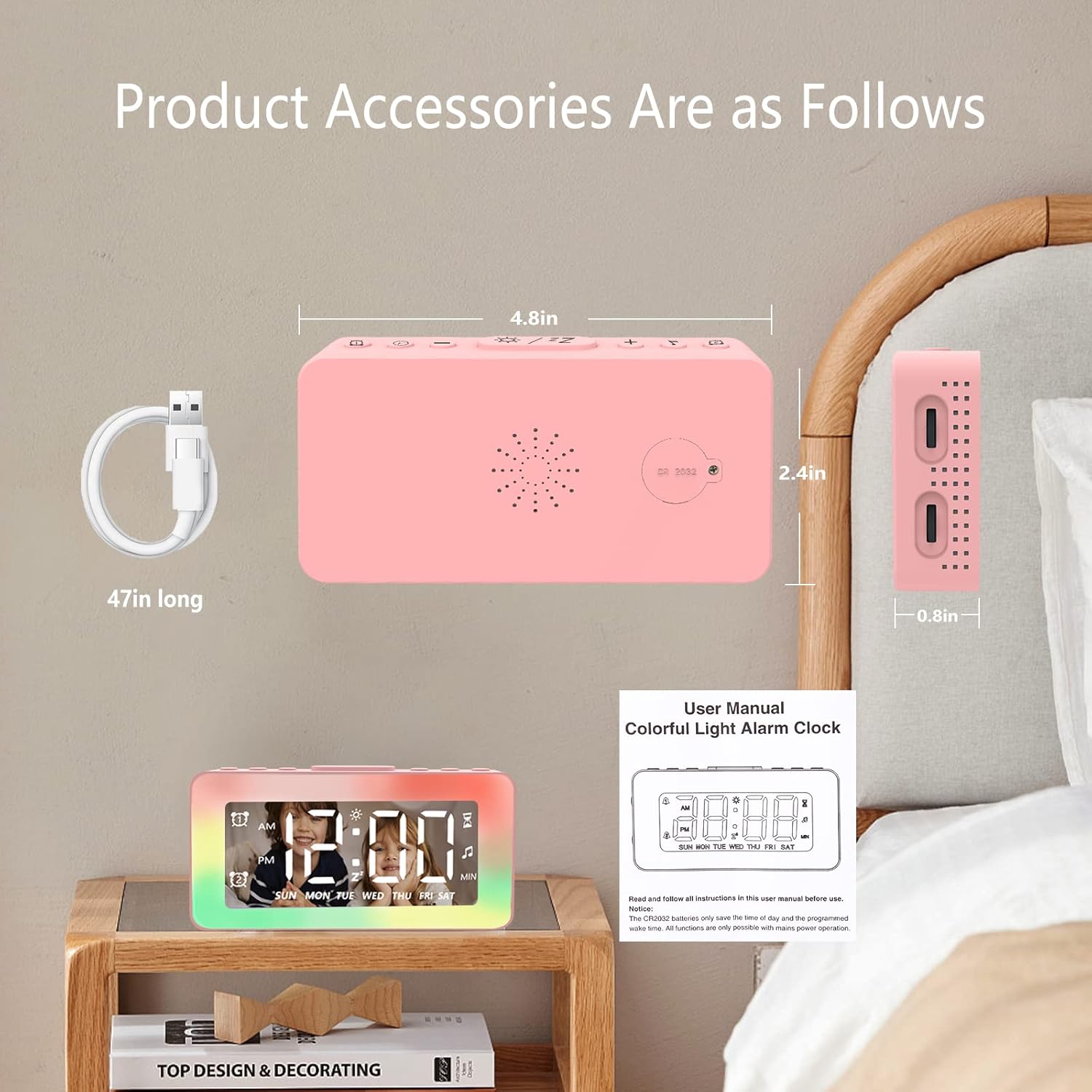
Image: The SPLITSKY NZFS Kids Alarm Clock, a USB-C power cable, and the user manual are included in the package.
3. Konec produktuview
Familiarize yourself with the buttons and ports on your alarm clock:

Obrázek: Podrobný view of the alarm clock's top buttons and side ports, including Alarm 1, Time Setting, Light Minus/Settings, Snooze/Light Mode Switch, Light Plus/Setup, Music Switch, Alarm 2, Volume Setting, Time Brightness Setting, USB Output Charging Port, and Type-C Input Interface.
- Tlačítko budíku 1: Set and activate Alarm 1.
- Tlačítko nastavení času: Upravte aktuální čas.
- Light Minus / Settings Button: Decrease light brightness or navigate settings.
- Snooze / Light Mode Switch Button: Activate snooze, or cycle through light modes.
- Light Plus / Setup Button: Increase light brightness or confirm settings.
- Music Switch Button: Cycle through white noise sounds.
- Tlačítko budíku 2: Set and activate Alarm 2.
- Volume Setting Wheel (Side): Adjust alarm and white noise volume.
- Time Brightness Setting Wheel (Side): Upravte jas displeje.
- USB Output Charging Port (Side): Charge external devices.
- Type-C Input Interface (Side): Connect power cable to the alarm clock.
4. Nastavení
4.1 Připojení napájení
- Connect the provided USB-C power cable to the Type-C Input Interface on the side of the alarm clock.
- Plug the other end of the USB-C cable into a compatible USB power adapter (not included) or a USB port.
- Displej se rozsvítí, což znamená, že hodiny jsou zapnuté.

Image: The SPLITSKY NZFS Kids Alarm Clock is shown powered on and connected via its USB-C port, also demonstrating its capability to charge a smartphone.
4.2 Battery Installation (Memory Backup)
The alarm clock includes a pre-installed CR2032 battery. This battery serves as a memory backup to retain time and alarm settings during a power outage or when the main power is disconnected. It does not power the clock for regular operation.
- If the battery needs replacement, locate the battery compartment on the back of the unit.
- K otevření přihrádky použijte malý šroubovák.
- Vyměňte baterii za novou CR2032 a dbejte na správnou polaritu.
- Přihrádku bezpečně uzavřete.
5. Návod k obsluze
5.1 Setting the Time (12H/24H Format)
- Stiskněte a podržte Tlačítko nastavení času until the hour digits begin to flash.
- Použijte Light Minus / Settings Button (dolů) popř Light Plus / Setup Button (up) to adjust the hour.
- Stiskněte tlačítko Tlačítko nastavení času again to move to minute adjustment. Adjust minutes using the Light Minus/Plus buttons.
- Stiskněte tlačítko Tlačítko nastavení času a third time to select 12-hour or 24-hour format. Adjust using the Light Minus/Plus buttons.
- Stiskněte tlačítko Tlačítko nastavení času ještě jednou pro potvrzení a ukončení režimu nastavení času.
5.2 Setting Alarms (Dual Alarm, Daily/Weekday/Weekend Mode)
Hodiny podporují dva nezávislé budíky (Budík 1 a Budík 2).
- Stiskněte a podržte Tlačítko budíku 1 (pro alarm 1) nebo Tlačítko budíku 2 (for Alarm 2) until the alarm hour digits flash.
- Použijte Light Minus / Settings Button or Light Plus / Setup Button upravit hodinu.
- Press the respective Alarm Button again to move to minute adjustment. Adjust minutes using the Light Minus/Plus buttons.
- Press the respective Alarm Button again to select the alarm mode:
- Denní režim: Budík zvoní každý den.
- Režim pro všední dny: Budík zvoní od pondělí do pátku.
- Víkendový režim: Budík zvoní v sobotu a neděli.
- Press the respective Alarm Button once more to confirm and exit alarm setting mode.
- Chcete-li zapnout/vypnout budík, krátce stiskněte Tlačítko budíku 1 or Tlačítko budíku 2Na displeji se zobrazí/zmizí ikona alarmu.
5.3 Funkce odložení
When an alarm sounds, tap the Snooze / Light Mode Switch Button on top to activate snooze. The alarm will pause for 9 minutes and then sound again. This can be repeated multiple times.
5.4 Night Light (8 Modes RGB, 10-level dimming)
The alarm clock features 6 solid color lights and 2 ambient colorful lights.
- Krátce stiskněte Snooze / Light Mode Switch Button to turn on the night light and cycle through the 8 color modes.
- To adjust the brightness (10 levels), use the Light Minus / Settings Button or Light Plus / Setup Button while the night light is active.
- To turn off the night light, continue pressing the Snooze / Light Mode Switch Button dokud světlo nezhasne.

Image: Multiple SPLITSKY NZFS Kids Alarm Clocks are shown, each displaying a different color from the 8 available RGB night light modes.
5.5 White Noise Sleep Aid (8 Sounds)
The clock offers 8 soothing sounds to aid sleep.
- Krátce stiskněte Tlačítko pro přepínání hudby to turn on the white noise and cycle through the available sounds.
- To adjust the volume (16 levels), use the Volume Setting Wheel on the side of the clock.
- To turn off the white noise, continue pressing the Tlačítko pro přepínání hudby until the sound stops.

Image: The SPLITSKY NZFS Kids Alarm Clock is displayed on a bedside table, with icons illustrating the various white noise options such as rain, cicadas, piano, bonfire, waves, birdsong, and church bells.
5.6 Sleep Timer (10-120 minutes)
The sleep timer allows you to set a duration for the white noise and/or night light to play before automatically turning off.
- While white noise or night light is active, press and hold the Tlačítko pro přepínání hudby (for white noise timer) or Snooze / Light Mode Switch Button (for light timer).
- Použijte Light Minus / Settings Button or Light Plus / Setup Button to select the desired timer duration (10, 20, 30, 60, 90, 120 minutes).
- Press the respective button again to confirm the timer setting. The timer icon will appear on the display.
5.7 Nastavení jasu displeje
Adjust the brightness of the LED time display using the Time Brightness Setting Wheel on the side of the clock.
5.8 USB nabíjecí port
The USB output charging port on the side of the alarm clock can be used to charge other small electronic devices, such as smartphones. Connect your device's charging cable to this port.
6. Údržba
6.1 Čištění
- Před čištěním se ujistěte, že je zařízení odpojeno.
- Otřete povrch měkkým suchým hadříkem.
- Nepoužívejte abrazivní čisticí prostředky, rozpouštědla ani chemické spreje.
6.2 Skladování
When not in use for extended periods, store the alarm clock in a cool, dry place, away from direct sunlight and extreme temperatures.
7. Řešení problémů
If you encounter issues with your SPLITSKY NZFS Kids Alarm Clock, refer to the table below for common problems and solutions.
| Problém | Možná příčina | Řešení |
|---|---|---|
| Zobrazení hodin je vypnuté nebo tlumené. | Not connected to power; Time brightness set too low. | Ensure USB-C cable is securely connected to a power source. Adjust the Time Brightness Setting Wheel. |
| Alarm se nespustí. | Alarm not activated; Alarm volume too low. | Check if the alarm icon is displayed. If not, short press the respective Alarm Button to activate. Adjust the Volume Setting Wheel. |
| Time/settings reset after power disconnection. | CR2032 backup battery is depleted or missing. | Replace the CR2032 battery in the battery compartment. |
| Night light or white noise not working. | Function not activated; Sleep timer active. | Krátce stiskněte Snooze / Light Mode Switch Button or Tlačítko pro přepínání hudby to activate. Check if a sleep timer is set. |
8. Specifikace
| Funkce | Detail |
|---|---|
| Značka | SPLITSKÝ |
| Číslo modelu | NZFS |
| Typ zobrazení | Digitální LED |
| Rozměry produktu | 3.17"Š x 3.17"V (přibližně 8.05 cmŠ x 8.05 cmV) |
| Hmotnost položky | 8.1 Ounces (approximately 230 grams) |
| Zdroj napájení | Corded Electric (USB-C), Battery Powered (CR2032 for memory) |
| Režimy nočního světla | 8 (6 solid colors, 2 ambient colorful) with 10-level dimming |
| Zvuky bílého šumu | 8 uklidňujících zvuků |
| Tóny alarmu | 7 wake-up alarm tones with 16-level volume control |
| Funkce alarmu | Dual Alarm, Daily/Weekday/Weekend modes, 9-minute Snooze |
| Funkce časovače | 10-120 minute sleep timer for sounds and lights |
| Konektivita | USB-C Input, USB-A Output (for charging external devices) |
| Materiál | Akrylonitril-butadien-styren |
9. Záruka a podpora
9.1 Informace o záruce
Please refer to the warranty information provided at the time of purchase or contact your retailer for details regarding the product warranty. Keep your proof of purchase for any warranty claims.
9.2 Zákaznická podpora
For technical assistance, troubleshooting beyond this manual, or general inquiries, please contact the seller through the platform where you purchased the product. Provide your order number and a detailed description of the issue for prompt support.