
Uživatelská příručka k laserovému nivelačnímu přístroji Firecore F95T-PRO-WT 3x360 se zeleným laserovým nivelačním přístrojem a stativem 60 palců
Model: F95T-PRO-WT | Brand: Firecore
Zavedení
This manual provides detailed instructions for the safe and effective operation of your Firecore F95T-PRO-WT 3x360 Green Laser Level. This precision tool is designed for various leveling and alignment tasks in construction, renovation, and DIY projects. Please read this manual thoroughly before use and retain it for future reference.
Bezpečnostní informace
VAROVÁNÍ: LASEROVÉ ZÁŘENÍ
Do not stare directly into the laser beam. Direct exposure to the laser beam can cause eye injury. Always wear appropriate laser safety glasses when operating the device. Ensure the laser is not aimed at people or reflective surfaces.
- Zabraňte přímému vystavení očí laserovému paprsku.
- Nerozebírejte laserový nivelační přístroj. Opravy by měl provádět pouze autorizovaný servisní personál.
- Udržujte zařízení mimo dosah dětí.
- Používejte pouze určené baterie a nabíjecí příslušenství.
- Operate the device in a stable environment to prevent accidental movement.
Obsah balení
Ověřte, zda jsou v balení obsaženy všechny níže uvedené položky:
- 1x Firecore F95T-XG Laser Level with Integrated Magnetic Bracket
- 1x 60palcový stativ
- 2x dobíjecí lithium-iontové baterie s kapacitou 4000 mAh
- 1x Dálkové ovládání
- 1x napájecí kabel typu C
- 1x napájecí adaptér
- 1x laserový terč
- 1x Uživatelská příručka (tento dokument)
- 1x taška na přenášení
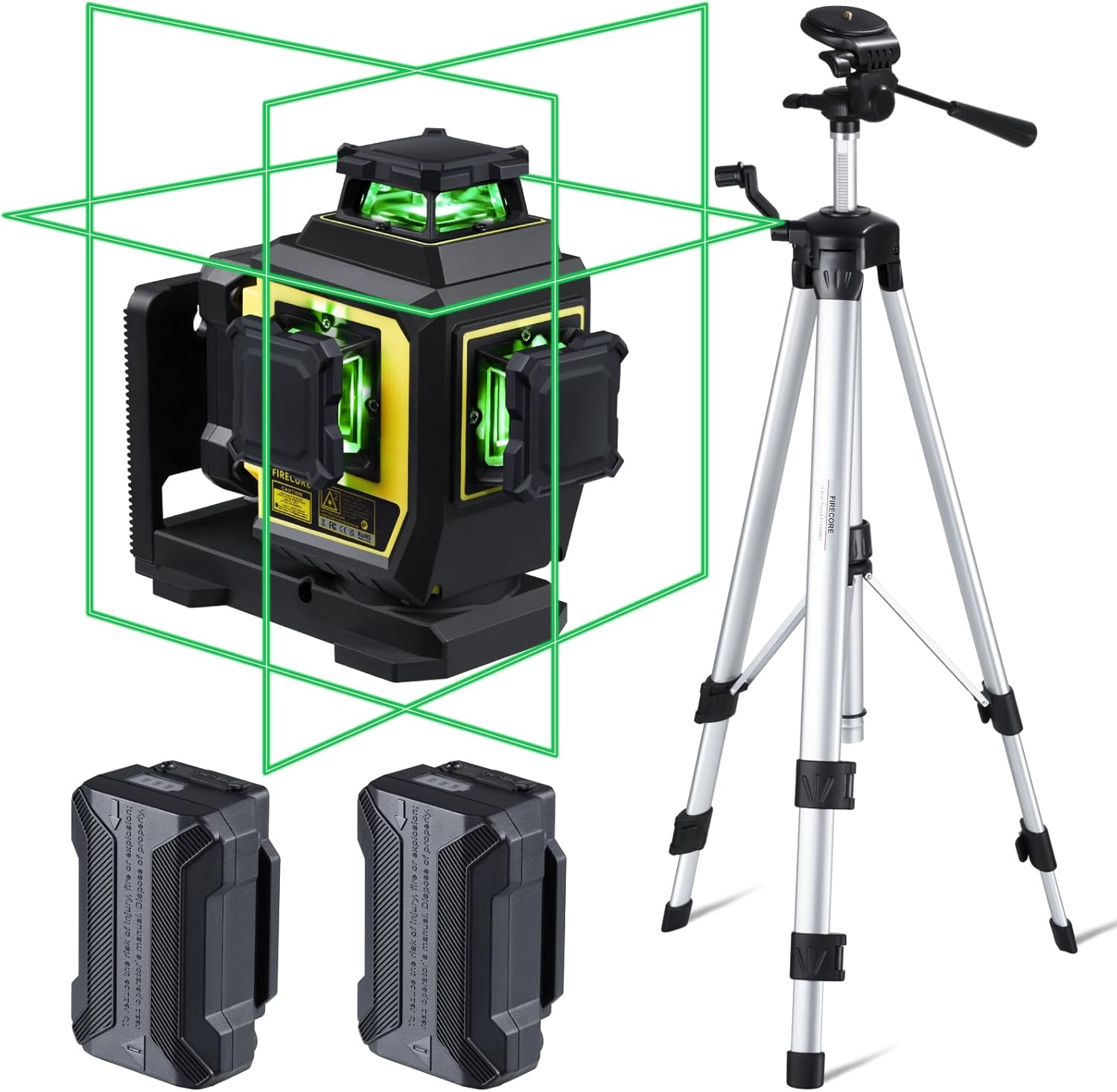
Figure 1: Complete package contents of the Firecore F95T-PRO-WT Laser Level system.
Vlastnosti produktu
- Jasně zelený laser: Up to 4X brighter than standard red beams, offering a working range of up to 98 ft with ±1/13" accuracy at 33 ft.
- 3 x 360° Line Laser: Projects one 360° horizontal and two 360° vertical planes for comprehensive room layout.
- Samonivelační režim: Automatically levels within ±4°. The laser blinks as an alarm when out of range.
- Manuální režim: Allows the laser tool to be placed at any angle when the pendulum is locked.
- Venkovní pulzní režim: Extends the working range up to 197 ft with a Firecore Line Laser Receiver (sold separately).
- Duální dobíjecí baterie: Dvě lithium-iontové baterie s kapacitou 4000 mAh poskytují až 16 hodin nepřetržitého provozu.
- Dálkové ovládání: Adjust laser lines, brightness, and modes without direct interaction with the unit.
- Robustní design: Odolnost proti prachu a vodě IP54 s potahovanou konstrukcí.
- Všestranná montáž: Integrated magnetic bracket, 360° rotating base with micro-adjustment, and 1/4-20 & 5/8-11 threads for tripod mounting.
- 60palcový stativ: Lightweight aluminum construction, adjustable from 26 to 60 inches, with a quick-release plate and built-in bullseye level.
Nastavení
- Instalace baterie:
Insert one of the provided 4000mAh Li-ion batteries into the battery compartment of the laser level. Ensure it clicks securely into place. The device can also be powered by the second battery or charged via the Type-C port.
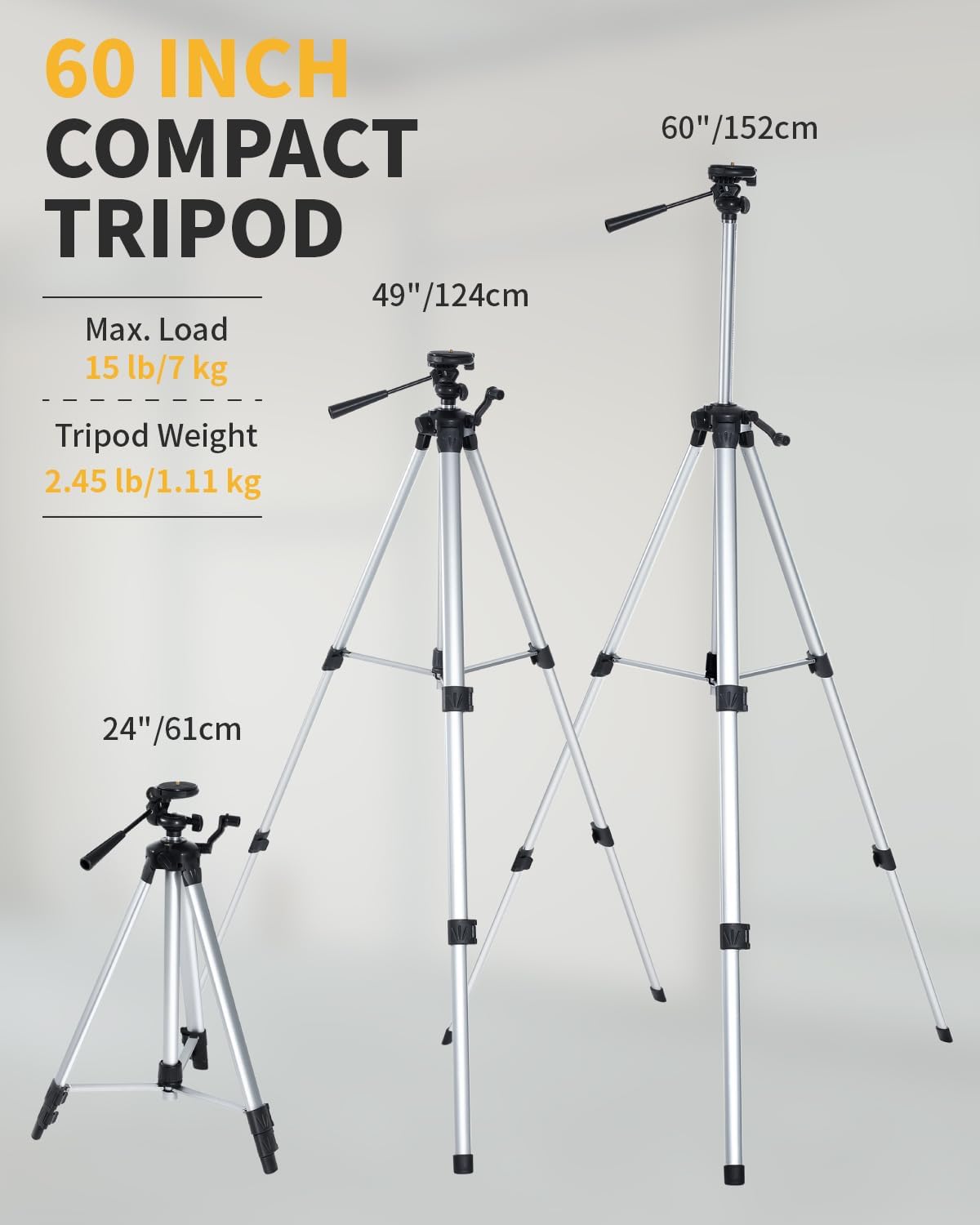
Figure 2: Battery installation and Type-C charging port.
- Mounting the Laser Level:
The laser level offers multiple mounting options:
- On the Tripod: Attach the laser level to the 60-inch tripod using the 1/4-20 or 5/8-11 mounting threads. Extend the tripod legs and adjust the height as needed. Use the built-in bullseye level on the tripod to ensure a stable and level base.
- Magnetický držák: Utilize the integrated magnetic bracket to attach the laser level to metal surfaces, such as steel studs.
- Otočná základna: The 360° rotating base allows for fine adjustment of horizontal lines.

Figure 3: Laser level mounted on the tripod.
Provozní režimy
The Firecore F95T-PRO-WT laser level features several operating modes to suit different applications.
1. Režim samonivelace
This mode is ideal for applications requiring precise horizontal and vertical alignment. The device automatically levels itself within a range of ±4°.
- Odemkněte kyvadlo posunutím zamykacího spínače do odemčené polohy.
- Place the laser level on a stable surface or tripod.
- The laser will automatically self-level. If the device is outside its ±4° self-leveling range, the laser lines will blink as an alarm. Adjust the device's position until the lines become steady.

Figure 4: Self-Leveling Mode in operation.
2. Manuální režim (uzamčený režim)
Manual mode allows you to project laser lines at any desired angle, useful for tasks like installing handrails or decorative patterns.
- Lock the pendulum by sliding the lock switch to the locked position.
- Press and hold the Manual button for 3 seconds to activate manual mode.
- The laser lines will be projected at the angle the device is positioned, without self-leveling.

Figure 5: Manual Mode for angled projections.
3. Pulse Mode (Outdoor Mode)
Pulse mode extends the working range of the laser level, especially useful for outdoor applications or in bright conditions when paired with a compatible Firecore Line Laser Receiver.
- Activate the pulse mode by pressing the Receiver Button on the laser level or the remote control.
- The laser lines will emit a pulsed signal, allowing detection by a Firecore Line Laser Receiver up to 197 ft away.

Figure 6: Pulse Mode for extended range with a receiver.
4. Switching Line Modes and Brightness
The laser level can project various combinations of horizontal and vertical lines, and the brightness can be adjusted.
- Use the H/V buttons on the device or the remote control to cycle through different line combinations (e.g., one horizontal, two vertical, all three 360° planes).
- The remote control also allows adjustment of laser brightness.

Figure 7: Using the remote control to switch line modes.
Informace o baterii
The Firecore F95T-PRO-WT laser level is powered by two 4000mAh Li-ion batteries, providing extended operation.
- Nabíjení: Connect the Type-C power cord to the laser level and the power adapter. Plug the adapter into a standard electrical outlet. The battery indicator will show charging status.
- Doba běhu: A fully charged battery provides up to 16 hours of continuous runtime.
- Výměna baterie: The two included batteries allow for easy hot-swapping to minimize downtime.

Figure 8: Charging the laser level and spare batteries.
Tripod Usage
The included 60-inch tripod provides a stable and adjustable platform for the laser level.
- Nastavení výšky: The tripod can be adjusted from 26 inches (61 cm) to 60 inches (152 cm) to suit various working heights.
- Rychloupínací deska: Use the quick-release plate for fast attachment and detachment of the laser level.
- Vyrovnání: Ensure the tripod is on a level plane using its built-in bullseye level before mounting the laser level.
- Stabilita: Always ensure the tripod legs are fully extended and locked for maximum stability.
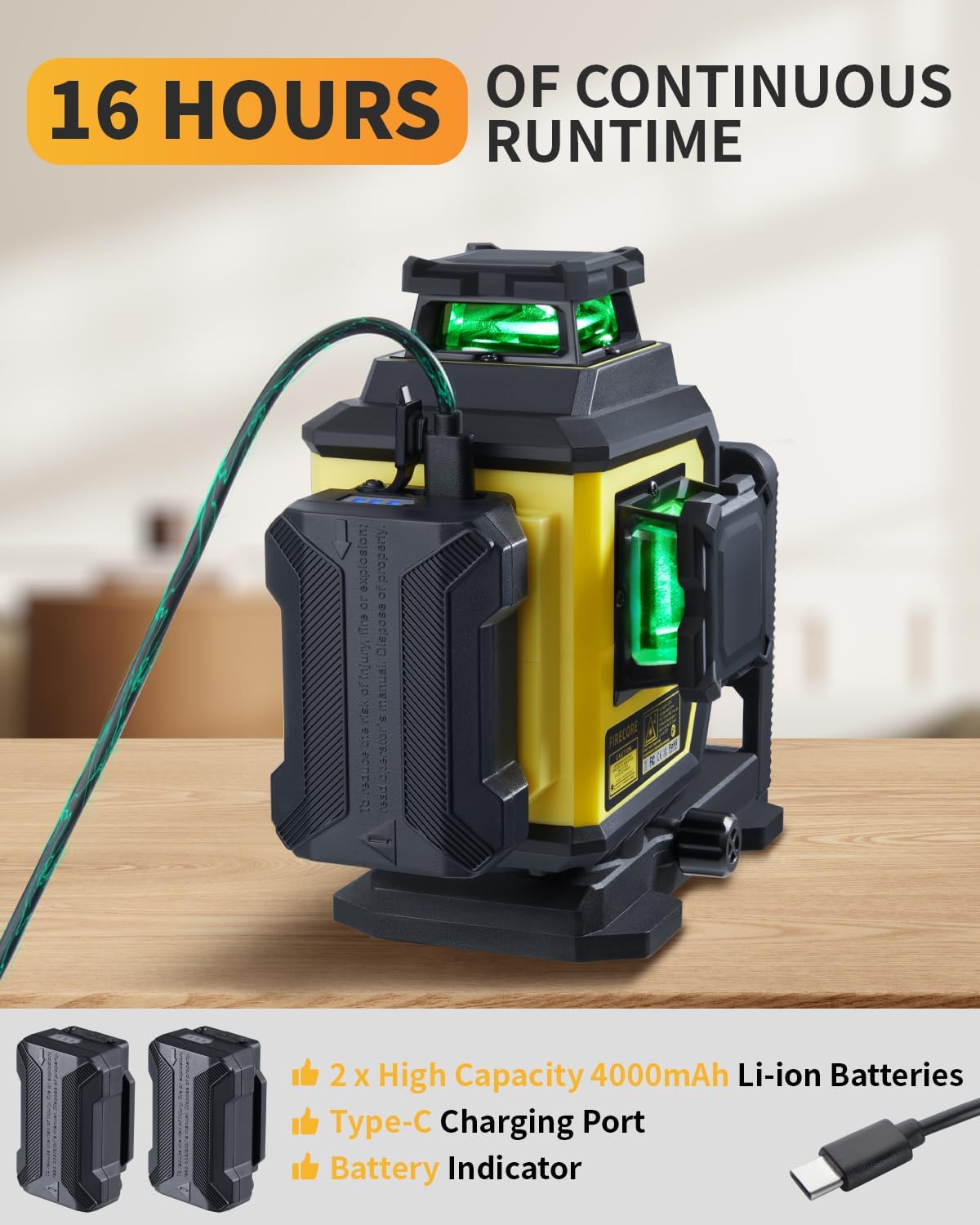
Figure 9: Tripod height adjustments and features.
Údržba
- Čištění: Otřete zařízení měkkým, damp tkanina. Nepoužívejte agresivní chemikálie nebo abrazivní čisticí prostředky.
- Skladování: Store the laser level and accessories in the provided carry pouch in a dry, cool place when not in use.
- Péče o baterie: Charge batteries regularly, even if not in use, to maintain their lifespan.
- Inspekce: Pravidelně kontrolujte zařízení, zda nejeví známky poškození nebo opotřebení.
Figure 10: Store the laser level and accessories in the provided carry pouch.
Odstraňování problémů
| Problém | Možná příčina | Řešení |
|---|---|---|
| Laser lines are blinking. | Device is out of self-leveling range (±4°). | Adjust the device's position until it is within the self-leveling range. Ensure the pendulum is unlocked. |
| Laser lines are not visible or dim. | Low battery; Bright ambient light; Brightness setting is low. | Charge the battery; Use pulse mode with a receiver in bright conditions; Adjust brightness using the remote control. |
| Zařízení se nezapne. | Baterie není správně nainstalována nebo je vybitá. | Ensure the battery is properly inserted and charged. Try using the second battery. |
| Dálkové ovládání nefunguje. | Remote battery depleted; Obstruction between remote and device. | Vyměňte baterii v dálkovém ovladači; Zajistěte volný výhled. |
Specifikace
| Funkce | Detail |
|---|---|
| Značka | Firecore |
| Číslo modelu | F95T-PRO-WT (F95T-XG Laser Level) |
| Laserová barva | Zelený paprsek |
| Přesnost | ±1/13" at 33 ft (±2mm at 10m) |
| Samonivelační rozsah | ±4° |
| Pracovní rozsah | Up to 98 ft (197 ft with receiver in Pulse Mode) |
| Laser Planes | One 360° Horizontal, Two 360° Vertical |
| Provozní režimy | Režim samonivelace / Manuální režim / Pulzní režim |
| Zdroj napájení | Napájení z baterie (2x 4000mAh Li-ion baterie jsou součástí balení) |
| Výdrž baterie | Up to 16 hours (continuous with all beams on) |
| Nabíjecí port | Typ-C |
| Hodnocení IP | IP54 (Dust/Water Resistant) |
| Montážní závity | 1/4-20 & 5/8-11 |
| Výška stativu | 26 palce (61 cm) až 60 palce (152 cm) |
| Materiál | Termoplastické elastomery, akrylonitril-butadien-styren, hliník |
| Hmotnost položky | 7.05 libry (přibližně 3.2 kg) |
Záruka a podpora
Firecore poskytuje 24měsíční poprodejní servis a doživotní technickou podporu for the F95T-PRO-WT laser level.
For any concerns, questions, or technical assistance, please contact Firecore customer support through the official channels or refer to the contact information provided with your purchase documentation.
Pro více informací navštivte Firecore Store on Amazon.


