
Zavedení
This manual provides detailed instructions for the setup, operation, and maintenance of your ATTACK SHARK Wireless Bluetooth/USB Wired Gaming Mechanical Keyboard. This compact 100-key keyboard features RGB backlighting, hot-swappable switches, and multiple connectivity options for versatile use across various devices.

Image: The ATTACK SHARK Wireless Mechanical Keyboard, showcasing its 100-key layout, RGB backlighting, orange coiled USB-C cable, and a cloud-shaped wrist rest.
Obsah balení
Ověřte, zda jsou v balení přítomny všechny položky:
- ATTACK SHARK Wireless Mechanical Keyboard
- Cloud Keyboard Wrist Rest
- USB-C to USB-A Data Cable (Coiled)
- Klíčenka a stahovák spínačů
- 2.4GHz USB přijímač
- Additional Switches (Red Switch type)
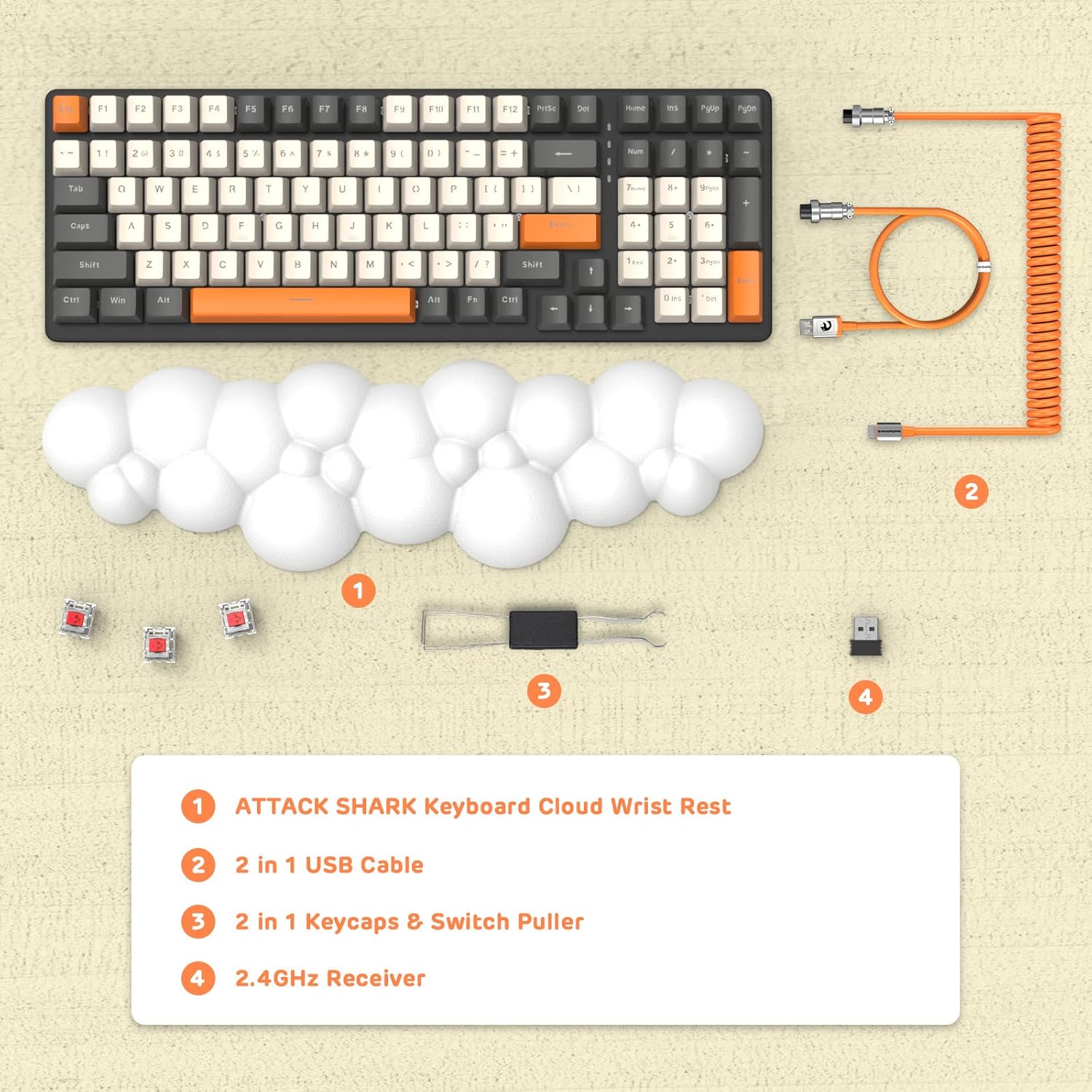
Obrázek: Pohled zhora view displaying the keyboard, cloud wrist rest, coiled USB cable, keycap and switch puller, and 2.4GHz USB receiver, along with spare switches.
Nastavení
The keyboard supports three connection modes: Bluetooth 5.0, 2.4GHz Wireless, and USB-C Wired.
1. Drátové připojení (USB-C)
- Connect the USB-C end of the provided coiled cable to the keyboard's USB-C port.
- Připojte konec kabelu USB-A k volnému portu USB v počítači.
- The keyboard will automatically switch to wired mode (indicated by FN+5).

Image: A visual representation of the keyboard connecting to various devices (laptop, tablet, desktop, smartphone) via wired USB, 2.4GHz wireless, and Bluetooth.
2. Bezdrátové připojení 2.4 GHz
- Vyhledejte 2.4GHz USB přijímač.
- Zapojte USB přijímač do volného USB portu na vašem počítači.
- Stiskněte FN + 4 on the keyboard to activate 2.4GHz wireless mode. The indicator light will show the connection status.
3. Připojení Bluetooth
The keyboard can store up to three Bluetooth devices.
- Stiskněte a podržte FN + 1, FN + 2nebo FN + 3 for 3-5 seconds to enter Bluetooth pairing mode for the desired channel. The indicator light will flash rapidly.
- On your device (e.g., laptop, tablet, smartphone), navigate to Bluetooth settings and search for available devices.
- Select "ATTACK SHARK Keyboard" (or similar name) from the list to pair.
- Po spárování přestane kontrolka blikat a zůstane svítit.
- Chcete-li přepínat mezi spárovanými zařízeními Bluetooth, jednoduše stiskněte FN + 1, FN + 2nebo FN + 3.
Návod k obsluze
Ovládání podsvícení RGB
The keyboard features customizable RGB backlighting with multiple modes.
- Přepnout režim podsvícení: Stiskněte FN + INS pro přepínání mezi různými efekty RGB osvětlení.
- Upravit jas: Stiskněte FN + ↑ (Šipka nahoru) pro zvýšení jasu, FN + ↓ (Šipka dolů) pro snížení jasu.
- Upravit rychlost: Stiskněte FN + ← (Left Arrow) to decrease effect speed, FN + → (Šipka doprava) pro zvýšení rychlosti efektu.

Image: The keyboard displaying various RGB lighting patterns, with key combinations for switching modes and adjusting brightness/speed.
Přepínače vyměnitelné za provozu
The keyboard's PCB supports 3-pin mechanical switches, allowing for easy replacement without soldering. This feature enables customization of typing feel and extends the keyboard's lifespan.
- Pomocí dodaného stahováku na klávesy opatrně vyjměte požadovanou klávesu.
- Use the switch puller to gently grasp and remove the switch from the PCB.
- Align the pins of the new 3-pin switch with the holes on the PCB and press firmly until it clicks into place.
- Vyměňte krytku kláves.

Obrázek: Podrobný view of the keyboard's PCB with a switch removed, demonstrating the hot-swappable feature. Spare red switches are also shown.
Baterie a nabíjení
The keyboard is equipped with a 4000mAh lithium battery.
- Životnost baterie: Up to 200 hours of use with the backlight turned off.
- Nabíjení: Connect the keyboard via the USB-C cable to a power source. The charging indicator light will show the charging status.
- Nízký objemtage Indikátor: The keyboard features a low voltage indicator to alert you when charging is required.

Image: The keyboard shown from the side, emphasizing its 4000mAh lithium battery capacity.
Údržba
To ensure the longevity and optimal performance of your keyboard:
- Čištění: Use a soft, dry cloth to wipe the keyboard surface. For deeper cleaning, remove keycaps using the provided puller and use compressed air to clear debris from between switches.
- Opěrka zápěstí: The PU material of the wrist rest is durable and washable. Clean with a damp hadřík a v případě potřeby jemné mýdlo.
- Skladování: Klávesnici skladujte na chladném a suchém místě mimo dosah přímého slunečního záření a extrémních teplot.
- Vyhněte se tekutinám: Do not expose the keyboard to liquids. In case of spills, immediately disconnect power and allow it to dry completely before use.
Odstraňování problémů
| Problém | Možná příčina | Řešení |
|---|---|---|
| Klávesnice nereaguje v bezdrátovém režimu. | Low battery, incorrect mode selected, receiver not connected, or Bluetooth not paired. | Charge the keyboard. Ensure correct mode (FN+4 for 2.4G, FN+1/2/3 for Bluetooth) is selected. Verify 2.4G receiver is securely plugged in. Re-pair Bluetooth if necessary. |
| Keys are "sticking" or registering multiple inputs. | Debris under keycap/switch, faulty switch. | Remove keycap and switch, clean thoroughly with compressed air. If issue persists, replace the switch using the hot-swappable feature. |
| RGB backlight not working or dim. | Backlight turned off, brightness set too low, or low battery. | Press FN+INS to cycle modes. Adjust brightness with FN+↑ / FN+↓. Charge the keyboard. |
| Keyboard not recognized by device. | Driver issue, incorrect connection mode, or device compatibility. | Ensure correct connection mode is active. Try a different USB port or device. For wired mode, ensure the cable is fully inserted. Check device's operating system for necessary drivers (usually plug-and-play). |
Specifikace
- Model: 3b5c1fdb-29da-409c-b4b7-12e9e72fb741
- Konektivita: Bluetooth 5.0, 2.4GHz Wireless (RF), USB-C Wired
- Rozložení: Compact 100 Keys (98% layout)
- Přepínače: Hot-Swappable 3-pin Mechanical (Red Switch variant)
- Podsvícení: RGB podsvícení (9 režimů)
- Baterie: Lithiová baterie 4000mAh
- Kompatibilní zařízení: Laptop, PC, Tablet (Mac/Win Supported)
- Materiál: Polyurethane (PU) for wrist rest
- Rozměry: 16.97 x 6.42 x 2.52 palce (balení)
- Hmotnost položky: 2.94 libry
- Speciální vlastnosti: Ergonomic design, Custom Coiled Aviator Keyboard Cable, Keycap and Switch Puller included.
Záruka a podpora
For warranty information and technical support, please refer to the documentation provided with your purchase or visit the official ATTACK SHARK webUschovejte si doklad o koupi pro případné reklamace.
Výrobce: ÚTOČNÉHO ŽRALOKA
Datum první dostupnosti: 8. května 2023