
1. Úvod
This manual provides essential instructions for the setup, operation, maintenance, and troubleshooting of your HPE ProLiant DL360 Gen11 1U Rack Server. Please read this document thoroughly before operating the server to ensure proper functionality and longevity.
2. Konec produktuview
The HPE ProLiant DL360 Gen11 is a compact 1U rack server designed for diverse workloads and environments, offering enhanced performance, expandability, and density. It is suitable for IT infrastructure, whether physical, virtual, or containerized.
Mezi klíčové vlastnosti patří:
- Supports 4th Generation Intel® Xeon® Scalable Processors with up to 60 cores.
- Utilizes 4800 MT/s HPE DDR5 SmartMemory, supporting up to 4.0 TB per socket.
- Features PCIe Gen5 and Intel® Software Guard Extensions (SGX) support.
- Designed for versatility and resiliency.
This server is an excellent choice for general compute, database management, Virtual Desktop Infrastructure (VDI), Content Delivery Networks (CDN), edge acceleration, and intelligent video analytics.

Obrázek 2.1: Přední strana view of the HPE ProLiant DL360 Gen11 1U Rack Server, showing drive bays and front panel controls.
3. Pokyny k nastavení
Follow these steps for initial server setup:
- Vybalení a kontrola: Carefully remove the server from its packaging. Inspect for any physical damage that may have occurred during shipping. Report any damage to your supplier immediately.
- Instalace do racku: Install the server into a standard 19-inch server rack using the appropriate rail kit (sold separately or included). Ensure proper airflow around the server for optimal cooling.
- Připojení napájení: Connect the power cables to the server's power supply units (PSUs) and then to a grounded power source. For redundancy, connect each PSU to a separate power circuit if available.
- Internetové připojení: Connect Ethernet cables from the server's network ports to your network switch or router. Utilize the dedicated management port (iLO) for remote management access.
- Periferní připojení: Connect any necessary peripherals such as a monitor, keyboard, and mouse for initial configuration, if not using remote management.
- Počáteční zapnutí: Press the power button on the front panel. Observe the boot process and system status indicators.

Obrázek 3.1: Zadní view of the HPE ProLiant DL360 Gen11 1U Rack Server, showing power supply units, network ports, and other I/O connections.
4. Návod k obsluze
This section covers basic server operation.
4.1 Zapnutí/vypnutí
- Zapnutí: Stiskněte tlačítko napájení na předním panelu. Systém zahájí spouštěcí sekvenci.
- Normální vypnutí: For a controlled shutdown, always use the operating system's shutdown procedure.
- Nucené vypnutí: In emergencies, press and hold the power button for approximately 5 seconds until the server powers off. This should be avoided during normal operation to prevent data corruption.
4.2 Remote Management (iLO)
The HPE Integrated Lights-Out (iLO) management processor allows for remote server management, including power control, virtual media, and console access, even when the operating system is not running. Refer to the iLO documentation for detailed configuration and usage.
4.3 Instalace operačního systému
Install your preferred operating system (e.g., Windows Server, Linux distributions, VMware ESXi) using a bootable USB drive, optical media (if an optical drive is present), or virtual media via iLO. Follow the operating system's installation guide.
5. Údržba
Regular maintenance ensures optimal server performance and longevity.
- Kontrola prostředí: Ensure the server operates within recommended temperature and humidity ranges. Maintain proper airflow in the rack.
- Odstranění prachu: Periodically inspect and clean dust from air vents and internal components using compressed air. Ensure the server is powered off and disconnected from power before cleaning.
- Aktualizace firmwaru: Regularly check the HPE support website for the latest firmware updates for the server, iLO, and other components. Apply updates as recommended.
- Výměna součásti: For component replacement (e.g., drives, memory, power supplies), refer to the detailed service manual available on the HPE support website. Always power down the server and disconnect power before performing internal maintenance.
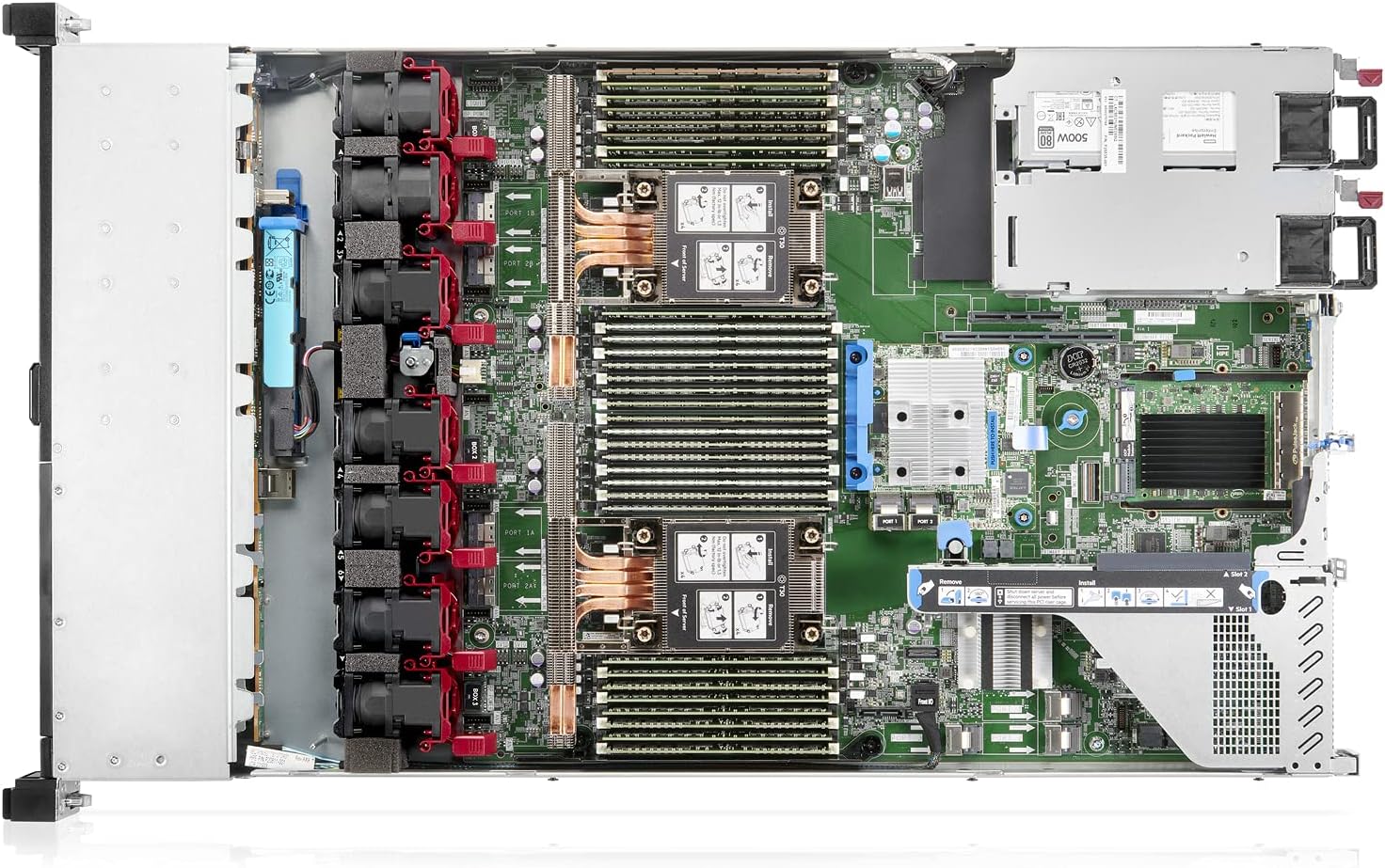
Obrázek 5.1: Vnitřní view of the HPE ProLiant DL360 Gen11 1U Rack Server, showing CPU sockets, memory slots, and cooling fans.
6. Řešení problémů
Tato část obsahuje základní kroky pro řešení běžných problémů.
- Server Does Not Power On:
- Verify power cables are securely connected to both the server and the power source.
- Check power supply unit (PSU) status LEDs.
- Ujistěte se, že je zdroj napájení aktivní.
- Žádný video výstup:
- Ujistěte se, že je monitor připojen a zapnutý.
- Try connecting to the server via iLO remote console.
- Reseat any installed video cards (if applicable).
- Operační systém se nedaří spustit:
- Check boot order in BIOS/UEFI settings.
- Verify the integrity of the boot drive.
- Consult operating system documentation for specific boot errors.
- Problémy s připojením k síti:
- Zkontrolujte připojení síťového kabelu.
- Verify network adapter status LEDs.
- Confirm network configuration in the operating system.
For more advanced troubleshooting, consult the HPE ProLiant DL360 Gen11 documentation or contact HPE support.
7. Specifikace
| Komponent | Detail |
|---|---|
| Produktová řada | ProLiant |
| Produktová řada | DL360 Gen11 |
| Výrobce procesoru | Intel |
| Typ procesoru | Xeon Silver |
| Model procesoru | 4410Y |
| Rychlost procesoru | 2 GHz |
| Počet podporovaných procesorů | 2 |
| Number of Processors Installed | 1 |
| Standardní paměť | 32 GB |
| Maximální podporovaná paměť | 8 TB |
| Technologie paměti | DDR5 SDRAM |
| Kontrola chyb | ECC |
| Výrobce čipové sady | Intel |
| Model čipové sady | C741 |
| Form Factor | 1U stojan |
8. Informace o záruce
The HPE ProLiant DL360 Gen11 server is backed by a comprehensive warranty. For specific terms, conditions, and duration of your product's warranty, please refer to the documentation included with your server or visit the official HPE support webmísto.
9. Podpora
For additional assistance, technical support, driver downloads, and further documentation, please visit the official Hewlett Packard Enterprise (HPE) support webmísto:
When contacting support, please have your server's serial number and model information readily available.