
Zavedení
The Dirt Devil DD2505 Bagless Vacuum Cleaner is designed for efficient home cleaning, particularly beneficial for individuals with allergies or dust sensitivities. This vacuum features a HEPA 12 filter, which captures 99.5% of small dust particles, preventing them from recirculating into the air. Its bagless design includes a 2.5-liter dust collection bin for easy emptying and no need for replacement bags. The vacuum comes equipped with a combibrush for various floor types, a crevice tool, and an upholstery attachment, offering versatile cleaning options for both hard-to-reach areas and furniture.

Image: The Dirt Devil DD2505 Bagless Vacuum Cleaner, showcasing its compact design and transparent dustbin.
Nastavení a montáž
Follow these steps to assemble your Dirt Devil DD2505 vacuum cleaner before first use.
- Rozbalte komponenty: Carefully remove all parts from the packaging. Ensure all accessories (hose, telescopic tube, floor nozzle, crevice tool, upholstery brush) are present.
- Připojte hadici: Zasuňte ohebnou hadici do sacího otvoru na hlavní jednotce, dokud bezpečně nezacvakne na místo.
- Připojení teleskopické trubice: Attach the telescopic metal tube to the handle end of the flexible hose. Adjust the tube length by pressing the release button and sliding it to your desired height.
- Připevnění podlahové hubice: Connect the combibrush floor nozzle to the end of the telescopic tube. Ensure it is firmly attached.
- Připojení napájení: Extend the power cord from the vacuum cleaner. Plug the power cord into a suitable electrical outlet (220-240V AC, 50/60Hz).

Image: The Dirt Devil DD2505 vacuum cleaner fully assembled with hose, telescopic tube, and floor nozzle, ready for use.
Návod k obsluze
Learn how to effectively use your vacuum cleaner and its attachments.
- Zapnutí/vypnutí: Stisknutím tlačítka napájení na hlavní jednotce spustíte nebo zastavíte vysavač.
- Using the Combibrush: The combibrush is suitable for various floor types. Use the foot switch on the nozzle to retract the bristles for hard floors or extend them for carpets and rugs.
- Použití štěrbinové hubice: For narrow spaces, corners, and edges, attach the crevice tool directly to the hose handle or the telescopic tube.

Image: The crevice tool, ideal for cleaning tight spaces and corners.
- Using the Upholstery Brush: Attach the upholstery brush for cleaning furniture, curtains, or car interiors.
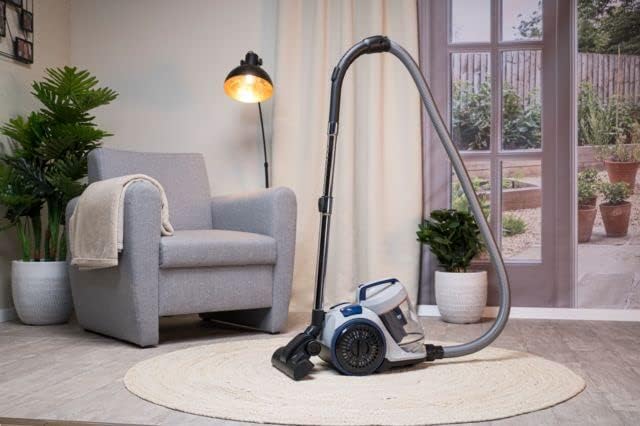
Image: The upholstery brush, designed for effective cleaning of fabric surfaces.
- Automatic Cable Rewind: After use, gently pull the power cord to activate the automatic cable rewind function. The cord will retract into the unit.
Údržba
Pravidelná údržba zajišťuje optimální výkon a prodlužuje životnost vašeho vysavače.
Vyprazdňování popelnice
The 2.5-liter dustbin should be emptied regularly, especially when the 'Max' fill line is reached, to maintain suction power.
- Odpojit napájení: Před prováděním jakékoli údržby vždy odpojte vysavač ze zásuvky.
- Odstraňte popelnici: Press the dustbin release button (if applicable) and lift the dustbin away from the main unit.
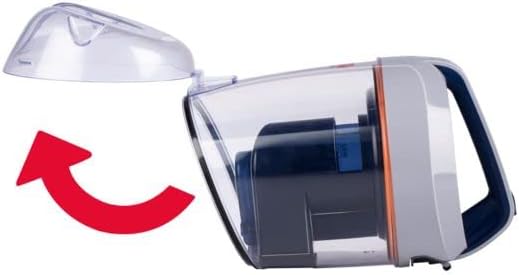
Image: Illustration showing how to detach the dustbin from the main vacuum unit.
- Prázdný obsah: Position the dustbin over a waste bin. Open the bottom flap of the dustbin to release the collected dirt and debris.
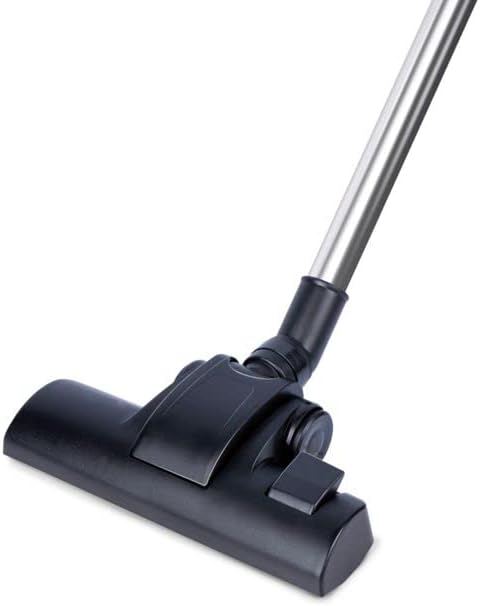
Image: The dustbin with its bottom flap open, ready to be emptied into a waste receptacle.
- Znovu sestavit: Close the dustbin flap securely and reattach the dustbin to the vacuum cleaner until it locks into place.
Cleaning the HEPA 12 Filter
The HEPA 12 filter is washable and should be cleaned periodically to maintain filtration efficiency. The frequency depends on usage.
- Filtr přístupu: The HEPA filter is located within the dustbin assembly. Remove the dustbin as described above and locate the filter.
- Mytí filtru: Rinse the HEPA filter under cold running water until the water runs clear. Do not use detergents or hot water.
- Důkladně vysušte: Allow the filter to air dry completely for at least 24 hours before reinserting it into the vacuum cleaner. Do not use heat to dry the filter.
- Znovu vložte filtr: Once completely dry, place the filter back into its housing within the dustbin and reattach the dustbin to the vacuum.
Odstraňování problémů
Pokud se s vysavačem setkáte s problémy, podívejte se na následující běžné problémy a jejich řešení.
- Bez napájení:
- Zkontrolujte, zda je napájecí kabel bezpečně zapojený do funkční elektrické zásuvky.
- Ujistěte se, že je stisknuté tlačítko napájení na vysavači.
- Ztráta sání:
- Zkontrolujte, zda není nádoba na prach plná a zda ji není třeba vyprázdnit.
- Inspect the HEPA filter for excessive dirt and clean it if necessary.
- Check the hose, telescopic tube, and floor nozzle for any blockages. Remove any obstructions carefully.
- Neobvyklý hluk:
- Turn off and unplug the vacuum. Check for any foreign objects caught in the brush roll or hose.
- Ujistěte se, že všechny díly jsou správně smontovány a bezpečně upevněny.
Specifikace
| Číslo modelu | DD2505 |
| Výkon | 800 W |
| svtage | 220-240 V AC, 50/60 Hz |
| Kapacita popelnice | 2.5 litrů |
| Typ filtru | HEPA 12 (Washable) |
| Délka kabelu | 5 metrů |
| Provozní poloměr | 7.5 metrů |
| Úroveň hluku | 80 dB |
| Hmotnost | 4.7 kg |
| Rozměry (D x Š x V) | 38 x 27 x 32 cm |
| Zahrnuté příslušenství | Combibrush, Crevice Tool, Upholstery Tool |
| Automatic Cable Rewind | Ano |
Záruka a podpora
This Dirt Devil DD2505 Bagless Vacuum Cleaner comes with a 2letá záruka. For warranty claims, technical support, or service inquiries, please refer to the contact information provided with your purchase documentation or visit the official Dirt Devil webwebu. Uschovejte si prosím doklad o koupi pro ověření záruky.