
1. Úvod
Thank you for choosing the Woputne LED Desk Lamp with Dual Heads, Model JB510. This manual provides essential information for the safe and efficient operation of your new desk lampPřed použitím si jej pečlivě přečtěte a uschovejte si jej pro budoucí použití.
Tento lamp features a dual-head design, offering versatile lighting with 5 color modes and 10 brightness levels. It is designed for various environments including home offices, bedrooms, study areas, and craft spaces.

Figure 1: Woputne LED Desk Lamp with Dual Heads in use, demonstrating phone charging capability.
2. Obsah balení
Ověřte prosím, zda jsou ve vašem balení obsaženy všechny níže uvedené položky:
- 1 x Woputne LED Desk Lamp (Model JB510)
- 1 x 5V 2A Mains Plug
- 1 x USB kabel
- 1 x Uživatelská příručka (tento dokument)
3. Bezpečnostní pokyny
- Zajistěte napájení objtage odpovídá lamppožadavky (5 V).
- Nerozebírejte ani neupravujte lamp.
- Vyvarujte se vystavení lamp to water or high humidity. This product is not waterproof.
- Nechte si lamp mimo dosah zdrojů tepla a přímého slunečního záření.
- Odpojte lamp ze zásuvky před čištěním nebo pokud jej nebudete delší dobu používat.
- Nepoužívejte, pokud je poškozen napájecí kabel nebo zástrčka.
4. Nastavení
- Rozbalit: Opatrně vyjměte všechny součásti z obalu.
- Umístění: Umístěte lamp základnu na stabilním, rovném povrchu.
- Připojte napájení: Zasuňte USB kabel do lamp's 5V 2A USB Charging input-port (labeled 'IN' on the back of the base). Connect the other end of the USB cable to the provided mains plug, then plug the mains plug into a suitable wall outlet.
- Manuální vypínač: Locate the manual 'ON/OFF' sliding button on the back of the lamp base. Ensure this switch is in the 'ON' position for the lamp to function. If the button is 'OFF', the desk lamp nerozsvítí se.

Obrázek 2: Detail lamp base, highlighting the USB input port and the manual ON/OFF switch.
5. Návod k obsluze
The Woputne LED Desk Lamp features intuitive touch controls located on the base.

Figure 3: Touch control panel and visual representation of light modes and brightness levels.
5.1 Zapnutí/vypnutí
- Ensure the manual switch on the back is 'ON'.
- Dotkněte se Tlačítko napájení (symbol: kruh se svislou čarou) na základně pro otočení lamp ZAPNUTO nebo VYPNUTO.
5.2 Adjusting Color Modes
- Dotkněte se Tlačítko režimu (symbol: book) to cycle through 5 different color temperatures (3000K to 6000K).
5.3 Úprava úrovní jasu
- Dotkněte se Tlačítko jasu (symbol: gear) to cycle through 10 brightness levels.
5.4 Funkce paměti
- Jáamp will remember your last used brightness and color mode settings when turned off and on again, provided the main power is not disconnected.
- Poznámka: Pokud lamp is unplugged or experiences a power outage, it will reset to factory default settings.
5.5 Časovač automatického vypnutí
- Dotkněte se Tlačítko časovače (symbol: hodiny) to activate the 45-minute auto-off timer. This is useful for nighttime reading.
6. Vlastnosti
6.1 Dual Head Design
Jáamp features a unique dual-head design, allowing for flexible lighting. The two light bars can be adjusted independently or together to concentrate light for specific tasks or disperse it for broader illumination. The total length of the lamp head is 56cm, with each single head measuring 25cm.
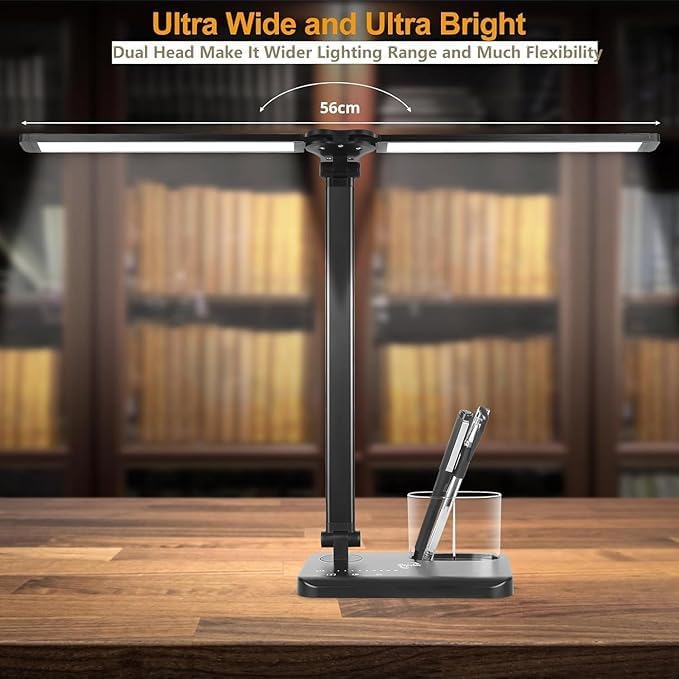
Figure 4: Dual head design for wide and flexible lighting.
6.2 Adjustable Arm and Base
Jáamp offers extensive adjustability for optimal positioning:
- Jáamp arm is 180° flexible.
- The base can be adjusted up to 135°.
- The foldable design enhances portability and storage.

Figure 5: Adjustable arm and base for flexible positioning.
6.3 USB nabíjecí port
Jáamp includes a 5V 1A USB output port on the base, allowing you to charge compatible devices such as smartphones while using the lamp.
Figure 6: USB charging port on the lamp báze.
7. Údržba
- Čištění: Ujistěte se, že lamp is unplugged before cleaning. Use a soft, dry cloth to wipe the surface. Do not use abrasive cleaners or solvents.
- Skladování: Když se nepoužívá, uložte lamp na chladném a suchém místě, mimo dosah přímého slunečního záření a vlhkosti.
8. Řešení problémů
| Problém | Možná příčina | Řešení |
|---|---|---|
| Lamp nezapne. | 1. Manual ON/OFF switch is in 'OFF' position. 2. Power cable is not properly connected. 3. Napájenítage or lamp resetovat. | 1. Ensure the manual switch on the back of the base is 'ON'. 2. Check all power connections, including the mains plug and USB cable. 3. If unplugged or power was lost, the lamp may need to be turned on via the touch control. |
| Lamp settings (mode/brightness) reset. | Power was disconnected or there was a power outage. | This is normal behavior. Re-adjust your preferred settings. The memory function only works when the lamp is turned off via touch control and remains plugged in. |
| Lamp head/arm does not stay in position. | Joints may be loose or the weight distribution is uneven. | Nastavte lamp head and arm to a balanced position. Ensure the joints are not excessively loose. |
| Nabíjecí port USB nefunguje. | 1. Device not compatible. 2. Lamp není zapnutý. 3. Problém s kabelem. | 1. Ensure your device is compatible with 5V 1A USB charging. 2. Lamp must be powered on for the USB charging port to function. 3. Zkuste jiný USB kabel. |
9. Specifikace
Obrázek 7: Rozměry produktu.
| Specifikace | Detail |
|---|---|
| Název modelu | JB510 |
| Značka | Woputne |
| Typ světelného zdroje | LED |
| Wattage | 5 wattů |
| svtage | 5 voltů |
| Jas | 270 lumenů |
| Teplota barev | 5 modes (3000K to 6000K) |
| Úrovně jasu | 10 úrovní |
| Kontrolní metoda | Dotek |
| Speciální funkce | Manual ON/OFF Switch, Memory Function, 45-minute Auto-Off Timer, USB Charging Port (5V 1A output) |
| Materiál | Hliník, Plast |
| Rozměry produktu | 5.2"H x 1.81"Š x 15.35"V (přibližně 13.2 cmH x 4.6 cmŠ x 39 cmV) |
| Hmotnost položky | 1.47 libry (přibližně 665 gramů) |
| Délka kabelu | 39.37 Inches (approx. 100cm) |
| UPC | 715377635471 |
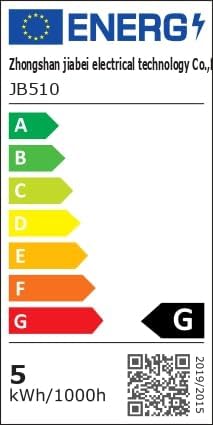
Figure 8: Energy Efficiency Label. For more details, visit eprel.ec.europa.eu/qr/1481462.
10. Záruka a podpora
Woputne is committed to providing quality products. For any questions, concerns, or support needs regarding your LED Desk Lamp, please contact our customer service. Specific warranty details may vary; please refer to your purchase documentation or contact the seller for more information.
We aim to ensure customer satisfaction and are available to assist with product inquiries or operational guidance.