
1. Úvod
The SHIDU M500 is a compact and portable wired voice amplifier designed to project your voice clearly and powerfully. It is an ideal tool for teachers, presenters, tour guides, and anyone who needs to amplify their voice in various settings. This device also supports music playback from multiple sources.

Image 1.1: SHIDU M500 Wired Voice Amplifier. This image shows the front view of the compact, black and white voice ampživější.
2. Konec produktuview
2.1. Součásti a ovládací prvky
Familiarize yourself with the various parts and controls of your SHIDU M500 ampživější:

Image 2.1: SHIDU M500 Controls and Ports Diagram. This diagram illustrates the top panel controls including Play/Pause, Recording, Previous, Next, Mode Switch, LED Screen, and the Switch/Volume knob. It also shows the side ports: USB, TF card socket, DC 5V charging port, AUX-IN, and MIC-IN.
- Switch/Vol Knob: Otočením zapnete/vypnete a upravíte hlasitost.
- LED obrazovka: Displays current mode, battery level, and track information.
- Tlačítko Přehrát/Pozastavit: Spustí nebo pozastaví přehrávání zvuku.
- Tlačítko nahrávání: Initiates or stops audio recording.
- Předchozí tlačítko: Přeskočí na předchozí skladbu nebo prochází menu.
- Tlačítko Další: Přeskočí na další skladbu nebo prochází menu.
- Tlačítko pro přepnutí režimu: Toggles between different input modes (e.g., USB, TF card, AUX).
- USB port: For connecting USB flash drives for music playback.
- Zásuvka na kartu TF: Pro vložení TF (MicroSD) karty pro přehrávání hudby.
- Port DC 5V: Power input for charging the ampživější.
- Port AUX-IN: Pro připojení externích audio zařízení pomocí 3.5mm audio kabelu.
- MIC-IN Port: Pro připojení kabelového mikrofonu.
3. Nastavení
3.1. Nabíjení Ampdoživotní
- Connect the provided charging cable to the DC 5V port na ampživější.
- Druhý konec kabelu připojte ke standardnímu napájecímu adaptéru USB (není součástí balení) nebo k portu USB počítače.
- The LED screen will indicate charging status. A full charge typically takes 3-5 hours.
- Zajistěte amplifier is fully charged before first use for optimal battery life.
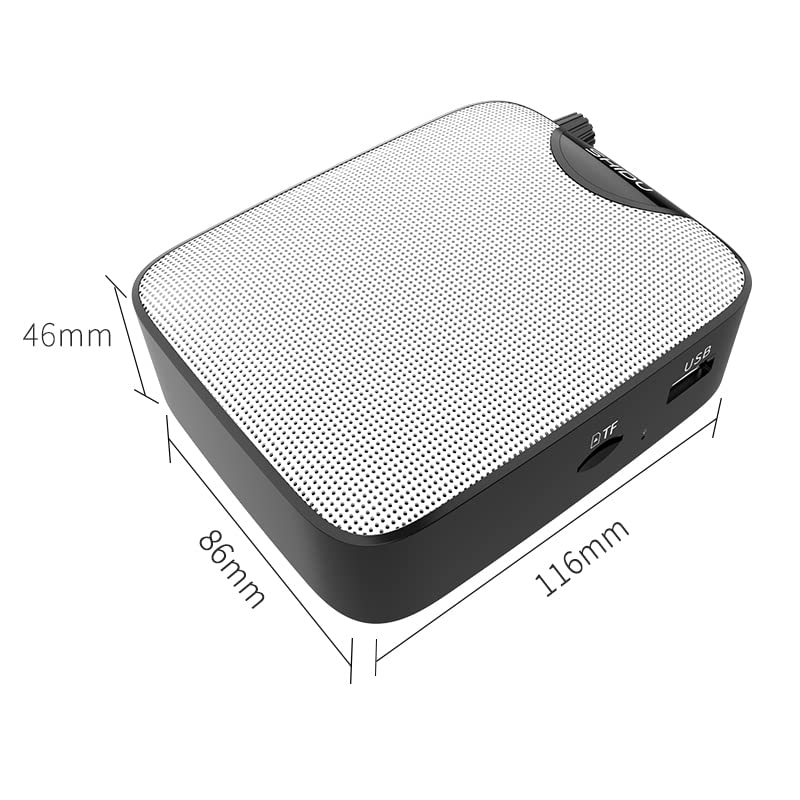
Image 3.1: SHIDU M500 Built-in 1800mAh Battery. This image highlights the amplifier's internal 1800mAh high-quality lithium battery, indicating long standby time and extended battery life.
3.2. Připojení mikrofonu
- Insert the 3.5mm plug of the wired microphone into the MIC IN port na ampživější.
- Position the microphone headset comfortably on your head, ensuring the microphone is close to your mouth for best voice pickup.
3.3. Zapnutí/vypnutí a nastavení hlasitosti
- Pro zapnutí otočte Switch/Vol Knob clockwise until you hear a click and the LED screen illuminates.
- Pokračujte v otáčení knoflíku ve směru hodinových ručiček pro zvýšení hlasitosti. Otáčením proti směru hodinových ručiček pro snížení hlasitosti.
- Chcete-li vypnout, otočte Switch/Vol Knob counter-clockwise until you hear a click and the LED screen turns off.
4. Návod k obsluze
4.1. hlas Ampzvedání
- Ensure the microphone is connected and the amplifier je zapnutý.
- Upravte Switch/Vol Knob na vaše přání ampúroveň zvedání.
- Speak clearly into the microphone. Avoid placing the microphone too close to the amplifier to prevent feedback (a high-pitched squeal).
4.2. Music Playback (USB/TF Card/AUX-IN)
- USB/TF karta: Vložte USB flash disk do USB port or a TF card into the Zásuvka na kartu TF. The amplifier will automatically switch to the corresponding mode and begin playback. If not, press the Tlačítko pro přepnutí režimu.
- AUX-IN: Připojte externí audio zařízení (např. chytrý telefon, MP3 přehrávač) k Port AUX-IN using a 3.5mm audio cable. Press the Tlačítko pro přepnutí režimu until 'AUX' is displayed on the LED screen.
- Použijte Přehrát/Pozastavit, Předchozía Další tlačítka pro ovládání přehrávání hudby.
- Upravte hlasitost pomocí Switch/Vol Knob.
4.3. Funkce nahrávání
- Ensure a USB flash drive or TF card is inserted to save recordings.
- Stiskněte tlačítko Tlačítko nahrávání to start recording. The LED screen will indicate recording status.
- Mluvte do mikrofonu.
- Stiskněte tlačítko Tlačítko nahrávání again to stop recording. The recording will be saved to the inserted storage device.
5. Údržba
5.1. Čištění
- Otřete ampVnější povrch změkčovače otřete měkkým, suchým hadříkem.
- Nepoužívejte agresivní chemikálie, rozpouštědla ani abrazivní čisticí prostředky.
- Udržujte porty čisté od prachu a nečistot.
5.2. Péče o baterie
- Nabijte amplifier regularly, even if not in frequent use, to maintain battery health.
- Před nabíjením se vyhněte úplnému vybití baterie.
- Nevystavujte ampzvlhčovač extrémním teplotám.
5.3. Skladování
- Uložte amplifier in a cool, dry place away from direct sunlight and moisture.
- When storing for extended periods, ensure the battery is partially charged (around 50%).
6. Řešení problémů
| Problém | Možná příčina | Řešení |
|---|---|---|
| Žádný zvuk od ampdoživotní | Amplifier is off; Volume is too low; Microphone not connected properly; Incorrect mode selected. | Zapněte amplifier and increase volume; Ensure microphone is fully plugged into MIC-IN; Press Mode Switch to select correct input. |
| Zkreslený zvuk nebo zpětná vazba | Volume too high; Microphone too close to amplifier; Microphone damaged. | Decrease volume; Increase distance between microphone and amplifier; Try a different microphone if available. |
| Baterie se nenabíjí | Charging cable not connected properly; Faulty cable or adapter; Amplifier not powered off during charging. | Ensure cable is securely connected to DC 5V port and power source; Try a different USB cable or adapter; Power off the amplifier while charging. |
| Přehrávání hudby nefunguje | USB/TF card not inserted correctly; Incorrect mode selected; Corrupt audio files. | Reinsert USB/TF card; Press Mode Switch to select USB/TF mode; Ensure audio files jsou v kompatibilním formátu. |
7. Specifikace
- Model: SHIDU M500
- Rozměry (D x Š x V): 8.6 x 2.8 x 10.4 centimetrů
- Hmotnost: 280 gramů
- Technologie připojení: Kabelové
- Výkon: 10W
- Baterie: Built-in 1800mAh High Quality Lithium Battery
- Kompatibilní zařízení: Laptop, MP3 Player, Smartphone (via AUX-IN)
- Vstupní porty: MIC-IN (3.5mm), AUX-IN (3.5mm), USB, TF Card Slot, DC 5V (Charging)
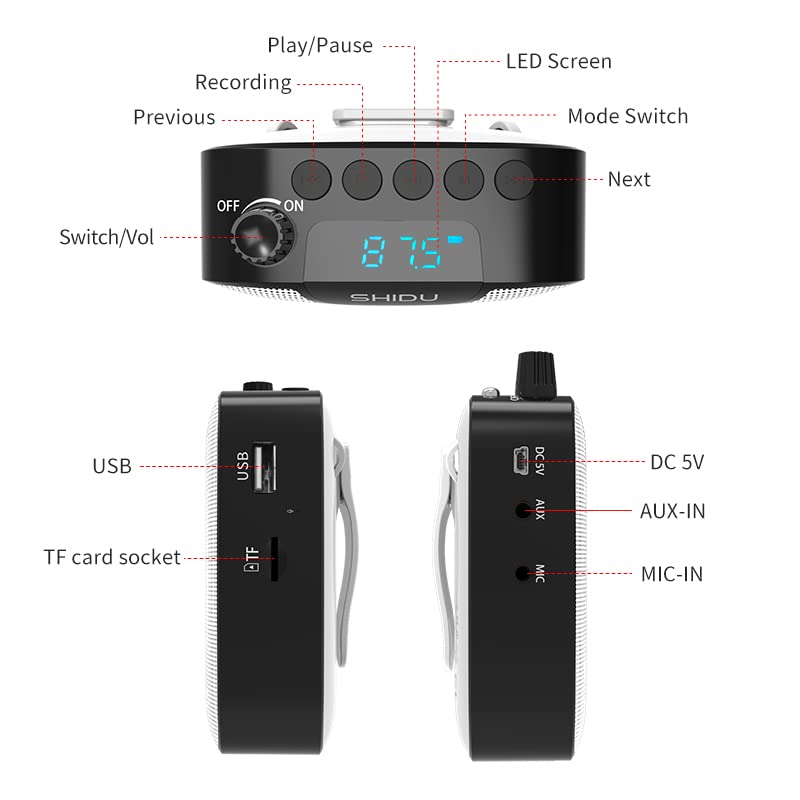
Image 7.1: SHIDU M500 Dimensions Diagram. This image shows the amplifier's dimensions: 116mm length, 86mm width, and 46mm height.

Image 7.2: SHIDU M500 10W High Power Acoustic Amplifier. This image illustrates the amplifier's 10W power output, capable of providing loud and clear sound in a standard 500m² space.

Image 7.3: SHIDU M500 Mini and Portable. This image emphasizes the amplifier's compact size and light weight of only 282g, comparable to the size of a mobile phone.

Image 7.4: SHIDU M500 High-Fidelity Dual Magnetic Speaker. This image highlights the advanced speaker technology for realistic vocal reproduction and powerful bass and treble.
8. Informace o záruce
SHIDU warrants its voice amplifier hardware products against defects in materials and workmanship for a period of jeden rok from the date of original purchase, provided the purchase was made from an authorized SHIDU dealer. This warranty is void if the equipment is altered, misused, mishandled, suffers excessive wear, or is serviced by any parties not authorized by SHIDU.
9. Podpora
For further assistance, technical support, or warranty claims, please refer to the contact information provided with your purchase or visit the official SHIDU website. Ensure you have your product model number (M500) and proof of purchase ready when contacting support.