
1. Úvod
This manual provides detailed instructions for the assembly, operation, and maintenance of your RFIVER TF3001WHT TV Stand. Please read these instructions carefully before beginning assembly to ensure safe and correct installation and usage. Keep this manual for future reference.
2. Bezpečnostní informace
- Před montáží se ujistěte, že jsou všechny díly přítomny a nepoškozené. Nepoužívejte, pokud některé díly chybí nebo jsou vadné.
- Nepřekračujte maximální nosnost 35 kg (77 liber).
- This stand is designed for TVs between 32 and 65 inches. Verify your TV's size and VESA pattern before installation.
- Sestavujte na měkkém, čistém povrchu, abyste zabránili poškrábání.
- Tighten all screws firmly, but do not overtighten. Overtightening can damage threads.
- Během montáže držte děti a domácí zvířata v dostatečné vzdálenosti. Malé části mohou představovat nebezpečí udušení.
- Always ensure the TV is securely mounted to the stand and stable before use.
3. Obsah balení
Ověřte, zda jsou v balení obsaženy všechny níže uvedené komponenty:
- Základna z tvrzeného skla
- Hlavní podpůrný sloup
- TV Mounting Brackets (Left and Right)
- Adaptační desky VESA (pokud jsou k dispozici)
- Sada hardwaru (různé šrouby, podložky, distanční podložky pro montáž televizoru a stojanu)
- Klipy pro správu kabelů
- Non-slip Feet for Base

4. Montážní návod
Pro správnou montáž postupujte pečlivě podle následujících kroků:
- Attach Non-slip Feet to Base: Carefully place the tempered glass base on a soft surface. Attach the non-slip feet to the designated spots on the underside of the glass base.
- Secure Main Support Column to Base: Align the main support column with the mounting holes on the tempered glass base. Use the provided screws and tools to securely fasten the column to the base. Ensure it is stable and upright.
- Attach TV Mounting Brackets to TV: Identify the VESA mounting holes on the back of your television. Select the appropriate screws, washers, and spacers from the hardware kit that fit your TV. Attach the left and right TV mounting brackets to the back of your TV. Ensure the brackets are level and securely fastened.
- Upevnění televizoru na stojan: With assistance, carefully lift the television and hook the TV mounting brackets onto the main support column. Ensure the brackets are properly seated on the column's hooks.
- Secure TV with Safety Locks: Once the TV is hung, locate the safety locks on the bottom of the TV mounting brackets. Tighten these screws to secure the TV to the stand, preventing accidental dislodgement.
- Správa kabelů: Use the provided cable management clips to route and organize cables along the back of the main support column. This helps maintain a tidy appearance and prevents cable damage.


5. Návod k obsluze
5.1 Nastavení výšky
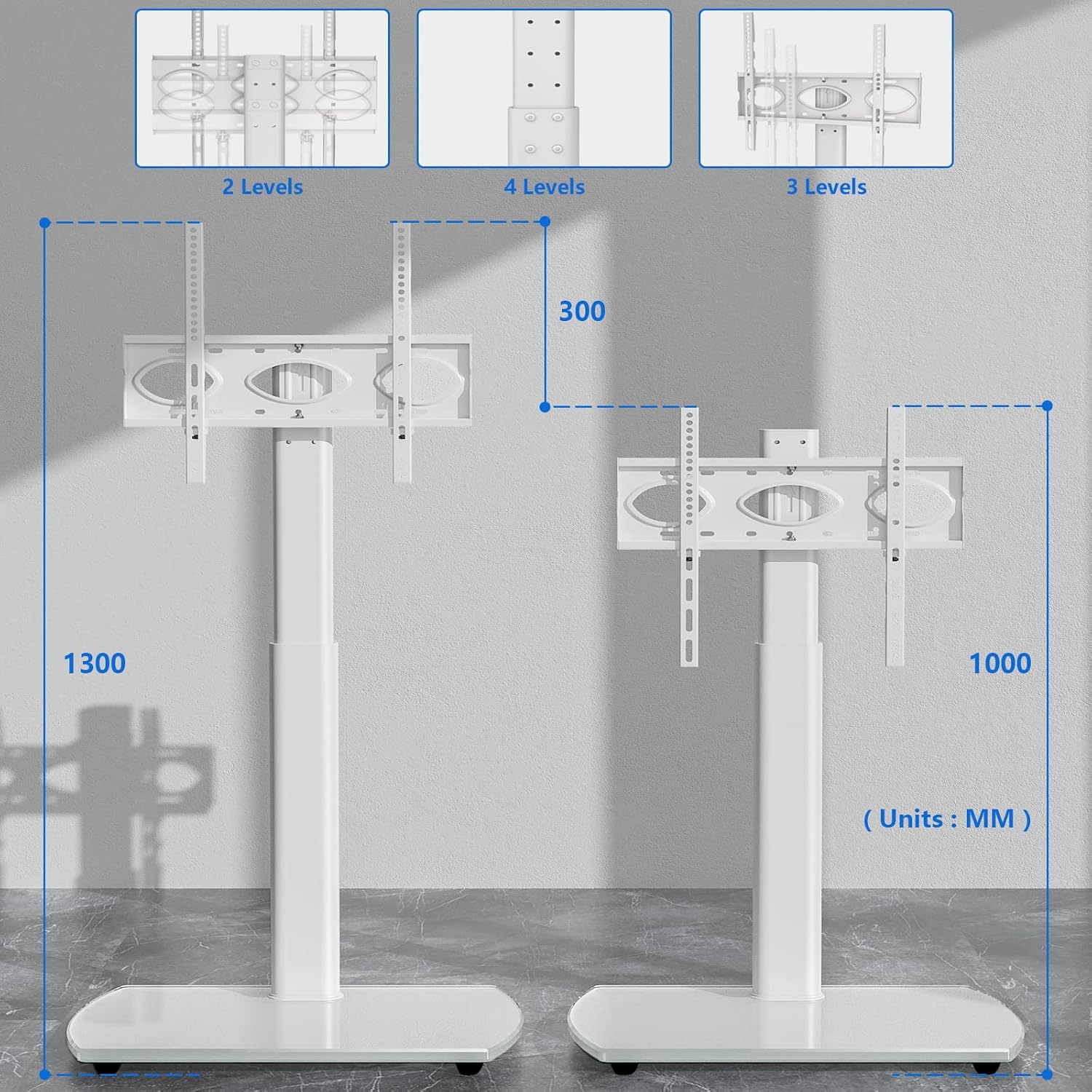
The RFIVER TF3001WHT TV stand allows for height adjustment to optimize your viewing experience. The TV can be adjusted between 1000 mm and 1300 mm from the floor.
- To adjust the height, loosen the screws on the main support column that secure the TV mounting plate.
- Carefully slide the TV (with brackets) up or down to the desired height.
- Once the desired height is achieved, retighten all screws firmly to secure the TV in place.
5.2 Funkce otáčení
The TV stand features a swivel function, allowing you to rotate your television for optimal viewing úhly.
- The TV can be swiveled up to 30 degrees to the left and 30 degrees to the right.
- Gently grasp the sides of your television and rotate it to the desired angle. No locking mechanism is required for the swivel function.

6. Údržba
Abyste zajistili dlouhou životnost a vzhled vašeho televizního stolku, dodržujte tyto pokyny pro údržbu:
- Čištění: Použijte měkký, damp cloth to clean the glass base and metal parts. Avoid abrasive cleaners or harsh chemicals that could damage the finish.
- Inspekce: Pravidelně kontrolujte všechny šrouby a spoje, zda jsou pevně utažené. V případě potřeby je dotáhněte.
- Rozložení hmotnosti: Avoid placing excessive weight on the stand, especially on the edges of the glass base.
7. Řešení problémů
Pokud narazíte na nějaké problémy, podívejte se na následující běžné problémy a jejich řešení:
- Televizor není vodorovně umístěn: Ensure the TV mounting brackets are installed evenly on the back of the TV. Check that the main support column is securely fastened to the base and is not leaning.
- Stojan se zdá být nestabilní: Verify that all assembly screws are fully tightened. Ensure the stand is placed on a flat, stable surface. Do not exceed the maximum weight capacity.
- Difficulty with height adjustment: Loosen the adjustment screws sufficiently before attempting to slide the TV. Ensure no cables are snagged.
- Chybějící části: If any parts are missing upon opening the package, contact RFIVER customer support for assistance.
8. Specifikace
Detailed product specifications for the RFIVER TF3001WHT TV Stand:
| Funkce | Specifikace |
|---|---|
| Číslo modelu | TF3001WHT |
| Kompatibilní velikosti TV | 32-65 palců |
| Maximální nosnost | 35 kg (77 lb) |
| Kompatibilita VESA | 100x100mm až 400x400mm |
| Rozsah nastavení výšky | 1000 mm - 1300 mm |
| Úhel otočení | ±30 stupňů |
| Základní materiál | Tvrzené sklo |
| Barva | Bílý |

9. Záruka a podpora
The RFIVER TF3001WHT TV Stand comes with a manufacturer's warranty of 5 years.
For warranty claims, technical support, or any questions regarding your product, please contact RFIVER customer service through the retailer's platform or the official RFIVER website. Please have your model number (TF3001WHT) and purchase information ready when contacting support.