
1. Nastavení
1.1 Součásti balení
Your MAGIC-REFINER MK32 keyboard package includes:
- MK32 82-Key Hot Swappable Wired Mechanical Keyboard
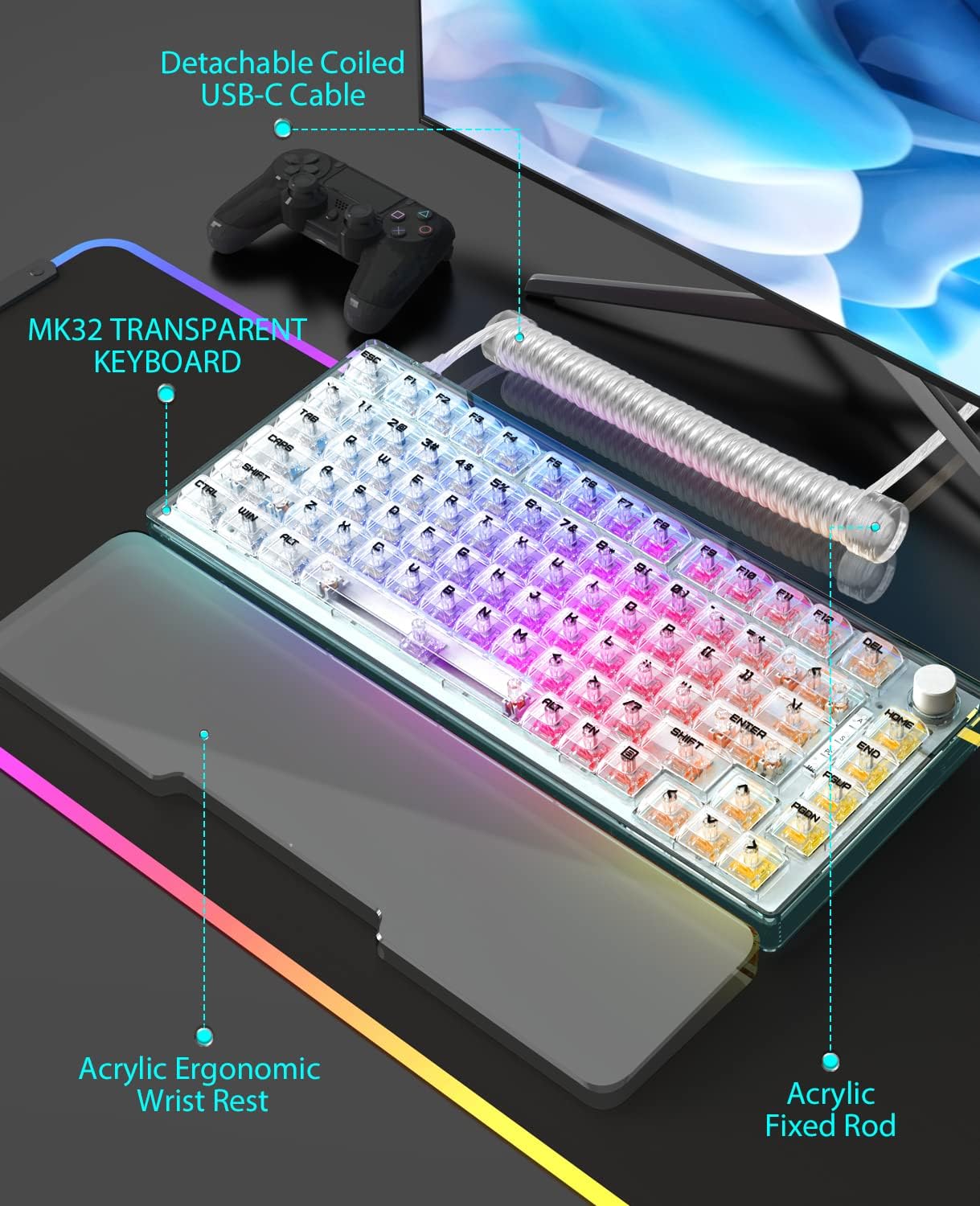
- Acrylic Wrist Rest
- Custom Coiled USB-C Cable
- Stahovač klíčů
- Stahovák spínačů
1.2 Konektivita
The MK32 keyboard offers versatile connectivity options:
- Kabelové (USB-C): Připojte klávesnici přímo k zařízení pomocí dodaného kabelu USB-C.
- Bezdrátové připojení 2.4 GHz: For a stable and fast wireless connection, use the dedicated 2.4GHz dongle.
- Bluetooth: Connect wirelessly to compatible devices via Bluetooth.
To switch between connectivity modes, locate the switch on the top edge of the keyboard. Select your desired mode (Wired, 2.4G, or Bluetooth).
1.3 Fyzické úpravy
The keyboard features two-level adjustable feet on the underside to customize your typing angle for optimal comfort.

Obrázek: Celkově view of the MAGIC-REFINER MK32 keyboard with vibrant RGB lighting.
2. Návod k obsluze
2.1 Základní funkce klávesnice
The MK32 is an 82-key, 75% form factor keyboard. All standard alphanumeric and function keys operate as expected. Refer to your operating system's documentation for specific key combinations.
2.2 Ovládání RGB osvětlení
The keyboard features double-sided RGB LEDs with 18 default lighting effects. You can adjust multiple brightness levels and flowing backlight speeds. Use the FN key in combination with other keys (refer to the included function card) to:
- Procházejte 18 světelnými efekty.
- Upravte úrovně jasu.
- Control backlight speed.
- Control base and keyboard lighting effects separately.

Image: Dynamic RGB lighting effects illuminating the transparent keycaps and base of the MK32 keyboard.
2.3 Rotary Knob Functionality
Otočný knoflík umístěný v pravém horním rohu klávesnice umožňuje pohodlné ovládání médií:
- Střídat: Adjusts system volume (clockwise for up, counter-clockwise for down).
- Stiskněte: Přepíná/pozastavuje přehrávání médií.

Image: The 82-key layout of the MK32 keyboard, highlighting the convenient rotary knob for media control.
2.4 Přepínače vyměnitelné za provozu
The MK32 features a hot-swappable PCB, allowing you to easily replace switches without soldering. It supports 99% of 3/5-pin MX-similar mechanical switches. The keyboard comes equipped with custom Ice-rock linear switches, designed for smooth and quick feedback with lower sound.
Obrázek: Detailní záběr view of the transparent OEM profile keycaps, showcasing their clear design and the underlying switches.
2.5 Kompatibilita systému
The keyboard is compatible with a wide range of operating systems and devices, including:
- PC (Windows series)
- Android
- Linux
- iOS
- Gaming Consoles: PS4, Xbox Series X|S, Xbox One
3. Údržba
3.1 Čištění klávesnice
Pro udržení optimálního výkonu a vzhledu pravidelně čistěte klávesnici:
- Use a soft brush or compressed air to remove dust and debris from between keycaps.
- Wipe the keycaps and frame with a slightly damp, lint-free cloth. Avoid harsh chemicals.
- For the acrylic wrist rest, wipe clean with a damp cloth as needed, especially if it's white and prone to showing dirt.
3.2 Výměna spínačů a kláves
Utilize the included keycap puller to carefully remove keycaps. Use the switch puller to gently extract switches from the PCB. When inserting new switches, ensure the pins are aligned correctly to avoid damage. Press firmly until the switch clicks into place.

Image: The MK32 keyboard paired with its ergonomic acrylic wrist rest and custom coiled USB-C cable.
4. Řešení problémů
4.1 Problémy s připojením
- Kabelové: Ujistěte se, že je kabel USB-C bezpečně připojen ke klávesnici i k zařízení. Zkuste jiný port USB nebo kabel.
- Bezdrátové připojení 2.4 GHz: Verify the 2.4GHz dongle is properly inserted into your device. Ensure the keyboard is switched to 2.4GHz mode.
- Bluetooth: Ensure Bluetooth is enabled on your device and the keyboard is in pairing mode. Re-pair the device if necessary.
4.2 Poruchy kláves
If a key is unresponsive or inconsistent:
- Carefully remove the keycap and switch using the provided tools.
- Inspect the switch for any visible damage or debris. Clean if necessary.
- Re-insert the switch firmly. If the issue persists, try replacing it with one of the spare switches or a known working switch.
4.3 Problémy s RGB osvětlením
If the RGB lighting is not functioning correctly:
- Check the keyboard's lighting settings using the FN key combinations.
- Ujistěte se, že úroveň jasu není nastavena na minimum.
- If using wireless mode, ensure the battery has sufficient charge.
5. Specifikace
| Funkce | Detail |
|---|---|
| Číslo modelu | MK32 |
| Rozložení | 82-Key, 75% Form Factor |
| Konektivita | Kabelové (USB-C), bezdrátové 2.4 GHz, Bluetooth |
| Spínače | Hot-swappable, Custom Ice-rock Linear Switches (40g force) |
| Klíčenky | Transparent OEM Profile Klíčenky |
| Podsvícení | Double-sided RGB LEDs (18 effects, adjustable brightness/speed) |
| Materiál | Japanese silencing NANO cotton, high-density EVA, acrylic, TPU |
| Speciální funkce | Ergonomic Wrist Rest, Transparent Base, Rotary Knob, Two-level Adjustable Feet |
| Rozměry | 10 x 5 x 1 palce (balení) |
| Hmotnost položky | 10.4 unce |
6. Záruka a podpora
6.1 Plány ochrany
Optional protection plans are available for your product:
- Dvouletý ochranný plán
- Dvouletý ochranný plán
- Kompletní ochrana (měsíční fakturace)
For details on coverage and terms, please refer to the specific protection plan documentation.
6.2 Podpora výrobce
For any product inquiries, technical assistance, or warranty claims, please contact MAGIC-REFINER customer support.
Manufacturer: MAGIC-REFINER
Pro další informace a podporu navštivte MAGIC-REFINER Store on Amazon.