
1. Úvod
The UNI-T UT60S is a smart, true RMS digital multimeter designed for accurate and reliable electrical measurements. Featuring 9999 counts, this device can measure AC/DC voltage, AC/DC current, resistance, diode, capacitance, temperature, and frequency. Its fully automatic anti-burn intelligent design helps prevent operational errors and device damage, making it suitable for both professional technicians and everyday users.

Obrázek 1: Přední strana view of the UNI-T UT60S Digital Multimeter.
2. Bezpečnostní informace
Always adhere to safety precautions when using the multimeter. Failure to do so may result in electric shock, injury, or damage to the meter or equipment under test.
- Přečtěte si manuál: Před použitím si pečlivě přečtěte a pochopte všechny pokyny a bezpečnostní varování v tomto návodu.
- Jmenovitý objemtage: Neaplikujte více než jmenovitý objemtage, as marked on the meter, between terminals or between any terminal and earth ground. The UT60S is capable of withstanding a maximum overvoltage impulse of 1000V.
- Před použitím zkontrolujte: Před každým použitím zkontrolujte měřicí přístroj, měřicí kabely a příslušenství, zda nejsou poškozené. Nepoužívejte jej, pokud jsou poškozené.
- Proper Terminals: Ensure test leads are connected to the correct input terminals for the measurement function selected.
- Circuit De-energization: Always de-energize the circuit and discharge all high-voltagPřed měřením odporu, vodivosti, diod nebo kapacity vyměňte kondenzátory.
- Live Circuit Work: When working on live circuits, work alone as little as possible, and ensure another person is present to provide assistance if needed.
- Nadproudová ochrana: The meter features overcurrent alarms and protection functions. Do not exceed the maximum current ratings for the input terminals.
- Podmínky prostředí: Use the meter only as specified in this manual. Do not use the meter in explosive gas, vapor, or dusty environments.
- Osobní ochranné prostředky: Při práci s elektrickými obvody vždy používejte vhodné osobní ochranné prostředky (OOP), jako jsou ochranné brýle a izolované rukavice.
3. Vlastnosti produktu
The UNI-T UT60S Digital Multimeter offers a range of features for versatile and safe electrical testing:
- Zobrazení 9999 počtů: Provides high-resolution measurements for precision.
- Skutečné měření RMS: Ensures accurate readings for non-sinusoidal waveforms.
- Fully Automatic Anti-Burn Design: Intelligent protection against operational errors and potential device damage.
- Široké možnosti měření: Měří AC/DC objtage (up to 1000V), AC/DC current, resistance, diode, capacitance, temperature, and frequency.
- Large LCD Screen with Dual Display: Allows simultaneous display of AC voltage and frequency, enhancing readability.
- Full Button Design: Offers intuitive control and automatic recognition of current input jacks.
- Fast ADC (Analog to Digital Converter): Provides rapid measurement updates (3 times/second).
- Misoperation Protection: Capable of withstanding a maximum overvoltage impulse of 1000V, with overvoltage and overcurrent alarms.
- NCV (bezkontaktní svtage) Funkce: Detekuje AC svtage without physical contact, featuring audible and visual alarms for safety.
- Automatická úspora energie: Low power consumption (7mA during operation, 5uA in sleep state) and automatic backlight display in dark environments, extending battery life. Automatic shut-down feature.

Figure 2: The UT60S display with 9999 counts for precise readings.
4. Co je v krabici
Po otevření balíčku byste měli najít následující položky:
- Digitální multimetr UNI-T UT60S
- Thermocouple (for temperature measurements)
- Měřicí kabely pro multimetr (červený a černý)
- 1.5V AAA Batteries (pre-installed or included separately)

Figure 3: Contents of the UNI-T UT60S package, including the multimeter, test leads, and thermocouple.
5. Nastavení
5.1. Instalace baterie
The UT60S typically uses 1.5V AAA batteries. To install or replace batteries:
- Ujistěte se, že je multimetr vypnutý a měřicí vodiče odpojené.
- Vyhledejte přihrádku na baterie na zadní straně měřiče.
- Pomocí šroubováku otevřete kryt prostoru pro baterie.
- Vložte baterie AAA a dbejte na správnou polaritu (+ a -).
- Nasaďte kryt prostoru pro baterie a zajistěte jej šroubem.
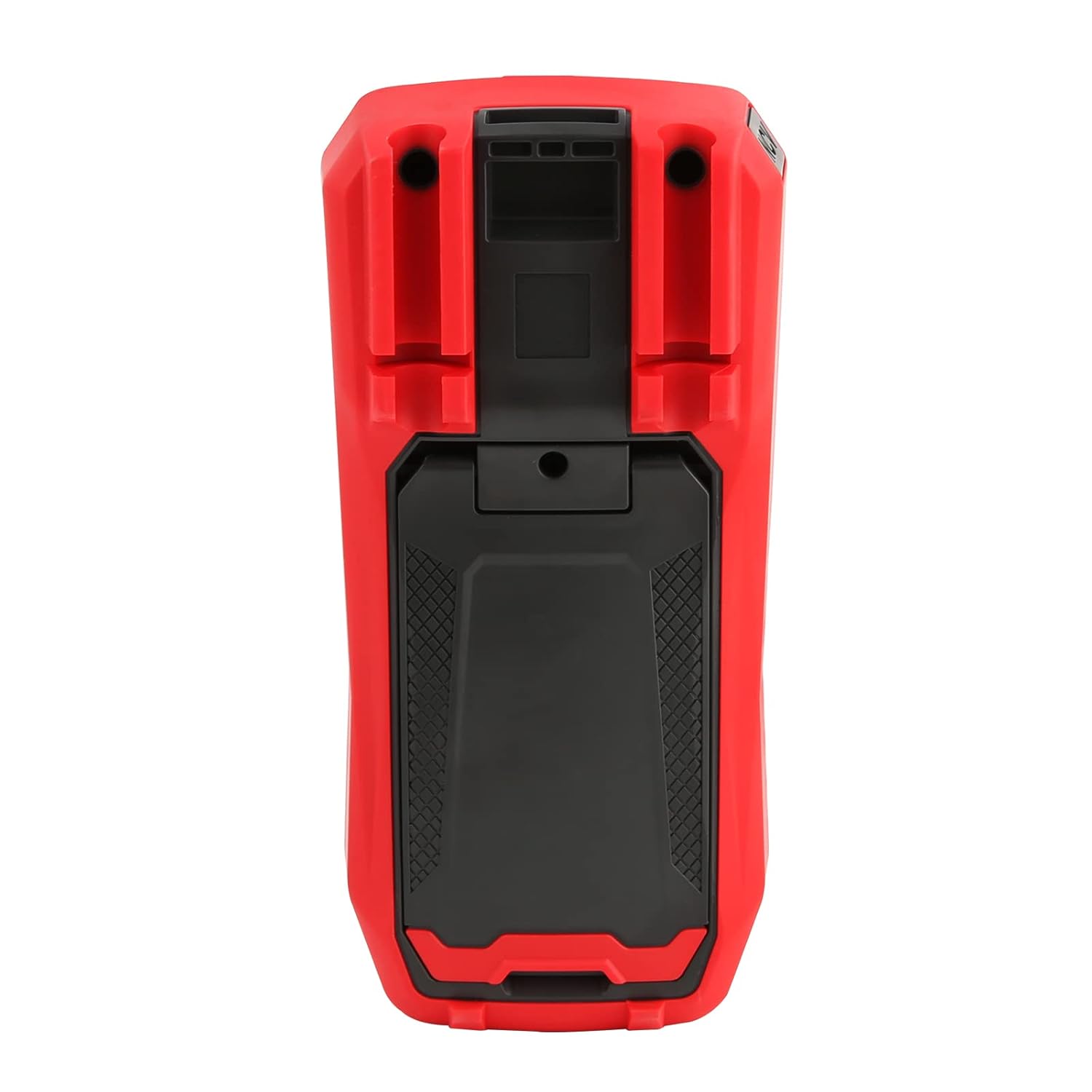
Obrázek 4: Zadní view of the UT60S, indicating the battery compartment location.
5.2. Připojení testovacích vodičů
Connect the test leads to the appropriate input terminals:
- The black test lead (common) should always be connected to the COM terminál.
- Za svtage, resistance, capacitance, frequency, diode, and continuity measurements, connect the red test lead to the VΩHzCAP terminál.
- For current measurements (mA/A), connect the red test lead to the mA/A terminál.
- Pro mikroampere current measurements (μA), connect the red test lead to the μA terminál.

Figure 5: Input terminals of the UT60S for connecting test leads.
6. Návod k obsluze
The UT60S features a full button design for selecting measurement functions. The meter's intelligent anti-burn design automatically recognizes the input jack and selected function.
6.1. Zapnutí/vypnutí
Stiskněte tlačítko MOC button to turn the meter on or off. The meter will automatically shut down after a period of inactivity to save battery life.
6.2. Auto Mode
In Auto mode, the meter automatically identifies the measurement type (voltage, resistance, continuity) and selects the appropriate range. This simplifies operation for general troubleshooting.
6.3 Měření AC/DC Volumetage
K měření objtage:
- Připojte černý testovací vodič k COM terminál a červený testovací vodič k VΩHzCAP terminál.
- Stiskněte tlačítko V~/Hz button to select AC voltage measurement, or the V= / NCV button for DC voltage. The meter may automatically select the correct mode in Auto range.
- Připojte měřicí sondy k měřenému obvodu nebo součástce.
- Přečtěte si svtaghodnota na displeji. Pro objem střídavého proudutage, the frequency may also be displayed simultaneously.

Obrázek 6: Měření objemu střídavého proudutage and frequency with the UT60S.
6.4 Měření střídavého/stejnosměrného proudu
Pro měření proudu:
- DŮLEŽITÉ: To measure current, the meter must be connected in series with the circuit. Always turn off power to the circuit before connecting the meter.
- Připojte černý testovací vodič k COM terminál.
- For current up to 10A, connect the red test lead to the mA/A terminal. For microampere current, connect to the μA terminál.
- Stiskněte tlačítko ACA/DCA button to select AC or DC current measurement.
- Přerušte obvod a zapojte měřicí vodiče sériově se zátěží.
- Zapněte obvod a odečtěte hodnotu proudu na displeji.
6.5. Measuring Resistance, Diode, and Continuity
To measure resistance, diode, or continuity:
- Ensure the circuit is de-energized and capacitors are discharged.
- Připojte černý testovací vodič k COM terminál a červený testovací vodič k VΩHzCAP terminál.
- Stiskněte tlačítko Ω→+ button to cycle through resistance, diode, and continuity functions.
- Připojte měřicí sondy napříč součástkou.
- Read the measurement. For continuity, an audible buzzer will sound if continuity is detected.
6.6. Měření kapacity
Chcete-li měřit kapacitu:
- Před testováním se ujistěte, že je kondenzátor zcela vybitý.
- Připojte černý testovací vodič k COM terminál a červený testovací vodič k VΩHzCAP terminál.
- Stiskněte tlačítko mV~°C°F button to select temperature measurement.
- Připojte měřicí sondy na svorky kondenzátoru.
- Odečtěte hodnotu kapacity na displeji.

Figure 7: The UT60S performing a capacitance measurement.
6.7. Měření teploty
Pro měření teploty:
- Connect the thermocouple to the appropriate input terminals (usually the VΩHzCAP a COM terminals, or dedicated temperature inputs if available).
- Stiskněte tlačítko mV~°C°F button to select temperature measurement.
- Place the thermocouple probe at the point where temperature needs to be measured.
- Hodnotu teploty odečtěte na displeji ve stupních Celsia nebo Fahrenheita.
6.8. NCV (Nekontaktní svtage) Funkce
Funkce NCV umožňuje detekci objemu střídavého proudutage bez přímého kontaktu s vodiči.
- Stiskněte tlačítko V= / NCV button to activate the NCV function.
- Move the top of the meter close to the conductor or outlet.
- The meter will provide an audible alarm and visual indication (flashing light) if AC voltage is detected. The intensity of the alarm and light may vary with voltage síla.

Figure 8: Using the NCV function to detect live AC voltage.
6.9. Data Hold
Stiskněte tlačítko DRŽET tlačítko pro zmrazení aktuální hodnoty na displeji. Opětovným stisknutím funkci pozastavení zrušíte.
6.10. Range Selection
While the meter typically operates in Auto range, you can manually select a range by pressing the RANGE button. This can be useful for specific applications or to speed up measurements in stable conditions. Press and hold the RANGE button to return to Auto range.
6.11. USB Communication (if applicable)
The UT60S series may support USB communication for data logging and analysis on a computer. If your model includes this feature, connect the meter to your computer using the provided USB cable and install the UNI-T software. Refer to the software manual for detailed instructions.
Video 1: Demonstration of features like NCV, LoZ, and USB communication on a UNI-T UT161 series multimeter. The UT60S shares similar functionalities.
7. Údržba
7.1. Čištění
Otřete pouzdro měřiče čističemamp hadříkem a jemným čisticím prostředkem. Nepoužívejte abrazivní prostředky ani rozpouštědla. Před použitím se ujistěte, že je měřič zcela suchý.
7.2. Výměna baterie
Vyměňte baterie, když se na displeji zobrazí indikátor slabé baterie. Pokyny k instalaci baterií naleznete v části 5.1.
7.3. Výměna pojistky
If the current measurement function stops working, the fuse may need replacement. Refer to the full user manual for specific fuse ratings and replacement procedures. Always use fuses with the specified voltage a aktuální hodnocení.
8. Řešení problémů
If you encounter issues with your UNI-T UT60S, try the following basic troubleshooting steps:
- Žádný displej/Napájení zapnuto: Zkontrolujte instalaci baterií a ujistěte se, že nejsou vybité. V případě potřeby je vyměňte.
- Nesprávné čtení: Verify that the test leads are correctly connected to the appropriate terminals for the selected function. Ensure the function dial is set correctly. Check for damaged test leads.
- Měření proudu nefunguje: Check the fuse. If blown, replace it with a fuse of the correct rating. Ensure the meter is connected in series with the circuit.
- Indikace „OL“ nebo přetížení: This indicates that the measured value is outside the selected range or the maximum capability of the meter. Try selecting a higher range (if in manual range mode) or ensure the component is within the meter's specifications.
- NCV nedetekuje: Ensure the NCV function is activated and the meter is brought close enough to the AC voltage zdroj.
For more complex issues, refer to the detailed troubleshooting section in the complete user manual or contact UNI-T customer support.
9. Specifikace
Key specifications for the UNI-T UT60S Digital Multimeter:
| Funkce | Specifikace |
|---|---|
| Počet zobrazení | 9999 |
| Skutečné RMS | Ano |
| AC/DC Voltage | Až 1000V |
| AC / DC proud | Up to 10A (mA/A terminals), Up to 1000μA (μA terminal) |
| Odpor | 0.1Ω - 40MΩ |
| Kapacita | 1nF - 4000μF |
| Teplota | Yes (with thermocouple) |
| Frekvence | Ano |
| Test diod | Ano |
| Test kontinuity | Ano |
| NCV (bezkontaktní svtage) | Ano |
| Zdroj napájení | Battery Powered (1.5V AAA batteries) |
| Hmotnost položky | 370 gramů |
| Soulad s bezpečností | UL 61010-1, IEC 61010-2-030, CAT III 1000V, CAT II 600V |
10. Záruka a podpora
UNI-T provides customer support for their products. If you encounter any problems during use, please contact UNI-T customer service directly via email. They offer 7/24 1-to-1 user support to address your concerns promptly.
For specific warranty details, please refer to the warranty card included with your product or visit the official UNI-T webmísto.