
USHINING T3105
Uživatelská příručka k rozkládacímu telefonu USHINING 3G pro seniory
Model: T3105
Zavedení
Thank you for choosing the USHINING 3G Senior Flip Phone. This manual provides comprehensive instructions for setting up, operating, and maintaining your new device. Designed with ease of use in mind, this phone features large buttons, a clear display, and essential functions to keep you connected. Please read this manual thoroughly to ensure proper usage and to maximize your phone's capabilities.
Obsah balení

This image displays all items included in the USHINING 3G Senior Flip Phone package. It shows the flip phone, its dedicated charging dock, a long-lasting battery, the user manual, a SpeedTalk SIM card, and the charging cord.
- USHINING 3G Senior Flip Phone (Model: T3105)
- Nabíjecí dok
- Long Lasting Battery (1200mAh)
- SpeedTalk SIM Card
- Charging Cord (USB cable and power adapter)
- Uživatelská příručka
Nastavení
1. Instalace SIM karty a baterie
Before using your phone, you need to install the SIM card and battery. The phone supports dual SIM cards (Micro and Full-sized) for added flexibility.
- Opatrně sejměte zadní kryt telefonu.
- Insert the SpeedTalk SIM card (or your preferred compatible SIM card) into the designated SIM slot(s). Ensure the gold contacts face downwards and the card is correctly oriented.
- Vložte baterii s kapacitou 1200 mAh do přihrádky na baterii a zarovnejte kontakty.
- Nasaďte zadní kryt zpět, dokud bezpečně nezacvakne na místo.
2. Nabíjení telefonu

This image illustrates the USHINING 3G Senior Flip Phone placed in its charging dock. It highlights the phone's 1200mAh battery, indicating a standby time of over 200 hours and approximately 300 minutes of voice talk time.
The phone comes with a convenient charging dock. For initial use, fully charge the battery.
- Connect the charging cord to the charging dock and then to a power outlet.
- Place the phone into the charging dock, ensuring it is seated correctly. The phone will indicate that it is charging.
- A full charge typically takes approximately 3 hours. The 1200mAh battery provides 5-6 hours of talk time or over 100 hours (4 days) of standby time.
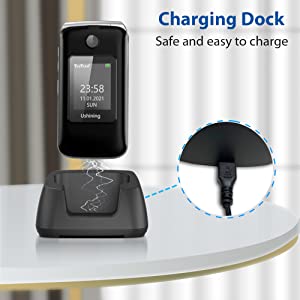
Tento obrázek nabízí detailní záběr view of the charging dock, emphasizing its design for safe and easy charging. It shows the USB port where the charging cable connects.
Návod k obsluze
Základní funkce
- Zapnutí/vypnutí: Press and hold the Power/End Call button (red button) to turn the phone on or off.
- Uskutečňování hovorů: Dial the number using the large keypad and press the Call button (green button).
- Přijímání hovorů: Press the Call button (green button) to answer an incoming call.
- Textové zprávy: Navigate to the 'Messages' menu to compose and send text messages.
Klávesnice a displej

This image highlights the user-friendly design of the USHINING 3G Senior Flip Phone, showcasing its large keypad buttons and big, easy-to-read icons on the internal display.
The phone features a 2.8-inch inner screen and a 1.77-inch external screen with large menu icons and a large font for enhanced visibility. The keypad is designed with large, easy-to-press buttons.
Tísňová volání SOS

This image illustrates the SOS emergency call feature of the USHINING 3G Senior Flip Phone. It shows the dedicated SOS button on the phone and a diagram indicating how it connects to five pre-set emergency contacts, ensuring safety for the elderly.
The dedicated SOS button allows for immediate dialing to pre-set emergency contacts in case of an emergency. You can preset up to 5 emergency contact numbers.
- Go to the 'SOS Settings' menu.
- Přidejte až 5 telefonních čísel pro případ nouze.
- In an emergency, press and hold the SOS button. The phone will automatically dial the preset numbers sequentially until one is answered. It will also send an emergency text message to these contacts.
Rychlá volba
The phone supports speed dial buttons (2-9) for quick access to frequently called numbers.
- Přejděte do nabídky „Nastavení“ > „Rychlá volba“.
- Assign a contact to each number (2-9).
- To use, press and hold the assigned number key to dial the contact.
Doplňkové funkce

This image displays a grid of icons representing the practical functions available on the USHINING 3G Senior Flip Phone. These include Calendar, support for Dual SIM cards, SOS Button, Alarm Clock, Speed Dial, Camera, Torch (flashlight), and FM Radio.
- Svítilna: The phone includes a powerful flashlight. Activate it via a dedicated shortcut key or through the menu.
- FM rádio: Enjoy external FM radio without needing headphones.
- Budík: Nastavte si více budíků pro připomenutí.
- Audio přehrávač: Přehrát zvuk files stored on the phone or an inserted memory card.
- Kalkulačka: Proveďte základní výpočty.
- Kalendář: Sledujte data a události.
- Bluetooth: Připojení k Bluetooth headsetům nebo jiným zařízením.
- Černá listina: Block unwanted numbers.
- Nastavení jazyka: Supports English, Dutch, Spanish, Portuguese, French, and Italian.
- Fotoaparát: The phone has front and rear cameras. Note that camera quality is basic and not comparable to smartphones.
Kompatibilita v síti

This image clearly outlines the network compatibility of the USHINING 3G Senior Flip Phone. It lists compatible carriers such as T-Mobile, MetroPCS, Red Pocket (GSMT), SpeedTalk, Tello, Lyca Mobile, Ultra Mobile, and Mint Mobile. It also explicitly states that the phone is not compatible with AT&T, Sprint, or Verizon networks.
This USHINING 3G basic cell phone operates on a 3G WCDMA network. It is compatible with carriers that utilize T-Mobile's service. Please verify your carrier's network type before use.
- Kompatibilní nosiče: T-Mobile (Prepaid Plan), MetroPCS, Tello Mobile, Ultra Mobile, SpeedTalk, Simple Mobile, Mint Mobile, Red Pocket (GSMT).
- NOT Compatible with: CDMA Carriers such as Verizon, Sprint, Boost, PagePlus, or AT&T.
Údržba
- Udržujte telefon suchý. Vlhkost může poškodit elektronické obvody.
- Nevystavujte telefon extrémním teplotám.
- Clean the phone with a soft, dry cloth. Avoid using harsh chemicals or cleaning solvents.
- Handle the battery with care. Do not puncture, disassemble, or expose it to high temperatures.
- Používejte pouze schválené nabíječky a příslušenství.
Odstraňování problémů
| Problém | Možné řešení |
|---|---|
| Telefon se nezapne. | Ensure the battery is correctly installed and fully charged. Press and hold the power button for a few seconds. |
| Nelze uskutečňovat ani přijímat hovory. | Check if the SIM card is properly inserted. Verify network signal strength. Ensure your SIM card is activated and compatible with 3G WCDMA networks (T-Mobile based carriers). |
| Špatná kvalita hovoru. | Move to an area with better network coverage. Ensure the earpiece/microphone is not obstructed. |
| Baterie se nenabíjí. | Ensure the charging dock and cable are properly connected to the phone and power outlet. Check for any damage to the charger or charging port. |
| Tlačítko SOS nefunguje. | Verify that emergency contacts are correctly set up in the SOS settings. Ensure the phone has network signal. |
Specifikace
- Model: T3105
- Rozměry: 4.09 x 2.11 x 0.83 palce
- Hmotnost: 9.6 unce
- Zobrazit: 2.8-inch inner screen, 1.77-inch external screen (240 x 320 resolution)
- Baterie: 1200mAh Lithium-ion (5-6 hours talk time, 100+ hours standby)
- BERAN: 64 MB
- Interní úložiště: 128 MB
- Síťová technologie: 3G WCDMA (UMTS)
- Podpora SIM karet: Dual SIM (Micro and Full-sized)
- Konektivita: Bluetooth
- Fotoaparát: Rear and Front (basic functionality)
- Vstup lidského rozhraní: Tlačítka
- Barva: Černý
- jazyky: English, Dutch, Spanish, Portuguese, French, Italian
Záruka a podpora
For warranty information and technical support, please refer to the documentation included with your purchase or contact USHINING customer service. Keep your purchase receipt as proof of purchase for any warranty claims.
Ask a question about this manual
Ask about setup, troubleshooting, compatibility, parts, safety, or missing instructions. Manuals+ will review the question and use this page’s manual context to help answer it.