
1. Úvod
Thank you for choosing the Aigo AC SE 120 Water Cooler. This All-in-One (AIO) liquid cooling system is designed to provide efficient thermal management for your CPU, ensuring stable performance and extended component lifespan. This manual provides detailed instructions for installation, operation, maintenance, and troubleshooting.
Please read this manual thoroughly before installation and use to ensure proper setup and to prevent any damage to your system.
2. Bezpečnostní informace
- Always disconnect power from your computer before installing or performing maintenance on any components.
- S komponenty zacházejte opatrně, abyste předešli jejich poškození.
- Noste antistatický náramek, abyste zabránili poškození citlivých součástí elektrostatickým výbojem (ESD).
- Do not open the sealed liquid cooling loop. Tampering with the unit may cause leaks and void your warranty.
- Ensure all cables are properly connected and routed to avoid interference with moving parts (e.g., fan blades).
- Uchovávejte mimo dosah dětí.
3. Obsah balení
Před zahájením instalace ověřte, zda jsou všechny komponenty přítomny a v dobrém stavu.
- Aigo AC SE 120 Water Cooler Unit (Pump, Radiator, Fan pre-installed)
- Mounting Hardware for Intel Sockets (LGA 2066/ 2011-v3 / 2011 / 1700 / 1366 / 1200 / 115X)
- Mounting Hardware for AMD Sockets (FM1 / FM2 / FM2+ / AM2 / AM2+ / AM3 / AM3+ / AM4)
- Teplovodní pasta (předem nanesená nebo v tubě)
- Uživatelská příručka

Image: Aigo AC SE 120 Water Cooler unit with its fan, radiator, pump, and various mounting brackets and screws for different CPU sockets.
4. Specifikace
| Socket Compatibility (Intel) | LGA 2066/ 2011-v3 / 2011 / 1700 / 1366 / 1200 / 115X |
| Socket Compatibility (AMD) | FM1 / FM2 / FM2+ / AM2 / AM2+ / AM3 / AM3+ / AM4 |
| Rozměry vodního bloku | 71 x 66.5 x 45 mm |
| Rozměry chladiče | 154 x 120 x 27 mm |
| Rozměry ventilátoru | 120 x 120 x 25 mm |
| Rychlost čerpadla | 3200 ± 10 % RPM |
| Rychlost ventilátoru | 800 ~ 1800 RPM |
| Proudění vzduchu | 64.05 CFM |
| TDP (Tepelný návrhový výkon) | 165W |
| Úroveň hluku | 30 dBA ± 10% |
| Statický tlak | 1.85 mm H2 |
| Typ ložiska | Keramický |
| Jmenovitý objemtage | 12V |
| Způsob chlazení | Kapalina (voda) |
| Kompatibilní zařízení | Desktop |
5. Nastavení a instalace
This section outlines the general steps for installing your Aigo AC SE 120 Water Cooler. Specific steps may vary slightly depending on your motherboard and PC case. Always refer to your motherboard and case manuals for detailed instructions.
5.1 Prepare the CPU Socket
- Patice Intel: Attach the correct Intel backplate to the rear of your motherboard. Secure the standoffs through the motherboard holes from the front.
- Patice AMD: The cooler typically uses the existing AMD backplate. Remove the plastic retention clips from the stock AMD cooler mount, leaving the backplate in place. Install the appropriate AMD standoffs.
- Ensure the CPU is correctly seated in its socket.
- Očistěte povrch procesoru isopropylalkoholem, abyste odstranili starou teplovodivou pastu nebo zbytky.
- Apply a thin, even layer of thermal paste to the center of the CPU's integrated heat spreader (IHS). If thermal paste is pre-applied to the water block, skip this step.
5.2 Install the Radiator and Fan
- Determine the optimal mounting location for the 120mm radiator in your PC case. Common locations include the rear exhaust or top exhaust.
- Mount the 120mm fan to the radiator using the provided screws. Ensure the fan is oriented to push or pull air in the desired direction (e.g., exhaust air out of the case).
- Secure the radiator assembly to your PC case using the appropriate screws.

Obrázek: Boční view of the Aigo AC SE 120 Water Cooler, showing the radiator with a white fan attached, and the pump/water block unit.
5.3 Mount the Water Block
- Attach the correct mounting brackets to the water block/pump unit.
- Carefully place the water block onto the CPU, aligning the mounting holes with the standoffs.
- Secure the water block with the provided thumb screws or nuts, tightening them in a diagonal pattern until snug. Do not overtighten.
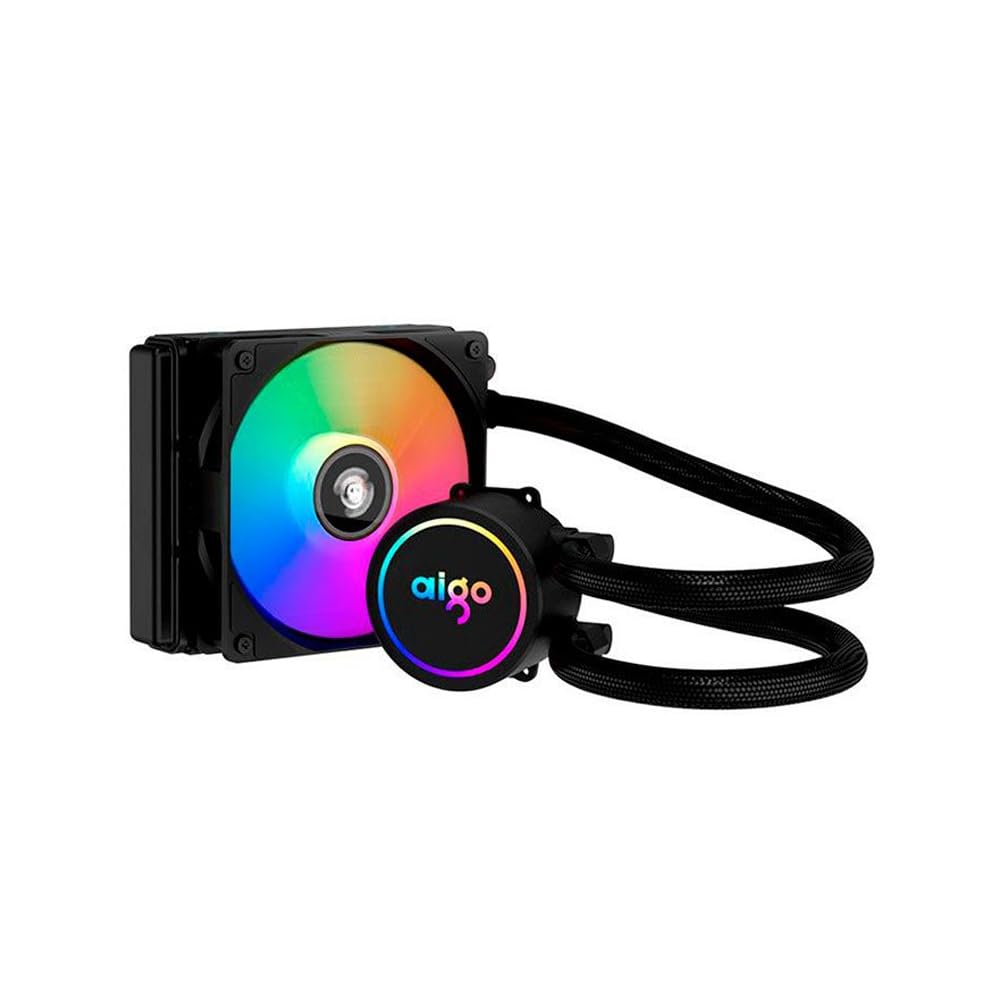
Image: The Aigo AC SE 120 Water Cooler showing the pump unit with an illuminated Aigo logo and a rainbow-colored fan on the radiator.
5.4 Připojení kabelů
- Connect the pump power cable to a dedicated AIO_PUMP or CPU_FAN header on your motherboard. If your motherboard has neither, use a SYS_FAN header and ensure it is set to run at full speed in the BIOS.
- Connect the fan power cable to the CPU_FAN header on your motherboard. If your motherboard has multiple fan headers, consult your motherboard manual for the recommended CPU fan header.
- If your cooler has RGB lighting, connect the RGB cable to a compatible RGB header on your motherboard (e.g., 3-pin ARGB or 4-pin RGB, depending on the cooler's connector type).
- Route all cables neatly to avoid obstructing airflow or interfering with other components.
6. Návod k obsluze
Once installed, the Aigo AC SE 120 Water Cooler operates automatically based on your motherboard's fan control settings.
- Počáteční zapnutí: After installation, power on your computer. The pump and fan should start operating.
- Nastavení BIOSu/UEFI: Access your motherboard's BIOS/UEFI settings to ensure the CPU_FAN and AIO_PUMP headers are configured correctly. It is recommended to set the pump header to run at full speed (100%) for optimal cooling performance. Fan speeds can be adjusted based on temperature curves for a balance of cooling and noise.
- RGB osvětlení: If connected to an RGB header, the lighting effects can typically be controlled via your motherboard's RGB software (e.g., ASUS Aura Sync, MSI Mystic Light, Gigabyte RGB Fusion, ASRock Polychrome Sync).
- Sledování: Použijte software pro monitorování systému ke kontrole teploty procesoru a zajištění efektivního fungování chladiče.

Obrázek: Shora dolů view of the Aigo AC SE 120 Water Cooler, highlighting the illuminated Aigo logo on the pump and the rainbow lighting of the fan.
7. Údržba
Regular maintenance helps ensure optimal performance and longevity of your water cooler.
- Čištění prachu: Pravidelně čistěte žebra chladiče a lopatky ventilátoru, abyste zabránili hromadění prachu, který může bránit proudění vzduchu a snižovat účinnost chlazení. Používejte stlačený vzduch nebo měkký kartáč.
- Kontrola ventilátoru: Check the fan for any signs of wear, damage, or excessive noise. Replace if necessary.
- Kontrola hadice: Visually inspect the hoses for any kinks, cracks, or signs of leakage. While AIOs are sealed, regular checks are recommended.
- Teplovodní pasta: The thermal paste typically lasts for several years. If you notice a significant increase in CPU temperatures over time, consider reapplying fresh thermal paste. This requires carefully removing the water block, cleaning both surfaces, and applying new paste.
8. Řešení problémů
If you encounter issues with your Aigo AC SE 120 Water Cooler, refer to the following common problems and solutions:
| Problém | Možná příčina | Řešení |
|---|---|---|
| Vysoké teploty procesoru |
|
|
| Ventilátor se netočí |
|
|
| Pump Not Running / Unusual Noise |
|
|
| Osvětlení RGB nefunguje |
|
|
9. Záruka a podpora
The Aigo AC SE 120 Water Cooler comes with a Záruka 12 měsíců od data nákupu. Tato záruka se vztahuje na výrobní vady a poruchy za běžných podmínek používání.
Záruka se nevztahuje na:
- Poškození způsobené nesprávnou instalací, zneužitím, zneužitím nebo zanedbáním.
- Poškození způsobené neoprávněnými úpravami nebo opravami.
- Škody způsobené přírodními katastrofami nebo nehodami.
For technical support, warranty claims, or further assistance, please contact your retailer or the Aigo customer service department. Please have your proof of purchase and product model number (ACSE120-BK) ready when contacting support.