
Zavedení
Thank you for choosing the Chieftec PPS-850FC-A3 850W ATX 3.0 Power Supply Unit. This manual provides essential information for the safe and efficient installation, operation, and maintenance of your new power supply. Please read this manual thoroughly before installation and retain it for future reference.
Bezpečnostní pokyny
- Před instalací nebo demontáží napájecího zdroje vždy odpojte napájecí kabel ze zásuvky.
- Do not open the power supply unit casing. Vysoký objemtagUvnitř se nacházejí žádné části a nejsou v nich žádné součásti, které by mohl uživatel opravit. Otevření krytuasing zruší platnost záruky.
- Ujistěte se, že je napájecí zdroj instalován v dobře větraném prostoru bez nadměrného tepla, vlhkosti nebo prachu.
- Používejte pouze modulární kabely dodané s tímto napájecím zdrojem. Použití nekompatibilních kabelů může způsobit poškození napájecího zdroje nebo připojených komponent.
- Před zapnutím systému se ujistěte, že jsou všechny konektory bezpečně připojeny.
- This product is designed for use in personal computer systems. Do not use it for any other purpose.
Obsah balení
Zkontrolujte prosím obsah balení. Pokud některé položky chybí nebo jsou poškozené, obraťte se na prodejce.
- Chieftec PPS-850FC-A3 850W ATX 3.0 Power Supply Unit
- Modular Cable Set (including PCIe Gen 5 connector)
- AC napájecí kabel
- Montážní šrouby
- Uživatelská příručka (tento dokument)
Nastavení a instalace
Follow these steps to properly install your Chieftec PPS-850FC-A3 power supply unit.
1. Kontrola před instalací
- Ensure your computer case supports ATX form factor power supplies.
- Verify that your motherboard and other components are compatible with an 850W power supply and ATX 3.0 standard.
2. Fyzická instalace
- Montáž zdroje: Carefully slide the power supply into the designated PSU bay in your computer case. Ensure the fan is oriented correctly for optimal airflow (typically facing down if there's a bottom vent, or facing inside the case). Secure the PSU with the provided mounting screws.
- Připojení modulárních kabelů: Identify the necessary modular cables for your system components (motherboard, CPU, GPU, storage drives). Connect them to the appropriate ports on the power supply.

Image: Chieftec PPS-850FC-A3 power supply shown with its retail packaging, highlighting the unit itself and a detailed view of the PCIe Gen 5 connector, which is essential for modern high-performance graphics cards.
- Connecting to Motherboard: Připojte 24pinový hlavní napájecí konektor ATX k základní desce.
- Connecting to CPU: Connect the 4+4-pin or 8-pin EPS/CPU power connector(s) to your motherboard.
- Connecting to GPU: For graphics cards, use the appropriate PCIe power connectors. For modern GPUs, utilize the dedicated 12VHPWR (PCIe Gen 5) connector if your GPU supports it.
- Connecting to Peripherals: Connect SATA power cables to SSDs/HDDs and Molex connectors to other peripherals as needed.
- Připojení střídavého proudu: Jakmile jsou všechna vnitřní připojení bezpečná, připojte napájecí kabel ke zdroji napájení a poté do zásuvky ve zdi.
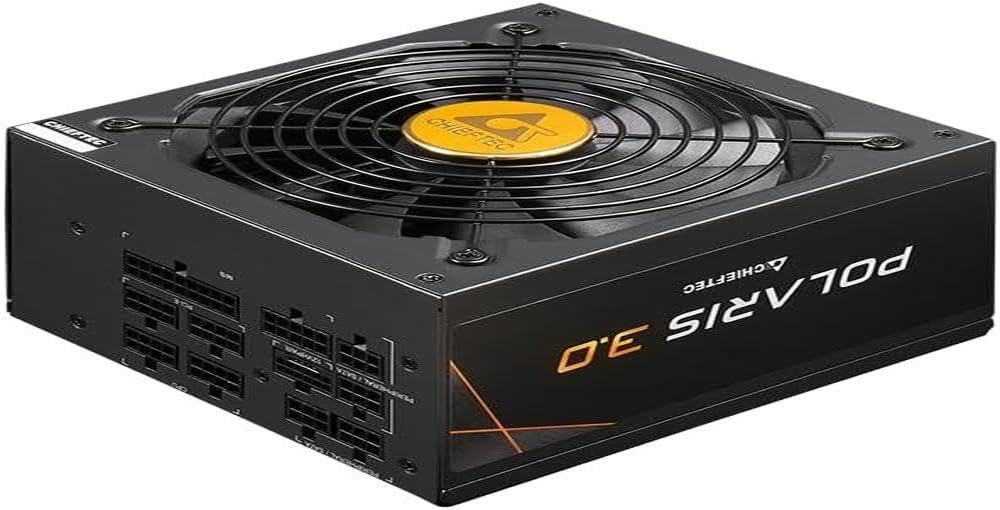
Obrázek: Přímá fronta view of the Chieftec PPS-850FC-A3 power supply, showcasing its large cooling fan and the protective grille. The Chieftec logo is visible in the center of the fan.
Návod k obsluze
After successful installation, ensure the power switch on the back of the PSU is in the 'ON' position (usually marked 'I'). You can then power on your computer system using the case's power button. The power supply will automatically manage power delivery to your components.
Údržba
- Čištění: Periodically clean the exterior of the power supply and its fan grille to prevent dust buildup, which can impede airflow and cooling performance. Use compressed air to gently remove dust. Ensure the system is powered off and unplugged before cleaning.
- Větrání: Ensure that the computer case has adequate ventilation and that the power supply's fan intake and exhaust are not obstructed.
- Správa kabelů: Proper cable management can improve airflow within your case, contributing to better cooling for all components, including the PSU.
Odstraňování problémů
Pokud narazíte na problémy se zdrojem napájení, postupujte podle následujících běžných kroků pro řešení problémů:
- Bez napájení:
- Zkontrolujte, zda je napájecí kabel bezpečně připojen k napájecímu zdroji i k elektrické zásuvce.
- Ensure the power switch on the PSU is in the 'ON' position ('I').
- Ověřte funkčnost zásuvky zapojením jiného zařízení.
- Confirm all internal power cables (24-pin ATX, CPU, GPU) are correctly and firmly seated.
- Nestabilita systému/náhodné vypnutí:
- This could indicate insufficient power or a faulty component. Ensure your system's power requirements do not exceed the PSU's 850W capacity.
- Check for overheating of components.
- Ensure the PSU fan is spinning freely and not obstructed.
- Neobvyklé zvuky:
- A rattling or grinding noise may indicate a fan issue. If the noise is persistent and loud, contact support.
- Coil whine (a high-pitched electronic noise) can occur under certain loads but is generally harmless.
If these steps do not resolve your issue, please contact Chieftec customer support or your retailer for further assistance.
Specifikace
| Funkce | Specifikace |
|---|---|
| Název modelu | PPS-850FC-A3 |
| Značka | Chieftec |
| Kompatibilní zařízení | Osobní počítač |
| Typ konektoru | ATX |
| Výstupní Wattage | 850 wattů |
| Form Factor | ATX |
| Způsob chlazení | Vzduch |
| Velikost ventilátoru | 120 milimetrů |
| Maximální vstupní objemtage | 230 voltů |
| Typ konektoru použitý na kabelu | ATX |
| System Bus Connector Type | 4 Pin |
| UPC | 753263078131 |
Záruka a podpora
This Chieftec PPS-850FC-A3 power supply unit comes with a manufacturer's warranty. Please refer to the warranty card included in your package or visit the official Chieftec webpodrobné záruční podmínky naleznete na webu.
Pro technickou podporu, dotazy k produktům nebo reklamace v záruce kontaktujte zákaznický servis Chieftec prostřednictvím jejich oficiálních webnebo kontaktní informace poskytnuté při nákupu.