
1. Úvod
Thank you for choosing the COUGAR MX360 RGB Mid Tower Case. This manual provides essential information for the proper installation, operation, and maintenance of your new PC case. The MX360 RGB combines a sleek design with ARGB LED strips on the front panel, offering excellent cooling performance and support for a wide range of components, including up to a 360mm radiator, 315mm graphics cards, and 170mm CPU coolers. Its compact layout and full-length PSU shroud contribute to a clean and organized build.
2. Bezpečnostní informace
- Před instalací nebo demontáží jakýchkoli součástí vždy odpojte napájecí kabel ze zásuvky.
- S komponenty zacházejte opatrně, abyste předešli poškození statickou elektřinou. Zvažte použití antistatického náramku.
- Uchovávejte malé součástky a šrouby mimo dosah dětí.
- Zajistěte dostatečné větrání kolem skříně, abyste zabránili přehřátí.
- Nepokoušejte se upravovat kryt ani jeho součásti, mohlo by to vést ke ztrátě záruky a k bezpečnostním rizikům.
3. Obsah balení
Zkontrolujte prosím, zda jsou ve vašem balení obsaženy všechny následující položky:
- COUGAR MX360 RGB Mid Tower Case
- Krabice s příslušenstvím (obsahuje šrouby, distanční sloupky, stahovací pásky atd.)
- Uživatelská příručka (tento dokument)
4. Konec produktuview
The COUGAR MX360 RGB case features a minimalist design with integrated ARGB lighting and a tempered glass side panel for showcasing your build.

Obrázek 4.1: Přední strana view of the COUGAR MX360 RGB case, showing the interior and active RGB lighting.
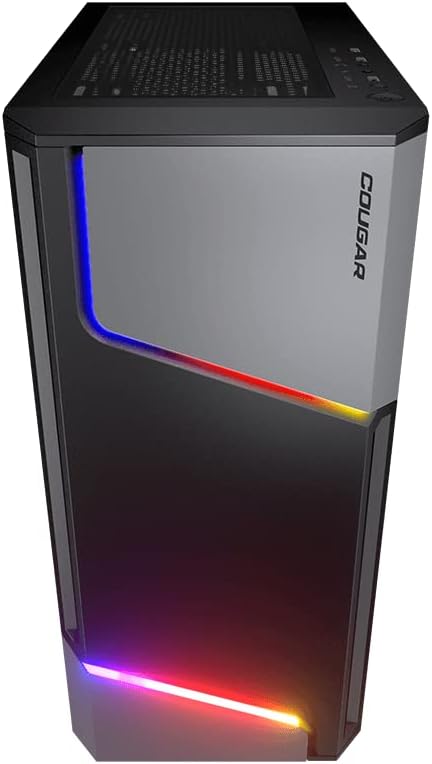
Obrázek 4.2: Přední strana view of the COUGAR MX360 RGB case, highlighting the integrated ARGB LED strips.
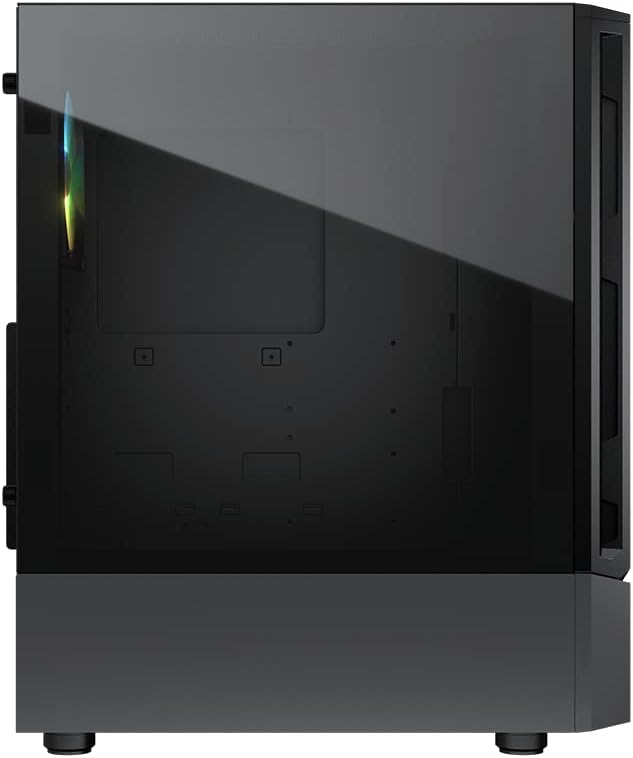
Obrázek 4.3: Strana view of the COUGAR MX360 RGB case, featuring the tempered glass panel.

Obrázek 4.4: Zkosená přední strana view of the COUGAR MX360 RGB case, showcasing its design and ARGB elements.
5. Nastavení a instalace
Follow these steps to install your components into the COUGAR MX360 RGB case.
5.1 Příprava případu
- Umístěte pouzdro na rovný a stabilní povrch.
- Remove the tempered glass side panel by unscrewing the thumb screws at the rear of the case and carefully sliding the panel off.
- Remove the opposite metal side panel by unscrewing the thumb screws and sliding it off.
5.2 Instalace základní desky
- Install the I/O shield (if not pre-installed on your motherboard) into the rear opening of the case.
- Ensure the correct standoffs are installed for your motherboard form factor (ATX, Micro-ATX, Mini-ITX). Adjust or add standoffs as needed.
- Opatrně umístěte základní desku na distanční sloupky a zarovnejte otvory pro šrouby.
- Zajistěte základní desku dodanými šrouby.
5.3 Instalace jednotky napájecího zdroje (PSU)
- Locate the PSU shroud at the bottom of the case.
- Zasuňte zdroj do určené přihrádky ze zadní strany skříně.
- Zajistěte zdroj šrouby ze zadní strany skříně.
- Route necessary cables through the cutouts in the PSU shroud for cable management.
5.4 Instalace úložného disku
The MX360 RGB supports various storage configurations.
- 3.5" pevné disky: Install into the drive cage located under the PSU shroud.
- 2.5" SSDs/HDDs: Mount onto the dedicated trays or mounting points behind the motherboard tray.
5.5 Instalace grafické karty (GPU)
- Odstraňte potřebné kryty slotů PCIe ze zadní strany skříně.
- Vložte grafickou kartu do příslušného slotu PCIe na základní desce.
- Secure the graphics card with screws. The case supports graphics cards up to 315mm in length.
5.6 Instalace chladicího systému (ventilátory/chladiče)
The case supports up to six fans and a 360mm water cooling radiator.
- Přední: Supports up to 3 x 120mm or 2 x 140mm fans, or a 240/280/360mm radiator.
- Nahoře: Supports up to 2 x 120mm or 2 x 140mm fans, or a 240/280mm radiator.
- Zadní: Podporuje 1 x 120mm ventilátor.
Install fans or radiators using the provided screws, ensuring proper airflow direction.
5.7 Připojení předního panelu
Connect the front panel cables (USB, Audio, Power, Reset, LED) to their corresponding headers on your motherboard. Refer to your motherboard manual for exact header locations.
5.8 ARGB Lighting Connection
The integrated ARGB LED strips on the front panel connect via a 5V/3Pin ARGB connector. Connect this cable to a compatible 5V/3Pin ARGB header on your motherboard to synchronize lighting effects with your system.
6. Obsluha pouzdra
Once all components are installed and connected, replace the side panels. Power on your system using the power button on the top I/O panel. The ARGB lighting will illuminate, controlled by your motherboard's software or a dedicated ARGB controller if you have one installed.
7. Údržba
Pravidelná údržba pomáhá zajistit optimální výkon a dlouhou životnost komponent vašeho počítače.
- Prachové filtry: The MX360 RGB includes removable dust filters (e.g., top, bottom). Periodically remove and clean these filters with compressed air or water (ensure they are completely dry before reinstallation).
- Čištění interiéru: Use compressed air to remove dust from internal components like fans, heatsinks, and the motherboard.
- Čištění exteriéru: Vnější povrchy otřete měkkým, damp tkanina. Vyhněte se abrazivním čisticím prostředkům.
8. Řešení problémů
Pokud narazíte na problémy, postupujte podle následujících běžných kroků pro řešení potíží:
- Bez napájení: Ensure all power cables (24-pin ATX, 8-pin CPU, GPU power) are securely connected. Check the PSU switch is in the 'ON' position. Verify front panel power button connection to the motherboard.
- ARGB osvětlení nefunguje: Confirm the 5V/3Pin ARGB connector is correctly plugged into a compatible motherboard header. Check your motherboard's RGB software for control settings.
- Přehřívání: Ensure all case fans are spinning and oriented correctly for optimal airflow. Check for dust buildup on filters and components. Verify CPU cooler and GPU cooler are properly installed.
- Uvolněná připojení: Re-seat all components (RAM, GPU, storage drives) and check all power and data cables.
9. Specifikace
| Funkce | Specifikace |
|---|---|
| Značka | PUMA |
| Název modelu | MX360 RGB |
| Číslo modelu položky | CGR-5CC6G-RGB |
| Typ pouzdra | Střední věž |
| Rozměry (DxŠxV) | 14.88 x 8.27 x 18.11 palce (378 x 210 x 460 mm) |
| Hmotnost položky | 10.56 liber (4.8 kilogramů) |
| Materiál | Tempered Glass, Fine Metal |
| Barva | Černý |
| Podpora základní desky | Mini ITX / Micro ATX / ATX |
| Max. Délka grafické karty | 315 mm |
| Max. Výška chladiče CPU | 170 mm |
| Podpora PSU | Standardní ATX PS2 |
| Způsob chlazení | Vzduch / Voda |
| Podpora radiátorů | Front: 360mm / 280mm / 240mm / 140mm / 120mm Top: 280mm / 240mm / 140mm / 120mm Zadní: 120 mm |
| Podpora fanoušků | Přední: 3 x 120 mm / 2 x 140 mm Horní část: 2 x 120 mm / 2 x 140 mm Zadní: 1 x 120 mm |
| Drive Bays | 3.5" HDD: 2 2.5" SSD: 2+2 (converted from 3.5" drive bays) |
| I/O panel | USB 3.0 x 2, USB 2.0 x 1, Mic x 1, Audio x 1, RGB Button |
| Speciální funkce | ARGB LED Strips, Full-length PSU Cover for Cable Hiding and Improved Airflow |
10. Záruka a podpora
COUGAR products are designed and manufactured to the highest quality standards. For warranty information, please refer to the warranty card included with your product or visit the official COUGAR webUschovejte si doklad o koupi pro případ reklamace.
For technical support or further assistance, please visit the official COUGAR website or contact their customer service department. You can find more information and resources on the COUGAR Store on Amazon.