
1. Úvod
This manual provides essential instructions for the installation, operation, and maintenance of your Urmet Note 2 Wifi Video Kit 1723/95. This video intercom system offers a comprehensive security and comfort solution for residential properties, featuring integrated Wi-Fi, video monitoring capabilities, and smart home integration. Please read this manual thoroughly before installation and use to ensure proper functioning and to prevent damage.
2. Bezpečnostní informace
- Elektrická bezpečnost: Installation must be performed by a qualified electrician in accordance with local electrical codes. Disconnect power before performing any wiring or maintenance.
- Podmínky prostředí: Do not expose the unit to extreme temperatures, humidity, or direct sunlight. Ensure proper ventilation.
- Vystavení vodě: This device is not waterproof unless specified. Avoid contact with water or other liquids.
- Čištění: K čištění používejte měkký, suchý hadřík. Nepoužívejte abrazivní čisticí prostředky nebo rozpouštědla.
- Modifikace: Do not attempt to modify or repair the device yourself. Refer all servicing to qualified personnel. Unauthorized modifications may void the warranty and pose safety risks.
3. Obsah balení
Ověřte, zda jsou v balení přítomny všechny položky:
- Urmet Note 2 Wifi Video Monitor (1723/95)
- Outdoor Station/Doorbell Unit
- Montážní držák a šrouby
- Power Adapter/Supply
- Uživatelská příručka (tento dokument)
- Kabelové konektory
- (Optional: Flush mounting kit ref. 1723/60, Micro SD card)
4. Konec produktuview
The Urmet Note 2 Wifi Video Kit 1723/95 features a 7-inch color LCD touchscreen monitor and an outdoor station. It supports up to 4 cameras and includes video memory. Integrated Wi-Fi allows for call forwarding to smartphones via the Urmet CallMe app.
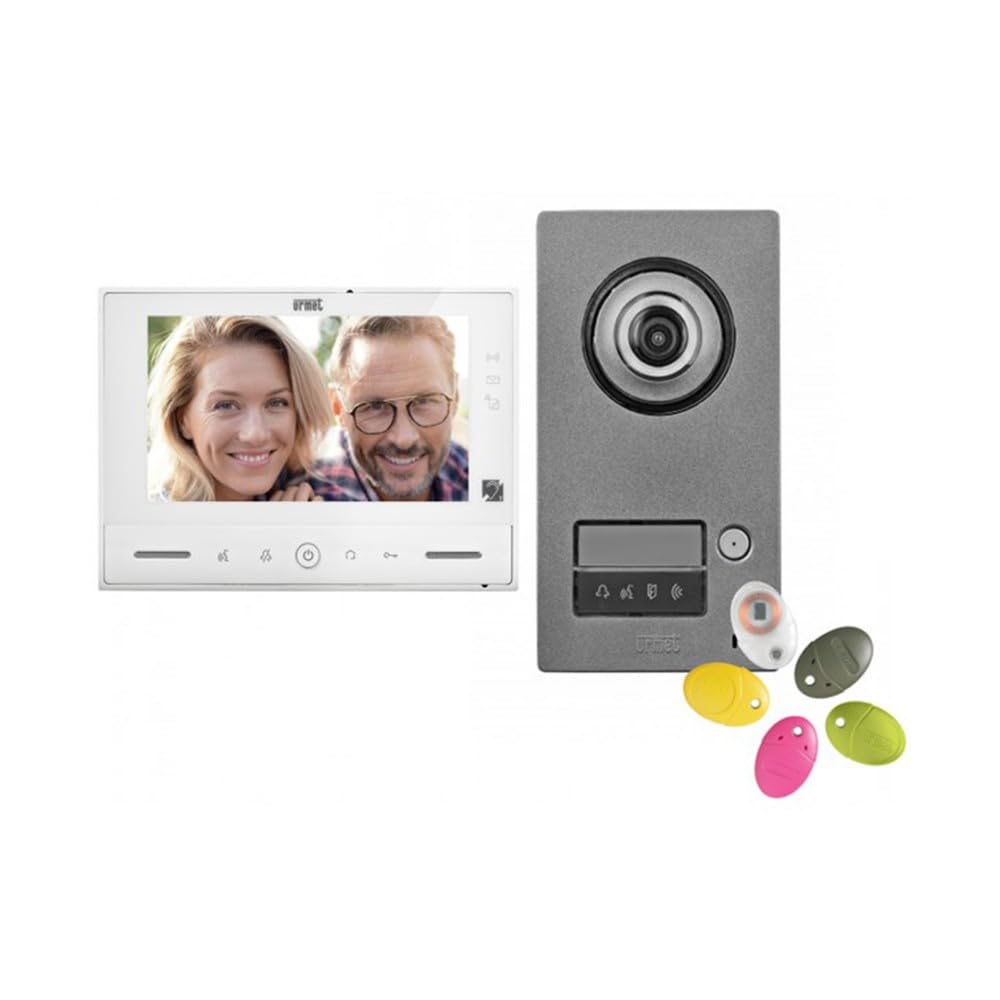
Obrázek 1: Urmet Note 2 Wifi Video Kit 1723/95 components, showing the indoor monitor and outdoor doorbell unit. The monitor features a large screen for clear viewing, and the outdoor unit is designed for weather resistance.
Vlastnosti monitoru:
- 7'' (18 cm) color LCD touchscreen display.
- Integrated Wi-Fi for smartphone connectivity.
- Video memory for 32 clips of 10 seconds (requires micro SD card).
- Adjustable ringtone level, brightness, contrast, and color.
- 5 volitelných melodií.
- Magnetic loop for hearing-impaired users.
- Controls for door opening, motorized gate opening, and 8 radio controls (e.g., outdoor lighting, roller shutters).
- 6 customizable scenarios.
- Multiple inputs/outputs for additional devices (doorbells, detectors, cameras).
5. Instalace a nastavení
Důležité: Professional installation by a qualified technician is highly recommended for optimal performance and safety.
5.1. Fyzická instalace
- Mounting the Outdoor Station: Choose a suitable location near your entrance, ensuring it is protected from direct rain and accessible for visitors. Mount the outdoor station at an appropriate height.
- Mounting the Indoor Monitor: The monitor can be surface-mounted. An optional flush-mounting kit (ref. 1723/60) is available for recessed installation. Select a central location within your home for easy access.
- Zapojení: Connect the outdoor station to the indoor monitor according to the wiring diagram provided in the full installation guide (not included in this manual). Ensure all connections are secure and correctly polarized. Connect the power supply.
- Další připojení: If connecting additional devices (e.g., extra doorbells, detectors, surveillance cameras), follow the specific wiring instructions for those components.
5.2. Počáteční nastavení a konfigurace
- Zapnutí: Once all wiring is complete, connect the system to the main power supply. The monitor should power on.
- Základní nastavení: On the monitor's touchscreen, navigate to the settings menu to configure basic parameters such as date, time, language, and ringtone preferences.
- Wi-Fi připojení: Access the Wi-Fi settings on the monitor. Select your home Wi-Fi network and enter the password to connect the device to the internet.
- Urmet CallMe App Setup:
- Download the "Urmet CallMe" app from the Google Play Store (Android) or Apple App Store (iOS).
- Zaregistrujte si účet nebo se přihlaste.
- Follow the in-app instructions to pair your Urmet Note 2 Wifi Video Kit with your smartphone. This typically involves scanning a QR code displayed on the monitor or entering a device ID.
- Integrace kamery: If connecting additional surveillance cameras, configure them through the monitor's settings or the Urmet CallMe app as per their respective manuals.
6. Provoz
6.1. Přijetí hovoru
- When a visitor presses the doorbell button on the outdoor station, the indoor monitor will ring and display the visitor's image.
- To answer the call, tap the "Answer" icon on the monitor's touchscreen. You can then converse with the visitor.
- If you are away, the call will be forwarded to your smartphone via the Urmet CallMe app (if configured). You can answer, view, and converse through the app.
6.2. Opening Access
- During a call, tap the "Door Open" icon on the monitor to unlock the connected door or gate.
- Through the Urmet CallMe app, you can also remotely open up to two accesses.
6.3. Monitorování
- You can manually activate the outdoor station camera or connected surveillance cameras from the monitor to view the outside area at any time.
- The Urmet CallMe app also allows live viewing from connected cameras.
6.4. Video Memory
- The system automatically records short video clips (10 seconds) when a visitor calls or motion is detected (if configured).
- These clips are saved to a micro SD card (not included) and can be reviewed from the monitor's menu. The system supports up to 32 clips.
6.5. Home Automation Controls
- Utilize the integrated YOKIS home automation controls and 8 radio controls to manage various devices such as outdoor lighting or roller shutters directly from the monitor.
- Configure up to 6 customizable scenarios for automated actions.
7. Údržba
- Čištění: Regularly wipe the monitor screen and outdoor station with a soft, dry, lint-free cloth. Do not use liquid cleaners or sprays directly on the device.
- Aktualizace softwaru: Check for firmware updates periodically through the monitor's settings or the Urmet CallMe app to ensure optimal performance and security.
- Kontrola kabelů: Periodically inspect all visible cables and connections for any signs of wear or damage.
8. Řešení problémů
| Problém | Možná příčina | Řešení |
|---|---|---|
| No image on monitor / Monitor not powering on. | Žádné napájení; uvolněné zapojení; vadná jednotka. | Check power connection. Verify all wiring connections. Contact support if issue persists. |
| Během hovoru není slyšet žádný zvuk. | Volume too low; faulty microphone/speaker; wiring issue. | Adjust volume settings. Check wiring. |
| Wi-Fi connection unstable or failing. | Weak Wi-Fi signal; incorrect password; router issue. | Ensure monitor is within Wi-Fi range. Re-enter Wi-Fi password. Restart router. |
| App not receiving calls. | App not paired; phone settings (notifications, background data); internet connection issue. | Verify app pairing. Check phone's notification and data settings. Ensure stable internet connection on both monitor and phone. |
| Door/Gate not opening. | Wiring issue to lock/gate; faulty lock/gate mechanism. | Check wiring to the access control device. Test the lock/gate mechanism independently. |
If you encounter problems not listed here or if the suggested solutions do not resolve the issue, please contact Urmet customer support or a qualified technician.
9. Specifikace
| Funkce | Detail |
|---|---|
| Číslo modelu | 1723/95 |
| Značka | Urmet |
| Technologie připojení | Bezdrátový |
| Rozlišení záznamu videa | 720p |
| Speciální funkce | Wifi Integration, Accessible Features, Home Automation Capabilities |
| Počet kanálů | 4 |
| Barva | Černý |
| Zdroj napájení | Napájení DC |
| Kompatibilní zařízení | Notebook, chytrý telefon, tablet |
| Popis fotoaparátu | Přední |
| Snímková frekvence | 15 fps, 20 fps, or 30 fps |
| Formát signálu | Digitální |
| Typ antény | Vnitřní |
| Režim nahrávání | Video |
| Technologie optických senzorů | CMOS |
| Hardwarové rozhraní | 802.11 ac/b/g/n |
| Typ objektivu | Široký úhel |
| Tolerated Video Input Type | BNC |
| Hmotnost položky | 3 kg |
10. Záruka a podpora
Specific warranty details for the Urmet Note 2 Wifi Video Kit 1723/95 are not provided within this manual. For warranty information, technical support, or service inquiries, please refer to the documentation included with your purchase or visit the official Urmet website. You may also contact your local Urmet distributor or retailer for assistance.
Urmetův oficiální Webmísto: www.urmet.com