
SABLUTE KM61
SABLUTE KM61 Wireless Mechanical Gaming Keyboard User Manual
Model: KM61 | Brand: SABLUTE
1. Úvod
Thank you for choosing the SABLUTE KM61 Wireless Mechanical Gaming Keyboard. This manual provides essential information for setting up, operating, maintaining, and troubleshooting your new keyboard. Please read it carefully to ensure optimal performance and longevity of your device.
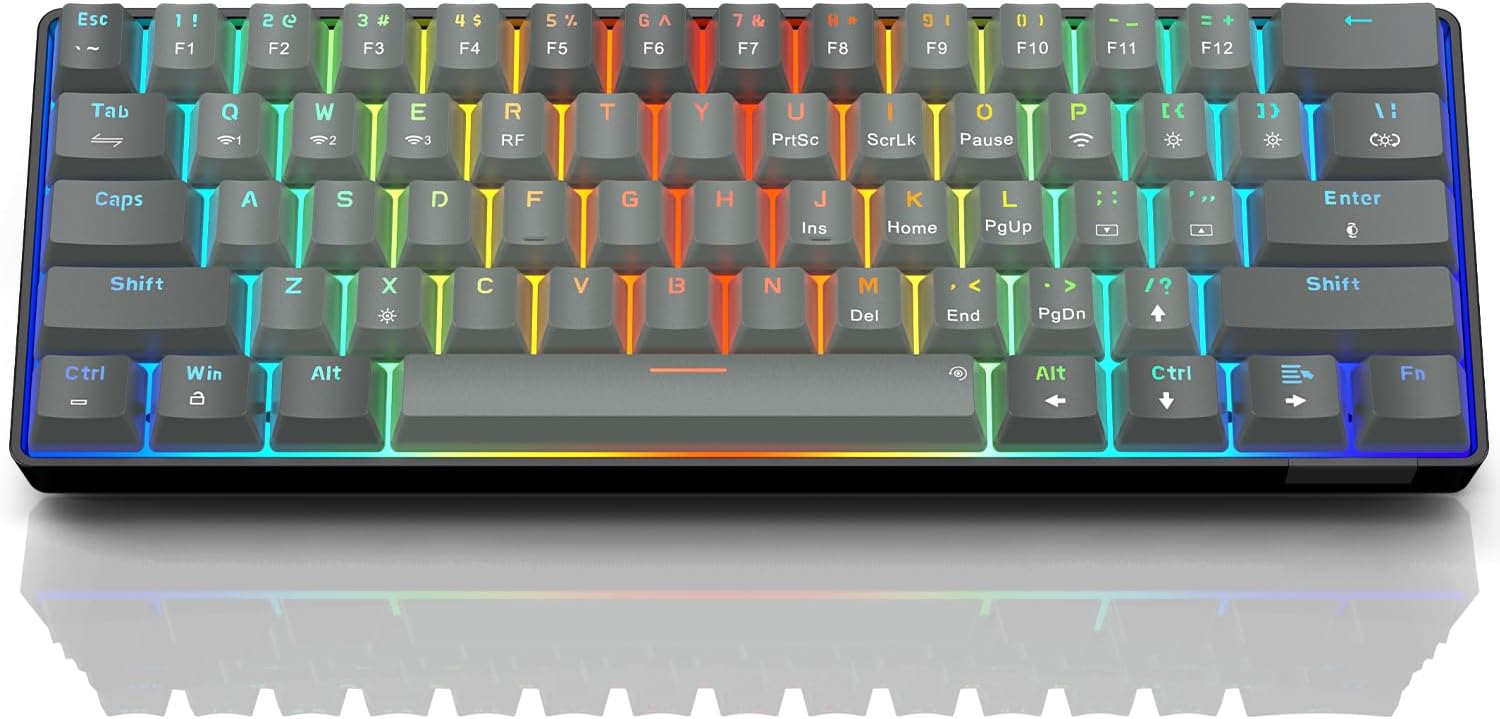
Image: The SABLUTE KM61 Wireless Mechanical Gaming Keyboard showcasinjeho kompaktní design a zářivé RGB podsvícení.
2. Co je v krabici
Ujistěte se prosím, že balení obsahuje všechny položky:
- SABLUTE KM61 Wireless Mechanical Gaming Keyboard
- Kabel USB typu C
- USB-A 2.4G Wireless Dongle
- Návod k použití
3. Klíčové vlastnosti
- Třírežimové připojení: Supports Bluetooth, 2.4G USB Wireless, and Wired (USB Type-C) connections.
- 60% kompaktní rozvržení: 61-key design for space-saving and portability.
- Mechanické červené spínače: Linear switches designed for fast response and durability (100,000,000 keystroke test).
- Vyměnitelné za provozu: Allows for easy replacement of switches without soldering, supporting 3-pin/5-pin switches.
- RGB podsvícení: Features 20 backlight effects, 7 pure colors, 5 brightness levels, and 5 speed adjustments.
- Chytrá úspora energie: Includes a 60-second smart sleep mode, offering up to 600 hours of working time (with lights off) and 365 days of standby time.
- Ergonomický design: Features a ladder key layout and adjustable height for comfortable typing.
- N-Key Rollover: Ensures every keypress is registered accurately, even during rapid typing or gaming.
- Široká kompatibilita: Compatible with Chrome OS, Android, Windows 7-11, Mac, and Linux systems.

Image: The compact 61-key layout of the SABLUTE KM61 keyboard, highlighting its space-saving design.
4. Nastavení a připojení
The SABLUTE KM61 keyboard offers three connection modes: Wired, 2.4G Wireless, and Bluetooth. Ensure the keyboard is charged before initial wireless use.
4.1. Kabelové připojení
- Připojte dodaný kabel USB typu C k portu typu C na klávesnici.
- Plug the other end of the USB Type-C cable into an available USB port on your computer.
- Klávesnice se automaticky přepne do kabelového režimu a začne se nabíjet.
4.2. Bezdrátové připojení 2.4G
- Locate the USB-A 2.4G wireless dongle. It is typically stored in a compartment on the back of the keyboard.
- Plug the 2.4G wireless dongle into an available USB-A port on your computer.
- Turn the power switch on the back of the keyboard to the 'ON' position.
- Stiskněte
Fn+Rto activate 2.4G wireless mode. The keyboard should connect automatically.
4.3. Připojení Bluetooth
Klávesnice podporuje až tři zařízení Bluetooth.
- Turn the power switch on the back of the keyboard to the 'ON' position.
- Stiskněte
Fn+Q,Fn+WneboFn+Eto select a Bluetooth channel. The indicator light for the selected channel will flash rapidly, indicating pairing mode. - Na svém zařízení (počítač, tablet, chytrý telefon) povolte Bluetooth a vyhledejte dostupná zařízení.
- Select "SABLUTE KM61" or a similar name from the list to pair.
- Po spárování přestane kontrolka blikat a zůstane svítit.
- Chcete-li přepínat mezi spárovanými zařízeními Bluetooth, stiskněte
Fn+Q,Fn+WneboFn+E.

Image: Visual representation of the three connection methods: Bluetooth, 2.4G USB Wireless, and Wired.
Video: Overview of the SABLUTE KM61 Mini Mechanical Gaming Keyboard, demonstrating its features and connectivity options.
5. Návod k obsluze
5.1. Ovládání podsvícení RGB
The KM61 keyboard features customizable RGB backlighting:
- Change Backlight Effect: Stiskněte
Fn+|\to cycle through 20 different backlight effects. - Upravit jas: Stiskněte
Fn+[{snížit jas aFn+]}pro zvýšení jasu (5 úrovně). - Upravit rychlost: Stiskněte
Fn+;:to decrease effect speed, andFn+'"to increase effect speed (5 levels). - Změnit barvu: Stiskněte
Fn+Enterto cycle through 7 pure colors. - Zapnutí/vypnutí podsvícení: Stiskněte
Fn+Xpro přepnutí podsvícení.
Video: Demonstration of the RGB lighting effects and color changes on the SABLUTE keyboard.
Video: A close-up view of the SABLUTE keyboard with its backlight turned off, showcasing the keycap design.
5.2. Inteligentní úspora energie
The keyboard enters a 60-second smart sleep mode when inactive to conserve battery. It can provide up to 600 hours of working time with the backlight off and 365 days of standby time. Keystroke will wake up the keyboard. Note that the backlight does not turn off when connected via Type-C cable.

Image: The keyboard connected via its Type-C cable, illustrating the charging process.
6. Údržba
6.1. Čištění
To clean your keyboard, first disconnect it from all power sources. Use a soft, dry cloth to wipe down the keycaps and chassis. For deeper cleaning, use the provided keycap puller to remove keycaps and clean underneath with compressed air or a small brush.
6.2. Replacing Switches (Hot-Swappable)
The KM61 keyboard features hot-swappable switches, allowing you to easily replace them without soldering:
- Pomocí stahováku na klávesy jemně vyjměte požadovanou klávesu.
- Use the switch puller to carefully grip the switch and pull it straight up to remove it from the PCB.
- Zarovnejte piny nového spínače s otvory na desce plošných spojů.
- Jemně zatlačte nový spínač na místo, dokud bezpečně nezacvakne.
- Znovu nasaďte krytku kláves.

Image: A close-up of the keyboard demonstrating the hot-swappable feature, with switches being removed and inserted.
7. Řešení problémů
- Klávesnice nereaguje: Ensure the keyboard is properly connected (wired, 2.4G dongle, or Bluetooth). Check battery level if using wireless modes. Try restarting your computer or device.
- Problémy s bezdrátovým připojením: Ensure the 2.4G dongle is securely plugged in or Bluetooth is enabled and paired correctly. Move closer to the receiver/device to reduce interference.
- Podsvícení nefunguje: Ujistěte se, že je podsvícení zapnuté (
Fn+X). Adjust brightness levels (Fn+[{/]}). - Klávesy se neregistrují nebo se píší dvakrát: To by mohlo znamenat vadný přepínač. K výměně poškozeného přepínače použijte funkci výměny za provozu.
- MacOS compatibility: Some multimedia keys may not be fully compatible with Mac systems. Refer to your Mac's system preferences for keyboard settings.
8. Specifikace
| Funkce | Specifikace |
|---|---|
| Model | KM61 |
| Konektivita | Bluetooth, 2.4G USB Wireless, Wired (USB Type-C) |
| Typ přepínače | Mechanický červený spínač |
| Rozložení | 60 % (61 kláves) |
| Podsvícení | RGB (20 effects, 7 colors, 5 brightness, 5 speeds) |
| Možnost výměny za provozu | Yes (3-pin/5-pin switches) |
| Baterie | 1 lithiová kovová baterie (součástí balení) |
| Working Time (Light Off) | Až 600 hodin |
| Pohotovostní doba | 365 dní |
| Doba nabíjení | Přibl. 4 hodin |
| Rozměry produktu | 11.5 cm D x 4 cm Š x 1.46 cm V |
| Hmotnost položky | 1.35 libry |
| Kompatibilita | Chrome OS, Android, Windows 7-11, Mac, Linux |
9. Záruka a podpora
SABLUTE products are designed for quality and reliability. For warranty information, technical support, or any product-related inquiries, please contact SABLUTE customer support. Refer to the contact details provided in your product packaging or visit the official SABLUTE webmísto.
Thank you for your purchase and support!
Ask a question about this manual
Ask about setup, troubleshooting, compatibility, parts, safety, or missing instructions. Manuals+ will review the question and use this page’s manual context to help answer it.