
1. Úvod
This manual provides comprehensive instructions for the Maxcom Fit FW55 Aurum Pro Smartwatch. It covers essential information regarding product setup, operation, maintenance, and troubleshooting to ensure optimal performance and user experience. Please read this manual carefully before using your device.
2. Obsah balení
Ověřte prosím, zda jsou v balení vašeho produktu přítomny všechny níže uvedené položky:
- Maxcom Fit FW55 Aurum Pro Smartwatch
- Nabíjecí kabel
- Uživatelská příručka (tento dokument)
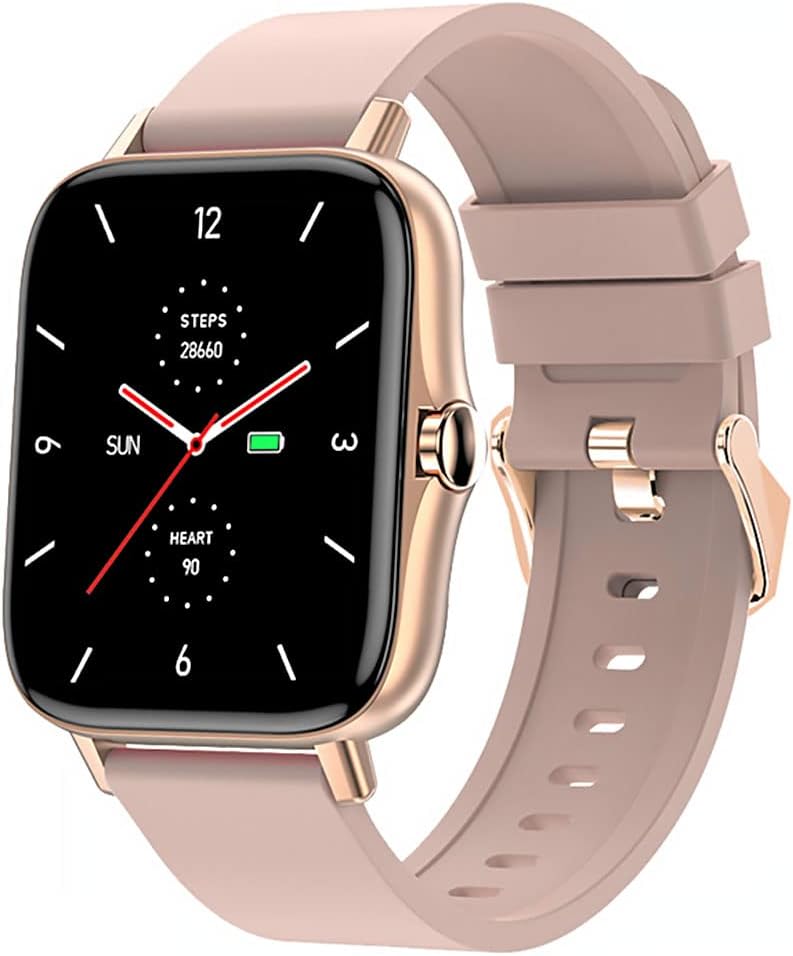
Image 1: Maxcom Fit FW55 Aurum Pro Smartwatch with a pink silicone band. The watch face displays steps, heart rate, and time.
3. Nastavení
3.1. Nabíjení chytrých hodinek
Before initial use, fully charge your Maxcom Fit FW55 Aurum Pro Smartwatch. Connect the provided charging cable to the charging port on the back of the smartwatch and plug the other end into a standard USB power adapter (not included) or a computer's USB port. The watch display will indicate charging status.
- Ensure the charging pins are clean and properly aligned with the watch's charging contacts.
- Plné nabití obvykle trvá přibližně 2 hodiny.
3.2. Párování s vaším smartphonem
To unlock the full functionality of your smartwatch, you need to pair it with your smartphone via Bluetooth.
- Stáhněte si aplikaci: Hledat the official Maxcom Fit application in your smartphone's app store (iOS App Store or Google Play Store) and install it.
- Povolit Bluetooth: Ujistěte se, že je na vašem smartphonu povoleno Bluetooth.
- Otevřete aplikaci: Launch the Maxcom Fit application on your smartphone.
- Přidat zařízení: Follow the in-app instructions to add a new device. Select "FW55 Aurum Pro" from the list of available devices.
- Potvrdit spárování: A pairing request may appear on both your smartphone and the smartwatch. Confirm the pairing on both devices.
Once successfully paired, the smartwatch will synchronize data with your phone, and you can customize settings through the app.
4. Ovládání chytrých hodinek
4.1. Zapnutí/vypnutí
- Zapnutí: Press and hold the side button for a few seconds until the Maxcom logo appears.
- Vypnout: From the watch face, swipe down to access quick settings, or navigate to the 'Settings' menu. Select 'Power Off' and confirm. Alternatively, press and hold the side button and select 'Power Off'.
4.2. Základní navigace
- Dotyková obrazovka: The FW55 Aurum Pro features a 1.7-inch touch screen for intuitive interaction.
- Přejetí nahoru/dolů: Scroll through notifications, menus, or quick settings.
- Přejetí doleva/doprava: Access different widgets or main functions (e.g., heart rate, activity data).
- Klepněte na: Vyberte položku nebo potvrďte akci.
- Boční tlačítko: Press to return to the watch face or wake the screen. A long press may access power options.
4.3. Klíčové vlastnosti
The Maxcom Fit FW55 Aurum Pro Smartwatch offers a range of features to support your daily activities and health monitoring:
- Sledování aktivity: Monitors steps taken, distance covered, and calories burned.
- Monitorování srdeční frekvence: Poskytuje data o tepové frekvenci v reálném čase.
- Monitorování spánku: Sleduje spánkové vzorce a kvalitu spánku.
- Oznámení: Přijímá upozornění na hovory, zprávy a oznámení aplikací ze spárovaného smartphonu.
- GPS: Integrated GPS for accurate outdoor activity tracking.
- Přizpůsobitelné ciferníky: Personalize your watch face through the companion app.

Image 2: Maxcom Fit FW55 Aurum Pro Smartwatch featuring a gold metal mesh band. The watch face displays digital time, steps, and heart rate.
5. Údržba
Proper care and maintenance will extend the lifespan of your smartwatch.
- Čištění: Regularly wipe the watch screen and body with a soft, dry, lint-free cloth. For stubborn dirt, slightly damphadřík vodou. Nepoužívejte agresivní chemikálie ani abrazivní materiály.
- Péče o popruh: Clean the watch strap according to its material. Silicone straps can be washed with mild soap and water. Metal straps may require specific cleaning agents.
- Vyhněte se extrémním podmínkám: Nevystavujte chytré hodinky extrémním teplotám, delšímu přímému slunečnímu záření ani korozivním kapalinám.
- Voděodolnost: While the watch may have some water resistance, it is not suitable for diving or high-pressure water activities. Refer to the product specifications for detailed water resistance ratings.
6. Řešení problémů
If you encounter issues with your Maxcom Fit FW55 Aurum Pro Smartwatch, try the following solutions:
- Hodinky se nezapínají: Ujistěte se, že jsou hodinky plně nabité. Připojte je k nabíječce alespoň na 30 minut.
- Nelze spárovat se smartphonem:
- Ujistěte se, že máte v telefonu i hodinkách zapnutou funkci Bluetooth.
- Ujistěte se, že jsou hodinky v dosahu Bluetooth vašeho telefonu.
- Restartujte telefon i chytré hodinky.
- Zkuste zařízení zrušit a znovu spárovat prostřednictvím aplikace.
- Nepřesné údaje (kroky, tepová frekvence):
- Ujistěte se, že hodinky máte pevně nasazené na zápěstí, asi na šířku jednoho prstu nad zápěstní kostí.
- Vyčistěte senzor na zadní straně hodinek.
- Aktualizujte doprovodnou aplikaci na nejnovější verzi.
- Neobdržená oznámení:
- Check notification settings in the Maxcom Fit app.
- Ujistěte se, že máte v telefonu povolena oprávnění k odesílání oznámení.
- Verify that the watch is successfully paired and connected to your phone.
If problems persist, consult the Maxcom support webnebo kontaktujte zákaznický servis.
7. Specifikace
Below are the technical specifications for the Maxcom Fit FW55 Aurum Pro Smartwatch:
| Funkce | Detail |
|---|---|
| Značka | Maxcom |
| Číslo modelu | FW55 Aurum Pro |
| Velikost obrazovky | 1.7 palce |
| Technologie připojení | Bluetooth |
| Standard bezdrátové komunikace | Bluetooth |
| Kompatibilní zařízení | Smartphone |
| GPS | Integrovaný GPS |
| Tvar | Náměstí |
| Cílové publikum | Unisex pro dospělé |
| Zahrnuté komponenty | Nabíječka |

Obrázek 3: Přední strana view of the Maxcom Fit FW55 Aurum Pro Smartwatch with a pink silicone band, highlighting the square display.
8. Záruka a podpora
For warranty information and customer support, please refer to the documentation included with your purchase or visit the official Maxcom webUschovejte si doklad o koupi pro případ reklamace.
For technical assistance or further inquiries, please contact Maxcom customer service through their official channels.