
1. Konec produktuview
The HP EliteDesk 800 G6 Mini Business Desktop is a compact and powerful computing solution designed for business environments. It features an Intel Core i5-10500T vPro Processor, 16GB of high-bandwidth RAM, and a 256GB PCIe NVMe M.2 Solid State Drive, ensuring efficient performance for demanding applications and multitasking. This mini PC comes pre-installed with Windows 11 Pro, offering enhanced productivity and security features.
Its small form factor allows for versatile placement, while comprehensive connectivity options, including Wi-Fi 6, multiple USB ports, and DisplayPort outputs, support a wide range of peripherals and display configurations.

Obrázek 1: Přední strana view of the HP EliteDesk 800 G6 Mini Business Desktop.
2. Průvodce nastavením
2.1 Rozbalení a umístění
- Carefully remove the HP EliteDesk 800 G6 Mini PC and all accessories from the packaging.
- Place the mini PC on a stable, flat surface with adequate ventilation. Ensure no vents are obstructed.
2.2 Připojení periferních zařízení
Connect your monitor(s), keyboard, mouse, and other necessary peripherals to the appropriate ports on the mini PC.

Figure 2: Front panel ports and indicators. Includes a Type-C SuperSpeed USB 10Gbps signaling rate port, two Type-A SuperSpeed USB ports (one 10Gbps, one 5Gbps with Fast Charging), a Universal Audio Jack, a power button, and a hard drive activity light.
- Zobrazit: Connect your monitor(s) to the DisplayPort outputs on the rear of the device. The system supports up to three DisplayPort connections.
- Zařízení USB: Connect your keyboard, mouse, and other USB devices to the available USB Type-A or Type-C ports. The front panel includes one USB Type-C 3.2 port and two USB Type-A 3.2 ports. The rear panel provides additional USB Type-A 3.2 ports.
- Síť: For wired network access, connect an Ethernet cable to the RJ45 port. For wireless connectivity, the system supports Intel Wi-Fi 6.
- Zvuk: Use the Universal Audio Jack (headphone/microphone combo) on the front panel for audio input/output.
2.3 Připojení napájení a první spuštění
- Connect the HP 65W DM External Power Supply to the power input on the mini PC, then plug the power cable into a wall outlet.
- Stisknutím tlačítka napájení na předním panelu zapněte zařízení.
- Postupujte podle pokynů na obrazovce a dokončete počáteční nastavení systému Windows 11 Pro.
3. Návod k obsluze
3.1 Zapnutí/vypnutí a restart
- Zapnutí: Stiskněte tlačítko napájení na přední straně jednotky.
- Vypnout: V systému Windows 11 klikněte na tlačítko Start a poté vyberte Napájení > Vypnout.
- Restartovat: V systému Windows 11 klikněte na tlačítko Start a poté vyberte Napájení > Restartovat.
3.2 Funkce systému Windows 11 Pro
The HP EliteDesk 800 G6 comes with Windows 11 Pro, offering features designed to enhance productivity and collaboration:
- Rozvržení Snap: Organize open applications with pre-configured layouts for efficient multitasking.
- Integrace s Microsoft Teams: Collaborate effectively with integrated communication tools.
- Vylepšené zabezpečení: Benefit from advanced security features inherent in Windows 11 Pro.
3.3 Síťové připojení
- Wi-Fi 6: To connect to a wireless network, click the network icon in the taskbar, select your Wi-Fi network, and enter the password.
- Kabelový Ethernet: Ensure an Ethernet cable is connected to the RJ45 port for a stable wired connection.
4. Údržba
4.1 Čištění zařízení
- Regularly clean the exterior of the mini PC with a soft, dry, lint-free cloth.
- Ensure vents are free from dust accumulation to maintain optimal airflow and prevent overheating. Use compressed air if necessary, holding the can upright.
- Nepoužívejte tekuté čisticí prostředky ani aerosolové spreje přímo na zařízení.
4.2 Aktualizace softwaru
- Keep your Windows 11 Pro operating system updated by regularly checking for updates via Settings > Windows Update.
- Ensure HP drivers and firmware are up-to-date. Visit the official HP support website for your model to download the latest updates.
4.3 Zálohování dat
Pravidelně zálohujte důležitá data na externí disk nebo cloudové úložiště, abyste předešli jejich ztrátě.
5. Řešení problémů
Tato část se zabývá běžnými problémy, se kterými se můžete setkat u počítače HP EliteDesk 800 G6 Mini PC.
5.1 Problémy s napájením
- Bez napájení: Ensure the power adapter is securely connected to both the mini PC and a working power outlet. Check the power adapter for any damage.
- Neočekávaná vypnutí: Verify that the mini PC has adequate ventilation and is not overheating. Ensure all cables are securely connected. If the issue persists, contact HP Support.
5.2 Problémy se zobrazením
- Bez displeje: Confirm that the monitor is powered on and the display cable (DisplayPort) is securely connected to both the mini PC and the monitor. Try a different display cable or monitor if available.
5.3 Problémy s připojením
- Bez Wi-Fi: Check if Wi-Fi is enabled in Windows settings. Ensure your router is functioning correctly and the mini PC is within range.
- No Wired Network: Verify the Ethernet cable is properly connected and your network router/switch is operational. Check network adapter settings in Windows.
5.4 Problémy s výkonem
- Pomalý výkon: Zavřete nepotřebné aplikace. Zkontrolujte Správce úloh, zda procesy nespotřebovávají mnoho CPU nebo RAM. Zajistěte dostatek volného místa na disku SSD.
6. Specifikace
Detailed technical specifications for the HP EliteDesk 800 G6 Mini Business Desktop.
| Funkce | Specifikace |
|---|---|
| Procesor | Intel Core i5-10500T vPro (6 Cores, 12 Threads, 2.30GHz Base, up to 3.80GHz Max Turbo) |
| Grafika | Grafická karta Intel UHD 630 (integrovaná) |
| BERAN | 16GB DDR4 SDRAM |
| Skladování | 256GB PCIe NVMe M.2 Solid State Drive |
| Operační systém | Windows 11 Pro |
| Přední porty | 1x USB Type-C 3.2, 2x USB Type-A 3.2 (one with Fast Charging), 1x Headphone/Microphone Combo |
| Zadní porty | 4x USB Type-A 3.2, 1x RJ45, 3x DisplayPort, 1x Power Supply |
| Bezdrátové připojení | Intel Wi-Fi 6 2x2 (Gig+), Bluetooth 5.2 |
| Napájení | HP 65W DM External Power Supply |
| Rozměry (ŠxHxV) | 6.97" x 6.89" x 1.35" (17.7 cm x 17.5 cm x 3.4 cm) |
| Hmotnost | 3.13 lb (1.42 kg) |
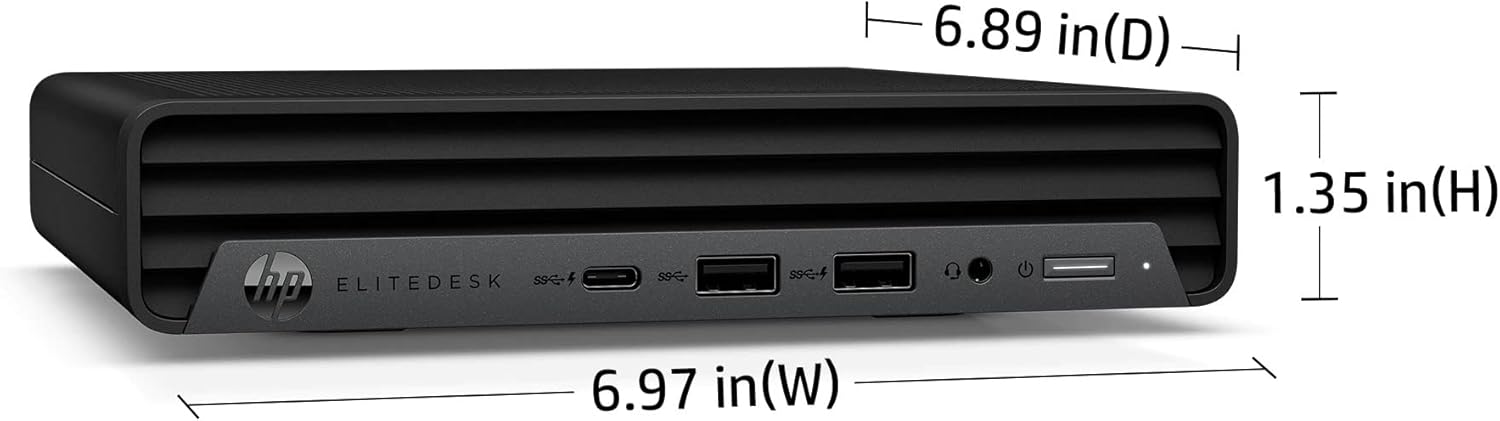
Figure 3: Dimensions of the HP EliteDesk 800 G6 Mini PC: 6.97 inches (W), 6.89 inches (D), 1.35 inches (H).
7. Záruka a podpora
7.1 Záruka na produkt
This HP product is covered by a standard limited warranty. For specific terms and conditions, please refer to the warranty documentation included with your purchase or visit the official HP support webZáruka se obvykle vztahuje na vady materiálu a zpracování při běžném používání.
7.2 Technická podpora
For technical assistance, troubleshooting, or service requests, please contact HP Support. You can find contact information and online resources, including drivers, manuals, and FAQs, on the official HP webmísto: www.hp.com/support.